# Keeping Secrets Out of Your Code
An API's secrets, such as the key that signs its tokens and its database password, live in environment variables loaded from a .env file that Git never sees, with a committed .env.example naming them, a check at startup that each one is set, and a new secret at once if one ever reaches GitHub.
Journeyman · Node.js · Web Development · Updated November 19, 2026
By Gregor Dzierzon
## After this lesson you can
- Keep an API's secrets in environment variables loaded with node --env-file, out of Git with .gitignore, and named in a .env.example
- Check at startup that every secret is set, and rotate a secret that reached GitHub
## Key takeaways
- A secret is anything that lets someone act as your app, such as the JWT secret or the database password. Written in the code, it goes wherever the code goes.
- The code reads each secret from process.env, and node --env-file=.env loads them from a .env file on your own computer.
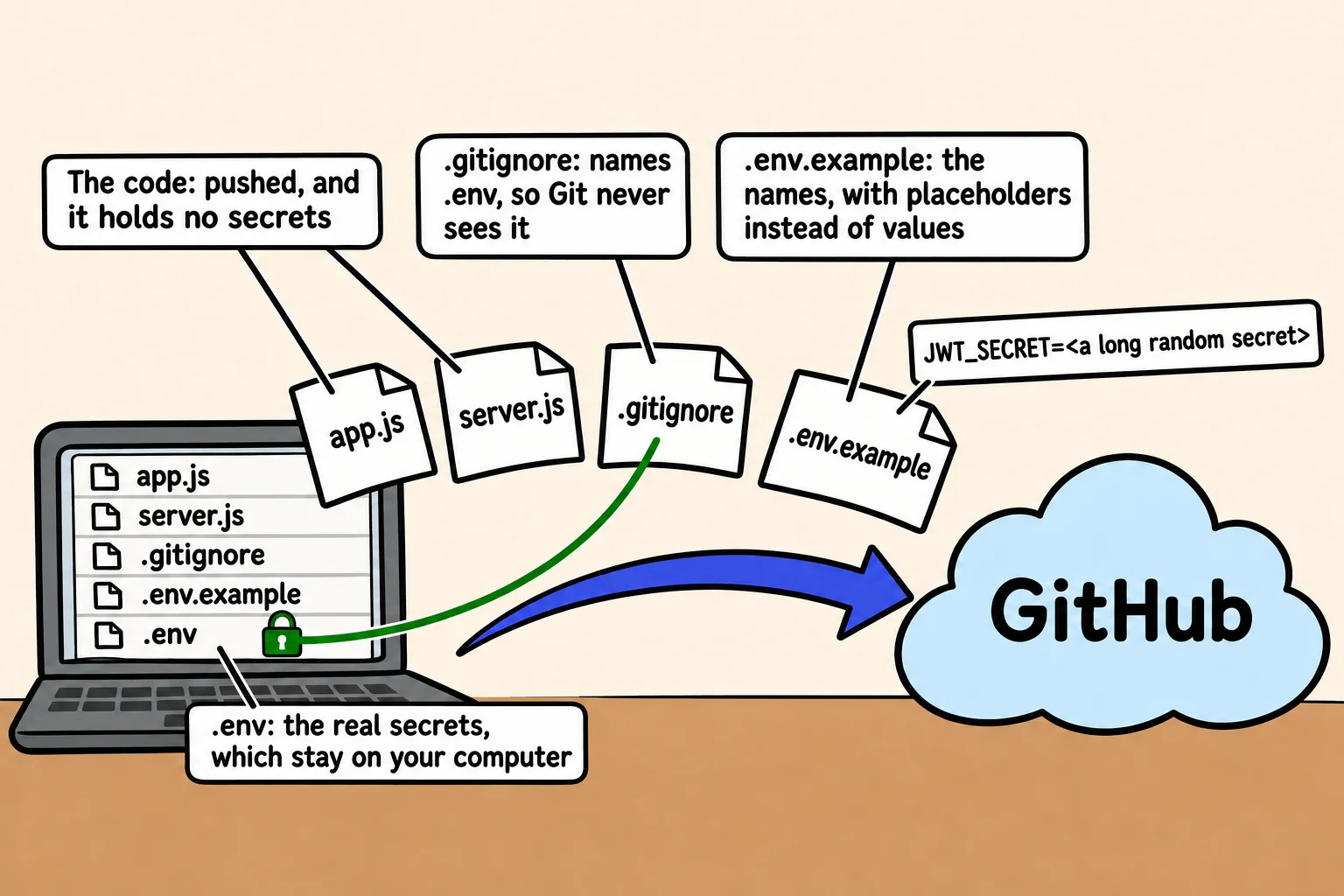
- The .env file goes in .gitignore, and a committed .env.example lists the names a teammate must set, with placeholders instead of values.
- A server that checks its secrets at startup stops with a message naming what's missing, instead of failing later in a confusing way.
- A secret that reached GitHub isn't secret any more. Deleting it isn't enough, so replace it with a new one, which is called rotating it.
Every API you put online holds secrets: the key that signs its tokens, the password to its database, maybe a key for an email service. Where they live decides whether your public repository gives them away. Programs search public repositories for keys all the time, so a secret that's pushed can be found within minutes. Getting this right once, in every project, is a habit every team expects.
Bean There Coffee Club's sign-in code signs its tokens with a secret written into `app.js`:
```javascript
// app.js: the secret is part of the code, so it goes wherever the code goes
const JWT_SECRET = "bean-there-club-secret";
```
The club pushes the code to a public repository so a volunteer can help. Now anyone who reads `app.js` can sign a token of their own that says `"role": "admin"`, and the API will believe it: they can make their own festival wristband.
## What counts as a secret
A **secret** is anything that lets someone act as your app: the JWT secret, a database connection string with its password, an **API key** for another service. The port your server listens on, or the name of a roast, isn't one.
A secret in the code is in every copy of the code: your laptop, the repository, every clone. And Git keeps history, so deleting the line in a later commit leaves it in the commit before. The fix is to keep secrets out of the code from the first commit.
## Secrets in environment variables
*Settings from Environment Variables* showed how a program reads a setting from `process.env`, and how `node --env-file=.env` loads settings from a file. Secrets use exactly that. The code names the secret but never holds it:
```javascript
const token = jwt.sign({ sub: member.id, role: member.role }, process.env.JWT_SECRET, { expiresIn: "1h" });
```
The values go in a file named `.env`, beside `package.json`, one `NAME=value` per line:
```text
JWT_SECRET=
MONGODB_URI=mongodb://localhost:27017/coffee_club
```
For a JWT secret, use something nobody could guess. This command prints 64 random characters; copy them into `.env` in place of the placeholder:
```bash
node -e "console.log(require('node:crypto').randomBytes(32).toString('hex'))"
```
Then let the scripts in `package.json` load the file, so `npm start` and `npm run dev` always have the secrets:
```json
{
"scripts": {
"start": "node --env-file=.env server.js",
"dev": "node --watch --env-file=.env server.js"
}
}
```
## .gitignore and .env.example
Two small files keep `.env` on your computer and still tell a teammate what it needs. `.gitignore` gets a line for it:
```text
node_modules/
.env
```
And `.env.example`, which **is** committed, holds the same names with placeholders, never real values:
```text
# Copy this file to .env and fill in your own values.
JWT_SECRET=
MONGODB_URI=mongodb://localhost:27017/coffee_club
```
Before your first commit, ask Git what it sees. In a new project with both files:
```bash
git status --short --untracked-files=all
```
```text
?? .env.example
?? .gitignore
?? package.json
?? server.js
```
`.env` isn't in the list: Git can't see it, so it can't commit it.
## Check at startup that every secret is set
A teammate clones the code and runs it without making a `.env`. The server starts, and nothing seems wrong until the first sign-in, when `jwt.sign` stops with `secretOrPrivateKey must have a value`. A few lines at the top of `server.js` catch it at once, naming every missing setting:
```javascript
const required = ["JWT_SECRET", "MONGODB_URI"];
const missing = required.filter((name) => !process.env[name]);
if (missing.length > 0) {
console.error(`Missing settings: ${missing.join(", ")}. Copy .env.example to .env and fill them in.`);
process.exit(1);
}
console.log("Every secret is set.");
```
Run with no settings, it stops before the server starts:
```text
Missing settings: JWT_SECRET, MONGODB_URI. Copy .env.example to .env and fill them in.
```
`!` (read "not") also counts an empty value, `JWT_SECRET=`, as missing. With a filled-in `.env`, `node --env-file=.env server.js` prints `Every secret is set.` If the `.env` file itself is missing, Node stops before your code runs, with a line ending `.env: not found`. *Configuration Checked at Startup*, in Module 6, grows this into a check of every setting.
## When a secret reaches GitHub: rotate it
It happens to careful people too. When a secret has been pushed, treat it as known to everyone, and **rotate** it, which means replacing it:
1. **Make a new secret** and put it everywhere the app runs: your `.env`, and later your host's settings.
2. **Restart the app,** so the old secret stops working. Every token signed with it now fails `jwt.verify`, so members sign in again. That's the point: nobody keeps a wristband made with the old secret. For a database password, change it in the database too.
3. **Then fix the code:** read the secret from `process.env`, add `.env` to `.gitignore`, and push.
Deleting the commit, or the whole repository, isn't enough on its own: someone may already have a copy. The new secret is what makes the old one useless.
## Check yourself
2 questions to try on the lesson page.
## So what
Secrets in `.env`, names in `.env.example` and a check at startup is the same setup in every project you'll work on, and it means a public repository never gives away the keys to the club's API.
## Key terms
- [process.env](https://www.ask-codey.com/glossary/process-env)
- [.env File](https://www.ask-codey.com/glossary/env-file)
- [.gitignore](https://www.ask-codey.com/glossary/gitignore)
- [API Key](https://www.ask-codey.com/glossary/api-key)
- [Secret Rotation](https://www.ask-codey.com/glossary/secret-rotation)
## Related
- [Settings from Environment Variables](https://www.ask-codey.com/lessons/node-environment-variables)
- [Tokens: Signing In with a JWT](https://www.ask-codey.com/lessons/node-auth-tokens-jwt)
Source: https://www.ask-codey.com/lessons/node-security-secrets