But Arrays Can Be Tedious
Arrays can't grow or shrink, so adding, inserting and removing elements means making new arrays and shifting values by hand.
Apprentice · C# · Updated
After this lesson you can
- Explain why arrays are awkward when items are added or removed
Key takeaways
- An array's size is fixed when it's created. To add an element, you make a new, bigger array and copy every element across.
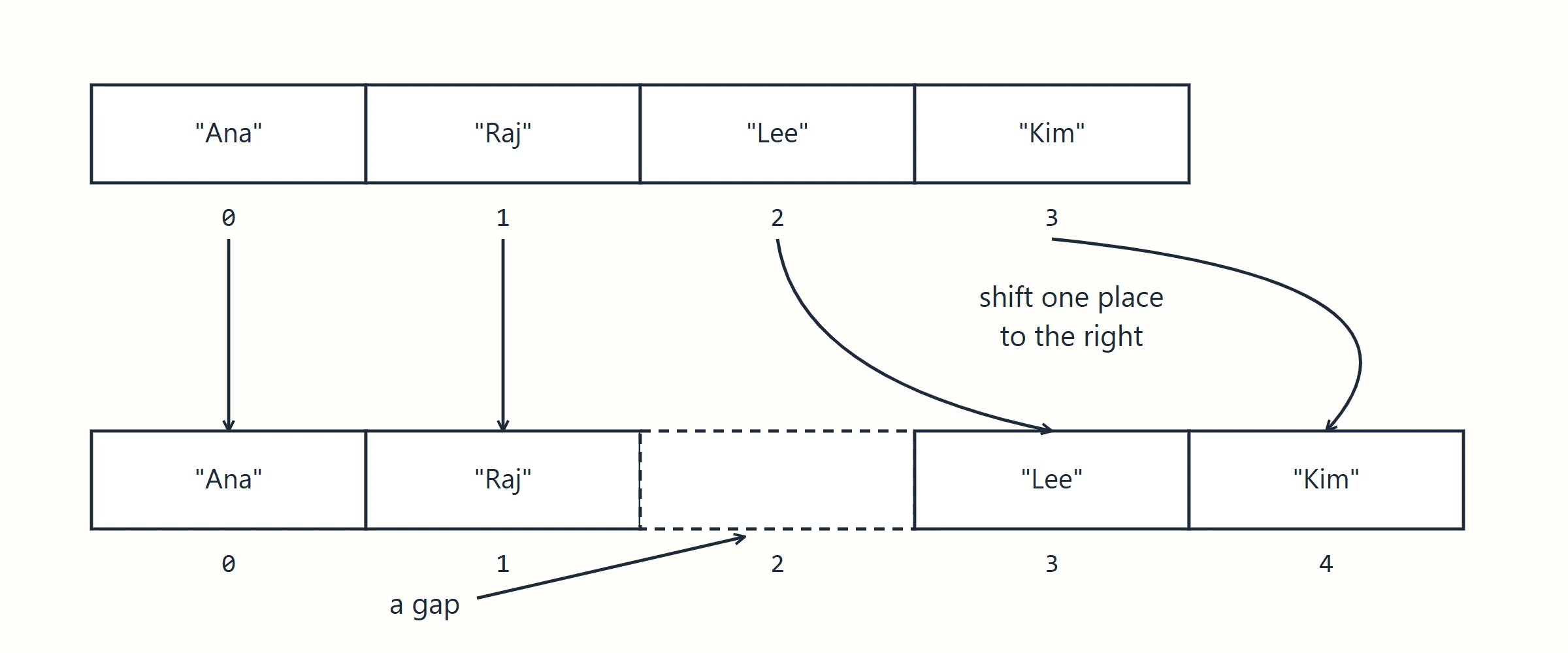
- Inserting in the middle of an array means shifting every later element one place right; removing means shifting them left to close the hole.
- .NET's collections, such as
List<T>andDictionary<TKey, TValue>, do the growing, shifting and copying for you. - Use an array for a group that stays the same size, and a collection for data that grows and shrinks.
Arrays are excellent at finding a slot. But real data comes and goes: a shopping cart gains items, a waiting list loses names. That's where arrays get tedious.
You can't stretch an array
An array's size is fixed when it's created. To add one more element to a full array, you must create a new, bigger array, and copy every element across:
string[] cart = { "milk", "eggs", "bread" };

// Adding a fourth item: make a bigger array and copy everything
string[] biggerCart = new string[cart.Length + 1];
for (int i = 0; i < cart.Length; i++)
{
    biggerCart[i] = cart[i];
}
biggerCart[cart.Length] = "butter";
cart = biggerCart;

Console.WriteLine(string.Join(", ", cart));
milk, eggs, bread, butter
Five lines of work to add one item, every time.
Inserting in the middle
To put an element in the middle, everything after that position has to shift one place to the right, to make a gap, and that's on top of making the array bigger.
Removing from the middle
Taking an element out leaves a hole. To close it, every element after it shifts one place to the left, and you're left with an unused slot at the end, or another copy into a smaller array.
string[] waitingList = { "Ana", "Raj", "Lee", "Kim" };

// Remove "Raj" (index 1): shift everything after it to the left
for (int i = 1; i < waitingList.Length - 1; i++)
{
    waitingList[i] = waitingList[i + 1];
}
waitingList[waitingList.Length - 1] = "";

Console.WriteLine(string.Join(", ", waitingList));
Ana, Lee, Kim,
The last slot is now an empty string the program has to remember to ignore.
Every program needs this
Growing, inserting and removing are such common jobs that writing the shifting and copying by hand, again and again, would be a waste of time and a source of bugs. So .NET provides collections that do it for you. The next lessons meet the two you'll use most: List<T> and Dictionary<TKey, TValue>.
Check yourself
1 question to try on the lesson page.
So what
Arrays are perfect for fixed groups, and painful for groups that change. When your data grows and shrinks, reach for a collection that manages the array for you.