Array Basics
Create C# arrays, read and change their elements by index starting at 0, and use Length to find the last one.
Novice · C# · Updated
After this lesson you can
- Create an array and read or change its elements by index
- Use an array's Length to reach its last element
Key takeaways
new int[5]creates 5 elements set to the type's default:0for numbers,falseforbool,nullforstring.{ "Alice", "Bob" }or[12.75m, 10.25m]creates an array and fills it, and C# sizes it for you.- Indexes start at 0, so the first element is
[0]and the last is[Length - 1]. - An element works like a variable:
testScores[1] = 88;changes it. - An index below 0, or at
Lengthor above, stops the program with anIndexOutOfRangeException.
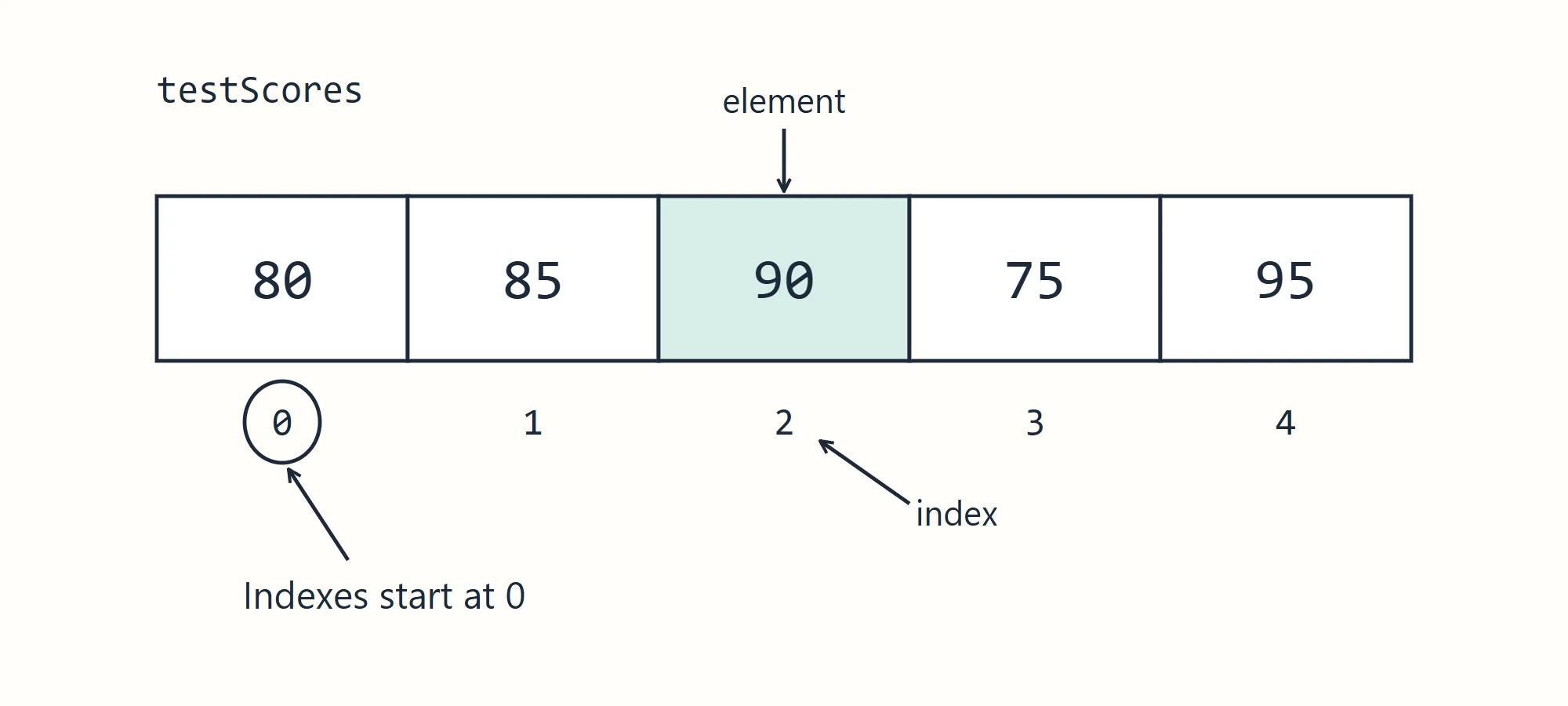
An array is a group of values of the same type, stored side by side, with a size that's fixed when it's created. Each value in it is an element, and each element has a numbered position, its index.
Creating an array
Put square brackets after the type to make an array type, and new with a size to create one:
// An array that holds 5 ints
int[] testScores = new int[5];
Console.WriteLine(testScores.Length);
Console.WriteLine(testScores[0]);
5
0
int[] reads as "an array of int". A new array is filled with its type's default value: 0 for numbers, false for bool, and null, which means "no value at all", for string.
Indexes start at 0
You reach an element with the array's name and its index in square brackets. The first element is at index 0, so an array of 5 elements has indexes 0 to 4.
int[] testScores = new int[5];
testScores[0] = 80;
testScores[1] = 85;
testScores[2] = 90;
testScores[3] = 75;
testScores[4] = 95;

Console.WriteLine("First test score: " + testScores[0]);
Console.WriteLine("Third test score: " + testScores[2]);
First test score: 80
Third test score: 90
Creating and filling in one step
When you know the values already, list them in curly braces. C# counts them and sizes the array for you:
string[] names = { "Alice", "Bob", "Charlie", "Diana", "Eve" };
decimal[] prices = [12.75m, 10.25m, 8.44m];
Console.WriteLine("First student: " + names[0]);
Console.WriteLine("Second price: First student: Alice
Second price: $10.25
The square brackets in [12.75m, 10.25m, 8.44m] are a collection expression, a newer way to write the same thing. Both forms are common.
Changing an element
An element works like any variable: assign to it to change it.
int[] testScores = { 80, 85, 90 };
testScores[1] = 88;
testScores[2] = testScores[2] + 5;

Console.WriteLine(testScores[1]);
Console.WriteLine(testScores[2]);
88
95
Length and the last element
Length is the number of elements. Because indexes start at 0, the last index is always Length - 1:
string[] names = { "Alice", "Bob", "Charlie", "Diana", "Eve" };

Console.WriteLine("Students: " + names.Length);
Console.WriteLine("Last student: " + names[names.Length - 1]);
Console.WriteLine("Also the last: " + names[^1]);
Students: 5
Last student: Eve
Also the last: Eve
^1 means "1 from the end", a shortcut for names.Length - 1. Writing it with Length works in every language you'll meet; ^1 is a C# extra.
Outside the array
An index below 0, or at Length or above, isn't in the array. C# stops the program with an IndexOutOfRangeException:
int[] testScores = { 80, 85, 90 };
Console.WriteLine(testScores[3]);
Unhandled exception. System.IndexOutOfRangeException: Index was outside the bounds of the array.
The array has 3 elements, so its indexes are 0, 1 and 2. This mistake, off by one at the end, is one of the most common bugs in programming.
Remember
- Fixed size: once created, an array's
Lengthnever changes. For more elements, create a bigger array and copy them over (or use a list, later in the course). - One type: every element has the array's type.
- Indexed from 0: the first element is
[0]and the last is[Length - 1].
Check yourself
2 questions to try on the lesson page.
So what
With an index you can reach any element of an array directly, and with Length you always know where it ends. Put those two together with a loop, next, and you can work through every element.