# Git Hooks: Scripts Git Runs for You
A Git hook is a script Git runs at a set moment: a pre-commit hook in .git/hooks runs before every commit, and when it ends with an exit code other than 0, the commit is stopped, so test.sh and ShellCheck run without anyone having to remember them.
Freelancer · Unix · Linux · Updated November 10, 2026
## After this lesson you can
- Write a pre-commit hook that runs a project's checks, and explain how its exit code stops or allows a commit
- Share a project's hooks with git config core.hooksPath, and say what git commit --no-verify skips
## Key takeaways
- A hook is a script in .git/hooks named after the moment Git runs it, such as pre-commit, before every commit.
- When a pre-commit hook ends with an exit code other than 0, Git stops the commit. Exit code 0 lets it through.
- A pre-commit hook can run test.sh, and ShellCheck on the project's scripts, so a mistake is caught before it's saved.
- .git/hooks is never shared. Keep the hook in a folder of the project and point Git at it with git config core.hooksPath.
- git commit --no-verify skips the hooks once. It's for emergencies, not for silencing a failing check.
This lesson is for learners who use **Git**, the tool that keeps every saved version of a project. If you don't use it yet, read it to know what a hook is, and come back when you do.
`test.sh` catches a page without a title, but only when someone remembers to run it. On a busy day nobody does, the page goes live with "Untitled" in the browser tab, and a customer notices before you do. A check that has to be remembered gets forgotten. Git can remember for you: it runs a script of yours at set moments, such as right before every commit. Teams use this to run their tests and linters on every change, so a mistake is caught on the computer that made it.
## A hook is a script with a special name
A **Git hook** is a script that Git runs when something happens. Its name says when: `pre-commit` runs before every commit, `pre-push` before every push. Hooks live in the hidden `.git/hooks` folder of a repository. The examples use the bakery's project from *Secrets and .env Files*, which made it a repository with `git init -b main`; if yours isn't one, run that line in `~/terminal-practice/bakery-site` now. Commit what's there, then look in the hooks folder:
```bash
git add . && git commit -m "First version of the bakery site"
ls .git/hooks
```
```text
[main (root-commit) bc47daf] First version of the bakery site
9 files changed, 74 insertions(+)
create mode 100644 .env.example
create mode 100644 .gitignore
create mode 100755 scripts/deploy.sh
create mode 100755 scripts/dev.sh
create mode 100755 scripts/setup.sh
create mode 100755 scripts/test.sh
create mode 100644 site/index.html
create mode 100644 site/menu.html
create mode 100644 site/order.html
applypatch-msg.sample pre-commit.sample prepare-commit-msg.sample
commit-msg.sample pre-merge-commit.sample push-to-checkout.sample
fsmonitor-watchman.sample pre-push.sample sendemail-validate.sample
post-update.sample pre-rebase.sample update.sample
pre-applypatch.sample pre-receive.sample
```
Your commit's code after `main` will differ: it's this commit's ID. `.env` isn't among the nine files, thanks to `.gitignore`. Every `.sample` file is an example Git leaves for you, and none of them runs: Git runs a hook only when a file has the hook's exact name, with no `.sample`, and may be run (`chmod +x`).
## A pre-commit hook
The rule that makes hooks useful: if a `pre-commit` hook ends with an exit code other than 0, Git stops the commit. Exit code 0 lets it through (*Did It Work? Exit Codes, && and ||*).
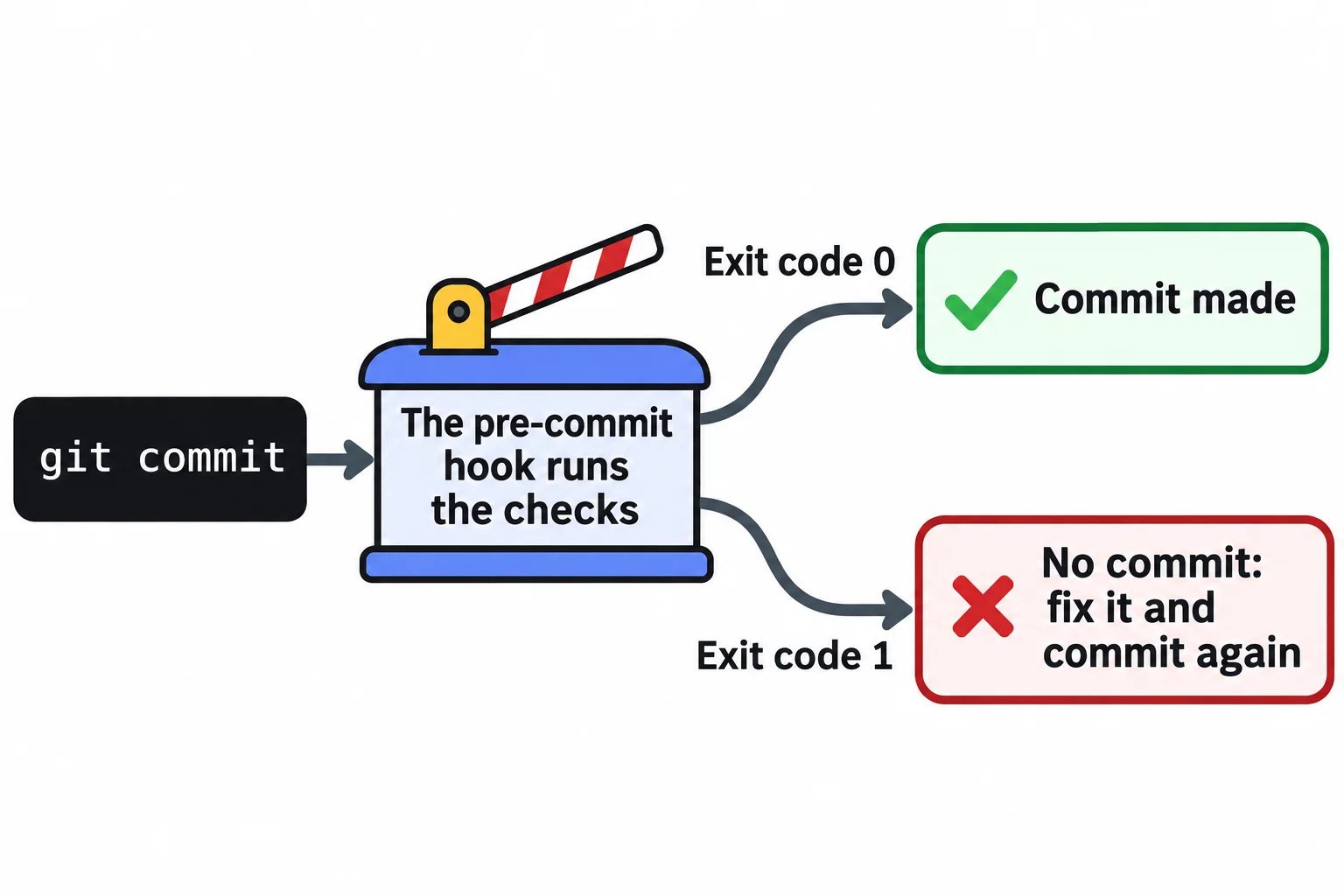
Make `.git/hooks/pre-commit` with nano:
```bash
#!/usr/bin/env bash
# pre-commit: Git runs this before every commit. Exit code 1 stops the commit.
./scripts/test.sh || exit 1
if command -v shellcheck > /dev/null; then
shellcheck --severity=warning scripts/*.sh || exit 1
else
echo "ShellCheck isn't installed, so the scripts weren't checked."
fi
```
Git runs a hook in the project's top folder, so `./scripts/test.sh` works. Read `|| exit 1` as "or, if that failed, stop with exit code 1". ShellCheck (*ShellCheck: A Second Pair of Eyes*) checks every script, and `--severity=warning` makes it stop the commit only for warnings and errors, not for its style tips. On a computer without ShellCheck, the hook says so and carries on.
Make it runnable, add a page without a title, and try to commit it:
```bash
chmod +x .git/hooks/pre-commit
printf 'Our cakes
\nChocolate, lemon and carrot.
\n' > site/cakes.html
git add site/cakes.html
git commit -m "Add the cakes page"; echo "exit code: $?"
```
```text
No title: site/cakes.html
exit code: 1
```
No commit was made: `git log --oneline` still shows only the first one. With ShellCheck installed, a script with a warning stops the commit the same way, with ShellCheck's report, such as *SC2086: Double quote to prevent globbing and word splitting.* Fix the page, add it again, and commit:
```bash
printf 'Our cakes\nOur cakes
\nChocolate, lemon and carrot.
\n' > site/cakes.html
git add site/cakes.html
git commit -m "Add the cakes page"
```
```text
Every page has a title.
ShellCheck isn't installed, so the scripts weren't checked.
[main 9e1f928] Add the cakes page
1 file changed, 3 insertions(+)
create mode 100644 site/cakes.html
```
## Sharing a hook with the team
`.git/hooks` is the one folder Git never copies: clone the project somewhere else, and the hook stays behind. To share it, keep it in a folder of the project, and tell Git to look there with `git config core.hooksPath`:
```bash
mkdir githooks && mv .git/hooks/pre-commit githooks/
git config core.hooksPath githooks
git add githooks && git commit -m "Share the pre-commit hook"
```
```text
Every page has a title.
ShellCheck isn't installed, so the scripts weren't checked.
[main 5fc17ba] Share the pre-commit hook
1 file changed, 10 insertions(+)
create mode 100755 githooks/pre-commit
```
The hook checked its own commit. The setting itself isn't shared either, so everyone runs that `git config` line once, in their own copy. That's a good line for `setup.sh`.
## The way around, and when to use it
`git commit --no-verify` skips the hooks for one commit. It's there for emergencies, such as saving work in progress on a hook that needs a tool you can't install right now. Using it to get past a failing check only moves the problem to whoever runs the project next. A hook is a helper on your own computer, not a lock: a team that must never let a failing change through also runs the same checks on a server, after every push.
## Check yourself
2 questions to try on the lesson page.
## So what
A pre-commit hook turns "remember to run the checks" into something that happens on every commit, and one `git config` line shares it with everyone who works on the project.
## Key terms
- Git hook
- Pre-commit hook
- [ShellCheck](https://www.ask-codey.com/glossary/shellcheck)
- [Exit Code](https://www.ask-codey.com/glossary/exit-code)
## Cheat sheets
- [Git Hooks: Scripts Git Runs for You](https://www.ask-codey.com/cheat-sheets/bash-git-hooks-cheat-sheet)
## Related
- [The Scripts Every Project Has](https://www.ask-codey.com/lessons/bash-project-scripts)
- [ShellCheck: A Second Pair of Eyes](https://www.ask-codey.com/lessons/bash-shellcheck)
- [Did It Work? Exit Codes, && and ||](https://www.ask-codey.com/lessons/bash-exit-codes)
- [Secrets and .env Files](https://www.ask-codey.com/lessons/bash-env-files-and-secrets)
Source: https://www.ask-codey.com/lessons/bash-git-hooks