Line by Line: while read
while IFS= read -r line reads a file one whole line at a time, spaces and backslashes kept, and while and until repeat commands for as long as a condition is true, or until it becomes true.
Journeyman · Unix · Linux · Updated
After this lesson you can
- Read a file line by line with while IFS= read -r line, and say what IFS= and -r keep
- Repeat commands while or until a condition is true, with while and until
Key takeaways
- A for loop over $(cat file) splits the file into words. To work through a file line by line, use while IFS= read -r line.
- IFS= keeps the spaces at the start and end of each line, -r keeps backslashes, and done < file feeds the file to the loop.
- while repeats commands as long as its condition is true; until repeats them until its condition becomes true.
- A loop whose condition never changes runs forever. Ctrl+C stops it.
A file is often a list: a guest list, the computers an IT tech has to check, a log to go through. The script's job is "for each line, do something", a loop people who look after servers write all the time. A for loop looks right, but it hands you words, not lines. This lesson's loop reads whole lines, exactly as written; then come two loops that keep going for as long as something is true.
The examples add two files to the Mission Control folder from For Every File: for Loops: a flight log whose detail lines start with two spaces, and a playlist saved on Windows, full of backslashes.
mkdir -p ~/terminal-practice/mission-control
cd ~/terminal-practice/mission-control
printf '%s\n' 'orbit 1: altitude 402 km' '  battery 98%, all normal' 'orbit 2: altitude 409 km' '  battery 97%, radio quiet' > flight-log.txt
printf '%s\n' 'C:\Music\launch-day\01 Countdown.mp3' 'C:\Music\launch-day\02 Blue Horizon.mp3' > playlist.txt
cat flight-log.txt playlist.txt
orbit 1: altitude 402 km
  battery 98%, all normal
orbit 2: altitude 409 km
  battery 97%, radio quiet
C:\Music\launch-day\01 Countdown.mp3
C:\Music\launch-day\02 Blue Horizon.mp3
A for loop reads words, not lines
Try a for loop over the file's contents, with $( ) from Values from Commands: $( ) and $(( )):
for line in $(cat flight-log.txt); do echo "Read: $line"; done | head -n 6
Read: orbit
Read: 1:
Read: altitude
Read: 402
Read: km
Read: battery
The shell split the file at every space, so the loop got eighteen words instead of four lines.
while read: one whole line at a time
while IFS= read -r line; do
  echo "Read: $line"
done < flight-log.txt
Read: orbit 1: altitude 402 km
Read:   battery 98%, all normal
Read: orbit 2: altitude 409 km
Read:   battery 97%, radio quiet
Read it aloud: "while reading a line works, do this, done, from flight-log.txt." A while loop repeats its commands for as long as the command after while works. Here that's read (Asking Questions: read), which takes one line into the variable line. The < (read "from") after done feeds the file to the whole loop (Three Streams: Output, Errors and Input), so each read takes the next line. At the end of the file read fails (Did It Work? Exit Codes, && and ||), and the loop stops.
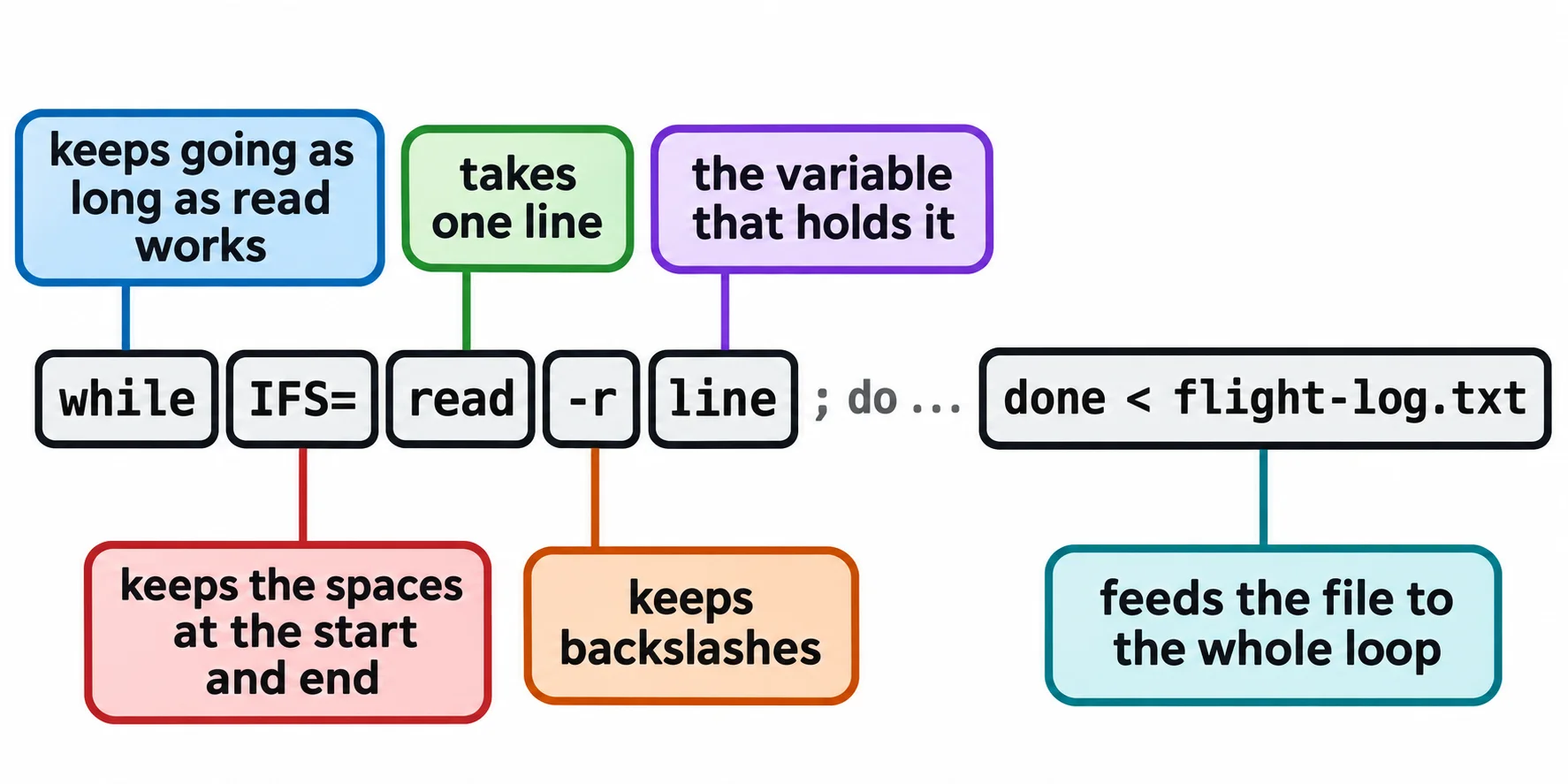
Why IFS= and -r are there
Each part keeps something that a plain read would change.
IFS, the internal field separator, is the list of characters the shell splits text on: a space, a tab and a new line. read trims them from the start and end of the line. IFS= empties the list for this one read, so nothing is trimmed. Without it, the detail lines lose their indent:
while read -r line; do echo "Read: $line"; done < flight-log.txt
Read: orbit 1: altitude 402 km
Read: battery 98%, all normal
Read: orbit 2: altitude 409 km
Read: battery 97%, radio quiet
-r (read "raw") keeps backslashes. Without it, read takes a backslash as a sign to treat the next character specially, and drops it:
while IFS= read line; do echo "Read: $line"; done < playlist.txt
while IFS= read -r line; do echo "Read: $line"; done < playlist.txt
Read: C:Musiclaunch-day01 Countdown.mp3
Read: C:Musiclaunch-day02 Blue Horizon.mp3
Read: C:\Music\launch-day\01 Countdown.mp3
Read: C:\Music\launch-day\02 Blue Horizon.mp3
So write while IFS= read -r line every time. One more trap: a last line with no new line at its end (some Windows programs save files that way) is skipped. while IFS= read -r line || [[ -n $line ]] keeps it; -n asks "is it not empty?"
while and until: as long as something is true
while can repeat any command, not only read. With a test in [[ ]] (If This, Then That: if and [[ ]]), it counts down from a number in a variable, which braces can't:
n=5
while [[ $n -gt 0 ]]; do
  echo "T-minus $n"
  n=$((n - 1))
done
echo "Liftoff"
T-minus 5
T-minus 4
T-minus 3
T-minus 2
T-minus 1
Liftoff
-gt is read "greater than". Each time round, n=$((n - 1)) takes one away. Leave that line out and n stays 5, the test is true forever, and the loop never ends: an infinite loop. Press Ctrl+C to stop it.
An until loop is the opposite: it repeats until its condition becomes true, which suits waiting. This one checks every two seconds for go.txt. Run it, then run touch ~/terminal-practice/mission-control/go.txt in a second terminal:
until [[ -e go.txt ]]; do
  echo "Waiting for go..."
  sleep 2
done
echo "Go for launch"
Waiting for go...
Waiting for go...
Waiting for go...
Go for launch
sleep 2 waits two seconds, and -e asks "does it exist?" (Checking Before You Act: File Tests). The number of Waiting for go... lines depends on how fast you are. Run it again and it prints only Go for launch, since go.txt is there; rm go.txt to watch it wait again.
Try it in the terminal
Terminal Quest: Mission Control, goal 4: played right on the lesson page.
Your turn: write check.sh, a script that loops over the sensor files and prints the name of every sensor hotter than 90, then send its output to the uplink. Each sensor file holds one line, such as temp=97, and cut -d= -f2 gives the number after the =.
Check yourself
2 questions to try on the lesson page.
So what
while IFS= read -r line lets a script work through any list kept in a file, exactly as written, and while and until keep a script going until its job is done.