# Naming Things: BEM and Component Classes
BEM names every class after the component it belongs to, as block\_\_element--modifier, so selectors stay flat and low-scoring and anyone on a team can find, change and reuse a component's styles.
Journeyman · CSS · Web Development · Updated November 1, 2026
## After this lesson you can
- Read and write class names in BEM form, block\_\_element--modifier, for a component and its parts
- Rewrite id selectors and long descendant chains as flat BEM class selectors that score (0, 1, 0)
- Keep a component's styles together in its own file, in a layer or inside @scope, and say what @scope changes
## Key takeaways
- BEM stands for Block, Element, Modifier. A class reads block__element--modifier, said "block, double underscore, element, double dash, modifier".
- A block is a component that stands on its own (event-card), an element is one of its parts (event-card__date), and a modifier is a version of either (event-card--featured).
- Give every part its own class and style it with that one class, so selectors score (0, 1, 0) and keep working wherever the HTML moves.
- Keep each component's rules together, in its own file or a components layer. @scope keeps rules inside one part of the page, in browsers from 2026 on.
Maple Street Library asks for one small change to its events page: the featured event's date badge should be orange instead of dark brown. You open the stylesheet and find the badge's rule: `#events .eventList .card p.date`. To change one badge, you need a selector stronger than that one, and whoever comes after you will need a stronger one still. Sooner or later, on a team at work or in a group project, you'll inherit a stylesheet like this. The way out is an agreement about how to name things, and that agreement is part of **CSS architecture**: how a team organizes its CSS so that anyone can change it safely, years later. **BEM** is the naming system you'll meet most often, in company codebases, open-source projects and design systems.
## Selectors that say where, not what
Here's how the library's stylesheet picks the date badges, the normal one and the featured one:
```css
#events .eventList .card p.date {
background-color: #2b2118;
}
#events #featured p.date {
background-color: #b4532a;
}
```
Both selectors describe *where* the badge is: inside a card, inside a list, inside the events section. That causes three problems:
- **They're hard to beat.** The first scores (1, 3, 1) and the second (2, 1, 1), so the next change needs ids too. (*Specificity: Scoring a Selector* shows how to score them.)
- **They break when the HTML moves.** Put the same card on the home page, outside `#events`, and it loses every style.
- **They don't say what things are.** `#events .eventList .card p` picks every paragraph in a card, the date, the tag and the description alike, and nothing in it says which one a rule is meant for.
A name that says *what* something is travels with it, wherever the HTML puts it.
## Blocks, elements and modifiers
Think of a bike in a shop's catalog. The bike is a thing on its own. Its seat and handlebars are parts that only make sense as part of that bike. And "kids' size" or "red" are versions of it: still the same bike, a little different.
**BEM** gives those three ideas names: a **block** is a component that stands on its own, an **element** is one of its parts, and a **modifier** is a version of a block or an element. Each class name says which one it is:
```css
/* A block: the event card */
.event-card { }
/* An element: a part of the card */
.event-card__date { }
/* A modifier: a version of the card */
.event-card--featured { }
/* A modifier of an element */
.event-card__tag--kids { }
```
The pattern is `block__element--modifier`, read "block, double underscore, element, double dash, modifier". Every name is lowercase, and words inside a name are joined with one hyphen (`event-card`, `all-ages`). That's why the separators are doubled: two underscores and two hyphens can't be mistaken for the hyphen between two words.
**Try it.** Name the parts of a different component the same way: a recipe card with a photo, a title, a cooking time and a "vegetarian" version. Write the five class names before reading on. (One answer: `recipe-card`, `recipe-card__photo`, `recipe-card__title`, `recipe-card__time`, `recipe-card--vegetarian`.)
## The event card in BEM
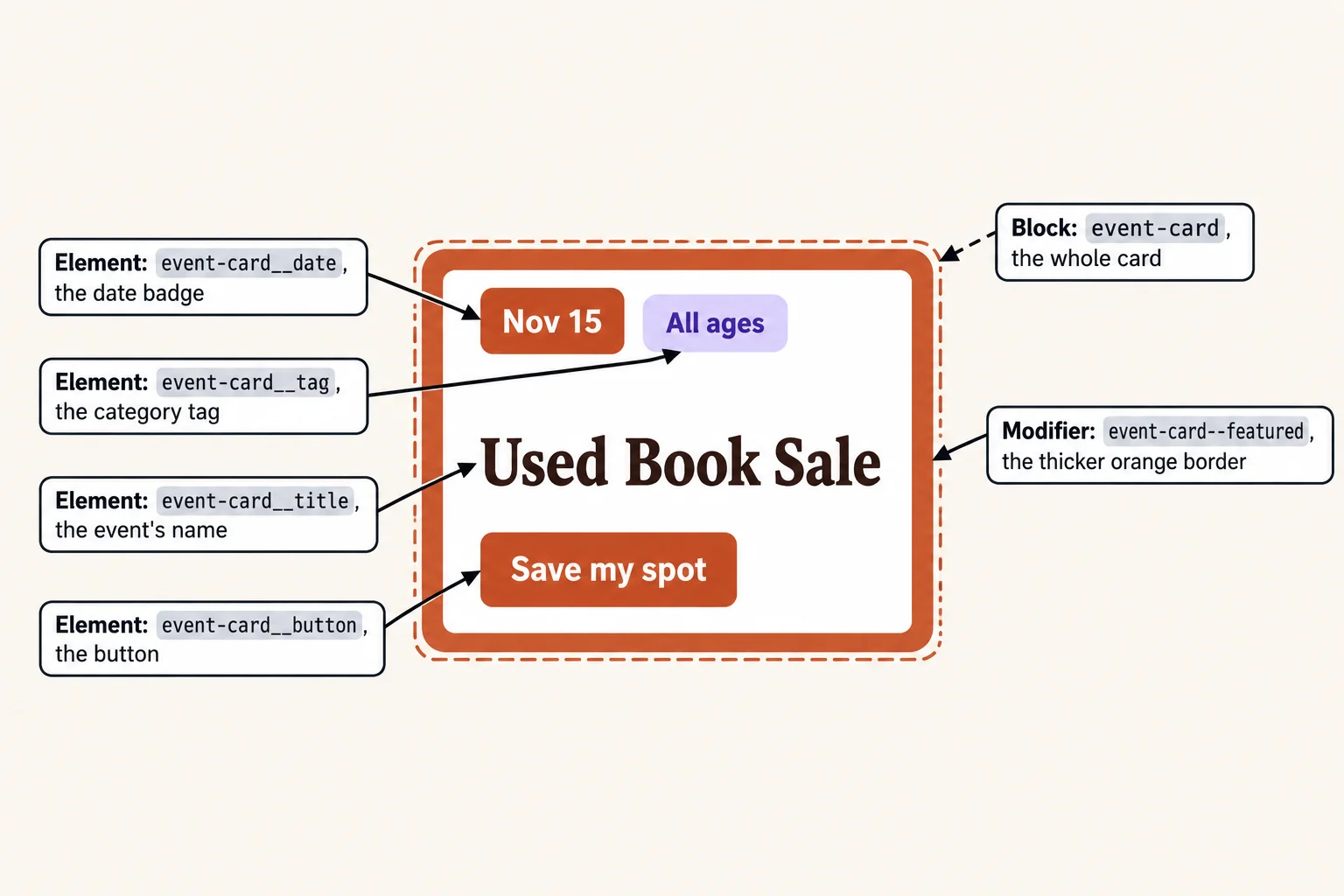
Here is the featured card, with a BEM class on every part that gets a style:
```html
Nov 15
All ages
Used Book Sale
Save my spot
```
Two rules make it work:
- **A modifier sits beside its base class, never alone.** `event-card--featured` only says what's different about this card, so the card needs `event-card` too, for everything that's the same.
- **Elements belong to the block, not to each other.** If the title sat inside a header strip, it would still be `event-card__title`, never `event-card__header__title`. One block name, one element name, at most.
## Flat selectors with low scores
Once every part has its own class, each rule needs only that class. The two badge rules become:
```css
.event-card__date {
background-color: #2b2118;
}
.event-card--featured .event-card__date {
background-color: #b4532a;
}
```
The first scores (0, 1, 0). The second scores (0, 2, 0): that's the one place BEM uses two classes, when a modifier on the block changes one of its elements. No ids, no tag names, no chains, so any rule can be changed or overridden by another rule of the same size, and source order settles a tie.
A team rule like this one ("one class per selector, two at most, no ids") is a **specificity strategy**: it keeps scores low and alike on purpose, so nobody has to win a fight to make a change. The ids can stay in the HTML when a link points to them (`href="#events"`); the CSS stops using them.
**Try it.** Rewrite `#events .eventList .card h2` for the card's title. Then rewrite `#top nav#menu a`, the header's menu links, with a new block of your own, such as `site-nav`. What do the two new selectors score?
## One component, one home
A kitchen works because the forks are always in the same drawer. A stylesheet works the same way: all of a component's rules in one place, so changing the event card means opening one spot and nowhere else.
On a bigger site, each block gets its own file, and one stylesheet pulls them into layers in order:
```css
@layer base, components, utilities;
@import url("styles/base.css") layer(base);
@import url("styles/components/event-card.css") layer(components);
@import url("styles/components/site-nav.css") layer(components);
@import url("styles/utilities.css") layer(utilities);
```
`@import` (read "at import") loads another stylesheet, and `layer(components)` puts all of it in the components layer. The `@layer` line and the `@import` lines must come before any other rule. Each file is one more download, so bigger sites usually join them into one file with a build tool before they go online. On a small site, one `styles.css` with an `@layer components` block, and a comment above each block's rules, does the same job. (*Cascade Layers with @layer* covers layers in full.)
## @scope: styles that stay inside
House rules such as "shoes off" apply inside your house, and nowhere else on the street. **Scoped styles** work the same way: rules that only apply inside one part of the page. CSS has an at-rule for it, `@scope` (read "at scope"):
```css
@scope (.event-card) {
:scope {
border: 1px solid #d9cbb8;
}
h2 {
font-size: 1.25rem;
}
}
```
The class in brackets is the **scope root**: the rules inside reach only elements in an event card. `:scope` (read "colon scope") is the card itself. So this `h2` rule changes the event names and leaves every other `` on the page alone, without a BEM class on the heading. Adding `to (.event-card__extra)` after the root sets a lower edge: the rules stop at that element, so another component placed inside the card keeps its own look.
Selectors inside `@scope` keep their normal scores. When two rules tie on score, the one whose scope root is nearer the element wins, before source order is looked at.
`@scope` has worked in every current browser since March 2026, when Safari 26.4 added it last; older browsers ignore it, so check who reads your site first. BEM is a naming habit, so it works in every browser. You'll see both, and often together.
**Try it.** Put the `@scope` rule above in a page with an event card and an `` outside it. Inspect both headings: which one did the rule reach?
## Check yourself
2 questions to try on the lesson page.
## So what
A stylesheet stays safe to change when its names say what things are and its selectors stay small. BEM gives every part of a component a name like `event-card__date`, and that name keeps working wherever the component goes, whoever edits it next.
## Key terms
- [CSS architecture](https://www.ask-codey.com/glossary/css-architecture)
- BEM
- [Specificity strategy](https://www.ask-codey.com/glossary/specificity-strategy)
- [Scoped styles](https://www.ask-codey.com/glossary/scoped-styles)
- [@scope](https://www.ask-codey.com/glossary/scope-css)
## Cheat sheets
- [Naming Things: BEM and Component Classes](https://www.ask-codey.com/cheat-sheets/css-bem-naming-cheat-sheet)
## Related
- [Specificity: Scoring a Selector](https://www.ask-codey.com/lessons/css-specificity)
- [Cascade Layers with @layer](https://www.ask-codey.com/lessons/css-cascade-layers)
- [Utility Classes and Utility-First CSS](https://www.ask-codey.com/lessons/css-utility-first)
Source: https://www.ask-codey.com/lessons/css-bem-naming