# The Cascade: How the Browser Picks a Winner
When two CSS rules set the same property on the same element, the browser runs the same tie-breaker contest every time, and knowing its rounds tells you why a style won or lost.
Apprentice · CSS · Updated November 1, 2026
## After this lesson you can
- Predict which of two conflicting rules wins by going through the cascade's rounds in order
- Explain what !important does and why it backfires, and fix a losing rule without it
- Find the winning rule and the crossed-out losers for an element in the developer tools
## Key takeaways
- When two rules disagree, the cascade picks a winner in fixed rounds: where the rule came from, !important, layers, specificity, then source order.
- Your stylesheet beats the browser's default styles. When every other round ties, the rule that comes last wins.
- A value marked !important wins early, but the next change then needs !important too. Fix the selector or the order instead.
- The developer tools' Styles pane lists every rule that matched an element, with the losing declarations crossed out.
You set the "Book a tune-up" button to orange, save, refresh, and it's still gray. You check the spelling. You refresh again. Nothing. "I changed it and nothing happened" is the most common CSS frustration there is, in a class project and in a web job. The good news: the browser isn't ignoring you. Another rule won, and the browser picks winners with the same steps every time. Learn the steps, and you can say why a style lost and fix it in a minute instead of an evening.
## Two rules, one button
Spoke & Chain is a neighborhood bike shop with a home page: a sale banner, its bikes and their prices, and a **Book a tune-up** button. Here is the button, and two rules from the shop's stylesheet:
```html
Book a tune-up
```
```css
.button {
background-color: #f4a261;
}
/* Last year's design, further down the file */
.button {
background-color: #adb5bd;
}
```
Both rules choose the same element, and both set the same property, `background-color`, to different values. A button can't be orange and gray at once, so the browser has to pick one. In Chrome, the button comes out gray, `#adb5bd`.
Choosing between rules that disagree is called the **cascade**. It's the C in CSS: Cascading Style Sheets. Rules don't fight over a whole element, only over one property at a time: if the first rule also set the text color and the second didn't, the button would keep that text color.
## A contest with fixed rounds
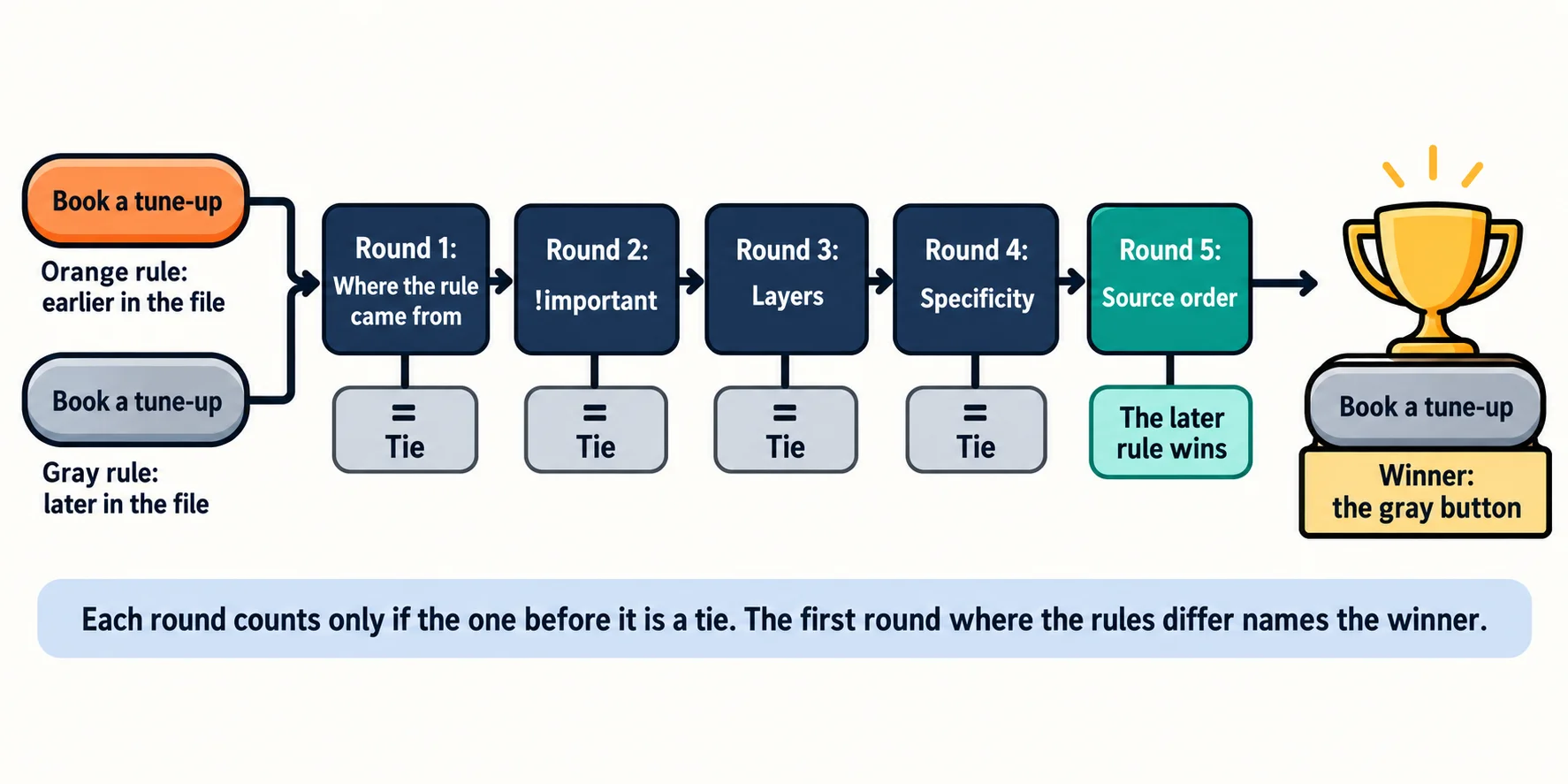
Think of a tie-breaker at a sports tournament. Two teams finish level, so the rules look at points first. Only if the points are equal do they look at head-to-head results, and only if those tie, at goal difference. Each round counts only when the one before it is a tie, and the order never changes.
The cascade works the same way. For every property of every element, the browser compares the declarations that set it, round by round:
1. **Where the rule came from:** the browser's own default styles lose to your stylesheet.
2. **`!important`:** a declaration marked important beats ordinary ones.
3. **Layers:** rules can be put in named layers, and later layers win. You'll meet them in *Cascade Layers with @layer*, in the chapter *Organizing Your Rules*. Until you use layers, every rule ties here.
4. **Specificity:** the more precise selector wins. `.button` beats `a`.
5. **Source order:** when everything else ties, the declaration that comes last wins.
The two `.button` rules tie in rounds 1 to 4: same stylesheet, nothing important, no layers, the same selector. So round 5 decides, and the later rule, the gray one, wins.
## Round 1: where a rule came from
Before your stylesheet arrives, the browser already has one of its own. These **browser default styles** are why a plain page isn't a wall of identical text: an `
` is big and bold, a link is blue and underlined, and the `` has an 8-pixel margin around it. In the developer tools they're labeled *user agent stylesheet*, because "user agent" is the formal name for a browser.
Where a declaration comes from is called its **cascade origin**. The browser's defaults are one origin, and your stylesheet (the "author" origin, since you wrote it) is another. Yours wins this round, whatever its selector:
```css
* {
margin: 0;
}
```
The universal selector `*` (read "star") is the least precise selector there is. The browser's default for the body is `body { margin: 8px; }`, which names the element exactly. But this round comes first, and your rule is from a stronger origin, so the body's margin is 0.
There's a third origin you'll rarely see: the reader's own settings, such as a minimum font size or a high-contrast mode. Normally it sits between the browser's defaults and yours.
## Round 2: !important, and why it backfires
Add `!important` (read "bang important") after a value, and that declaration jumps ahead of every ordinary one:
```css
#featured .product span {
color: #6c757d;
}
.price {
color: #2a9d8f !important;
}
```
Spoke & Chain's prices are `` elements inside the featured products. The first rule names an id, so it is more precise and would normally win (*Specificity: Scoring a Selector* shows why). With `!important`, the price turns green, `#2a9d8f`.
It works, so why not use it every time? Because it starts an arms race. Next month someone needs the sale prices red. A normal rule can't beat yours any more, so they add `!important` too, and now the two important rules are compared by specificity and source order, the same rounds as before. A few months later, half the stylesheet shouts, and nothing can be changed without reading all of it. When `!important` is what made something work, there was a real cause underneath that's still there: an over-precise selector, or a rule in the wrong place.
There are fair uses: overriding styles you can't edit, such as a widget pasted in from another site, and a small helper class that must always win, such as one that hides an element. For your own rules, fix the cause:
- **The other rule is more precise:** make it less precise, or make yours a little more precise.
- **The other rule comes later:** move yours after it, or delete the old one.
One note for the curious: `!important` also flips round 1. An important declaration from the reader's settings beats an important one from you. That's on purpose: a reader who needs bigger text gets the last word.
## Rounds 4 and 5: specificity, then source order
Most real disagreements are settled in the last two rounds. **Specificity** is a score for how precisely a selector names an element: an id beats a class, and a class beats an element's name. The next lesson scores selectors in full.
When two selectors score the same, **source order** decides: the later declaration wins. "Later" covers the whole page, read top to bottom:
```html
```
A rule in `sale.css` beats a rule with the same specificity in `styles.css`, because its file is linked second. That's why your own stylesheet goes after a framework's: on a tie, yours wins.
One more contestant: a style written on the element itself, in a `style` attribute, such as `
`. It is called an **inline style**, and it beats every selector in your stylesheet. It has a small round of its own, after `!important` and before layers. *Specificity: Scoring a Selector* covers it.
**Try it.** Make a page with one paragraph and give it two rules that set different colors, first with the same selector, then with `p` for one and a class for the other. Which wins each time? Swap the order of the rules and predict before you save.
## Watch the contest in the developer tools
You don't have to work the rounds out in your head. Right-click the element and choose **Inspect**. In Chrome and Edge, the **Styles** pane (Firefox calls it **Rules**) lists every rule that matched the element, with the winners at the top. For the tune-up button, it lists the two `.button` rules in this order, the later one first:
```css
.button {
background-color: #adb5bd;
}
.button {
background-color: #f4a261;
}
```
The orange declaration in the second rule is drawn crossed out, like a line through a name on a list: it lost. Next to each rule is the file and line it came from, such as `styles.css:42`, so you can click straight to it. Rules labeled *user agent stylesheet* are the browser's defaults.
- **A crossed-out declaration** lost the contest to a declaration above it.
- **A crossed-out declaration with a warning icon** never entered: the browser couldn't read it, often because of a typo such as `colr` or a missing semicolon. The browser skips a declaration it can't read and keeps going, without an error.
- **The Computed tab** shows the final value of every property. Open a property's arrow to see which rule set it and which ones lost.

**Try it.** Open any website you use, inspect a heading, and find one crossed-out declaration in the Styles pane. Which rule beat it? Hover over the two selectors and compare them.
## Check yourself
2 questions to try on the lesson page.
## So what
When a style "doesn't work", it lost a contest with fixed rules. Inspect the element, find the declaration that beat yours, and ask which round it won: that tells you the fix, and it's never "add `!important` and hope".
## Key terms
- [Cascade](https://www.ask-codey.com/glossary/cascade)
- [Cascade origin](https://www.ask-codey.com/glossary/cascade-origin)
- [Browser default styles](https://www.ask-codey.com/glossary/browser-default-styles)
- [Source order](https://www.ask-codey.com/glossary/source-order)
- [!important](https://www.ask-codey.com/glossary/important)
## Cheat sheets
- [The Cascade: How the Browser Picks a Winner](https://www.ask-codey.com/cheat-sheets/css-cascade-cheat-sheet)
## Related
- [Specificity: Scoring a Selector](https://www.ask-codey.com/lessons/css-specificity)
- [Inheritance: What Children Get from Their Parents](https://www.ask-codey.com/lessons/css-inheritance)
- [Look Inside Any Page with Developer Tools](https://www.ask-codey.com/lessons/css-developer-tools)
Source: https://www.ask-codey.com/lessons/css-cascade