# Custom Properties: Variables in CSS
A custom property gives a value such as a brand color a name you choose, once, and every rule that reads it with var() follows when that one value changes.
Apprentice · CSS · Updated November 1, 2026
## After this lesson you can
- Declare a custom property and read it with var(), with a fallback for when it isn't set
- Predict the value var() gets from where the custom property is declared and how it inherits
## Key takeaways
- A custom property is a name you make up, starting with two dashes, that holds a value, as in --brand: #6f4e37;.
- var(--brand) reads the value wherever a property needs it, and var(--brand, brown) adds a fallback for when it isn't set.
- Declared on :root, a custom property reaches the whole page. Declared on one element, it reaches only that element and what's inside it.
- Custom properties are inherited, so an element gets the value from the nearest element around it that declares one.
- Change a custom property in the developer tools, and every rule that reads it updates at once.
The Daily Grind is a neighborhood coffee shop, and its website uses one warm coffee brown, `#6f4e37`, for the buttons, the headings, the price tags and the links. In the stylesheet that color is typed out fourteen times. Then the owner repaints the shop a darker roast and asks for the website to match. You could search for `#6f4e37` and replace it fourteen times, and hope you didn't miss one written as `#6F4E37`. Or the color could have a name, written once, that every rule reads.
That name is a **custom property**, and you'll use them everywhere: a brand color that changes, a class project that asks for "a consistent color scheme", a dark theme, or someone else's stylesheet, since nearly every modern site and framework (Bootstrap included) is built on them. This lesson shows how to make one, read it, give it a backup, and decide how much of the page it reaches.
## A name for a value
A paint store mixes a color from a formula, but the label on the can says *Daily Grind Brown*. When the painter needs more, they ask for the name, not the formula. A **custom property** is that label: a name you choose, holding a value. People also call them **CSS variables**, and in a class you may hear either.
```css
:root {
--brand: #6f4e37;
--page: #fbf6ee;
}
```
- **The two dashes** are what make it a custom property. Read `--brand` as "dash dash brand". After the dashes, the name is yours: letters, numbers and dashes, no spaces.
- **Capital letters count.** `--Brand` and `--brand` are two different custom properties, unlike color names.
- **`:root`**, read "colon root", selects the page's outermost element, ``. Declared there, the names reach every element on the page.
Declaring a custom property doesn't change anything you can see yet. It only stores the value, like a label on a can nobody has opened.
## Reading it with var()
To use the value, write `var()` with the name inside. Read `var(--brand)` as "var dash dash brand"; `var` is short for variable.
```css
.btn-primary {
background-color: var(--brand);
color: var(--page);
}
.menu-card h3 {
color: var(--brand);
}
```
The button's background and the card's heading both read `--brand`. Change `#6f4e37` to `#5a3e2b` on the `:root` line, and both follow. That's the whole idea: the value lives in one place, and every rule that needs it asks for it by name.
`var()` works only where a value goes, after the colon. It can't stand in for a property's name or a selector: `var(--brand): red;` doesn't work.
**Try it.** In your `css-in-depth` folder, make a folder named `daily-grind` with a file named `brand.html`, paste this in, and open it with Live Server. Then change `--brand` to `#1f7a72`, a teal, save, and watch the heading and the button change together.
```html
The Daily Grind
The Daily Grind
```
## A fallback for when it isn't set
A barista's order ticket might say "oat milk, or whole milk if we're out". `var()` can carry the same backup plan: after the name, a comma and a **fallback** value, used only when the custom property isn't set.
```css
.badge {
color: var(--accent, brown);
}
```
Read it as "var dash dash accent, or brown". If `--accent` is declared somewhere above the badge, the badge uses it. If it isn't, because nobody declared it or because the name has a typo, the badge is brown. The fallback can even be another `var()`: `var(--accent, var(--brand))`.
Without a fallback, a missing name doesn't fail loudly. The browser treats the property as if it had never been set at all: `color` takes the color of the element around it, and `background-color` turns see-through. That holds even when an earlier rule gave the element a perfectly good color, which is why a typo such as `var(--bran)` can make a button's background vanish. When something you styled with `var()` looks wrong, check the spelling first.
## Where it applies: the whole page or one component
A house might have one thermostat for every room, and a small space heater in the room where someone always feels cold. A custom property works the same way: declare it on `:root` and it reaches the whole page; declare it on one element and it reaches only that element and everything inside it.
```css
:root {
--brand: #6f4e37;
}
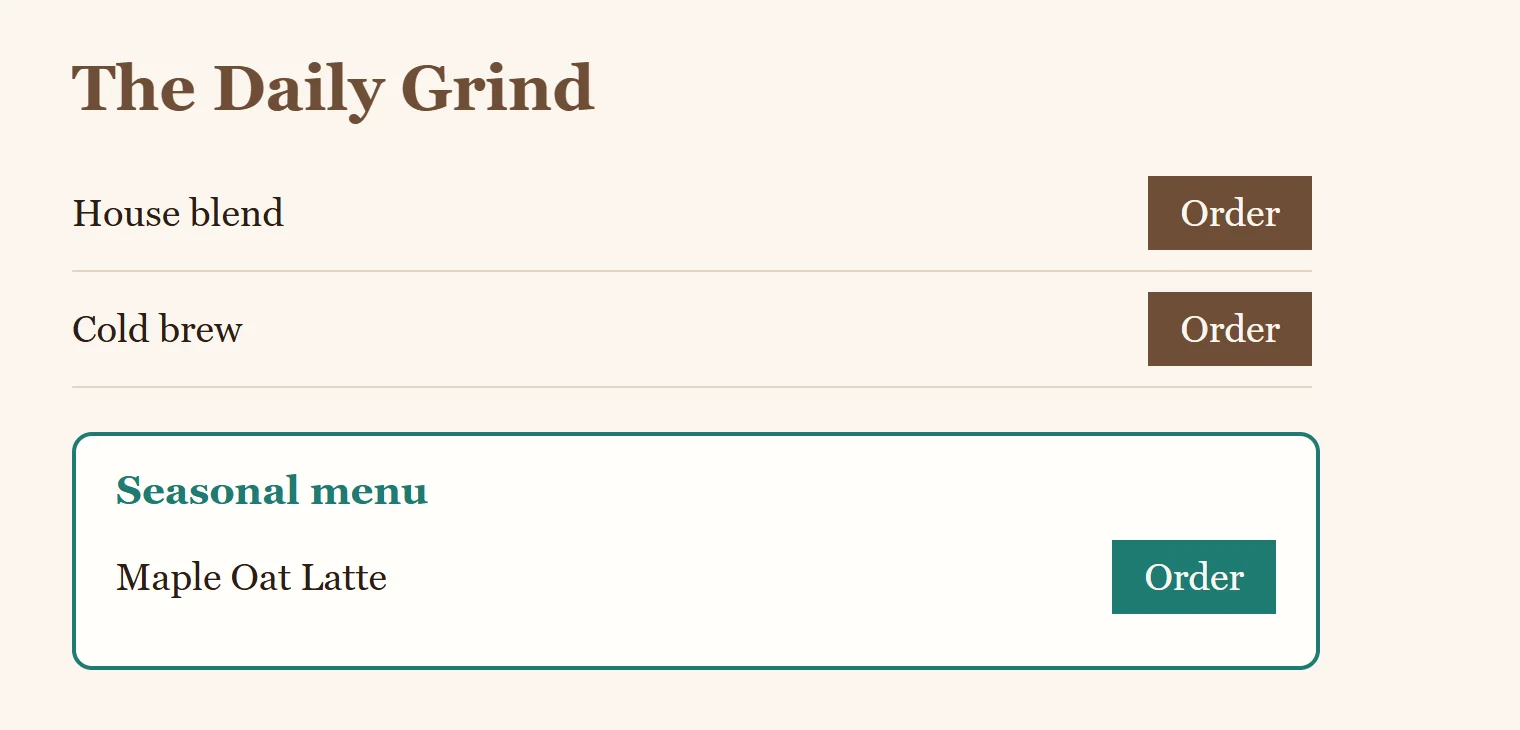
.seasonal {
--brand: #1f7a72;
}
.btn {
background-color: var(--brand);
}
```
Every button on the page is coffee brown, except the buttons inside an element with the class `seasonal`: those are teal. The `.btn` rule didn't change at all. This is how one component, such as the menu card for a seasonal drink, gets its own look without a single extra button rule.
## It's inherited
Custom properties pass down from parent to child, as `color` and `font-family` do (*Inheritance: What Children Get from Their Parents* covers which properties do). So when `var(--brand)` runs on a button, the browser looks at the button itself, then the element around it, then the one around that, and uses the **nearest** declaration it finds. In the example above, a button inside `.seasonal` finds teal before it ever reaches `:root`.
One thing surprises almost everyone the first time. A custom property that reads another one gets its value where it is declared:
```css
:root {
--brand: #6f4e37;
--button-bg: var(--brand);
}
.seasonal {
--brand: #1f7a72;
}
.btn {
background-color: var(--button-bg);
}
```
The button inside `.seasonal` is still brown. `--button-bg` worked out "brown" on `:root`, and the button inherited that finished answer, not the instruction "read `--brand`". To make the seasonal button teal, `.seasonal` would redefine `--button-bg` itself.
## Change one live in the developer tools
The developer tools let you try a new value on the real page before you touch your file.
1. Open your page with Live Server and press F12 (Cmd+Option+I on a Mac) to open the developer tools.
2. In the **Elements** panel (Firefox: **Inspector**), click the `` line at the top. The **Styles** pane (Firefox: **Rules**) shows your `:root` rule with `--brand` in it.
3. Click the value `#6f4e37`, type `#c0562c`, and press Enter. Every button and heading that reads `--brand` changes at once.
4. Now select a button. Its rule shows `var(--brand)`: hover over it to see the value it got.
Nothing is saved: reload, and the page goes back to your file. When you find a value you like, copy it into your stylesheet.

## Check yourself
2 questions to try on the lesson page.
## So what
A custom property turns a value you'd copy fourteen times into one decision with a name. Name the values your design repeats, and a rebrand, a seasonal look or a whole dark theme becomes a change to a few lines.
## Key terms
- [Custom property](https://www.ask-codey.com/glossary/custom-property)
- [var()](https://www.ask-codey.com/glossary/var-css)
- [Custom property fallback](https://www.ask-codey.com/glossary/custom-property-fallback)
- [Inheritance](https://www.ask-codey.com/glossary/inheritance-css)
## Cheat sheets
- [Custom Properties: Variables in CSS](https://www.ask-codey.com/cheat-sheets/css-custom-properties-cheat-sheet)
## Related
- [Design Tokens: a Small Design System](https://www.ask-codey.com/lessons/css-design-tokens)
- [Light and Dark Themes with prefers-color-scheme](https://www.ask-codey.com/lessons/css-dark-mode)
- [Inheritance: What Children Get from Their Parents](https://www.ask-codey.com/lessons/css-inheritance)
Source: https://www.ask-codey.com/lessons/css-custom-properties