Elements, Tags and Attributes
A web page is content with labels on it, called tags, and once you can read the labels you know exactly what your CSS will style.
Novice · HTML · CSS · Updated
After this lesson you can
- Write an element with its opening tag, content and closing tag, and recognize a void element
- Give an element attributes such as src, alt and href, and nest elements inside each other correctly
Key takeaways
- HTML labels each piece of content, like labels on moving boxes. A labeled piece is an element.
- An element is an opening tag, its content and a closing tag, such as
<p>, the words, and</p>. - A void element such as
<img>holds no content, so it has an opening tag only. - Attributes go inside the opening tag as name="value" and add details, such as
hreffor where a link goes andaltfor what a picture shows. - Elements go inside other elements. Close the inner one before the outer one.
Every CSS rule you will ever write points at a piece of HTML: "make the headings orange", "give the pet cards a border", "put the menu links in a row". When a class assignment hands you a page and says "now style it", the first job is reading its HTML to see what's there to style. This lesson teaches you to read it, and to write the little bits you'll need.
The running example for this chapter is Paws & Whiskers, a made-up pet adoption site. Each lesson builds a little more of its "Meet Biscuit" page, about a three-year-old beagle who is looking for a home.
Labels on moving boxes
Picture moving day. Every box gets a label: kitchen, books, winter coats. The label doesn't change what's inside, but it tells everyone what the box holds and where it goes.
HTML does the same for a web page. It puts a label on each piece of content: this is a heading, this is a paragraph. A labeled piece of content is called an element. HTML stands for HyperText Markup Language, and "markup" means exactly this: marking up content with labels.
<h1>Meet Biscuit</h1>
<p>Biscuit is a three-year-old beagle who loves long walks and longer naps.</p>
The browser reads the labels and shows the first line as a big, bold heading and the second as ordinary text. CSS reads the same labels to know what to style.
Opening and closing tags
The labels themselves are called tags. Most elements have two: one to open the box and one to close it.
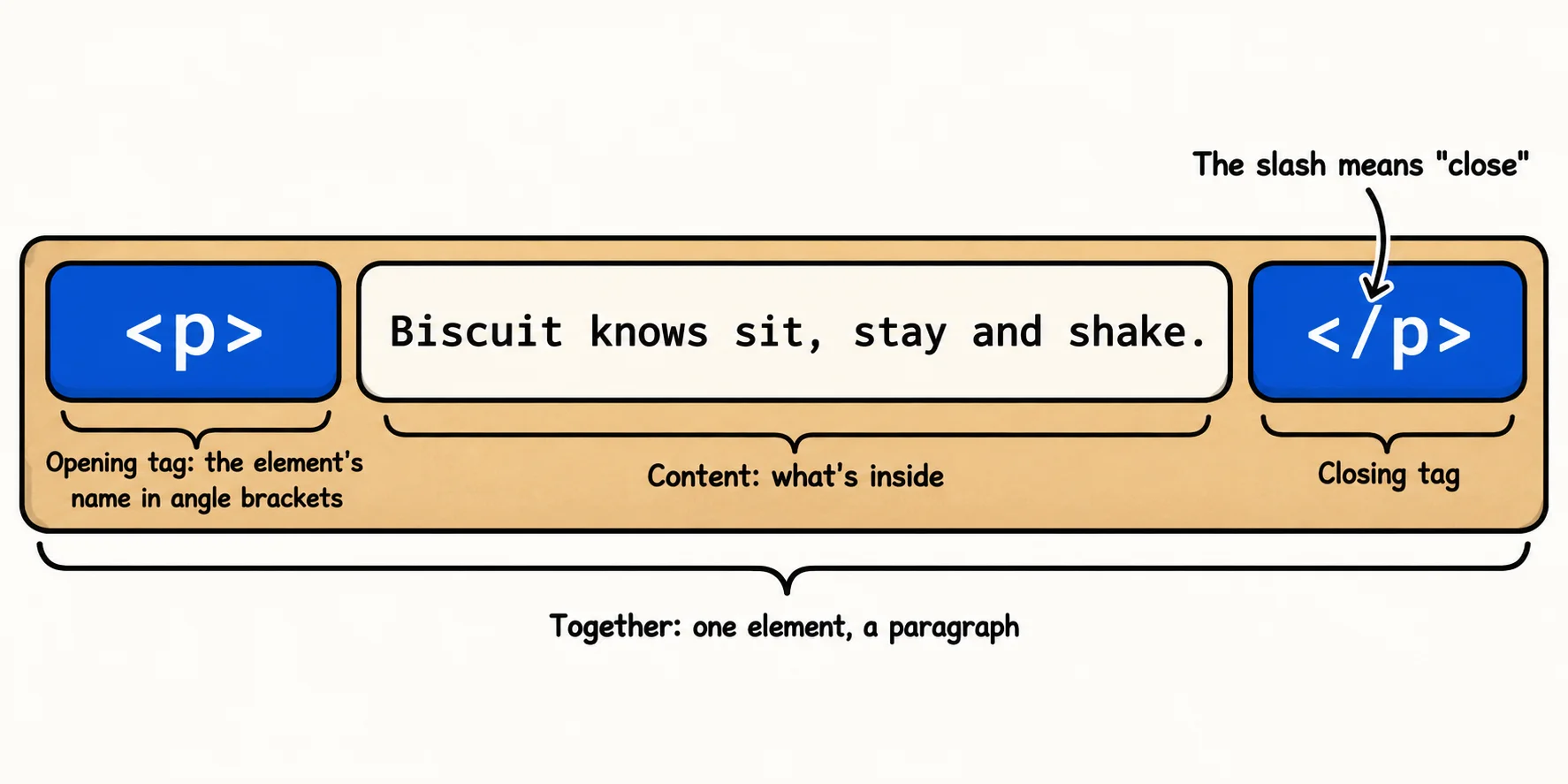
<p>Biscuit knows sit, stay and shake.</p>
<p>is the opening tag, read "p tag". The<and>are angle brackets (the less-than and greater-than signs on your keyboard), andpis the element's name: p for paragraph.Biscuit knows sit, stay and shake.is the content: what's in the box.</p>is the closing tag, read "closing p tag". It's the opening tag with a slash (/) after the first angle bracket.
Together, the opening tag, the content and the closing tag make one element. Tag names are written in lowercase by habit.
Try it. In VS Code, open the css-in-depth folder you made in Setup: VS Code, a Browser and Node.js, and make a new file named meet-biscuit.html. Type the two lines from the first example, save, then right-click the file and choose Open with Live Server. The browser shows them even without the page skeleton you'll add in the next lesson. Live Server can't reload a page without that skeleton yet (it may say so in a pop-up), so change the paragraph's words, save, and press the browser's reload button to see the change.
The elements you'll style most
A handful of elements make up most of the pages you'll style:
<h2>Fast facts</h2>
<ul>
  <li>Age: 3 years</li>
  <li>Breed: beagle</li>
  <li>Good with kids: yes</li>
</ul>
- Headings,
<h1>to<h6>:<h1>is the page's main title, and a page has one.<h2>starts a section,<h3>a part of that section, and so on down. - Paragraphs,
<p>: a block of ordinary text. - Lists:
<ul>(an unordered list, shown with bullets) or<ol>(an ordered list, shown with numbers), with each item in its own<li>(a list item). - Links,
<a>, and pictures,<img>, which need a little more than a tag. They come two sections down.
Boxes inside boxes
A big moving box can hold smaller boxes. Elements work the same way: the list above holds three list items. Putting one element inside another is called nesting.
<p>Biscuit is <strong>house-trained</strong> and walks well on a leash.</p>
<strong> marks words as important, and the browser shows them in bold. It sits inside the paragraph, so it has to close inside the paragraph too: the last box you opened is the first one you close. Writing <p>Biscuit is <strong>house-trained</p></strong> crosses the tags over, and the browser has to guess what you meant.
Indenting each element inside its parent, as the list example does, shows at a glance which box is inside which. The element on the outside is called the parent, and the ones inside it are its children. You'll meet those two words again when CSS passes styles from parents to children.
Attributes: notes on the label
Sometimes a label needs a note: fragile, this side up. In HTML, those notes are attributes. An attribute goes inside the opening tag, as a name, an equals sign (=, read "equals") and a value in quotes:
<a href="adopt.html">Adopt Biscuit</a>
<img src="images/biscuit.jpg" alt="Biscuit the beagle sitting in the grass, ears up">
hrefon a link (<a>, short for anchor) says where the link goes. The name comes from hypertext reference.src, short for source, on a picture says which file to show.alt, short for alternative text, says in words what the picture shows. A screen reader (software that reads a page aloud for people who can't see it) reads it out, and the browser shows it when the picture can't load.
Notice that <img> has no closing tag. A picture has no content to wrap: the file comes from src. An element like that is a void element, an empty box with a label and no lid. You'll meet two more in the next lesson, <meta> and <link>.
What CSS sees
In Your First CSS Rule you wrote a rule that starts with a selector. The simplest selector is an element's name, and it styles every element with that name:
h1 {
  color: darkorange;
}
This rule turns every <h1> on the page dark orange. The rest of this chapter adds the HTML that lets CSS be more precise: the page skeleton, structure elements, and names of your own with class and id.
Check yourself
2 questions to try on the lesson page.
So what
Every page you will style is made of these few parts: elements, their tags, and their attributes. When a style doesn't land where you expected, reading the HTML is where the answer usually starts.