Notebooks: Code, Results and Notes Together
A notebook is a file of cells, code cells and Markdown cells, that keeps each cell's result saved under it, like a scientist's lab notebook; an .ipynb file holds all of it as JSON, notebooks suit exploring and showing data, and a .py file suits code you reuse and test.
Novice · Python · Updated
After this lesson you can
- Explain what a notebook is, code cells and Markdown cells with each result saved under its cell, in an .ipynb file that holds JSON
- Choose a notebook for exploring and showing data, and a .py file for code you reuse and test
Key takeaways
- A notebook is a list of cells. A code cell holds Python, and a Markdown cell holds notes, headings and lists.
- When a code cell runs, its result appears under it and is saved in the file, so the code, what it gave and what you wrote about it stay together.
- A notebook is an .ipynb file, and inside it is JSON, plain text that lists every cell with its source and its saved outputs.
- A notebook suits exploring data and showing what you found. A .py file suits code you reuse and test, so this course explores in notebooks and puts answers in modules.
- JupyterLab and Google Colab open the same .ipynb files, so a notebook from a class opens in VS Code too.
Data classes, tutorials and data jobs pass their work around as notebooks: a homework handed out as an .ipynb file, an analysis a coworker shares, the example in an article about a new dataset. Before you open your first one, it helps to know what problem a notebook solves, what's inside the file, and when you'd write a plain .py file instead.
The example is Bean Street Coffee, a coffee chain with three stores. Its owner, Rosa, has the prices of a morning's first six orders, and a list of questions about them.
The problem with a script for exploring
A script is a .py file that runs from top to bottom. Here is one that answers Rosa's first two questions:
prices = [4.45, 3.45, 3.65, 3.95, 4.75, 2.95]
print("orders:", len(prices))
print("total:", sum(prices))
orders: 6
total: 23.2
That works. Then Rosa asks a third question, and a fourth. Each time you add a line and run the whole file again, from the top. The answers appear in the terminal and vanish when you close it. And the notes about what each number means, the morning was slow because of the rain, live somewhere else, in an email or a document. Exploring means asking question after question, and a script makes you start over for every one.
A lab notebook for code
A scientist's lab notebook keeps three things on the same page: what they did, what they saw, and what they think it means. A notebook does the same for code. It's a list of cells, blocks you run one at a time:
- A code cell holds Python. When it runs, its result appears right under it.
- A Markdown cell holds notes: headings, sentences, lists. Markdown is a way of formatting plain text, where
# Bean Street's morningbecomes a heading and**six orders**becomes bold.
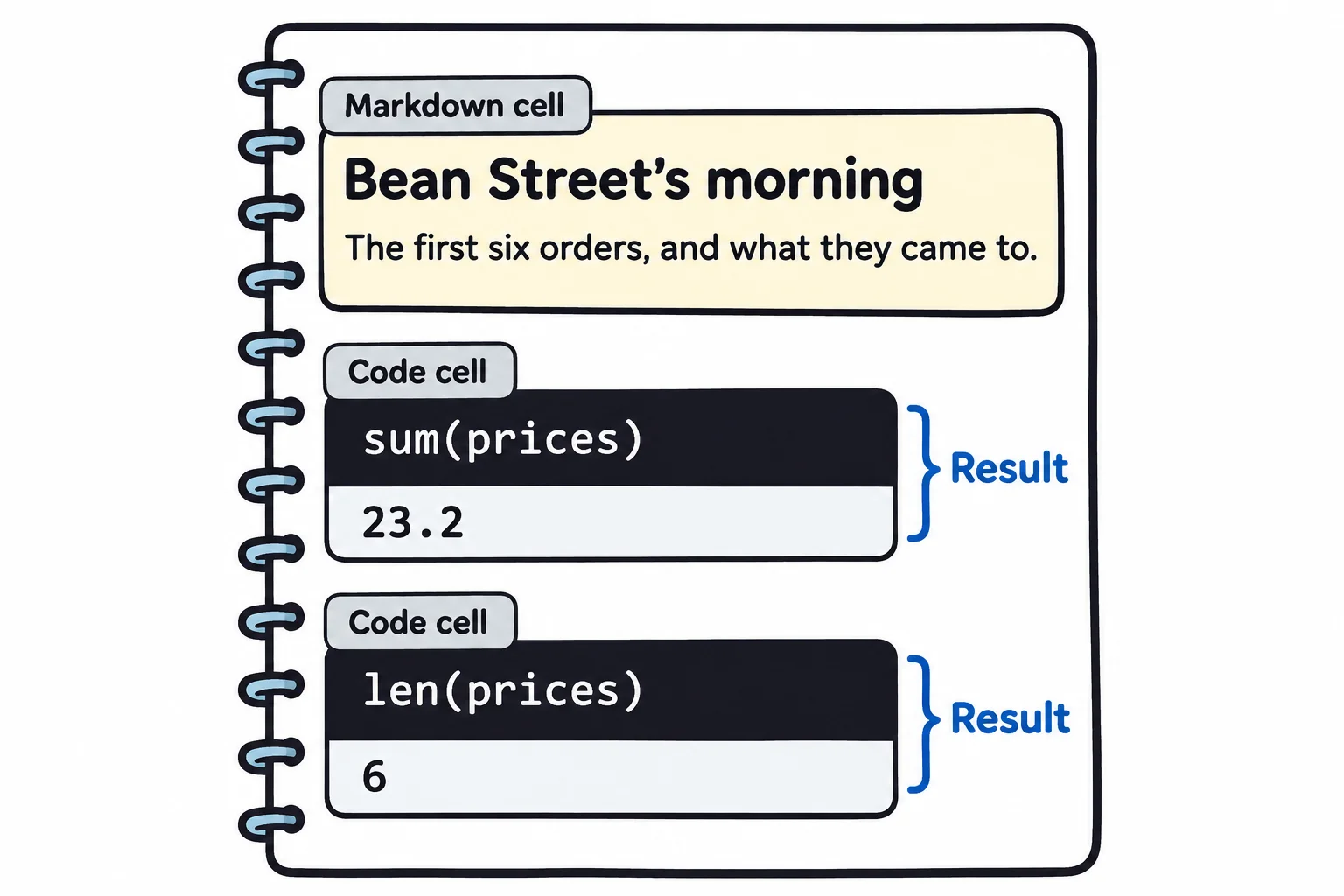
You run one cell, read its result, and write the next cell. Python remembers what earlier cells made, so the fourth question doesn't start over: it uses the prices the first cell already made. And when you save, the results are saved too. Open the file next week, or send it to Rosa, and every answer is still there under the code that gave it, with your notes beside them.
What an .ipynb file holds
A notebook is saved in a file ending in .ipynb, for IPython notebook; IPython is the interactive Python that notebooks grew out of. Open one in a text editor and you'll see JSON: plain text written as names and values in curly braces, the format web apps use to send data. Here is one code cell of a saved notebook, with its source and its saved result:
{
 "cell_type": "code",
 "execution_count": 2,
 "id": "total-prices",
 "metadata": {},
 "outputs": [
  {
   "data": {
    "text/plain": [
     "23.2"
    ]
   },
   "execution_count": 2,
   "metadata": {},
   "output_type": "execute_result"
  }
 ],
 "source": [
  "sum(prices)"
 ]
}
"source" is the code you typed, and "outputs" is the result, saved with it. You'll never need to edit this JSON by hand: VS Code reads it and draws the cells. It's worth knowing it's there, because it means a notebook is a plain text file. Git can track it, and a program can read it and check that a notebook ran without errors, which is how an exercise's tests can check a notebook.
Notebook or .py file?
| A notebook fits | A .py file fits |
|---|---|
| Exploring: question after question, looking at each result | Code you'll use again: a function that loads and cleans this month's file |
| Showing what you found: the result, the chart and a sentence about it, together | Code that tests check: a test can call a function in a module, not a cell |
| A one-off look at a new file | A script that runs every month with one command |
This course does both. You explore in a notebook, and once a few lines answer a question, you move them into a function in a .py file, where tests can check them and other code can use them. Most of this course's exercises come with a notebook to explore in and a module to finish.
Notebooks aren't only for VS Code. JupyterLab, which runs in a web browser on your own computer, and Google Colab, which runs notebooks on Google's computers, open the same .ipynb files. If a class uses one of them, its notebooks open in VS Code too, and yours open there.
Check yourself
2 questions to try on the lesson page.
So what
A notebook keeps the question, the code, the answer and what it means on one page, so your exploring is saved, and anyone you send it to can see how you got each number.