Sections Inside Sections: Recursion on Nested Data
Put a restaurant's menu online, with sections inside sections to any depth: add up one of everything, and print the menu as an outline with every section indented under the one that holds it, using one function per job that works at any depth.
Journeyman · Data Structures · Updated
After this lesson you can
- Write a recursive function that walks nested data, such as sections inside sections
- Explain why nested data of any depth calls for recursion rather than a fixed number of loops
Key takeaways
- Nested data holds smaller pieces of the same shape inside it: folders in folders, replies to replies, sections in sections.
- A recursive function handles one level, then calls itself for each piece inside, so it works at any depth.
- A depth parameter, one more on every call, tells each call how deep it is; one shared depth variable gets it wrong, because nothing takes it back off on the way out.
- The base case can hide in the loop: a section with nothing inside runs the loop zero times and stops.
- Walking nested data visits each piece once, so it is O(n) for n pieces.
Before this: How Big Is This Folder? Recursion walked one kind of nested data, folders, to work out one number. Most nested data isn't folders, and most jobs need more than a total.
A small restaurant is putting its dinner menu online. Some sections hold dishes, some hold more sections, and the owner keeps adding: Mains holds Pasta and Grill, Drinks holds Hot Drinks and Cold Drinks, and next week a Specials section goes inside Grill. The website needs two things from the menu:
- The price of one of everything, for the "taste the whole menu" night. That's the folder tool's job again, with prices instead of megabytes.
- The menu as an outline, each section on its own line, indented two spaces under the section that holds it, so a reader can see that Pasta is part of Mains.
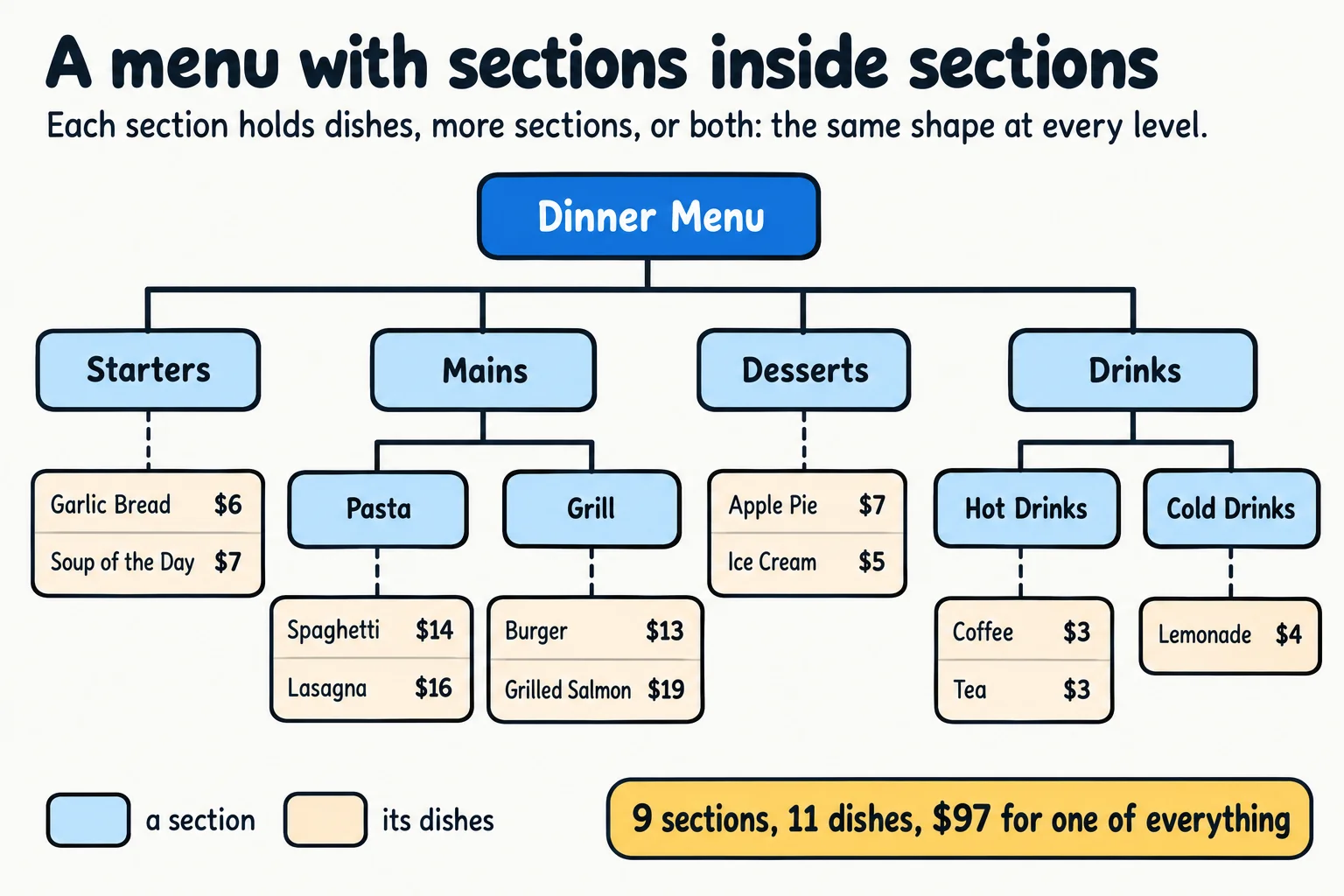
The same shape is everywhere at work: a shop's categories inside categories, a comment thread's replies to replies, a company's org chart, the JSON an API sends back. The total you already know how to do. The outline is the new part: every line has to know how deep it is.
What would you try?
One loop per level, indenting by hand. Print the top sections with no spaces, the sections inside them with two, and the ones inside those with four. It works for today's menu, three levels deep. Specials next week is a fourth level, so it needs a fourth loop, the same dead end as the folder tool's loops.
One recursive walk that prints each name. It reaches every level, and all nine section names come out, but every one at the left edge. Pasta looks like it's on the same level as Mains, and the outline shows nothing about what's inside what.
One shared depth variable. Add 1 to it each time the walk goes into a section, and indent by it. But nothing takes the 1 back off when a section is finished, so every line is one step deeper than the last: Desserts comes out 10 spaces in, as if it were inside Grill, and Cold Drinks 16.
| What we tried | Every level? | The outline | Where it breaks |
|---|---|---|---|
| A loop per level | no: three | right today | Specials, a fourth level |
| A walk with no depth | yes | all at the left edge | can't see what's inside what |
One shared depth |
yes | a staircase, one step deeper each line | nothing takes the depth back off |
All three touch each section once, O(n). The trouble is the indent, not the speed.
The questions that lead to it
How deep is a section? One level deeper than the section that holds it.
Who knows that? The call that holds it. When the call for Mains hands Pasta to the function, it knows exactly how deep Mains is.
So what could it hand over, along with the section? Its own depth plus one. Then every call knows how deep it is, without anyone keeping count. And because each call keeps its own depth in its own frame (Where Do the Waiting Calls Wait? The Call Stack), it's still right after the sections inside it have finished: Desserts gets the same depth as Mains, because it was handed the same number.
How it got its name
Data like this, where a piece holds smaller pieces of the same shape, is called nested data. In your textbook it's a recursive data structure, because the definition of a section mentions itself: a section has a name, some items, and some sections. Its picture is a tree, which Module 6 builds on. Walking it with one function that handles one level and calls itself for each piece inside is the recursion from this module, and the extra number handed down with each call is a depth parameter.
Walking the menu in code
The code below does both jobs on the same menu: TotalPrice adds up the price of one of everything, and PrintSections prints the outline, handing depth + 1 to each section inside. Prices are whole dollars, to keep the five languages' output the same.
MenuSection menu = new MenuSection("Dinner Menu", [], [
new MenuSection("Starters", [new MenuItem("Garlic Bread", 6), new MenuItem("Soup of the Day", 7)], []),
new MenuSection("Mains", [], [
new MenuSection("Pasta", [new MenuItem("Spaghetti", 14), new MenuItem("Lasagna", 16)], []),
new MenuSection("Grill", [new MenuItem("Burger", 13), new MenuItem("Grilled Salmon", 19)], []),
]),
new MenuSection("Desserts", [new MenuItem("Apple Pie", 7), new MenuItem("Ice Cream", 5)], []),
new MenuSection("Drinks", [], [
new MenuSection("Hot Drinks", [new MenuItem("Coffee", 3), new MenuItem("Tea", 3)], []),
new MenuSection("Cold Drinks", [new MenuItem("Lemonade", 4)], []),
]),
]);
int TotalPrice(MenuSection section)
{
int total = 0;
foreach (MenuItem item in section.Items)
{
total += item.Price;
}
foreach (MenuSection inner in section.Sections)
{
total += TotalPrice(inner);
}
return total;
}
void PrintSections(MenuSection section, int depth)
{
Console.WriteLine(new string(' ', depth * 2) + section.Name);
foreach (MenuSection inner in section.Sections)
{
PrintSections(inner, depth + 1);
}
}
Console.WriteLine("One of everything: One of everything: $97
Dinner Menu
Starters
Mains
Pasta
Grill
Desserts
Drinks
Hot Drinks
Cold Drinks
record MenuItem(String name, int price) {}
record MenuSection(String name, List<MenuItem> items, List<MenuSection> sections) {}
MenuSection menu = new MenuSection("Dinner Menu", List.of(), List.of(
new MenuSection("Starters", List.of(new MenuItem("Garlic Bread", 6), new MenuItem("Soup of the Day", 7)), List.of()),
new MenuSection("Mains", List.of(), List.of(
new MenuSection("Pasta", List.of(new MenuItem("Spaghetti", 14), new MenuItem("Lasagna", 16)), List.of()),
new MenuSection("Grill", List.of(new MenuItem("Burger", 13), new MenuItem("Grilled Salmon", 19)), List.of()))),
new MenuSection("Desserts", List.of(new MenuItem("Apple Pie", 7), new MenuItem("Ice Cream", 5)), List.of()),
new MenuSection("Drinks", List.of(), List.of(
new MenuSection("Hot Drinks", List.of(new MenuItem("Coffee", 3), new MenuItem("Tea", 3)), List.of()),
new MenuSection("Cold Drinks", List.of(new MenuItem("Lemonade", 4)), List.of())))));
int totalPrice(MenuSection section) {
int total = 0;
for (MenuItem item : section.items()) {
total += item.price();
}
for (MenuSection inner : section.sections()) {
total += totalPrice(inner);
}
return total;
}
void printSections(MenuSection section, int depth) {
IO.println(" ".repeat(depth * 2) + section.name());
for (MenuSection inner : section.sections()) {
printSections(inner, depth + 1);
}
}
void main() {
IO.println("One of everything: One of everything: $97
Dinner Menu
Starters
Mains
Pasta
Grill
Desserts
Drinks
Hot Drinks
Cold Drinks
from dataclasses import dataclass
@dataclass
class MenuItem:
name: str
price: int
@dataclass
class MenuSection:
name: str
items: list
sections: list
menu = MenuSection("Dinner Menu", [], [
MenuSection("Starters", [MenuItem("Garlic Bread", 6), MenuItem("Soup of the Day", 7)], []),
MenuSection("Mains", [], [
MenuSection("Pasta", [MenuItem("Spaghetti", 14), MenuItem("Lasagna", 16)], []),
MenuSection("Grill", [MenuItem("Burger", 13), MenuItem("Grilled Salmon", 19)], []),
]),
MenuSection("Desserts", [MenuItem("Apple Pie", 7), MenuItem("Ice Cream", 5)], []),
MenuSection("Drinks", [], [
MenuSection("Hot Drinks", [MenuItem("Coffee", 3), MenuItem("Tea", 3)], []),
MenuSection("Cold Drinks", [MenuItem("Lemonade", 4)], []),
]),
])
def total_price(section):
total = 0
for item in section.items:
total += item.price
for inner in section.sections:
total += total_price(inner)
return total
def print_sections(section, depth):
print(" " * (depth * 2) + section.name)
for inner in section.sections:
print_sections(inner, depth + 1)
print(f"One of everything: ${total_price(menu)}")
print_sections(menu, 0)
One of everything: $97
Dinner Menu
  Starters
  Mains
    Pasta
    Grill
  Desserts
  Drinks
    Hot Drinks
    Cold Drinks
const menu = {
name: "Dinner Menu", items: [], sections: [
{ name: "Starters", items: [{ name: "Garlic Bread", price: 6 }, { name: "Soup of the Day", price: 7 }], sections: [] },
{ name: "Mains", items: [], sections: [
{ name: "Pasta", items: [{ name: "Spaghetti", price: 14 }, { name: "Lasagna", price: 16 }], sections: [] },
{ name: "Grill", items: [{ name: "Burger", price: 13 }, { name: "Grilled Salmon", price: 19 }], sections: [] },
] },
{ name: "Desserts", items: [{ name: "Apple Pie", price: 7 }, { name: "Ice Cream", price: 5 }], sections: [] },
{ name: "Drinks", items: [], sections: [
{ name: "Hot Drinks", items: [{ name: "Coffee", price: 3 }, { name: "Tea", price: 3 }], sections: [] },
{ name: "Cold Drinks", items: [{ name: "Lemonade", price: 4 }], sections: [] },
] },
],
};
function totalPrice(section) {
let total = 0;
for (const item of section.items) {
total += item.price;
}
for (const inner of section.sections) {
total += totalPrice(inner);
}
return total;
}
function printSections(section, depth) {
console.log(" ".repeat(depth * 2) + section.name);
for (const inner of section.sections) {
printSections(inner, depth + 1);
}
}
console.log(`One of everything: ${totalPrice(menu)}`);
printSections(menu, 0);
One of everything: $97
Dinner Menu
  Starters
  Mains
    Pasta
    Grill
  Desserts
  Drinks
    Hot Drinks
    Cold Drinks
type MenuItem = { name: string; price: number };
type MenuSection = { name: string; items: MenuItem[]; sections: MenuSection[] };
const menu: MenuSection = {
name: "Dinner Menu", items: [], sections: [
{ name: "Starters", items: [{ name: "Garlic Bread", price: 6 }, { name: "Soup of the Day", price: 7 }], sections: [] },
{ name: "Mains", items: [], sections: [
{ name: "Pasta", items: [{ name: "Spaghetti", price: 14 }, { name: "Lasagna", price: 16 }], sections: [] },
{ name: "Grill", items: [{ name: "Burger", price: 13 }, { name: "Grilled Salmon", price: 19 }], sections: [] },
] },
{ name: "Desserts", items: [{ name: "Apple Pie", price: 7 }, { name: "Ice Cream", price: 5 }], sections: [] },
{ name: "Drinks", items: [], sections: [
{ name: "Hot Drinks", items: [{ name: "Coffee", price: 3 }, { name: "Tea", price: 3 }], sections: [] },
{ name: "Cold Drinks", items: [{ name: "Lemonade", price: 4 }], sections: [] },
] },
],
};
function totalPrice(section: MenuSection): number {
let total = 0;
for (const item of section.items) {
total += item.price;
}
for (const inner of section.sections) {
total += totalPrice(inner);
}
return total;
}
function printSections(section: MenuSection, depth: number): void {
console.log(" ".repeat(depth * 2) + section.name);
for (const inner of section.sections) {
printSections(inner, depth + 1);
}
}
console.log(`One of everything: ${totalPrice(menu)}`);
printSections(menu, 0);
One of everything: $97
Dinner Menu
  Starters
  Mains
    Pasta
    Grill
  Desserts
  Drinks
    Hot Drinks
    Cold Drinks
As in How Big Is This Folder? Recursion, C# and Java use a record for a menu item and a section, Python a dataclass, and JavaScript and TypeScript write each one as an object right where it's used, with TypeScript naming their shapes with type. The functions are the same in all five.
Where's the base case?
TotalPrice has no if at the top, so where does it stop? Look at a section with no sections inside it, such as Pasta. Its second loop runs zero times, so the function adds up its own items and returns without calling itself. That's the base case, hiding in the loop: a section with nothing nested inside. Every call goes one level deeper, and the menu has a bottom, so every path of calls reaches one.
PrintSections stops the same way. Its depth goes up by 1 on each call into a section, and never needs taking back off: when the call for Grill finishes, the call for Mains carries on with its own depth, which was never changed.
The cost card
| Job | Big-O | The everyday reason |
|---|---|---|
| Add up a menu of n sections and dishes | O(n) | Each section is called once and each dish looked at once |
| Print the outline | O(n) | One line per section, each printed once |
| Calls waiting at once | one per level | A section waits only for the sections inside it: here, 3 |
When loops are enough. If a form or a report always has exactly two levels (sections holding fields, say), a loop in a loop is simpler and can't miss a level, because the depth is fixed. Recursion earns its place when the depth isn't: when the owner, the user or the API can always add one more level.
Try it. Add a Specials section inside Grill holding a Steak at $24. Before you run it, predict both outputs: the total goes up to $121, and the outline gains a line, Specials, six spaces in, under Grill. No function changes.
Check yourself
2 questions to try on the lesson page.
So what
Whenever data holds smaller copies of its own shape (folders, categories, comments, menus), write one function that handles one level and calls itself for each piece inside, and hand down whatever each call needs to know, such as its depth. It works at every depth, including ones nobody has added yet.