Redo, the Back Button and Matching Brackets: Stacks at Work
Three everyday features need the most recent thing first: redo, a browser's back and forward buttons, and checking that brackets match. See why throwing things away, searching and counting fall short, and solve all three with stacks.
Apprentice · Data Structures · Updated
After this lesson you can
- Use two stacks to build undo and redo, or back and forward
- Check that brackets match with a stack
Key takeaways
- Undo and redo are two stacks: each change is pushed on the undo stack, and undoing moves it to the redo stack.
- A browser's back and forward buttons work the same way, and visiting a new page clears the forward stack.
- To check brackets, push each opening bracket and pop when a closing one arrives: they must match, and the stack must end empty.
- Counting brackets, even with one counter per kind, can't see their order, so it passes {[}]; a stack sees it.
- Every step is one push or one pop, so redo, back and a bracket check stay fast however long the history or the text.
Before this: Undo the Last Thing First: Stacks. A stack hands back the newest thing first, in one step.
Ctrl+Z works. Three more features turn out to need "the most recent thing first", and each one breaks the obvious first try. Press Ctrl+Y, and the change you just undid should come back. Press the browser's back button twice and forward once, and you should land on the page you backed away from last. Type a bracket in VS Code, and it should tell you at once whether every bracket in the file is closed in the right order. This lesson takes them one at a time.
Redo: where do undone changes go?
The first try: throw undone changes away. Undo pops the newest change off the history and drops it. That's fine until someone presses Ctrl+Y: the change is gone, and there's nothing to bring back.
The second try: keep undone changes in a list, and search it. Redo then has to find the most recently undone change, which means reading the list: O(n) per press, the same trap the last lesson's search fell into.
The question that settles it: which undone change does redo need? The one undone last. Last undone, first redone: that's a stack again. So a text editor keeps two:
- Every change you make is pushed on the undo stack. The most recent change is on top.
- Undo pops the top change, reverses it, and pushes it on the redo stack.
- Redo pops the top of the redo stack, makes the change again, and pushes it back on the undo stack.
- Making a new change clears the redo stack: once you've gone a different way, the old "future" no longer makes sense.
Every one of those is a push or a pop: O(1), however long your editing session has been.
The back and forward buttons
A browser has the same problem with pages. The first try: keep one list of the pages you've visited, and let Back go to the one before the current page. That answers Back once. But press Back twice, then Forward: where does Forward go? To the page you backed away from last. The one list has no idea which that was, unless it keeps those pages too, newest on top: a second pile.
So the browser keeps the page you're on as the "current" page, a back stack of where you've been, and a forward stack of where you've backed away from.
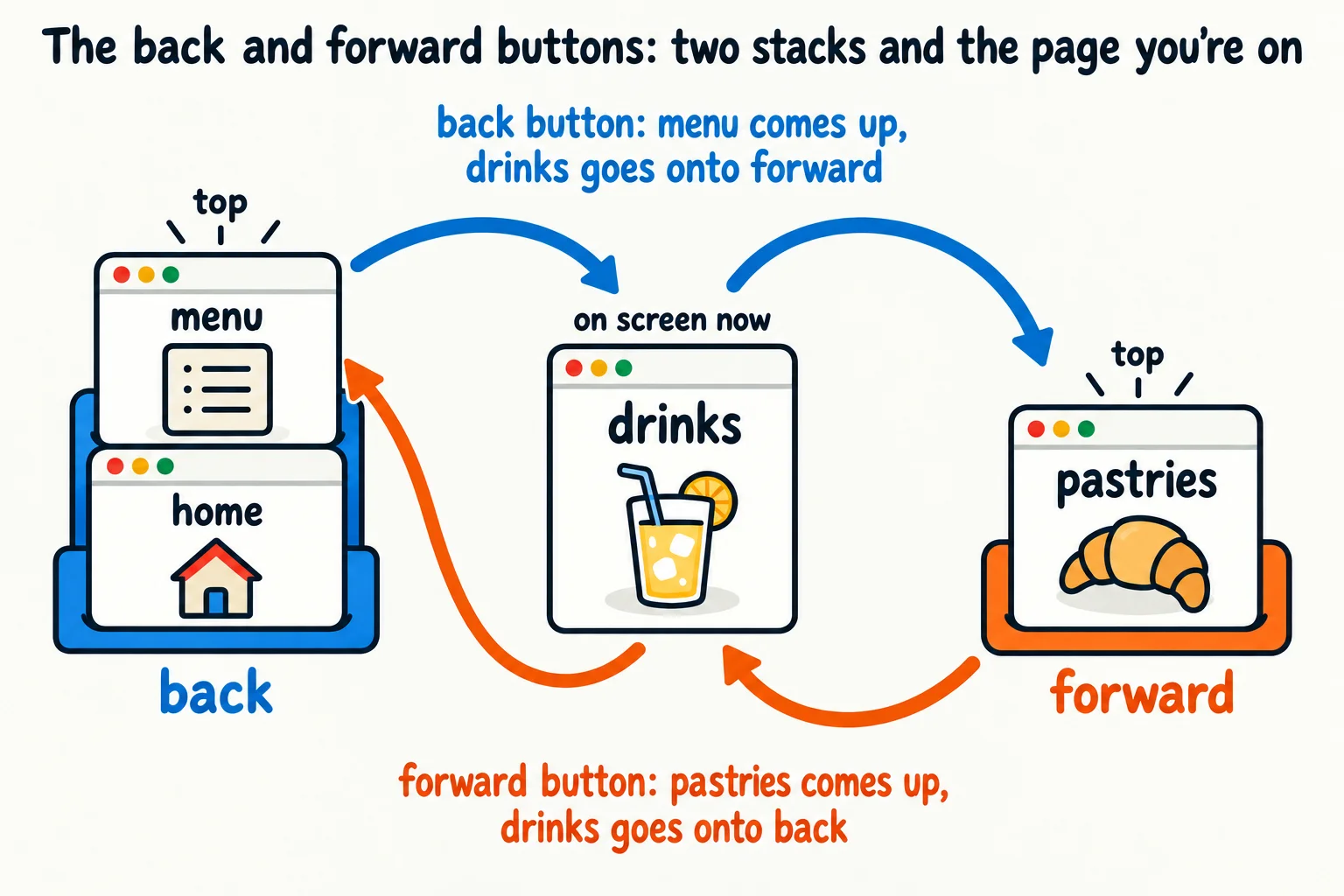
This code is the coffee shop's website, and someone clicking around it. It uses each language's own stack.
Stack<string> back = new Stack<string>();
Stack<string> forward = new Stack<string>();
string current = "home";

void Visit(string page)
{
    back.Push(current);
    current = page;
    forward.Clear();
    Show("visit " + page);
}

void Back()
{
    if (back.Count > 0)
    {
        forward.Push(current);
        current = back.Pop();
    }
    Show("back");
}

void Forward()
{
    if (forward.Count > 0)
    {
        back.Push(current);
        current = forward.Pop();
    }
    Show("forward");
}

void Show(string action)
{
    Console.WriteLine(action + ": on " + current + " (back " + back.Count + ", forward " + forward.Count + ")");
}

Visit("menu");
Visit("drinks");
Back();
Back();
Forward();
Visit("pastries");
Forward();
visit menu: on menu (back 1, forward 0)
visit drinks: on drinks (back 2, forward 0)
back: on menu (back 1, forward 1)
back: on home (back 0, forward 2)
forward: on menu (back 1, forward 1)
visit pastries: on pastries (back 2, forward 0)
forward: on pastries (back 2, forward 0)
ArrayDeque<String> back = new ArrayDeque<>();
ArrayDeque<String> forward = new ArrayDeque<>();
String current = "home";

void visit(String page) {
    back.push(current);
    current = page;
    forward.clear();
    show("visit " + page);
}

void back() {
    if (!back.isEmpty()) {
        forward.push(current);
        current = back.pop();
    }
    show("back");
}

void forward() {
    if (!forward.isEmpty()) {
        back.push(current);
        current = forward.pop();
    }
    show("forward");
}

void show(String action) {
    IO.println(action + ": on " + current + " (back " + back.size() + ", forward " + forward.size() + ")");
}

void main() {
    visit("menu");
    visit("drinks");
    back();
    back();
    forward();
    visit("pastries");
    forward();
}
visit menu: on menu (back 1, forward 0)
visit drinks: on drinks (back 2, forward 0)
back: on menu (back 1, forward 1)
back: on home (back 0, forward 2)
forward: on menu (back 1, forward 1)
visit pastries: on pastries (back 2, forward 0)
forward: on pastries (back 2, forward 0)
back = []
forward = []
current = "home"


def show(action):
    print(f"{action}: on {current} (back {len(back)}, forward {len(forward)})")


def visit(page):
    global current
    back.append(current)
    current = page
    forward.clear()
    show("visit " + page)


def go_back():
    global current
    if back:
        forward.append(current)
        current = back.pop()
    show("back")


def go_forward():
    global current
    if forward:
        back.append(current)
        current = forward.pop()
    show("forward")


visit("menu")
visit("drinks")
go_back()
go_back()
go_forward()
visit("pastries")
go_forward()
visit menu: on menu (back 1, forward 0)
visit drinks: on drinks (back 2, forward 0)
back: on menu (back 1, forward 1)
back: on home (back 0, forward 2)
forward: on menu (back 1, forward 1)
visit pastries: on pastries (back 2, forward 0)
forward: on pastries (back 2, forward 0)
const back = [];
const forward = [];
let current = "home";

function show(action) {
  console.log(`${action}: on ${current} (back ${back.length}, forward ${forward.length})`);
}

function visit(page) {
  back.push(current);
  current = page;
  forward.length = 0;
  show(`visit ${page}`);
}

function goBack() {
  if (back.length > 0) {
    forward.push(current);
    current = back.pop();
  }
  show("back");
}

function goForward() {
  if (forward.length > 0) {
    back.push(current);
    current = forward.pop();
  }
  show("forward");
}

visit("menu");
visit("drinks");
goBack();
goBack();
goForward();
visit("pastries");
goForward();
visit menu: on menu (back 1, forward 0)
visit drinks: on drinks (back 2, forward 0)
back: on menu (back 1, forward 1)
back: on home (back 0, forward 2)
forward: on menu (back 1, forward 1)
visit pastries: on pastries (back 2, forward 0)
forward: on pastries (back 2, forward 0)
const back: string[] = [];
const forward: string[] = [];
let current = "home";

function show(action: string): void {
  console.log(`${action}: on ${current} (back ${back.length}, forward ${forward.length})`);
}

function visit(page: string): void {
  back.push(current);
  current = page;
  forward.length = 0;
  show(`visit ${page}`);
}

function goBack(): void {
  const page = back.pop();
  if (page !== undefined) {
    forward.push(current);
    current = page;
  }
  show("back");
}

function goForward(): void {
  const page = forward.pop();
  if (page !== undefined) {
    back.push(current);
    current = page;
  }
  show("forward");
}

visit("menu");
visit("drinks");
goBack();
goBack();
goForward();
visit("pastries");
goForward();
visit menu: on menu (back 1, forward 0)
visit drinks: on drinks (back 2, forward 0)
back: on menu (back 1, forward 1)
back: on home (back 0, forward 2)
forward: on menu (back 1, forward 1)
visit pastries: on pastries (back 2, forward 0)
forward: on pastries (back 2, forward 0)
The last line is the interesting one: visiting pastries cleared the forward stack, so the forward button had nowhere to go. That's exactly what your browser does. In Python, global current lets the functions change the current variable defined outside them; back and forward need no such line, because the functions change the lists without replacing them. In JavaScript and TypeScript, setting length = 0 empties an array.
Matching brackets
Code, JSON and math are full of brackets, and every opening one needs its own closing one, in the right order: {size: [small, medium]} is fine, but {size: [small, medium}] closes the curly bracket while the square one is still open. An editor has to tell them apart as you type, in files thousands of characters long.
The first try: one counter. Add 1 for every opening bracket and take 1 away for every closing one; matched means the count never goes below zero and ends at zero. {size: [small, medium}] counts 1, 2, 1, 0, and passes. It's broken, and the counter can't see it.
The second try: three counters, one each for (), [] and {}. Now the curly count goes 1, 0 and the square count goes 1, 0: both end at zero, and {size: [small, medium}] still passes. Counting can't see order, and order is what's wrong here.
The question that settles it: when a closing bracket arrives, which opening bracket must it match? The one opened most recently that's still open. Last opened, first closed: a stack. So:
- Read the text one character at a time.
- An opening bracket,
(,[or{: push it. - A closing bracket: pop the top. If the stack was empty, or the popped bracket isn't its partner, the brackets don't match.
- At the end, the stack must be empty. Anything left over was never closed.
bool Matched(string text)
{
    Stack<char> open = new Stack<char>();
    foreach (char c in text)
    {
        if (c == '(' || c == '[' || c == '{')
        {
            open.Push(c);
        }
        else if (c == ')' || c == ']' || c == '}')
        {
            if (open.Count == 0) return false;
            char top = open.Pop();
            if ((c == ')' && top != '(') || (c == ']' && top != '[') || (c == '}' && top != '{')) return false;
        }
    }
    return open.Count == 0;
}

foreach (string text in new string[] { "{size: [small, medium]}", "{size: [small, medium}]", "((oat milk)", "oat milk)" })
{
    Console.WriteLine(text + " is " + (Matched(text) ? "matched" : "not matched"));
}
{size: [small, medium]} is matched
{size: [small, medium}] is not matched
((oat milk) is not matched
oat milk) is not matched
boolean matched(String text) {
    ArrayDeque<Character> open = new ArrayDeque<>();
    for (char c : text.toCharArray()) {
        if (c == '(' || c == '[' || c == '{') {
            open.push(c);
        } else if (c == ')' || c == ']' || c == '}') {
            if (open.isEmpty()) return false;
            char top = open.pop();
            if ((c == ')' && top != '(') || (c == ']' && top != '[') || (c == '}' && top != '{')) return false;
        }
    }
    return open.isEmpty();
}

void main() {
    for (String text : new String[] {"{size: [small, medium]}", "{size: [small, medium}]", "((oat milk)", "oat milk)"}) {
        IO.println(text + " is " + (matched(text) ? "matched" : "not matched"));
    }
}
{size: [small, medium]} is matched
{size: [small, medium}] is not matched
((oat milk) is not matched
oat milk) is not matched
def matched(text):
    partner = {")": "(", "]": "[", "}": "{"}
    open_brackets = []
    for c in text:
        if c in "([{":
            open_brackets.append(c)
        elif c in ")]}":
            if not open_brackets or open_brackets.pop() != partner[c]:
                return False
    return len(open_brackets) == 0


for text in ["{size: [small, medium]}", "{size: [small, medium}]", "((oat milk)", "oat milk)"]:
    print(text + " is " + ("matched" if matched(text) else "not matched"))
{size: [small, medium]} is matched
{size: [small, medium}] is not matched
((oat milk) is not matched
oat milk) is not matched
function matched(text) {
  const partner = { ")": "(", "]": "[", "}": "{" };
  const open = [];
  for (const c of text) {
    if ("([{".includes(c)) {
      open.push(c);
    } else if (")]}".includes(c)) {
      if (open.length === 0 || open.pop() !== partner[c]) return false;
    }
  }
  return open.length === 0;
}

for (const text of ["{size: [small, medium]}", "{size: [small, medium}]", "((oat milk)", "oat milk)"]) {
  console.log(`${text} is ${matched(text) ? "matched" : "not matched"}`);
}
{size: [small, medium]} is matched
{size: [small, medium}] is not matched
((oat milk) is not matched
oat milk) is not matched
function matched(text: string): boolean {
  const partner: Record<string, string> = { ")": "(", "]": "[", "}": "{" };
  const open: string[] = [];
  for (const c of text) {
    if ("([{".includes(c)) {
      open.push(c);
    } else if (")]}".includes(c)) {
      if (open.length === 0 || open.pop() !== partner[c]) return false;
    }
  }
  return open.length === 0;
}

for (const text of ["{size: [small, medium]}", "{size: [small, medium}]", "((oat milk)", "oat milk)"]) {
  console.log(`${text} is ${matched(text) ? "matched" : "not matched"}`);
}
{size: [small, medium]} is matched
{size: [small, medium}] is not matched
((oat milk) is not matched
oat milk) is not matched
Each character is looked at once, and each push or pop is O(1), so the whole check is O(n) for a text of n characters. The second text fails at }: the top of the stack is [, not {, which is exactly what the counters missed. The third fails at the end, with one ( still on the stack. The fourth fails at ), with nothing on the stack to pop.
Try it. Add [latte, (oat milk)] and ]latte[ to the list of texts. Predict each answer before you run it, and say at which character the second one fails.
Check yourself
2 questions to try on the lesson page.
So what
Redo, back buttons and bracket checks look like three different features, but they're one idea: the most recent thing first. When you spot that shape in a problem, a stack turns a tricky job into a few pushes and pops, where searching or counting would have been slow or wrong.