Exercise: First Styles
Give The Daily Grind's menu its look with five CSS rules from the owner's style guide, and run the exercise checks for the first time to see each rule pass.
Novice · CSS · Web Development · Updated
The Daily Grind's menu page works, but it looks like a plain document: black text on white, nothing that says "coffee". The owner has handed you a short style guide with the shop's colors and its font. Your job is five CSS rules in styles.css that make the menu match it. Seven checks tell you when each rule is doing its job, and this is your first time running them, so every step is spelled out.
Before you start
You need VS Code with Live Server, a current Chrome, Edge or Firefox, and Node.js, set up as in Setup: VS Code, a Browser and Node.js. The rules you'll write are the kind you met in Your First CSS Rule.
Get the exercise code
In the Exercise box beside the lesson, choose Get the starter on GitHub to open its GitHub repository. Click Code, then Download ZIP, and unzip it into your css-in-depth folder. The folder holds:
index.html: the menu page, ready to use. Don't change it.styles.css: empty except for a comment with the style guide and the five rules. This is the file you write.page.test.jsandpackage.json: the checks, and what they need. You don't need to change these.
In VS Code, choose File > Open Folder and open the exercise folder: the one with package.json directly inside it.
What to do
Right-click index.html, choose Open with Live Server, and put VS Code and the browser side by side. Then open styles.css. The comment at the top is the owner's style guide:
/*
  The owner's style guide
    cream          #fdf6ec   the page background
    dark roast     #3b2a20   the page's text
    coffee brown   #6f4e37   the brand color: the headings and the prices
    latte          #f3e3cf   the background of the Today's special box
    Georgia        the font for the main heading, written Georgia, serif
*/
The colors are color codes. Type them exactly as written; you'll learn to read them in the chapter Selectors, Color and Text. Write one rule at a time under the comment, save, and watch the menu change:
- The page: a rule for
bodythat makes the background cream and the text dark roast. - The main heading: a rule for
h1that makes it coffee brown, in Georgia. - The section headings: a rule for
h2that makes Coffee, Bakery and Today's special coffee brown. - The prices: every price is marked
class="price". A rule for.pricemakes them bold and coffee brown. - Today's special: the box is marked
class="special". A rule for.specialgives it a latte background.
Check your work
Checks are a small program that reads your files the way a browser does and says, for each rule, whether it's doing its job yet.
- Open VS Code's terminal with Terminal > New Terminal, or Ctrl+` (Ctrl on macOS too). Its prompt ends with the exercise folder's name: that's where the commands run.
- Install what the checks need, once. Type
npm installand press Enter. npm downloads a tool namedjsdominto a newnode_modulesfolder; it takes a few seconds and ends withfound 0 vulnerabilities. - Run the checks. Type
npm testand press Enter:
npm test
Each check prints a line: ✔ when it passes, ✖ when it doesn't yet. Before you write any rules, one check passes (the page already links styles.css) and six fail. That's expected. Under failing tests, each one has a message that starts Not yet: and names the rule to look at, for example Not yet: The main heading (h1) is not coffee brown (#6f4e37) yet. Rule 2 is for h1.
- Fix one thing, save, and run the checks again. The up arrow key brings
npm testback.
Hints
- Start from the shape. A selector, an opening curly brace, one
property: value;declaration per line, and a closing curly brace. The comment instyles.cssshows one. - Rule 1 has two declarations, and so do rules 2 and 4. One rule can change as many properties as it needs.
- Text color is
color; the color behind something isbackground-color. Both are spelled the American way. - A class selector starts with a dot. Without it,
pricelooks for an element named<price>, and there isn't one. - A style that won't show? Right-click it and choose Inspect, as in Look Inside Any Page with Developer Tools. A crossed-out declaration with a warning sign is one the browser couldn't read.
When you're done
The page is cream, the text is dark roast, every heading and price is coffee brown, the main heading is in Georgia, and Today's special sits on a latte-colored band. The checks say:
✔ index.html links styles.css
✔ rule 1: the page background is cream
✔ rule 1: the page text is dark roast
✔ rule 2: the main heading is coffee brown, in Georgia
✔ rule 3: the section headings are coffee brown
✔ rule 4: every price is bold and coffee brown
✔ rule 5: the Today's special box has a latte background
ℹ tests 7
ℹ pass 7
ℹ fail 0
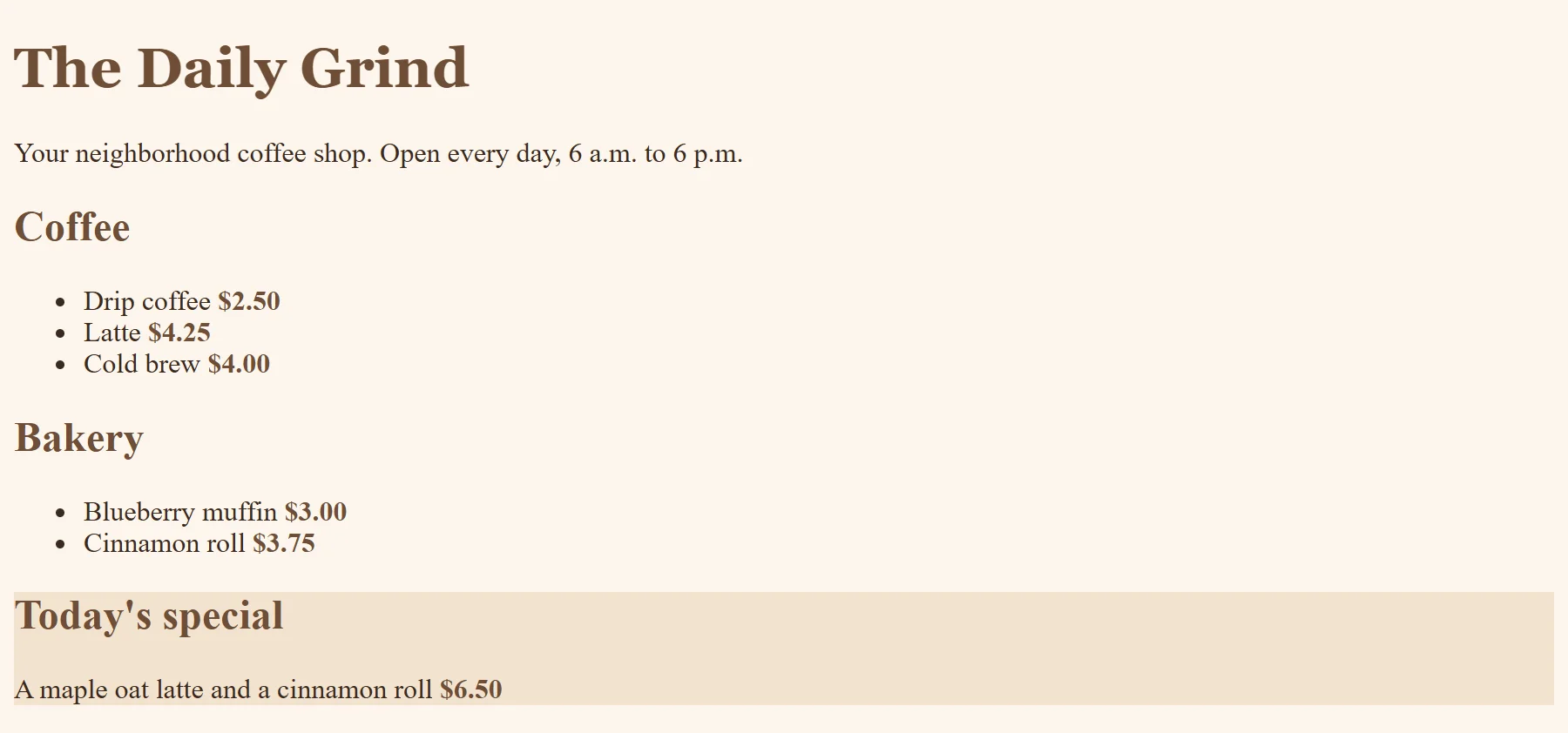
Now look closely at the Today's special box: its words touch the edges of the color. What would you want to change? The space inside a box is called padding, and the chapter The Box Model and Units shows how to add it.
So what
You turned a plain page into one with a brand, five rules long, and you ran the same write, save, check loop that every exercise in this course uses. Real sites get their look exactly this way: a style guide, a stylesheet, and rule after rule.