Exercise: Code from a Class Diagram
Take a ticket from Riverside Library's app team: a class diagram of the library's media is agreed, and the code doesn't match it yet. Finish the classes so audiobooks are lent like books, a member holds up to five items, and giving one back makes room, with the tests green throughout.
Apprentice · C# · Java · Python · JavaScript · TypeScript · Updated
Teams often agree on a design as a class diagram first, and then somebody has to turn it into code. That somebody is you. Riverside Library's app team drew the diagram for the library's media; a teammate started the code and didn't finish. Your job is to make the code match the diagram, box by box and line by line, without breaking anything that works today.
Before you start
You need one language set up, as in Setup: VS Code and Your Language, and to know how to run the tests, as in Running the Exercise Tests. The exercise is written in all five of the course's languages; pick the one you use.
Get the exercise code
Open this lesson's GitHub repository, github.com/ask-codey/exercise-dp-code-from-a-diagram, also linked from the Exercise box beside the lesson. Clone it into your course folder. In a terminal, in that folder:
git clone https://github.com/ask-codey/exercise-dp-code-from-a-diagram.git
Git makes a folder, exercise-dp-code-from-a-diagram, with the exercise code inside.
The repository has a folder for each language: csharp, java, python, javascript and typescript. Each folder holds:
- the library's code, as it is today: the
Borrowablepromise,Book,AudiobookandMember(the repository'sREADME.mdnames the files for each language); - the tests, which you don't need to change;
- a demo program: one member's visit to the library.
In VS Code, choose File > Open Folder and open your language's folder, not the whole repository.
The ticket
From: Priya, Riverside Library's app team
At Monday's planning meeting we agreed on the class diagram below for the library's media. Sam started turning it into code before his vacation:
BorrowableandBookare done,Audiobookis typed in but its loan days aren't, andMemberis still the version from when we only lent books. Please finish the code so it matches the diagram:
- Books go out for 14 days, audiobooks for 7.
- A member can borrow any item the library lends, up to 5 at a time. A sixth is refused until something comes back.
- Giving an item back makes room for another.
Everything that works today has to keep working. The checkout desk already calls
borrow, and the returns desk already callsgiveBack.
The diagram
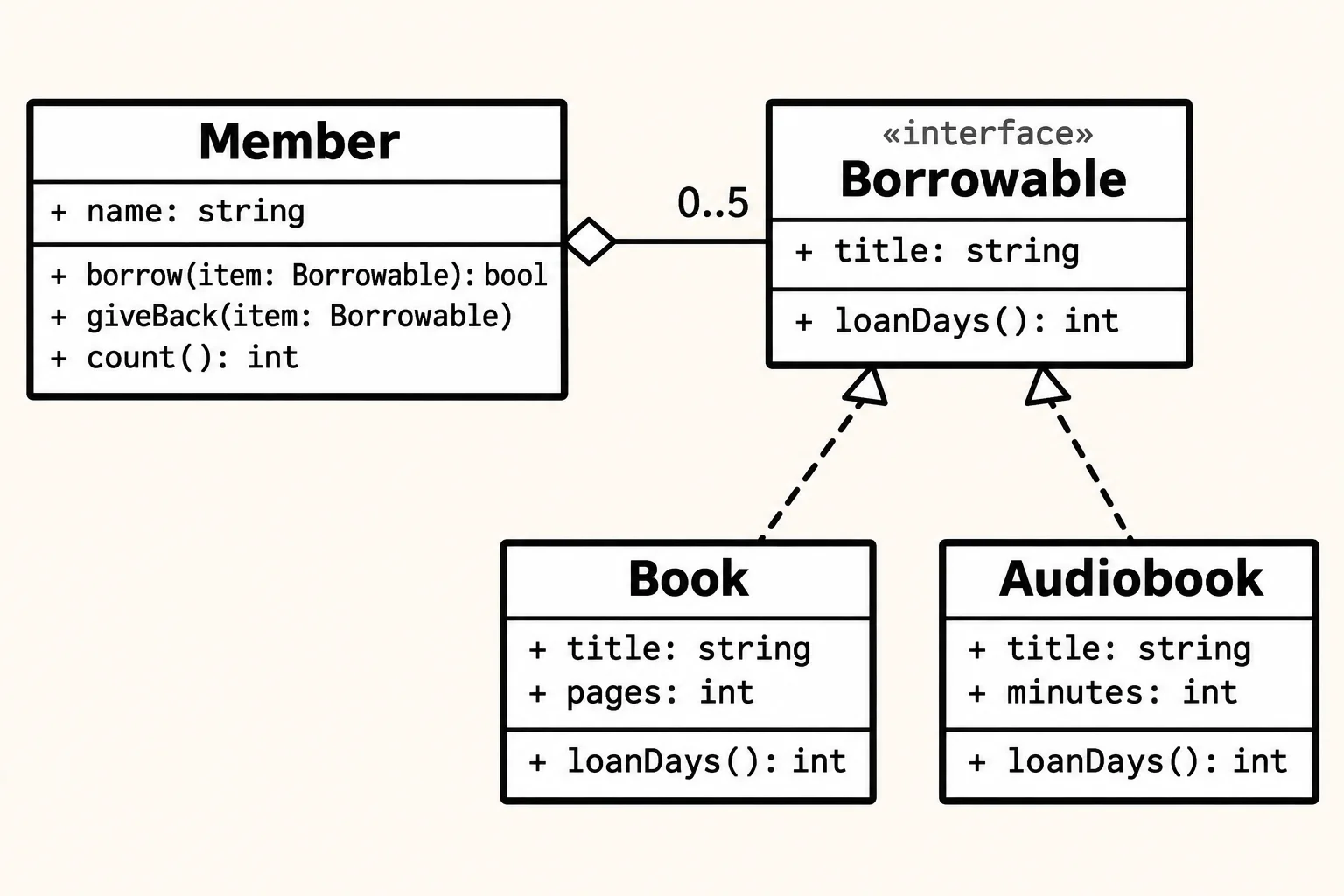
The same diagram in words:
| Box | Fields | Methods | Its lines |
|---|---|---|---|
«interface» Borrowable |
+ title: string |
+ loanDays(): int |
|
Book |
+ title: string, + pages: int |
+ loanDays(): int |
keeps the Borrowable promise |
Audiobook |
+ title: string, + minutes: int |
+ loanDays(): int |
keeps the Borrowable promise |
Member |
+ name: string |
+ borrow(item: Borrowable): bool, + giveBack(item: Borrowable), + count(): int |
a hollow diamond at Member, 0..5 at Borrowable |
The repository's README also has it as Mermaid text, which GitHub draws for you (Draw Your Own: Paper, Mermaid and draw.io).
What to do
- Run the tests first. Five pass: they're what the code does today. Four fail: they're the ticket.
- Read the diagram against the code, one box and one line at a time. Which box has a method that doesn't do what the ticket says? Where does the line out of
Memberend, and what does the code's list hold instead? What does0..5ask ofborrow? - Change the code in small steps, and run the tests after every step. The five that pass must stay green the whole time.
- Stop when all nine are green and the demo prints what When you're done shows.
The README's Stuck? section has a hint for each part, if you want them. Try a few minutes without it first: reading a diagram into code is the skill.
Check your work
Each language has its own command, run in the terminal in your language's folder (Terminal > New Terminal in VS Code). The repository's README.md has the full list, including the one-time setup for Python (a virtual environment and pytest) and TypeScript (npm install).
| Language | Run the tests | Run the demo |
|---|---|---|
| C# | dotnet test |
dotnet run --project LibraryMedia |
| Java | ./mvnw test (.\mvnw test in PowerShell) |
java src/main/java/Demo.java |
| Python | python -m pytest |
python demo.py |
| JavaScript | npm test |
node demo.js |
| TypeScript | npm test |
node demo.ts |
A failing test's message starts with Not yet: for the ticket's work, or Keep this working: if a change broke something that worked, and says what it expected, for example Not yet: the diagram says 0..5, so Sam's sixth item is refused.
Hints
- Each language writes the diagram's names its own way. C# calls the interface
IBorrowableand writesLoanDaysandGiveBack; Python writesloan_daysandgive_back. - Follow every line to its far end. A line that ends at an interface means "any class that keeps this promise".
- A number on a line is a rule. Something in the code has to keep it.
- One step at a time. Fix the audiobook's loan days first, and run the tests. Then the list
Memberkeeps. Then the limit. Then giving back.
When you're done
All 9 tests are green, and the demo prints the same six lines in every language:
The Lighthouse Keeper: 14 days
Rivers of Glass: 7 days
Maya borrows 2 items: yes, yes
Then 3 more: yes, yes, yes
And a sixth: no
After giving one back: yes
Look at what the code says now: Member never mentions Book or Audiobook, only Borrowable. That's the diagram's line, in code. When the library starts lending something new, Member won't need a change.
Submit your exercise
The exercise is how you finish this lesson. When your work is done, put it on GitHub in a repo of your own, then submit that repo's address here.
On GitHub, click +, then New repository. Name it (for example
exercise-dp-code-from-a-diagram), choose Public, and click Create repository. Leave out the README: your folder already has one.In a terminal in your exercise folder (Git Bash on Windows), send your work to your new repo. Point your copy at your own repo, then commit and push:
git remote set-url origin https://github.com/your-name/exercise-dp-code-from-a-diagram.git
git add .
git commit -m "My solution"
git push -u origin main
Paste your repo's address, such as
https://github.com/your-name/exercise-dp-code-from-a-diagram, into Submit your exercise on this page. The site checks that the repo is public and holds your commits, and then the lesson is complete.
Changed something after you submitted? Push it, and submit again: your latest submission is the one that counts.
So what
You read a design someone else drew and made the code keep every promise on it: each box, each line, each number. Next chapter: the ideas that explain why designs are drawn the way they are.