Storing Passwords Safely: Hashing with pwdlib
An API never stores a password, plain or encrypted, only a slow, salted, one-way hash of it made with Argon2 through pwdlib's PasswordHash.recommended(), and it checks each sign-in attempt with verify.
Journeyman · FastAPI · REST API · Updated
After this lesson you can
- Explain why an API keeps only a hash of each password, how hashing differs from encrypting, and what a salt adds
- Hash a password with pwdlib's PasswordHash.recommended() and check a sign-in attempt with verify
Key takeaways
- A stored password, plain or encrypted, can be read back by whoever copies the database. A hash can't be turned back into the password, so the app keeps only the hash.
- To check a sign-in, the app hashes what was typed the same way and compares the two. pwdlib's verify does both steps.
- A salt is a random value mixed into each password before hashing, so the same password never gives the same hash twice and ready-made lists of hashes are useless.
- Argon2 is slow on purpose and needs memory, so guessing passwords from stolen hashes costs an attacker real time. A fast hash such as SHA-256 doesn't.
- Store only the hash, never send it back in an answer, never log a password, and never invent a scheme of your own.
The day an app gets a Sign up button, it starts holding something that isn't its own: people's passwords, and many people use the same password for their email and their bank. Databases get copied, by an attacker, by a backup left somewhere public, by a laptop forgotten on a bus. This lesson makes sure that a copy of yours gives away nobody's password.
The example is Bright Minds Study Group, where students will sign up, sign in and see their own study sessions. Before any route, there's one decision to make: what goes in the password column.
What a stolen table gives away
The first idea is to save the password as the student typed it:
| id | password | |
|---|---|---|
| 1 | maya@example.com | correct-horse-staple |
| 2 | theo@example.com | maple-syrup-42 |
Anyone who reads this file can sign in as Maya, and because people reuse passwords, they can try hers on her email account too.
The second idea is to encrypt each password: scramble it with a key, so only someone with the key can unscramble it. It's a locked box. But the app needs that key every time it checks a sign-in, so the key lives on the same server as the database, and whoever copies one usually gets the other. An encrypted password can still be turned back into the password.
Look at what the app needs, though. It never has to read Maya's password back. It only has to tell whether what someone types now matches what she chose.
Hashing: a one-way recipe
Think of a smoothie. The same fruit always makes the same smoothie, but nobody can turn a smoothie back into strawberries. A hash function does this to text: the same input always gives the same fixed-length output, called a hash, and there's no way back. Python's hashlib shows the idea:
import hashlib

print(hashlib.sha256(b"correct-horse-staple").hexdigest())
print(hashlib.sha256(b"correct-horse-staple").hexdigest())
print(hashlib.sha256(b"correct-horse-stapler").hexdigest())
e7b15ba6d1321d3c486f40477d30f03c282377c49f9ab789386444195834d96f
e7b15ba6d1321d3c486f40477d30f03c282377c49f9ab789386444195834d96f
b7c9994a188fb51ab8fcabbcc1e4b118ceee7f8daa82f1ff152a65572f8f2de1
The same password gives the same hash; one extra letter gives a completely different one. To check a sign-in, the app hashes what was typed and compares the two hashes.
SHA-256 isn't the right hash for passwords, though, for two reasons:
- It's fast. It was built to fingerprint large files quickly, so an attacker with a stolen table can try billions of guesses a second.
- The same password always gives the same hash. Two students who share a password show the same hash, and attackers keep ready-made lists of the hashes of common passwords.
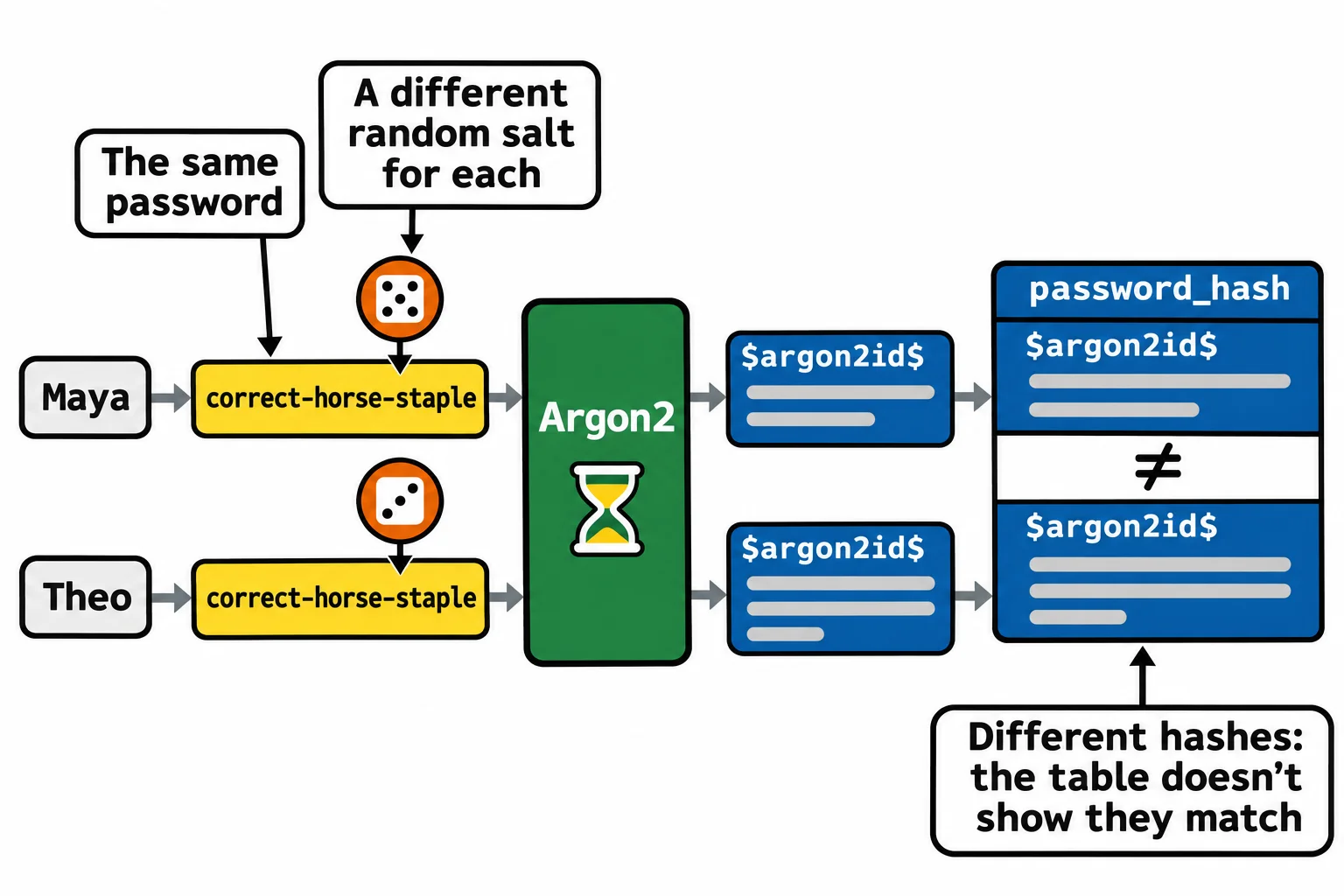
A salt fixes the second problem: a random value, different for every password, mixed in before hashing and kept beside the hash. Same password, two salts, two different hashes, and the ready-made lists are useless. A password hash such as Argon2 fixes the first: it's slow on purpose and needs a block of memory for every guess, so each guess costs the attacker real time.
Argon2 with pwdlib
pwdlib is a small package for password hashing, the one FastAPI's own documentation uses. The exercises install it as pwdlib[argon2], at the version their requirements.txt pins. PasswordHash.recommended() gives you a hasher set up with Argon2 and its recommended settings:
from pwdlib import PasswordHash

password_hash = PasswordHash.recommended()

hashed = password_hash.hash("correct-horse-staple")
print(hashed)
print(password_hash.verify("correct-horse-staple", hashed))
print(password_hash.verify("correct-horse-stapler", hashed))
$argon2id$v=19$m=65536,t=3,p=4$nz1qAZxKpoT9UR0oWNPiiQ$HrEWKDH+4qz1lScxWHRBafkNM2G2EKCe0i1dn0ah1KI
True
False
Your hash will differ, because its salt is random. Read it in parts, split at each $ (read "dollar"): argon2id is the algorithm, the Argon2 variety meant for passwords; v=19 is its version; m=65536,t=3,p=4 are its settings (64 MiB of memory, 3 passes, 4 lanes at once); then come the salt and the hash itself. Everything verify needs is in that one string, so the table needs one column, password_hash, and no column for the salt.
verify(password, hashed) takes the salt and settings out of hashed, hashes the attempt the same way and compares. Hash the same password twice and you can see the salt at work:
from pwdlib import PasswordHash

password_hash = PasswordHash.recommended()

first = password_hash.hash("correct-horse-staple")
second = password_hash.hash("correct-horse-staple")
print(first == second)
print(password_hash.verify("correct-horse-staple", first))
print(password_hash.verify("correct-horse-staple", second))
False
True
True
That's why a sign-in is always checked with verify, never by comparing two hashes with ==.
The rules that keep passwords safe
- Store only the hash, in a column named for what it holds:
password_hash. - Never send a hash back, not even in the answer to a sign-up. A hash in an answer is a free sample for guessing.
- Never log a password. A line such as
print(body)in a sign-up route writes it to a log file that anyone with access to the server can read. - Never invent your own scheme. Use pwdlib with Argon2.
You'll meet bcrypt in older projects: a password hash that is also slow on purpose and salted, set by a cost number. pwdlib can check bcrypt hashes too (pwdlib[bcrypt]), so an app that moves to Argon2 doesn't lose the accounts it already has.
Check yourself
2 questions to try on the lesson page.
So what
A copy of your database will leak one day, and when it does, salted Argon2 hashes give the attacker a very slow guessing game instead of a list of passwords.