HTTP in Plain Words: Requests and Responses
An app that asks an API for something sends an HTTP request with a method, a URL, headers and sometimes a body, and gets back a response with a status code, headers and usually a body, and Python's urllib.parse splits a URL into its path and its query values.
Apprentice · REST API · Web Development · Python · Updated
After this lesson you can
- Name the parts of an HTTP request and of a response, and choose the method that fits what a request wants to do
- Split a URL into its path and query values with urllib.parse, and explain why every query value arrives as text
Key takeaways
- A request is what the app sends. It has a method, a URL, headers and sometimes a body.
- A response is what the API sends back. It has a status code, headers and usually a body.
- The method says what the request wants to do. GET reads, POST adds, PUT replaces, PATCH changes part of something and DELETE removes it.
- A URL's path names what the request is about, and its query string, after the question mark, adds details such as free=true.
- urlsplit cuts a URL into its parts, and parse_qs turns the query string into a dictionary whose values are text, each inside a list.
Tap Track my order or check when the next bus comes, and your phone sends a short message to a computer somewhere, then waits for the answer. Every API you build in this course sits at the other end of that conversation. When an app shows the wrong thing, the first question is always "what did it send, and what came back?"
This chapter's example is Greenleaf Community Garden. Neighbors keep phoning its volunteer to ask which plots are free and who has plot 7, so the garden wants an API to answer for its app.
An order at a counter
The volunteer understands "anything free near the shed?", but a program can't guess: if every app asked in its own words, no API could understand them all. Both sides need one agreed shape for a question and its answer.
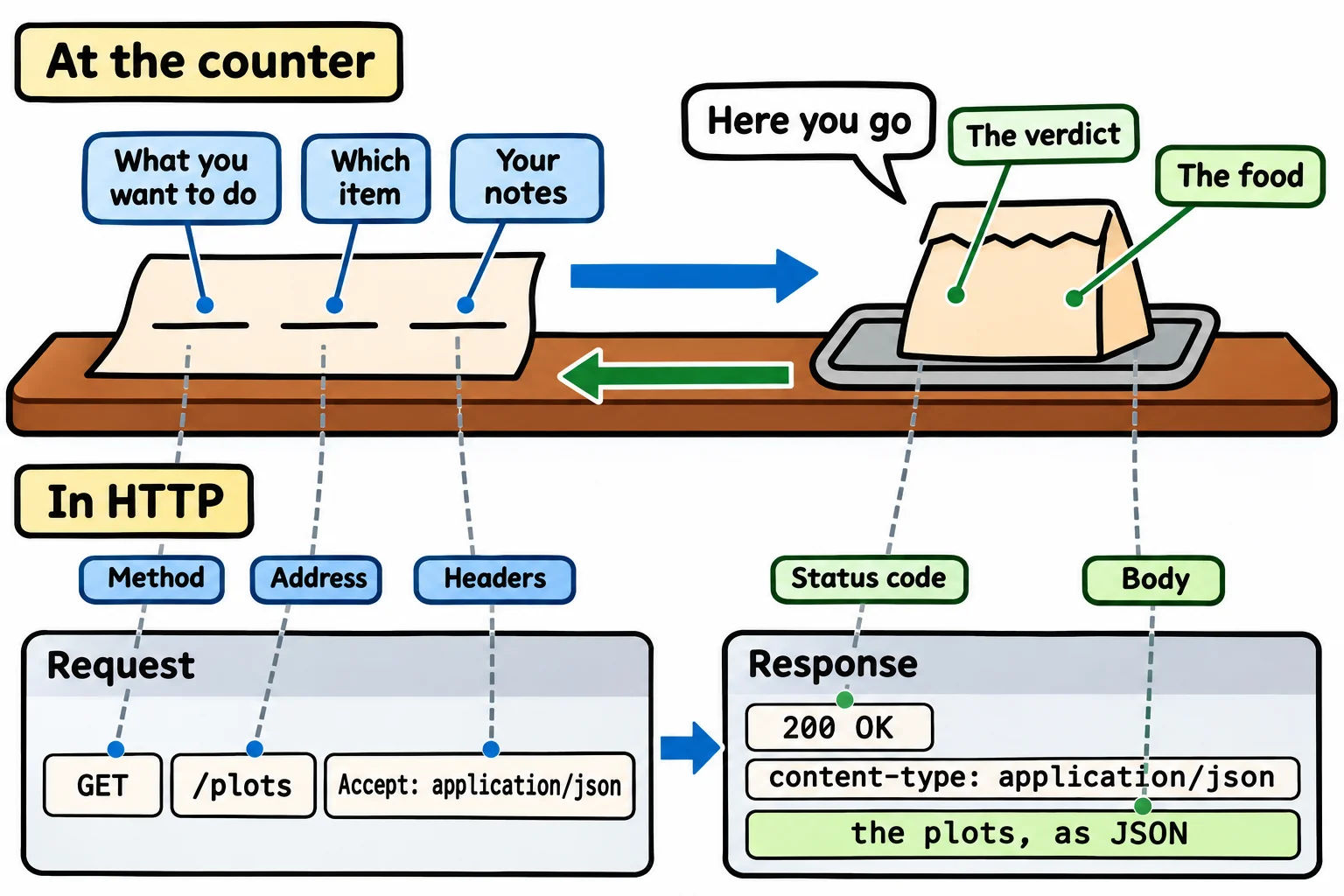
Ordering at a counter has a shape like that. You say what you want to do, which item and any notes ("no onions"), and sometimes hand something over, like a coupon. The counter answers with a verdict ("here you go" or "we're out"), notes ("careful, it's hot") and the food.
The web's agreed shape is HTTP (read "H-T-T-P", short for HyperText Transfer Protocol; a protocol is a set of rules two sides agree on). The app's message is a request, and the API's answer is a response. Here is the garden app's request for the list of plots, as HTTP writes it:
GET /plots HTTP/1.1
Host: 127.0.0.1:8000
Accept: application/json
The first line holds the method, GET, the address, /plots, and the version of HTTP. Under it are headers, notes with a name and a value: Accept: application/json says "please answer in JSON". A GET has no body, the data a request hands over, such as a new plot's details. Here is the response the garden's API sent back (its date header is left out):
HTTP/1.1 200 OK
server: uvicorn
content-length: 198
content-type: application/json

[{"number":1,"size":"small","gardener":"Rosa","growing":"tomatoes"},{"number":2,"size":"large","gardener":null,"growing":null},{"number":7,"size":"small","gardener":"Lena","growing":"strawberries"}]
Its first line holds the status code, the verdict: 200 OK, "here it is". Then come its own headers, a blank line, and the body: the plots, as JSON.
Methods: what the request wants to do
At a library desk you can ask to see a book, donate one, swap a damaged copy, fix its label, or take it off the shelf: the same desk, different jobs. In HTTP, the job is the method, a short word in capital letters:
| Method | What it asks for | At the garden |
|---|---|---|
| GET | Read something and change nothing | Which plots are free? |
| POST | Add something new | Open a new plot |
| PUT | Replace something whole | Replace plot 7's whole record |
| PATCH | Change part of something | Plot 7 is growing beans now |
| DELETE | Remove something | Take plot 7 off the map |
A browser's address bar sends GET. REST: Resources, Endpoints and Methods pairs each method with its addresses.
A URL's parts: the path and the query string
The address is a URL (read "U-R-L", for Uniform Resource Locator). Like a postal address, it goes from the general to the particular: http://127.0.0.1:8000/plots?free=true&size=large.
httpis the scheme, how to talk (online, usuallyhttps, the encrypted kind).127.0.0.1:8000is the host and the port: which computer, and which door on it.127.0.0.1means "this computer", where your API runs while you build it./plotsis the path: what the request is about.free=true&size=largeis the query string, the details after the?(read "question mark"): name and value pairs, joined with&(read "and").
Python's standard library cuts a URL apart with urllib.parse. urlsplit splits it into its parts, and parse_qs (read "parse query string") turns the query string into a dictionary:
from urllib.parse import urlsplit, parse_qs

parts = urlsplit("http://127.0.0.1:8000/plots?free=true&size=large")
print(parts.path)
print(parts.query)
query = parse_qs(parts.query)
print(query)
print(query["free"][0] == True)
/plots
free=true&size=large
{'free': ['true'], 'size': ['large']}
False
Each value comes in a list, because a name can repeat (?size=small&size=large), so query["free"][0] takes the first. And every value is text: "true" isn't True, and ?number=7 gives the text "7". A URL is text from end to end, so turning its values into yes-or-no answers and numbers is the API's job. With no query string, parse_qs gives {}.
One request on the docs page
FastAPI's docs page sends real requests and shows every part of the answer. Here is a tiny garden API, main.py:
from fastapi import FastAPI

app = FastAPI()

PLOTS = [
    {"number": 1, "size": "small", "gardener": "Rosa", "growing": "tomatoes"},
    {"number": 2, "size": "large", "gardener": None, "growing": None},
    {"number": 7, "size": "small", "gardener": "Lena", "growing": "strawberries"},
]


@app.get("/plots")
def list_plots():
    return PLOTS
Run it with fastapi dev main.py, as in Your First FastAPI App, open http://127.0.0.1:8000/docs, and click GET /plots, Try it out and Execute. Under Responses you'll find each part: the request's URL, the status code, the body and the headers:
Do it: read a request's method, path and query values
The garden's API logs every request it gets, and the log needs each request's method, path and query values on their own.
method: the request's method, such as"GET". It may arrive in small letters, such as"get".url: the whole address, such as"http://127.0.0.1:8000/plots?free=true&size=large".
Your job: write the function read_request(method, url) so it returns a dictionary with three keys:
"method": the method in capital letters."path": the URL's path."query": a dictionary of the query values, each name with its first value, as text. With no query string, it's{}.
Worked through: read_request("get", "http://127.0.0.1:8000/plots?free=true&size=large") makes "get" into "GET", finds the path /plots, and reads two query values, so it returns {"method": "GET", "path": "/plots", "query": {"free": "true", "size": "large"}}.
Practiced live on the lesson page: write the Python right there and check it.
Check yourself
2 questions to try on the lesson page.
So what
Every bug between an app and an API is a question about one request and one response, and now you can name every part of both and pull a URL apart in Python.