Rate Limits and Security Headers
A sign-in route that answers every guess lets a script try thousands of passwords, so a rate limit counts each address's tries in a window of time and answers 429 with Retry-After, slowapi puts one on a FastAPI route, and a small middleware adds security headers to every answer.
Journeyman · FastAPI · Web Development · Updated
After this lesson you can
- Explain why sign-in needs a rate limit, and decide whether one more try fits in a sliding window of recent tries
- Limit a FastAPI route with slowapi, answer 429 with a Retry-After header, and add security headers with a middleware
Key takeaways
- A rate limit counts each address's tries in a window of time, such as 5 sign-in tries a minute, and refuses the rest until older tries leave the window.
- 429 Too Many Requests means "slow down", and its Retry-After header says how many seconds to wait.
- slowapi puts a limit on a FastAPI route with @limiter.limit("5/minute"). The route must take request, and a handler gives the 429 the API's one error shape.
- A middleware made with @app.middleware("http") can add headers to every answer, such as X-Content-Type-Options, X-Frame-Options and Referrer-Policy.
- A limit makes guessing slow and noisy, not impossible. Strong passwords and Argon2 hashing still do their part.
The day an API with a sign-in route goes online, someone will point a script at it and try passwords, one after another, all night. It isn't personal: programs that do this run against every sign-in form they can find. This lesson gives Bean There Coffee Club's sign-in a limit on how often anyone may knock, and adds a few headers that tell browsers to be careful with the club's answers.
A door that never gets tired
The club's POST /auth/token checks an email and a password, as Sign-Up and Sign-In Routes built it, and answers 401 when they're wrong. Then it waits for the next try. A script with a list of the 1,000 most common passwords can send all of them to Dana's email in a few minutes, and the route checks every one. If Dana's password is on that list, the script gets in.
A bank's cash machine has the answer: after a few wrong PINs, it stops listening. An API does the same with a rate limit: it counts the tries from each address in a window of time, such as 5 sign-in tries a minute, and refuses the rest. One way to count is a sliding window: for each new try, look back 60 seconds from now and count the earlier tries in that stretch. Here Dana's address has tried five times, and a sixth try arrives at second 158:
| Earlier try at (second) | Seconds before 158 | In the last 60 seconds? |
|---|---|---|
| 100 | 58 | yes |
| 130 | 28 | yes |
| 145 | 13 | yes |
| 150 | 8 | yes |
| 155 | 3 | yes |
Five tries already count, so the sixth is refused. At second 161, the try at 100 is 61 seconds old and has left the window. Only four count, so that try goes ahead.
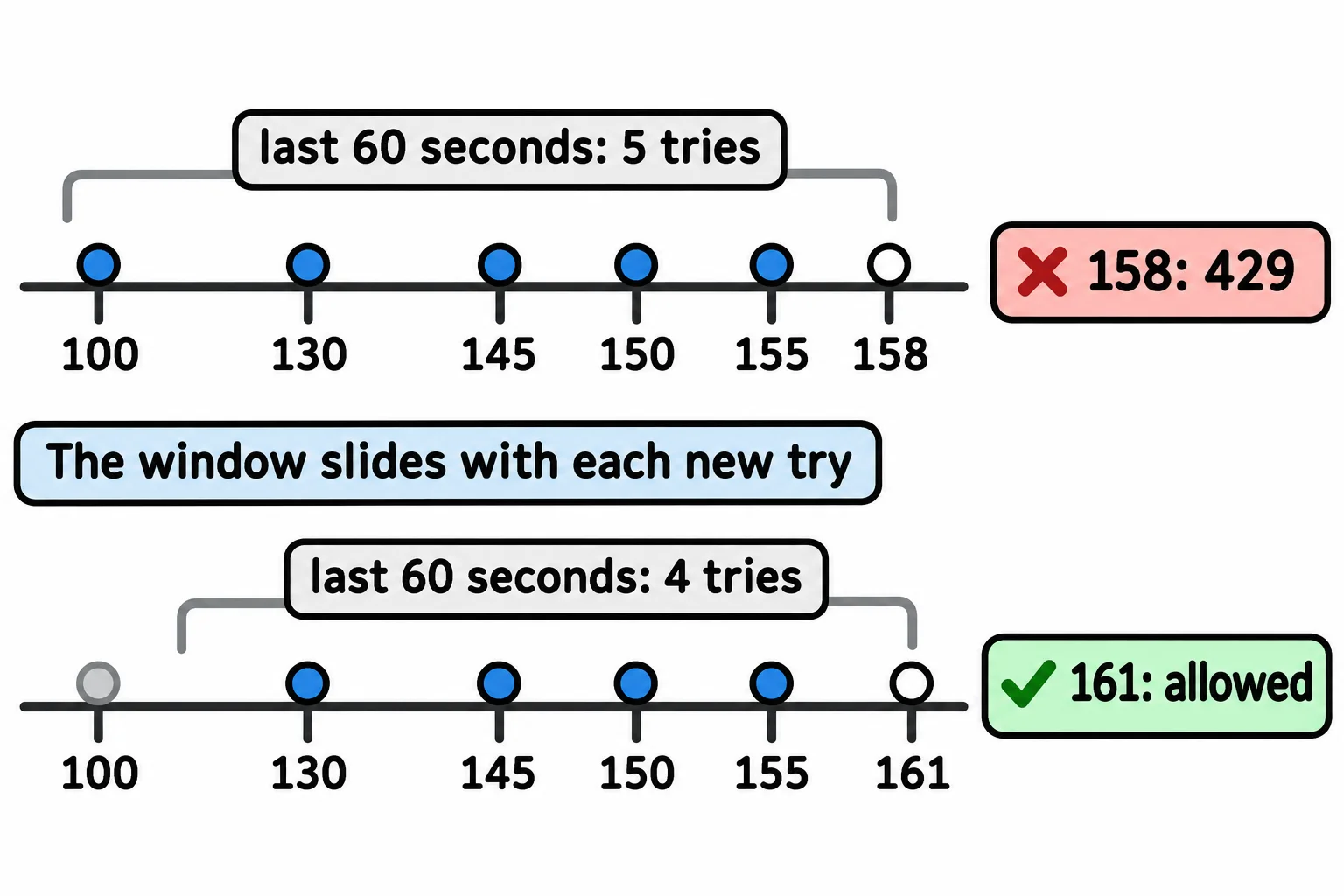
A refused try gets 429 Too Many Requests (read "too many requests"): slow down. Its Retry-After header says how many seconds to wait. At 5 tries a minute, that list of 1,000 passwords takes over three hours instead of a few minutes, and the club can spot it in its logs. A limit makes guessing slow and noisy, not impossible; strong passwords and Argon2 hashing do the rest.
slowapi on the sign-in route
slowapi is the package FastAPI projects use for rate limits. Install it with pip install slowapi==0.1.10, then make a limiter and put it on the sign-in route:
from slowapi import Limiter
from slowapi.errors import RateLimitExceeded
from slowapi.util import get_remote_address

limiter = Limiter(key_func=get_remote_address)
app.state.limiter = limiter


@app.exception_handler(RateLimitExceeded)
def too_many_tries(request: Request, exc: RateLimitExceeded):
    return problem(429, "Too many sign-in tries. Try again in a minute.", headers={"Retry-After": "60"})


@app.post("/auth/token")
@limiter.limit("5/minute")
def sign_in(request: Request, form: Annotated[OAuth2PasswordRequestForm, Depends()]):
    ...
Read it one piece at a time:
key_func=get_remote_addresssays who is counted: each address that requests come from gets its own count.app.state.limiteris where slowapi looks for the limiter.@limiter.limit("5/minute")goes under the route's decorator, and the route must takerequest: Request, which slowapi reads the address from. Without it, the app stops at startup withNo "request" or "websocket" argument on function.- When a sixth try comes in, slowapi raises
RateLimitExceeded. The handler turns it into a 429 in the API's one error shape, withproblem()from One Error Shape for the Whole API, and addsRetry-After.
Six wrong passwords from a test with TestClient:
for attempt in range(1, 7):
    form = {"username": "dana@example.com", "password": f"guess-{attempt}"}
    response = client.post("/auth/token", data=form)
    print(attempt, response.status_code, response.headers.get("retry-after"))

print(response.json())
1 401 None
2 401 None
3 401 None
4 401 None
5 401 None
6 429 60
{'status': 429, 'title': 'Too Many Requests', 'detail': 'Too many sign-in tries. Try again in a minute.'}
slowapi counts every try, right or wrong, and keeps the counts in the app's memory, so restarting the app clears them. Its usual way of counting is a fixed window: one minute that starts with the first try. Limiter(key_func=get_remote_address, strategy="moving-window") counts the sliding way instead, as the table above does.
Security headers from a small middleware
Browsers do some helpful things that an API never needs, and an attacker can use them. A security header tells the browser to turn one of them off. FastAPI has no package for these, so the club writes a small middleware of its own, the same kind of checkpoint as CORSMiddleware in CORS: Which Web Pages May Call Your API:
@app.middleware("http")
async def add_security_headers(request: Request, call_next):
    response = await call_next(request)
    response.headers["X-Content-Type-Options"] = "nosniff"
    response.headers["X-Frame-Options"] = "DENY"
    response.headers["Referrer-Policy"] = "no-referrer"
    return response
FastAPI's middleware is written with async def and await. Read await call_next(request) as "pass the request on to the route, and wait for its answer"; async and await in Plain Words explains both in Module 5. Each header turns off one thing:
| Header | What it tells the browser |
|---|---|
X-Content-Type-Options: nosniff |
Believe the Content-Type the API sends. Don't guess that some text is a script and run it. |
X-Frame-Options: DENY |
Never show these answers inside another site's frame, where a hidden button could trick someone into clicking it. |
Referrer-Policy: no-referrer |
Don't tell other sites which address a person came from, since an address can hold an id or a token. |
Every answer the routes and the error handlers give passes through the middleware, a 404 included. Asking for /roasts and for /coffee, which doesn't exist, from a test:
/roasts 200
nosniff DENY no-referrer
/coffee 404
nosniff DENY no-referrer
Once the API is online at an https:// address, a fourth header, Strict-Transport-Security, tells browsers to use only HTTPS for it; it does nothing over plain http://, so it waits until then.
Do it: decide whether one more sign-in try fits
Bean There's sign-in allows 5 tries a minute from one address, counted with a sliding window. Before trusting a package with it, write the rule yourself.
attempts: the times of this address's earlier sign-in tries, in seconds, oldest first, such as[100, 130, 145, 150, 155]. With no earlier tries, it's[].now: the time of the new try, in seconds, such as158.
Your job: write allow(attempts, now). It returns True when the new try may go ahead, and False when it must get a 429.
- An earlier try counts when it happened less than 60 seconds before
now: whennow - tried_at < 60. A try exactly 60 seconds beforenowdoesn't count. - When fewer than 5 earlier tries count, return
True. When 5 or more count, returnFalse. - Don't change
attempts.
Worked through: allow([100, 130, 145, 150, 155], 158). The tries were 58, 28, 13, 8 and 3 seconds before 158, so all five count, and five is the limit. It returns:
False
Practiced live on the lesson page: write the Python right there and check it.
Sources
- MDN, 429 Too Many Requests: the status code and its
Retry-Afterheader. - slowapi, documentation:
Limiter,@limiter.limitand therequestargument a limited route must take. - MDN, X-Content-Type-Options, X-Frame-Options, Referrer-Policy and Strict-Transport-Security: what each header tells the browser, and that browsers ignore Strict-Transport-Security over plain HTTP.
Check yourself
2 questions to try on the lesson page.
So what
A sign-in route without a limit lets anyone guess all night, and five lines of slowapi turn that into a 429 after the fifth try, while a small middleware makes every answer safer in the browser.