Keeping Secrets Out of Your Code
A secret typed into the code goes wherever the code goes, GitHub included, so an API reads its secrets from environment variables, keeps them in a .env file that .gitignore leaves out, commits a .env.example instead, stops at startup when one is missing, and rotates any secret that was ever pushed.
Journeyman · FastAPI · Web Development · Updated
After this lesson you can
- Keep a secret out of the code with an environment variable, a .env file in .gitignore and a .env.example
- Stop an API at startup when a secret is missing, and rotate a secret that reached GitHub
Key takeaways
- Anyone who reads a JWT secret can make tokens the API trusts, so a secret never goes in the code or in Git.
- An environment variable is a named value set outside the code. Python reads it with os.environ.get, which gives None when it isn't set.
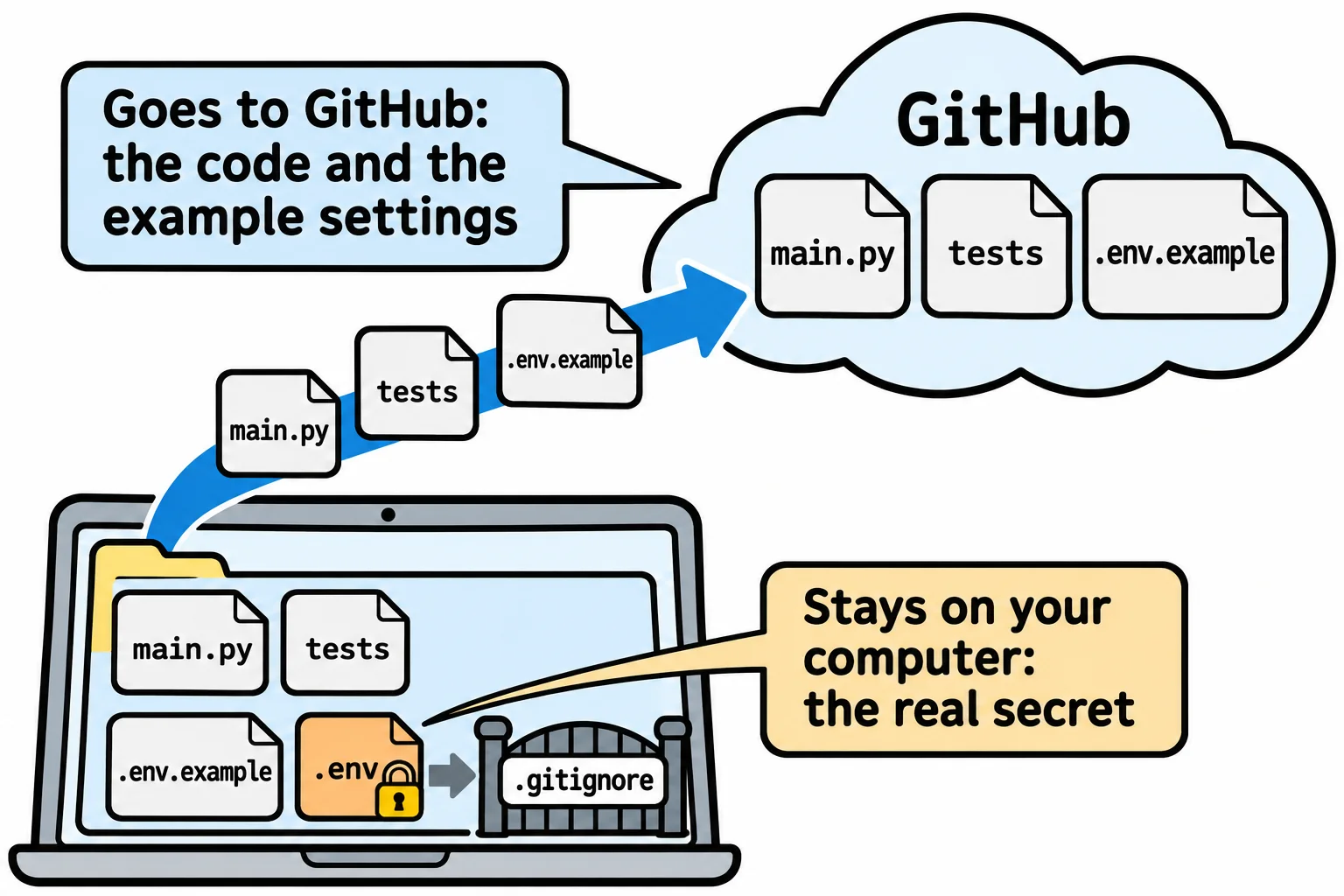
- A .env file holds the real secrets on your computer, .gitignore keeps it out of Git, and .env.example shows the names with placeholder values.
- An API that needs a secret checks for it at startup and stops with a sentence that says what's missing and how to fix it.
- A secret that reached GitHub is rotated, replaced by a new one everywhere. Deleting the commit doesn't take it back.
Every exercise in this course ends with a push to a public repository on GitHub, and before long your own projects will too. Everything in the folder goes along, and so does any password or key you typed into the code while you were building. This lesson moves the coffee club's secret out of its code, so you can push the project without giving the secret away.
A secret in the code is a secret on GitHub
While the club's API was being built, the secret that signs every token was typed straight into auth.py, as a placeholder that was going to change later:
JWT_SECRET = "change-me"
Push that, and anyone who reads the repository has the secret. The token's signature, from Tokens: Signing In with a JWT, is the API's only proof that a token is real, and the secret is all it takes to make one. Here is a token that says member 1 is staff, made by someone who isn't:
import jwt

token = jwt.encode({"sub": "1", "role": "staff"}, "change-me", algorithm="HS256")
print(jwt.decode(token, "change-me", algorithms=["HS256"]))
{'sub': '1', 'role': 'staff'}
The API checks the signature with the same secret, finds it correct, and believes every word. PyJWT even prints a warning beside the answer: The HMAC key is 9 bytes long, which is below the minimum recommended length of 32 bytes for SHA256. The placeholder was both public and short.
Environment variables: settings from outside the code
Think of a recipe that says "season with salt to taste". The recipe is the same in every kitchen, and each cook supplies the salt. An environment variable works the same way: a named value that the terminal hands to every program it starts, set outside the code. The code says which name it needs, and each computer supplies the value. Python reads them from os.environ, a dictionary of every variable the program was given:
import os

print(os.environ.get("JWT_SECRET"))
Save it as show_secret.py. Run it, and it prints None: no such variable yet. Set one in VS Code's terminal, then run it again. In PowerShell:
$env:JWT_SECRET = "change-me"
python show_secret.py
In zsh:
export JWT_SECRET=change-me
python3 show_secret.py
change-me
The value lives in that terminal only, and closing the terminal forgets it. Nothing went into a file Git could see.
A .env file, and the .gitignore that keeps it home
Typing every secret into each new terminal gets old fast, so projects keep them in a file named .env (read "dot env") beside main.py, one NAME=value per line. python-dotenv, which fastapi[standard] installs, reads it: load_dotenv() puts each line into os.environ when the app starts. A variable that's already set in the terminal wins over the file.
The .env file holds the real secret, so Git must never see it. Add its name to .gitignore, the list of files Git leaves out, which Virtual Environments and pip uses for .venv. In the club's folder, .gitignore lists .venv/, __pycache__/ and .env, and git status --short --untracked-files=all shows every file Git would add:
?? .env.example
?? .gitignore
?? main.py
No .env. Its partner, .env.example, does go to GitHub: the same names with placeholder values, so the next person who clones the project (or you, on a new laptop) knows what to fill in:
# Copy this file to .env and put a real secret after JWT_SECRET=.
JWT_SECRET=change-me
For the real secret, let Python pick one: python -c "import secrets; print(secrets.token_urlsafe(32))" prints 43 random letters, digits, - and _. Paste them after JWT_SECRET= in .env, never in .env.example.
Stop at startup when a secret is missing
os.environ.get gives None for a missing variable, and an API that carries on without its secret fails later, on the first sign-in, in front of a member. It's better to stop at once, with a sentence that says what to do:
import os

from dotenv import load_dotenv

load_dotenv()

JWT_SECRET = os.environ.get("JWT_SECRET")
if not JWT_SECRET:
    raise RuntimeError("JWT_SECRET isn't set. Copy .env.example to .env and put a secret in it.")
Start the app with no .env and no variable, and fastapi dev main.py stops before it serves a single request. The last line of its error report is the sentence you wrote:
RuntimeError: JWT_SECRET isn't set. Copy .env.example to .env and put a secret in it.
if not JWT_SECRET catches an empty value too, such as a .env line with nothing after the =. Settings Checked at Startup, in Module 5, does this for every setting an API has at once, with pydantic-settings.
When a secret reaches GitHub anyway
It happens to experienced developers too. What to do is the same every time:
- Rotate it. Make a new secret and put it in
.envon every computer and host that runs the API. The old secret stops working at once, and with it every token it signed, so members sign in again. That's the point: the leaked secret is now worthless. - Then take it out of the code, read it from the environment, and push the fix.
- Don't count on deleting the commit. A public repository can be copied the minute it's pushed, and programs search GitHub for keys all day. Deleting the commit doesn't take back what was copied. GitHub can warn about, or block a push with, some well-known kinds of keys, such as a cloud provider's, but a secret you made up looks like any other text to it.
Rotating takes a few minutes. Finding out months later that someone has been signing their own tokens takes much longer to fix.
Check yourself
2 questions to try on the lesson page.
So what
A secret that never enters your code can't leak with it, so environment variables, a .env in .gitignore and a .env.example let you push every project with confidence, and rotation is the plan for the day one slips through.