Related Tables and Foreign Keys
One vendor sells many products, so the products go in a table of their own and each product row holds its vendor's id in a foreign key column that REFERENCES the vendors table, a link SQLite checks only once PRAGMA foreign_keys = ON is sent on the connection.
Journeyman · SQLite · SQL · Database · Updated
After this lesson you can
- Link two tables in a one-to-many relationship with a foreign key column that REFERENCES the other table's primary key
- Turn on foreign keys with PRAGMA foreign_keys = ON, catch the IntegrityError a broken link raises, and choose when ON DELETE CASCADE fits
Key takeaways
- When one row owns many others (one vendor, many products), the many go in a table of their own, and each of their rows holds the id of the row it belongs to.
- A foreign key is a column that holds another table's primary key, and REFERENCES tells the database which table and column it points at.
- SQLite checks foreign keys only after PRAGMA foreign_keys = ON, sent on every connection right after it opens.
- With foreign keys on, a row that points at nothing is refused with sqlite3.IntegrityError, and so is deleting a row that other rows still point at.
- ON DELETE CASCADE deletes the rows that point at a row along with it. It fits rows that mean nothing alone, such as a vendor's products.
Almost every app keeps things that belong to other things: a customer's orders, a post's comments, a playlist's songs. You'll meet this shape in the first database you work on, and in almost every API you build. This lesson splits data like that into two tables, links them, and has the database guard the link, so no order can belong to a customer who doesn't exist.
The example for this chapter is the Saturday Farmers Market. Its website lists the vendors, each with a name and a stall number, and the products each vendor sells. (A vendor also has an email, which Indexes and Unique Values brings in.)
Where do the products go?
Each vendor sells several products, each with its own price. A first try adds a column to the vendors table:
| id | name | stall | products |
|---|---|---|---|
| 1 | Sunny Acres | 4 | Strawberries $5.00, Snap peas $3.50 |
| 2 | Hilltop Honey | 7 | Wildflower honey $9.00 |
It holds the words, but SQL can't use them. There's no WHERE price < 4 and no ORDER BY price, because the prices are buried inside a piece of text. A second try gives each product a row and copies the vendor's details onto it:
| product | price | vendor | stall |
|---|---|---|---|
| Strawberries | 5.00 | Sunny Acres | 4 |
| Snap peas | 3.50 | Sunny Acres | 4 |
| Wildflower honey | 9.00 | Hilltop Honey | 7 |
Prices work now, but Sunny Acres is written twice. When it moves to stall 6, every one of its rows has to change, and one missed row means the website shows two stalls for one farm.
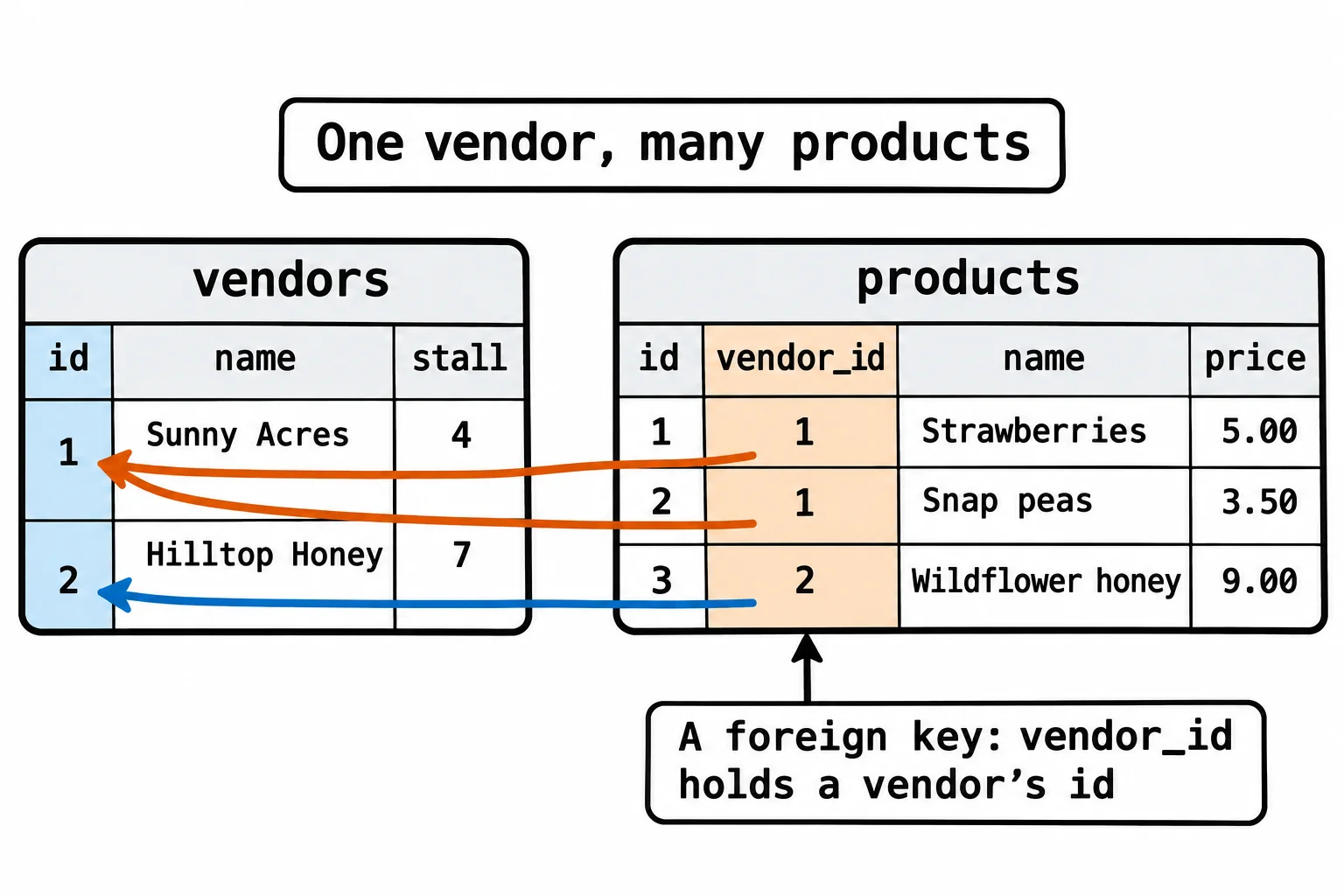
Think of the market's printed map. It lists each stall once, and a price tag at the market says only "Stall 4". The tag doesn't repeat the farm's details; it points at them. A database does the same: the products get a table of their own, and each product row holds the id of its vendor, the vendor's primary key. One vendor, many products: that's a one-to-many relationship, the most common shape in real data.
A column that points at a row: REFERENCES
The products table's vendor_id column holds a vendor's id. A column that holds another table's primary key is a foreign key ("foreign" because the value belongs to another table), and REFERENCES says where it points:
CREATE TABLE products (
    id INTEGER PRIMARY KEY,
    vendor_id INTEGER NOT NULL REFERENCES vendors (id),
    name TEXT NOT NULL,
    price REAL NOT NULL
);
Read the second line as "vendor id, an integer, not null, references vendors' id". NOT NULL means every product has a vendor. Here are both tables in Python, with two vendors and three products:
import sqlite3

conn = sqlite3.connect(":memory:")
conn.execute("""
    CREATE TABLE vendors (
        id INTEGER PRIMARY KEY,
        name TEXT NOT NULL,
        stall INTEGER NOT NULL
    )
""")
conn.execute("""
    CREATE TABLE products (
        id INTEGER PRIMARY KEY,
        vendor_id INTEGER NOT NULL REFERENCES vendors (id),
        name TEXT NOT NULL,
        price REAL NOT NULL
    )
""")
conn.executemany(
    "INSERT INTO vendors (name, stall) VALUES (?, ?)",
    [("Sunny Acres", 4), ("Hilltop Honey", 7)],
)
conn.executemany(
    "INSERT INTO products (vendor_id, name, price) VALUES (?, ?, ?)",
    [(1, "Strawberries", 5.00), (1, "Snap peas", 3.50), (2, "Wildflower honey", 9.00)],
)
conn.commit()

for row in conn.execute("SELECT name, vendor_id FROM products ORDER BY id"):
    print(row)
('Strawberries', 1)
('Snap peas', 1)
('Wildflower honey', 2)
The strawberries and snap peas point at vendor 1, Sunny Acres, and the honey at vendor 2. When Sunny Acres moves, one row changes: its own.
SQLite leaves the check off until you ask
REFERENCES makes a promise: every vendor_id matches a vendor. Here's a product that points at vendor 99, who doesn't exist:
conn.execute(
    "INSERT INTO products (vendor_id, name, price) VALUES (?, ?, ?)",
    (99, "Mystery jam", 6.00),
)
print(conn.execute("SELECT name, vendor_id FROM products WHERE vendor_id = 99").fetchall())
[('Mystery jam', 99)]
It went in. SQLite added foreign keys in 2009, when programs were already using it, and left the check off so those programs would keep working. PostgreSQL and SQL Server always check; SQLite checks only when the connection asks. You ask with a PRAGMA (read "prag-ma"), SQLite's statement for changing or reading one of its settings, and since the setting belongs to the connection and not to the file, every connection sends it:
conn = sqlite3.connect(":memory:")
conn.execute("PRAGMA foreign_keys = ON")
# ... the same CREATE TABLE and INSERT lines as above ...

try:
    conn.execute(
        "INSERT INTO products (vendor_id, name, price) VALUES (?, ?, ?)",
        (99, "Mystery jam", 6.00),
    )
except sqlite3.IntegrityError as error:
    print("Refused:", error)
Refused: FOREIGN KEY constraint failed
Send it right after connecting, before anything else: inside a transaction that's still open, SQLite ignores it without a word. With it on, a broken link raises sqlite3.IntegrityError, the error for a change that would break a rule of the data, and nothing is saved. Keeping every link pointing at a real row is called referential integrity.
Deleting a vendor: ON DELETE CASCADE
Sunny Acres leaves the market. With foreign keys on, deleting it is refused too, because two products still point at it:
try:
    conn.execute("DELETE FROM vendors WHERE id = ?", (1,))
except sqlite3.IntegrityError as error:
    print("Refused:", error)
Refused: FOREIGN KEY constraint failed
The refusal protects you from orphans, products whose vendor is gone. You can delete the products first and then the vendor, or the foreign key can say what happens. ON DELETE CASCADE ("on delete, cascade") deletes the rows that point at a row along with it, the way a cascade of water carries everything below it:
vendor_id INTEGER NOT NULL REFERENCES vendors (id) ON DELETE CASCADE,
With that line in the products table, deleting Sunny Acres takes its strawberries and snap peas with it:
conn.execute("DELETE FROM vendors WHERE id = ?", (1,))
conn.commit()
print(conn.execute("SELECT name FROM vendors").fetchall())
print(conn.execute("SELECT name FROM products").fetchall())
[('Hilltop Honey',)]
[('Wildflower honey',)]
Use it when the rows mean nothing without their parent: a vendor's products, a post's comments. Leave it off for records you must keep, such as last season's sales. There, the refusal is what stops someone deleting a vendor and losing its history.
Do it: link products to their vendors
The market is setting up its database. The vendors table is ready, but there's no products table yet, and nothing stops a product from pointing at a vendor that doesn't exist.
conn: an open connection to an empty database (the tests open a:memory:one).vendor_id,name,price: one product, such as1,"Strawberries"and5.0.
Your job: finish setup(conn) and write add_product(conn, vendor_id, name, price).
setup(conn)already makes the vendors table. Make its first line turn on foreign keys.- After the vendors table,
setup(conn)makes the tableproductswith four columns:id INTEGER PRIMARY KEY,vendor_id INTEGER NOT NULLas a foreign key tovendors (id),name TEXT NOT NULLandprice REAL NOT NULL. add_productinserts the product with?placeholders and returns the new product's id (the cursor'slastrowid).- When no vendor has that id, the insert raises
sqlite3.IntegrityError. Catch it and returnNone.
Worked through: the tests call setup(conn) and add one vendor, Sunny Acres at stall 4, who gets id 1. Then add_product(conn, 1, "Strawberries", 5.0) returns 1, add_product(conn, 99, "Mystery jam", 6.0) returns None, and the products table holds one row:
[(1, 'Strawberries', 5.0)]
Practiced live on the lesson page: write the Python right there and check it.
Check yourself
2 questions to try on the lesson page.
So what
Splitting data into tables that point at each other means every fact is written once, and with foreign keys switched on, the database itself makes sure no row ever points at nothing.
Sources
- SQLite, SQLite Foreign Key Support: foreign keys are off by default for backward compatibility and are turned on for each connection; the PRAGMA does nothing inside a transaction;
ON DELETE CASCADE.