Placeholders, and Why SQL Is Never Built from Strings
SQL built with an f-string lets whatever a person types become part of the query, so a name such as x' OR '1'='1 turns one search into "every row", which is SQL injection, and ? or :name placeholders stop it by sending each value separately from the SQL.
Journeyman · SQLite · SQL · Database · Updated
After this lesson you can
- Explain how SQL built from strings lets typed text change a query, and recognize SQL injection in code
- Pass every value with ? or :name placeholders, including a LIKE search, and never with an f-string
Key takeaways
- SQL built with an f-string pastes typed text into the query, so a quote in the text can end the value and the rest becomes SQL.
- SQL injection is typed text changing what a query does, such as x' OR '1'='1 turning one name into every row, or a sign-in check into "anyone at all".
- A ? placeholder sends the value separately from the SQL, so the database only ever compares it as a value, quotes and all.
- Named placeholders such as :low take their values from a dictionary, and a LIKE search puts its % signs in the value, never in the SQL.
- Placeholders hold values only, so a column name a person chooses must come from a fixed list in your code.
Every search box, sign-in form and filter on the web sends text that some program puts into a query. Get that step wrong and a stranger can read, change or delete data they should never touch. It has been one of the most common security holes on the web for over twenty years, and the fix is one habit you've used in every lesson of this chapter. This lesson shows why the habit matters.
The search that builds its own SQL
Fern & Fig's website gets a search box. A first try builds the query with an f-string, the way Python builds any other text:
import sqlite3

conn = sqlite3.connect(":memory:")
conn.execute("CREATE TABLE plants (id INTEGER PRIMARY KEY, name TEXT NOT NULL, price REAL NOT NULL)")
conn.executemany(
    "INSERT INTO plants (name, price) VALUES (?, ?)",
    [("Snake Plant", 24.0), ("Spider Plant", 12.5), ("Boston Fern", 18.0)],
)


def search_plants(conn, name):
    sql = f"SELECT name, price FROM plants WHERE name = '{name}'"
    print(sql)
    return conn.execute(sql).fetchall()


print(search_plants(conn, "Spider Plant"))
print(search_plants(conn, "x' OR '1'='1"))
SELECT name, price FROM plants WHERE name = 'Spider Plant'
[('Spider Plant', 12.5)]
SELECT name, price FROM plants WHERE name = 'x' OR '1'='1'
[('Snake Plant', 24.0), ('Spider Plant', 12.5), ('Boston Fern', 18.0)]
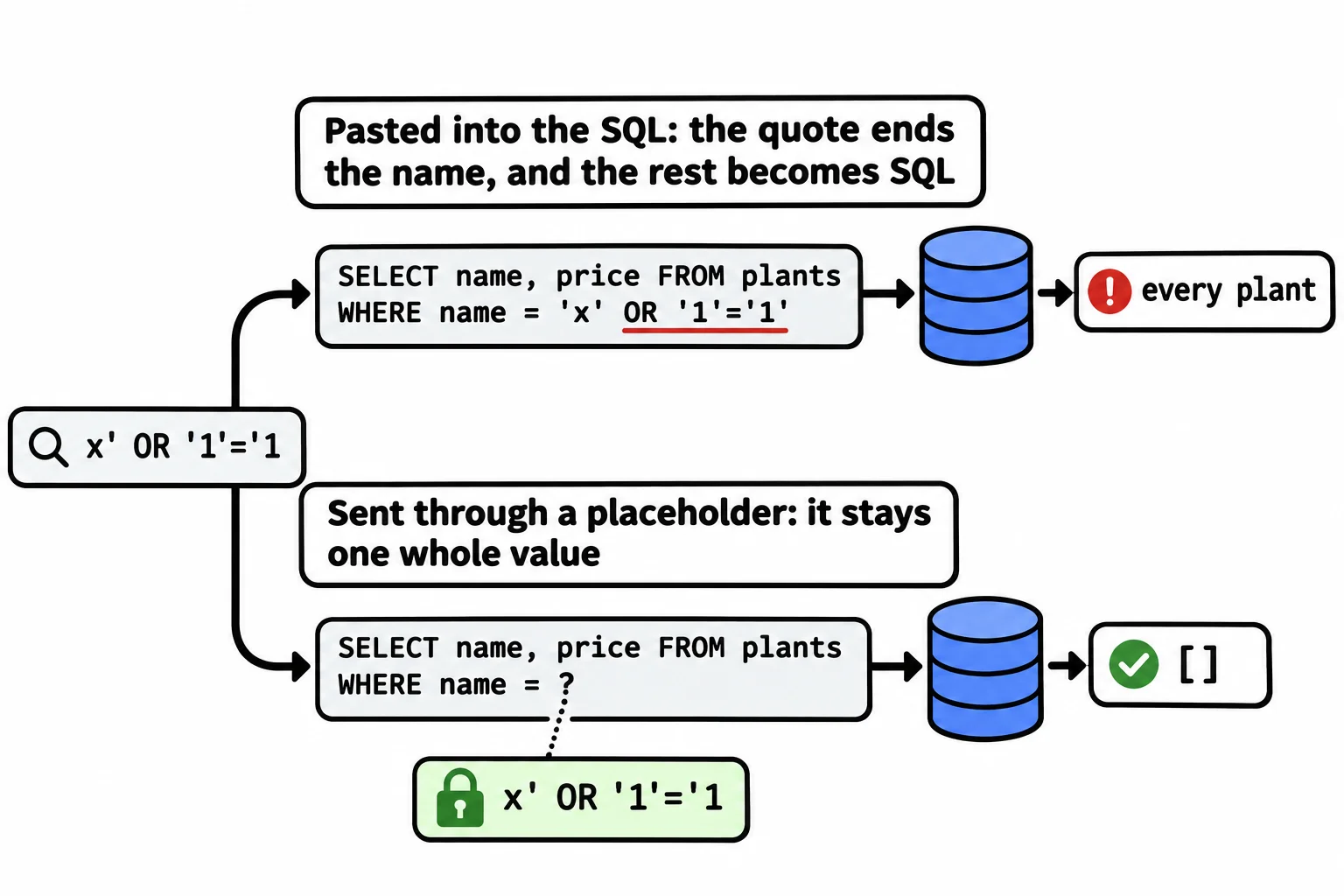
The first search works. Look at the second query that was printed. The typed text started with x', and that quote closed the name early. What followed, OR '1'='1', wasn't a name any more: it became part of the SQL. '1'='1' is true for every row, so the search returned the whole catalog. A customer's own name breaks it too, with no bad intent at all:
print(search_plants(conn, "Grandma's Fern"))
SELECT name, price FROM plants WHERE name = 'Grandma's Fern'
Traceback (most recent call last):
sqlite3.OperationalError: near "s": syntax error
The apostrophe in Grandma's ended the name after Grandma, and SQLite couldn't make sense of the s Fern' left over.
What SQL injection is
Think of a form with a blank: "Please give me the plant called ______." It's meant to hold a name. Someone writes in the blank: "x, or any plant at all." If whoever reads the form treats everything in the blank as part of the request, they hand over every plant. That's SQL injection: text that was meant to be a value gets read as part of the query, and changes what it does.
A plant catalog isn't secret, but the same trick works on any query. A sign-in check that asks "is there a staff member with this name and this PIN?" becomes "is there anyone at all?", and the attacker is in. With other databases and other tricks, injected text has changed prices, read every customer's details and deleted whole tables. (Python's sqlite3 refuses to run two statements in one execute, which stops one famous trick, '; DROP TABLE plants; --, but reading every row is harm enough.)
Checking the text for quotes, or escaping them by hand, is a trap: there's always one more character or encoding someone forgot. The fix is to never let the value into the SQL at all.
The fix: placeholders
A placeholder holds the value's place in the SQL, and the value travels separately. The database gets the query with a hole in it and, apart from it, the value for the hole, and it only ever treats that value as a value:
import sqlite3

conn = sqlite3.connect(":memory:")
conn.execute("CREATE TABLE plants (id INTEGER PRIMARY KEY, name TEXT NOT NULL, price REAL NOT NULL)")
conn.executemany(
    "INSERT INTO plants (name, price) VALUES (?, ?)",
    [("Snake Plant", 24.0), ("Spider Plant", 12.5), ("Boston Fern", 18.0)],
)


def search_plants(conn, name):
    return conn.execute("SELECT name, price FROM plants WHERE name = ?", (name,)).fetchall()


print(search_plants(conn, "Spider Plant"))
print(search_plants(conn, "x' OR '1'='1"))
print(search_plants(conn, "Grandma's Fern"))
[('Spider Plant', 12.5)]
[]
[]
Now x' OR '1'='1 is looked for as a plant's name, quotes and all. There's no plant called that, so the answer is an empty list, and Grandma's Fern is a name like any other. A query that takes its values this way is called a parameterized query. ((name,) has a comma because the values always go in a tuple, even when there's one.)
Named placeholders, and LIKE
When a query has several values, ? marks can end up in the wrong order. Named placeholders start with a colon, :low (read "colon low"), and take their values from a dictionary with the same keys:
prices = {"low": 15, "high": 25}
print(conn.execute("SELECT name FROM plants WHERE price >= :low AND price <= :high", prices).fetchall())

word = "fern"
print(conn.execute("SELECT name FROM plants WHERE name LIKE ?", (f"%{word}%",)).fetchall())
[('Snake Plant',), ('Boston Fern',)]
[('Boston Fern',)]
The second query is a LIKE search. Its % signs belong to the value, so the f-string builds the value, "%fern%", and the value goes through the placeholder. That's the one place an f-string may touch a query: never the SQL itself.
Placeholders hold values only, never a table's or a column's name. When a person picks how to sort a list (by name or by price), your code chooses the column from a fixed list of its own, and never pastes in what was typed.
That's why every query in this course uses placeholders, even for a number, even in a small script: the habit is the protection.
Do it: make find_plant safe
Fern & Fig's staff app looks up one plant by its exact name with find_plant. It was written with an f-string, so a name with an apostrophe crashes it, and x' OR '1'='1 finds a plant that isn't there.
conn: an open connection to a database whoseplantstable has the columnsid,nameandprice.name: the name someone typed, such as"Spider Plant".
Your job: fix the function find_plant(conn, name) in the box.
- Keep what it does: it returns the plant with exactly that name as a tuple
(id, name, price), orNonewhen no plant has that name. - Pass
namewith a placeholder instead of building the SQL with an f-string.
Worked through: in a catalog of Snake Plant, Spider Plant, Boston Fern and Grandma's Fern (ids 1 to 4), find_plant(conn, "x' OR '1'='1") looks for a plant with that exact name. There isn't one, so it returns:
None
Practiced live on the lesson page: write the Python right there and check it.
Check yourself
2 questions to try on the lesson page.
So what
SQL injection has emptied real databases and opened real accounts, and a placeholder for every value, every time, is the one habit that closes the door on it.