Testing an API with TestClient
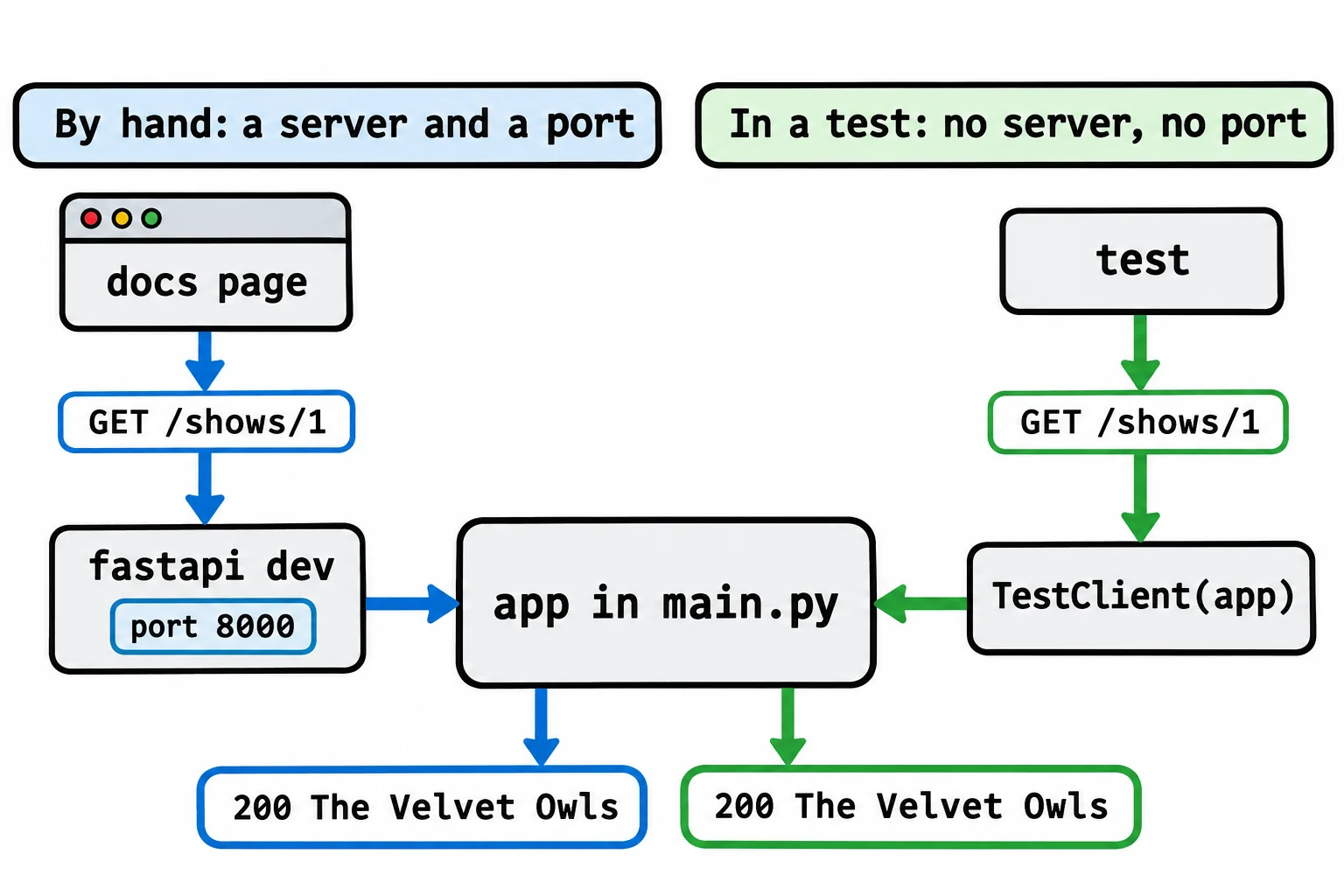
FastAPI's TestClient hands a request straight to your app, with no server running and no port, so a pytest test can check the status code, a header and the JSON body that come back, for a GET and for a POST with a body.
Journeyman · FastAPI · REST API · Updated
After this lesson you can
- Test a FastAPI route with TestClient, checking the status code, the Content-Type header and the JSON body
- Test a POST with json=, and check what it changed with a second request
- Explain what an end-to-end API test proves that a unit test doesn't, and why TestClient needs no server or port
Key takeaways
- TestClient(app) hands each request straight to the app in main.py, so no server runs and no port is chosen.
- client.get("/shows/1") gives back the response, and a test checks response.status_code, response.headers and response.json() with assert.
- client.post(..., json={...}) sends a JSON body, and a second request afterwards checks that the change really happened.
- A test name such as test_get_show_1_answers_200_with_the_velvet_owls says what it sends and what it expects, so a failure explains itself.
- A test through the whole app proves the path, the body, the status code and the data change work together, which a test of one function can't.
At work, an API's tests send it hundreds of requests on every change, and a change that breaks one endpoint doesn't go live until it's fixed. This lesson writes the first of those tests for a small concert venue's API, with pytest from Your First Tests with pytest and a tool FastAPI already gives you.
Clicking Try it out doesn't scale
Starlight Stage, a small concert venue, sells its tickets through a FastAPI app. main.py makes the app and adds two routers, one for shows and one for tickets, the way Organizing Routes with APIRouter split the café's API. The shows live in memory, in data.py:
| Show | id | Price | Seats left |
|---|---|---|---|
| The Velvet Owls | 1 | $25 | 40 |
| Midnight Brass Band | 2 | $32 | 4 |
| Juniper Lane | 3 | $18 | 0 |
The API answers GET /shows, GET /shows/1 (one show, or a 404), and POST /shows/2/tickets with a body such as {"quantity": 2}. That one sells the tickets, answers 201 Created with the new ticket, and takes the seats off the show. A ticket's total is the price times the quantity, plus a $2 booking fee for the order.
You could check every answer on the docs page after each change. But the API will grow to dozens of requests, and after every change someone would have to send each one again with Try it out and read each answer. Sooner or later, someone skips one. A test can send the request and read the answer for you, every time.
TestClient: a request with no server
Before a concert, the band plays a sound check: the real songs, on the real stage, with the doors still closed. FastAPI's TestClient gives your app a sound check. TestClient(app) hands each request straight to the app object in main.py, the same code that answers real requests, without starting a server or opening a port. Nothing keeps running when the tests end, and no port can be already in use.
TestClient comes with FastAPI (it's built on httpx2, the newer line of the httpx package; fastapi[standard] installs both). pytest doesn't, so add pytest==9.2.0 to the project's requirements.txt and run pip install -r requirements.txt again, with the virtual environment on.
Checking the status, a header and the body
Tests go in a tests folder, beside main.py. In tests/test_shows.py:
from fastapi.testclient import TestClient

from main import app

client = TestClient(app)


def test_get_show_1_answers_200_with_the_velvet_owls():
    response = client.get("/shows/1")

    assert response.status_code == 200
    assert response.headers["content-type"] == "application/json"
    assert response.json() == {
        "id": 1,
        "title": "The Velvet Owls",
        "date": "2026-12-04",
        "price": 25,
        "seats_left": 40,
    }
client is made once, at the top of the file, and every test can use it. client.get("/shows/1") sends the request and gives back the response, with three parts to check:
response.status_code: the status code, here 200, read "200: here it is".response.headers: every header the API sent.content-type(the name works in any capitals) is the Content-Type header, which says what kind of data the body is: hereapplication/json.response.json(): the body, turned from JSON text into Python data, so==can compare it with the dictionary you expect.
The test's name says what it sends and what it expects. When it fails, pytest prints that name, so the report starts with the whole story.
Sending a body, and checking what changed
A POST sends a body. json= turns a dictionary into JSON and sends it, and sets the request's Content-Type for you. Add a second test to the same file:
def test_buying_2_tickets_for_show_2_answers_201_and_leaves_2_seats():
    response = client.post("/shows/2/tickets", json={"quantity": 2})

    assert response.status_code == 201
    assert response.json() == {"id": 1, "show_id": 2, "quantity": 2, "total": 66}

    show = client.get("/shows/2")
    assert show.json()["seats_left"] == 2
The answer alone doesn't prove the sale happened, so the test asks for show 2 again: its 4 seats should now be 2. The total is 2 × $32 plus the $2 fee, 66, worked out by hand before it went in the test. Run both from the project's folder, with the virtual environment on (the exercises' READMEs write the short form, pytest, which runs the same tests):
python -m pytest
After the same first lines as in Your First Tests with pytest, pytest prints:
collected 2 items

tests/test_shows.py ..                                                   [100%]

============================== 2 passed in 3.22s ===============================
Now say someone tidies the POST route and leaves out status_code=201. The ticket still sells, and the docs page still shows it, so a person checking by eye could miss it. The test isn't fooled:
collected 2 items

tests/test_shows.py .F                                                   [100%]

=================================== FAILURES ===================================
_______ test_buying_2_tickets_for_show_2_answers_201_and_leaves_2_seats ________

    def test_buying_2_tickets_for_show_2_answers_201_and_leaves_2_seats():
        response = client.post("/shows/2/tickets", json={"quantity": 2})

>       assert response.status_code == 201
E       assert 200 == 201
E        +  where 200 = <Response [200 OK]>.status_code

tests/test_shows.py:25: AssertionError
=========================== short test summary info ============================
FAILED tests/test_shows.py::test_buying_2_tickets_for_show_2_answers_201_and_leaves_2_seats
========================= 1 failed, 1 passed in 7.32s ==========================
assert 200 == 201 puts what came back on the left and what the test expected on the right.
What a test through the whole app proves
The tests in Your First Tests with pytest are unit tests: each checks one function on its own. They're fast, and when one fails, you know exactly which function to look at. But a unit test of the ticket total can't tell you whether the route's path is right, whether the body's quantity reaches the function, whether the answer is 201, or whether the seats really change.
A TestClient test is an end-to-end test of the API: a request goes in one end and a response comes out the other, through every piece in between, the path, the type hints, the request model, the route and the data. It proves the pieces work together, the way a fan's phone app will use them. In your textbook, a test that checks several pieces working together may be called an integration test. Most projects keep both kinds: unit tests for the rules, and API tests for every endpoint.
Check yourself
2 questions to try on the lesson page.
So what
Every endpoint you build from here on can carry its own test, so one python -m pytest checks the whole API in a second, without starting a server.