Common Sense Design
Plan a database from the questions it must answer, then split the data into tables of closely related columns, linked by primary and foreign keys.
Journeyman · Database · MySQL · Updated
Designing a database means deciding which tables your data belongs in. In the RDBMS world, database design follows a set of formal rules called normalization. This lesson skips the formal rules and looks at breaking data into the tables where it naturally fits.
Before creating tables, you should begin by thinking about your end goal. You need to know why you are collecting data, and what you plan to do with it before you can really understand how you should store it. Begin by asking these questions.
- What data do you need?
- What reports will you need to create from the data?
- What are your most common queries?
- How will you filter the data in your queries?
- How granular does your data need to be?
The answers to these questions will help you design your database.
Study Existing Databases
Before designing your own database, it is a good idea to look at the design of other databases. Until now, we have only looked at a few of the Northwind database tables. Below is a diagram of the full Northwind database schema.
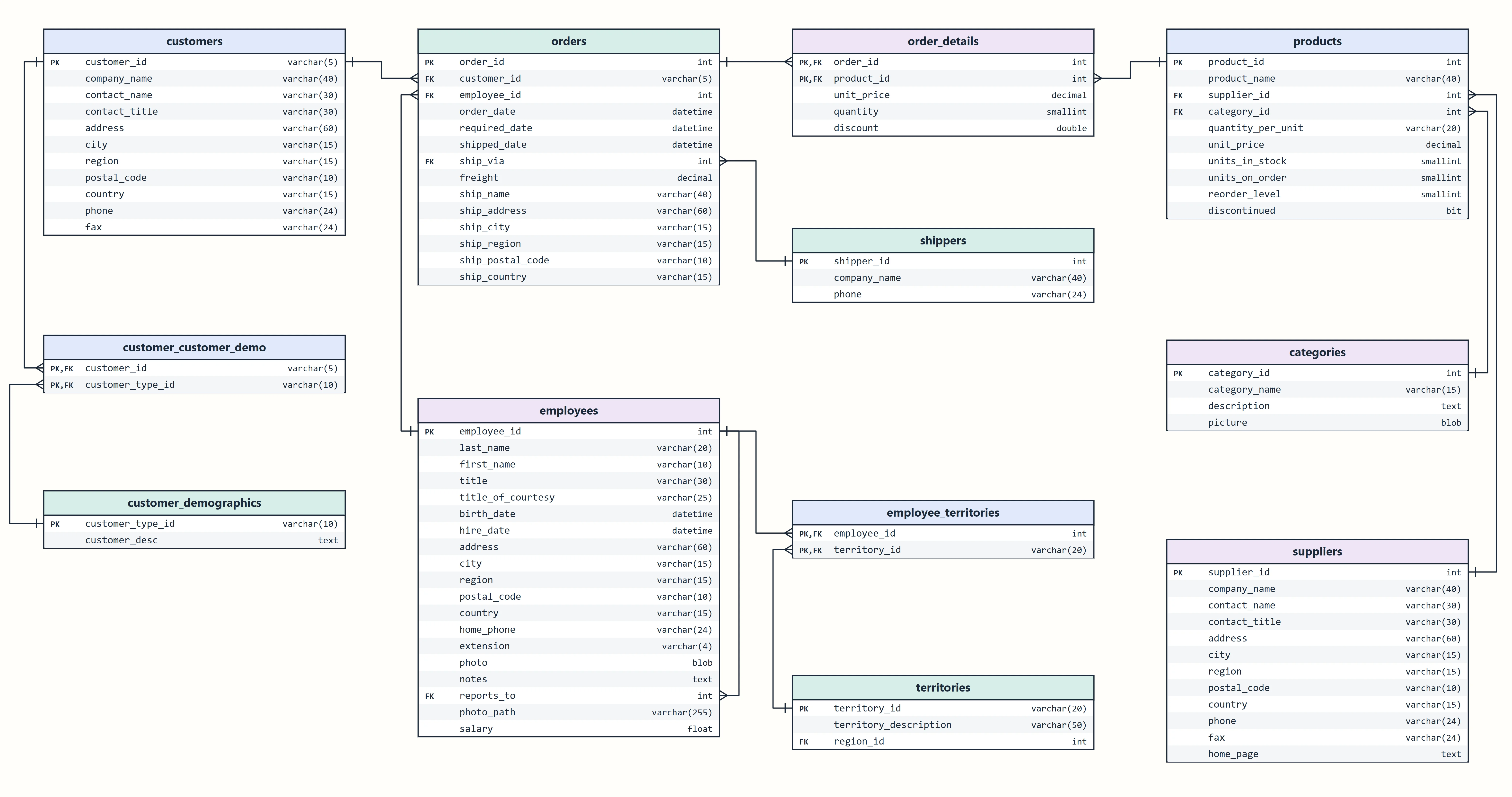
Take some time to look at the different tables and try to understand why the database is organized into these tables.
- How is the information organized?
- Why does each table contain the data that it has?
- Are the columns in each table related to each other? Why?
Tables
Notice that the data in each of the tables is closely related. The customer table only stores information specific to the customer. The orders table only stores order information; it does not have any details about the customer, the employee, or the products.
Granularity
Each column holds the smallest amount of data that you need to store. The customer table has address, city, region and postal_code fields. The full address is broken into its smallest parts rather than storing the entire address in a single field.
Imagine how difficult it would be to find all customers in a specific city without a separate city column.
Primary Keys
Each table has a primary key (PK). A primary key is a column that uniquely identifies each row. I.e. only one product can have a product_id of 1, only one customer can have a customer_id of 'ALFKI'.
Foreign Keys
A foreign key (FK) is an id that is the PK of a different table. This is how you can link to details that are stored in another table.
For example, the customer_id column in the orders table lets you find the customer's details. You don't store customer data in the orders table, only the customer_id.
Do it: find the customers in Portland, Oregon
The sales team is holding a tasting in Portland, Oregon, and wants to invite every customer there. Because the customers table keeps each part of an address in its own column, that's one short query. If the whole address sat in one column, you'd have to read every address by eye.
There's a catch: two cities in the United States are called Portland. One is in Oregon (OR), the other in Maine (ME). The region column tells them apart.
The customers table (the Tables tab shows the SQL that makes it) has these rows:
| customer_id | company_name | address | city | region | country |
|---|---|---|---|---|---|
| GREAL | Great Lakes Food Market | 2732 Baker Blvd. | Eugene | OR | USA |
| HUNGC | Hungry Coyote Import Store | City Center Plaza 516 Main St. | Elgin | OR | USA |
| LONEP | Lonesome Pine Restaurant | 89 Chiaroscuro Rd. | Portland | OR | USA |
| CASCO | Casco Bay Provisions | 14 Commercial St. | Portland | ME | USA |
| THEBI | The Big Cheese | 89 Jefferson Way Suite 2 | Portland | OR | USA |
| TRAIH | Trail's Head Gourmet Provisioners | 722 DaVinci Blvd. | Kirkland | WA | USA |
For example, Lonesome Pine Restaurant is in Portland, OR, so it's invited. Casco Bay Provisions is in Portland too, but in ME, so it isn't.
Your query should give exactly these rows, in this order:
| company_name | address |
|---|---|
| Lonesome Pine Restaurant | 89 Chiaroscuro Rd. |
| The Big Cheese | 89 Jefferson Way Suite 2 |
Your job: write one SELECT query for the invitation list.
- Show two columns,
company_nameandaddress, in that order. - Keep only the rows whose
cityis'Portland'and whoseregionis'OR'. - Sort the rows by
company_name, A to Z.
Practiced live on the lesson page: write the SQL right there and check it.