What is a Development Stack?
A development stack is the set of tools a team picks for each layer of an app, and this lesson compares several well-known stacks before naming the one you'll learn in this bootcamp.
Novice · Web Development · Software Development · Updated
After this lesson you can
- Explain what a development stack is
- Match the tools of a stack to the layer each one belongs to
Key takeaways
- A development stack (also called a tech stack) is the tools a team chooses for each layer of an app, from the screen down to the data.
- Different stacks pick different tools, but every layer does the same job in each of them.
- This course's stack is Angular and TypeScript for the front end, ASP.NET Core and C# for the back end, and SQL Server for the database, put online in Azure.
- Learning one stack well makes the next one much faster to learn, because the ideas carry over.
When you read a job listing, you'll often see a line like "Our stack: React, Node.js, PostgreSQL" or "We work in .NET, Angular and SQL Server". That line tells you what you'd be using every day if you got the job. This lesson teaches you to read it, and shows you the stack you'll learn here.
A stack is a set of choices
In the last lesson, What is a Full Stack Developer?, you met the three layers of a web app: the front end, the back end and the database. Each layer can be built with many different tools. A development stack, also called a technology stack or tech stack, is the set of tools a team picks for each layer.
Think of building a house. Every house needs a foundation, walls and a roof. One builder uses concrete, brick and clay tiles; another uses stone, timber and metal sheets. Both houses keep the rain out. A stack is the builder's list of materials: the jobs are the same, the choices differ.
A stack usually names:
| Layer | What gets chosen |
|---|---|
 Front end |
The language and the framework that build the screens. A framework is a ready-made set of code and rules you build on, so you don't start every app from nothing. |
 Back end |
The language and the framework the server code is written in |
 Database |
The database system that stores the data |
 Hosting |
Where the app runs online so people can use it: a company's own servers or a cloud such as Azure, AWS or Google Cloud |
Some stacks you'll hear about
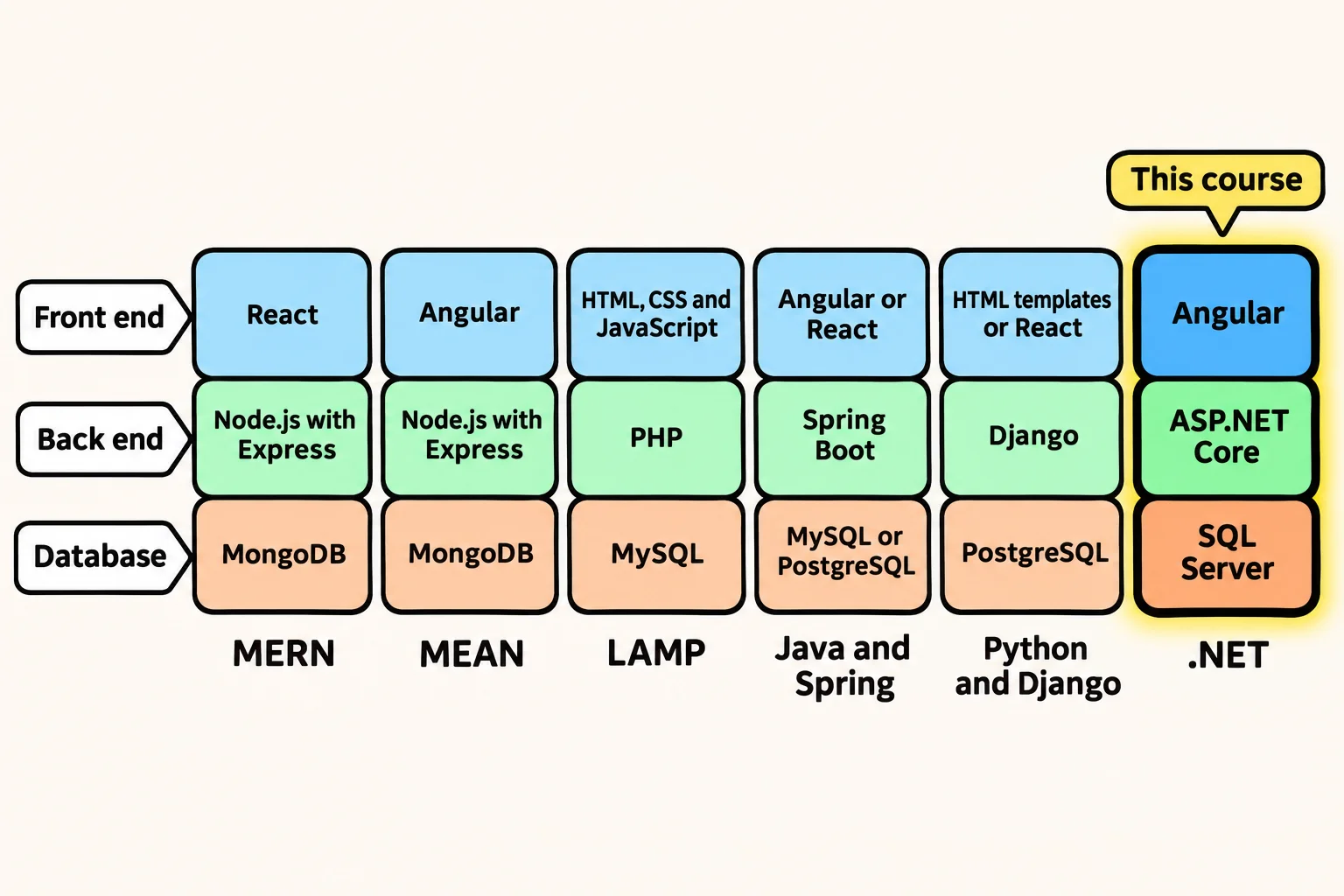
Some stacks are so common that they have nicknames made from the first letters of their tools:
| Stack | Front end | Back end | Database |
|---|---|---|---|
 MERN |
React (JavaScript) | Node.js with Express (JavaScript) | MongoDB |
 MEAN |
Angular (TypeScript) | Node.js with Express (JavaScript) | MongoDB |
 LAMP |
HTML, CSS and JavaScript | PHP, on the Apache web server, on Linux | MySQL |
 Java and Spring |
Angular or React | Spring Boot (Java) | MySQL or PostgreSQL |
 Python and Django |
HTML templates or React | Django (Python) | PostgreSQL |
 .NET (this course) |
Angular (TypeScript) | ASP.NET Core (C#) | SQL Server |
You don't need to remember this table. Notice instead that every row fills the same three columns. Whatever stack a team uses, there's something that draws the screens, something that runs the rules on the server, and something that stores the data. That's why a developer who knows one stack well can learn another one quickly: the ideas are the same, only the names change.
The stack you'll learn
This bootcamp teaches the .NET stack, the tools Microsoft makes and many banks, hospitals, insurance companies, governments and online stores build their software with:
| Layer | In this course | What it does |
|---|---|---|
| Front end | HTML, CSS and JavaScript, then Angular with TypeScript | HTML says what's on the page, CSS how it looks, JavaScript makes it react. Angular is a front-end framework for building whole apps, and TypeScript is JavaScript with types that catch mistakes early. |
| Back end | C# and ASP.NET Core | C# is the language you'll write most. ASP.NET Core is the framework that turns C# into web pages and web APIs. |
| Database | SQL Server, with T-SQL | SQL Server stores the data. T-SQL is the language you use to ask it questions and change what it holds. |
| Hosting | Azure | Microsoft's cloud, where you put an app online at the end of the course |
| Tools | Visual Studio, VS Code, Git and GitHub | Where you write the code, and how you save every version of it |
That's a lot of names, and none of them is expected yet. Each one gets its own chapter, in an order that builds up: C# first, then the database, then the back end, then the front end, then all of them together.
Try it. Search a job site for "full stack developer" in your area, open two listings and find the line that names their stack. Sort each tool into front end, back end or database. You'll be able to place most of them already.
Check yourself
2 questions to try on the lesson page.
So what
Every stack is a set of choices for the same three jobs, so the stack you learn here is your way into every other one too.
Key terms
- Technology Stack
- Framework
- Angular
- ASP.NET Core
- SQL Server