Input Types for Email, Numbers, Dates and More
One attribute, type, tells the browser what kind of answer an input is for, so a phone shows the right keyboard and the browser checks some answers for you.
Apprentice · HTML · Updated
After this lesson you can
- Choose the input type that fits a question, such as email, tel, number or date
- Set a number input's limits with min, max and step
Key takeaways
- The type attribute tells the browser what kind of answer an input is for. With no type, or a type that doesn't exist, you get a plain text box.
- On a phone, email brings up a keyboard with an @ key, tel a phone keypad, and date and time a picker.
- Email and url check the shape of the answer for free. Tel checks nothing, because people write phone numbers in many ways.
- A number input takes min, max and step. Use number for an exact amount, and range when roughly right is good enough.
- Password hides what is typed, file picks a file, and hidden sends a value the visitor never sees but anyone can read.
Think about the last time you typed your email address on your phone. The keyboard had an @ key right there, so you didn't have to hunt for it. That wasn't luck: whoever built the form wrote one word that told your phone what kind of answer to expect.
Slice of Heaven Pizza is putting its menu online, and its order form asks for an email address, a phone number, how many pizzas, and when to deliver them. Each question gets a different kind of box. In this lesson you'll pick the right one for each, and you'll use the same skill on every sign-up page, checkout and booking form you ever build.
One attribute, many kinds of box
A paper order slip has different blanks for different answers: a line for your name, little boxes for a phone number, a calendar to circle a date. An HTML form does the same with one element, <input>, and one attribute: type. The type is the input type: it tells the browser what kind of answer the box is for.
<label for="customer_name">Your name</label>
<input type="text" id="customer_name" name="customer_name">

<label for="email">Email, for your receipt</label>
<input type="email" id="email" name="email">

<label for="phone">Phone, in case the driver can't find you</label>
<input type="tel" id="phone" name="phone">
All three look like the same plain box on a computer. The difference shows up on a phone, and when the form is sent. text is the default: an input with no type at all is a text box.
Every box, button and list a form shows the visitor is a form control. That's the word you'll meet in documentation, and in some textbooks.
Email, phone and web addresses
Here is what the three types for contact details give you:
| Type | What it's for | What a phone shows | What the browser checks for free |
|---|---|---|---|
email |
An email address | A keyboard with @ and . keys | That the answer looks like an address: some text, an @ (read "at"), and more text after it |
tel |
A phone number | A phone keypad of digits | Nothing at all |
url |
A web address | A keyboard with / and .com keys | That it's a full address that starts with something like https:// |
Two of these surprise people:
telchecks nothing. People write phone numbers as (801) 555-0142, 801.555.0142 or +44 20 7946 0958, and every one is right somewhere. So the browser takes any text, and the type's job is to bring up the keypad.urlwants the start of the address.www.sliceofheaven.exampleis refused, andhttps://www.sliceofheaven.exampleis accepted.
The browser checks when the visitor sends the form: it stops, and shows a message beside the box. An empty box is still allowed until you add required, which you'll meet in Built-in Validation. And the check is about the shape only: pat@nowhere passes, whether or not anyone reads that inbox.
A type that doesn't exist, such as type="phone", isn't an error the browser tells you about. It quietly shows a plain text box. The validator (see Validating Your Page) catches it.
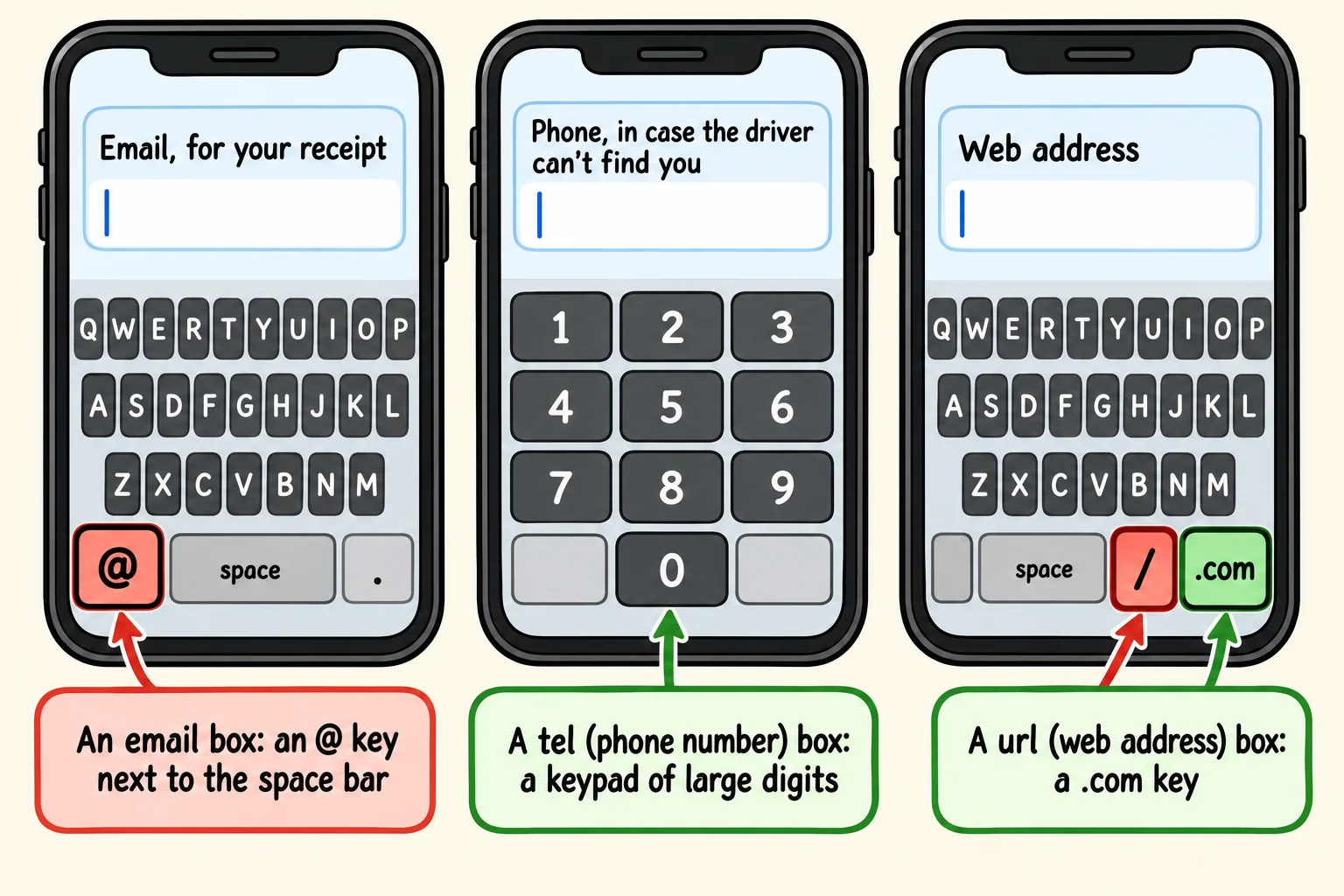
Try it. Make a file named input-types.html with the page skeleton, and put a <form> in its body with the three inputs above and a <button>Send</button>. Leave out the form's action, so it sends to the same page. Open it with Live Server, type pat at home into the email box and send it: read the browser's message. Then put the page online, as in Put Your Site Online for Free, and open it on your phone to see each keyboard.
Numbers: how many pizzas?
For an amount, use type="number". A computer shows small up and down arrows in the box, a phone shows a keyboard with the digits ready, and the browser refuses an answer that isn't a number.
<label for="quantity">How many pizzas?</label>
<input type="number" id="quantity" name="quantity" min="1" max="20" value="1">
minis the smallest answer allowed, andmaxthe largest. Nobody orders zero pizzas, and the kitchen can't bake 500 at once.valueis the answer the box starts with.
Here's a rule of thumb: if adding 1 to it makes no sense, it isn't a number. A phone number, a zip code and a card number are made of digits, but nobody adds 1 to a zip code, and up and down arrows on one would only cause mistakes. Give those tel or text. (Autocomplete and Phone Keyboards shows how to ask a phone for a digits keypad on a text box.)
Steps: whole numbers, halves or cents
With only min and max, a number box takes whole numbers. That's because of a third attribute, step, which is 1 unless you change it. Slice of Heaven lets you tip the driver in half dollars:
<label for="tip">Tip for the driver, in dollars</label>
<input type="number" id="tip" name="tip" min="0" max="50" step="0.5" value="0">
The allowed answers start at min and go up by step: 0, 0.5, 1, 1.5, and so on up to 50. A tip of 2.5 is fine; 2.25 is refused, and Chrome and Firefox suggest the nearest answers they would take, 2 and 2.5. The arrows move by the step too.
step="0.01"takes cents.step="5"withmin="0"takes 0, 5, 10, 15.step="any"takes any number at all.
Try it. Add the tip box to your input-types.html. Type 2.25 and send the form, then change step to 0.25 and try again.
Sliders, dates, times and colors
Some answers are easier to pick than to type.
<label for="crispy">How crispy? 1 is soft, 5 is extra crispy</label>
<input type="range" id="crispy" name="crispy" min="1" max="5" value="3">

<label for="order_day">Order ahead for</label>
<input type="date" id="order_day" name="order_day" min="2026-11-02">

<label for="ready_time">Ready by</label>
<input type="time" id="ready_time" name="ready_time" min="11:00" max="22:00">

<label for="balloon_color">Balloon color, for party orders</label>
<input type="color" id="balloon_color" name="balloon_color" value="#e63946">
rangeis a slider. It takesmin,maxandsteplikenumber, but it doesn't show the number, so use it when roughly right is good enough. With nominormaxit runs from 0 to 100, and with novalueit starts in the middle.dategives a calendar to pick from. The visitor sees the date in their own country's style, such as 11/14/2026 in the US or 14/11/2026 in the UK, but the browser always sends it year first:2026-11-14. Writeminandmaxthat way too.timegives a time picker and always sends 24-hour time: 6:30 PM is sent as18:30.coloropens a color picker and sends a web color code:#(read "hash"), then six digits and letters, such as#e63946.
There are a few more in the same family: datetime-local (a date and a time together), month and week.
Search, password, file and hidden
Four more types, each with one job:
<label for="menu_search">Search the menu</label>
<input type="search" id="menu_search" name="q">

<label for="logo">Your logo, for catering boxes</label>
<input type="file" id="logo" name="logo" accept="image/*">

<input type="hidden" name="store" value="downtown">
searchworks like a text box, and tells the browser it's for searching: on many phones the Enter key says Search or Go, and some browsers add an × to clear the box.passwordshows dots instead of what's typed, so someone looking over your shoulder can't read it. It doesn't scramble anything when the form is sent; only a site onhttps://keeps it private on the way.fileopens a file picker, and on a phone it offers the camera too.accept="image/*"asks for pictures only. To send the file itself, the form needsmethod="post"andenctype="multipart/form-data"; with GET, only the file's name is sent.hiddenis never shown, but it is sent with the form: here, which store's page the order came from. It isn't secret. Anyone can read it in the page's source and change it in the developer tools, so never put anything private in it.
Check yourself
2 questions to try on the lesson page.
So what
Picking the right input type takes one word, and it saves every visitor taps, typos and frustration. Forms people can fill in on a phone without a fight are forms people finish.