# Headings and the Page Outline
Headings from h1 to h6 give a page an outline, like a book's title, chapters and sections, so readers and screen readers can find their way around it.
Novice · HTML · Updated October 31, 2026
## After this lesson you can
- Choose heading levels from h1 to h6 that match a page's outline, with one h1 and no skipped levels
- Explain why a heading's level is chosen for the outline and not for its size
## Key takeaways
- A page's headings are its outline. The h1 is its title, each h2 a main section, each h3 a part of a section, and so on down to h6.
- Give a page one h1, and never skip a level on the way down, such as going from an h2 straight to an h4.
- Pick a heading's level by its place in the outline, never by its size. How big it looks is CSS's job.
- Screen reader users jump from heading to heading to find what they want, so the outline is how they skim a page.
Think of the last long page you read online: a recipe, a class syllabus, a band's website. Before you read a word of it, your eyes jumped down the big bold lines to find the part you wanted. Those lines are **headings**, and every page you build needs them. A class assignment is often marked on its structure, a help page at work is only useful if people can find the answer on it, and a screen reader user can't use your page at all without them. This lesson shows how headings work, using the website of The Neon Lanterns, a made-up indie band.
## Headings are a page's outline
A book has a title on its cover, chapters inside it, and sections inside each chapter. Its table of contents shows that shape at a glance. A web page works the same way.
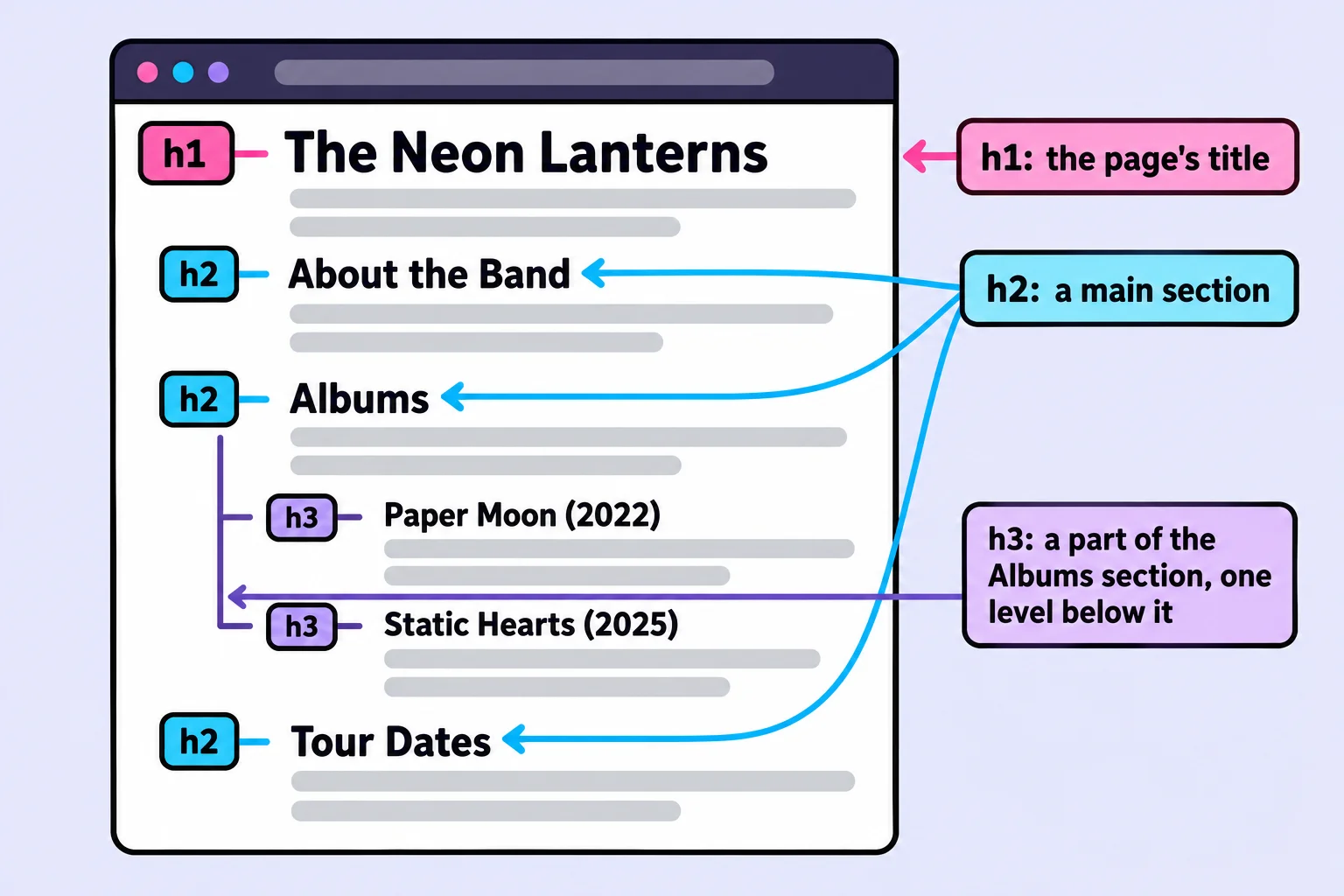
HTML has six **heading elements**, from `` to ``, read "h-one" to "h-six" (the h is for heading). The number is the heading's level: `` is the page's title, `` a main section, `` a part of an `` section, and so on down to ``. Here are the headings of the band's home page, with the paragraphs left out:
```html
The Neon Lanterns
About the Band
Albums
Paper Moon (2022)
Static Hearts (2025)
Tour Dates
```
Read only the headings, indented by level, and you get the page's table of contents:
```text
The Neon Lanterns
About the Band
Albums
Paper Moon (2022)
Static Hearts (2025)
Tour Dates
```
That shape is the page's **document outline**, and the levels inside levels are its **heading hierarchy**. In a textbook you may see them called *heading levels* or the page's *structure*.
## One h1, then down one step at a time
Two rules keep an outline sound:
- **One `` per page.** It's the page's title, the way a book has one title. (HTML allows more than one, but one is the usual rule, and it's the one this course's exercise checks use.)
- **Go down one level at a time.** After an ``, the next level down is ``. Jumping from `` straight to `` leaves a gap, like a book with a section 3.1.2 but no 3.1.
Going back *up* is fine, by any number of levels: after the last `` about an album, the next `` starts a new main section.
```html
The Neon Lanterns
Tour Dates
Fall 2026
```
The fix is to make `Fall 2026` an ``: it's a part of the Tour Dates section, one level below it. The W3C's HTML checker, which you'll use in the Try it below, reports a skipped level like this one as an error.
## Size is CSS's job
Browsers show `` biggest and `` smallest. That makes a mistake tempting: picking `` because `` looks too big. Do that and the outline says the album is five levels deep, inside sections that don't exist.
```html
Albums
Paper Moon (2022)
Albums
Paper Moon (2022)
```
**CSS** is the language that decides how a page looks: colors, fonts and sizes. It can make any heading any size, so choose the level for the outline and let CSS handle the size. (This course shows what CSS does in *A First Look at CSS*; the CSS in Depth course teaches you to write it, if you want to go further.)
The same goes the other way: don't make a sentence an `` because you want it big and loud, such as *Tickets go on sale Friday!* It would land in the outline as a section that has nothing in it. The next lessons show the elements for words that matter.
## How screen readers use headings
A **screen reader** is software that reads the screen aloud, used by people who are blind or can't see the screen well. Listening to a whole page from the top is slow, so screen reader users skim by headings instead. In NVDA, a free screen reader for Windows, pressing **H** jumps to the next heading and **2** to the next ``. VoiceOver on a Mac can list every heading on the page, like a table of contents. WebAIM's surveys of screen reader users find that most of them look for information on a long page by jumping through its headings first.
So the outline isn't decoration. For many visitors it's the only map of the page they get.
**Try it.** In VS Code, make a folder named `neon-lanterns` with a file named `index.html` in it. Type `!` and press **Tab** for the page skeleton (see *The Page Skeleton*), then put the six headings above inside ``, with a sentence under each one in a `
`. Open it with Live Server. Then go to validator.w3.org/nu, the W3C's free HTML checker. Next to **Check by**, choose **text input**, paste in your page, tick **outline** next to **Show**, and click **Check**. Under **Outline**, the checker lists your headings by level. Now change `Static Hearts (2025)` to an `
` and check again: the checker reports an error, because the heading skips a level.
## Check yourself
2 questions to try on the lesson page.
## So what
Headings are the first thing people and screen readers use to find their way around a page. Choose each level for its place in the outline, and readers can skim every page you build.
## Key terms
- [Heading](https://www.ask-codey.com/glossary/heading)
- [Heading hierarchy](https://www.ask-codey.com/glossary/heading-hierarchy)
- [Document outline](https://www.ask-codey.com/glossary/document-outline)
- [Heading element](https://www.ask-codey.com/glossary/heading-element)
## Cheat sheets
- [Headings and the Page Outline](https://www.ask-codey.com/cheat-sheets/html-headings-and-the-page-outline-cheat-sheet)
## Related
- [Paragraphs, Line Breaks and Special Characters](https://www.ask-codey.com/lessons/html-paragraphs-and-special-characters)
Source: https://www.ask-codey.com/lessons/html-headings-and-the-page-outline