`, misnested tags get split, and stray text in a table moves above it.
- View Source shows your file; the Elements panel shows the repaired tree. The validator reads your file as written, so it finds the mistakes the browser hides.
You copy an old page into your project. It looks fine in the browser, but a style you add won't reach one paragraph, or a test says a `
` is in a different place from where you typed it. Open the developer tools and the page isn't quite the file you wrote: the browser has changed it. Every web developer hits this sooner or later, and the ones who know how the browser reads HTML can explain it in a minute instead of guessing for an hour. This lesson shows you what happens between your file and the page, so you can read any page's HTML and know why the browser shows what it shows.
The running example is Pixel Palace, a made-up video game store with a page of new arrivals and player reviews.
## From characters to tokens
When you read a sentence, you don't see letters one at a time. You see words, then you work out how the words fit together. The browser does the same with your HTML.
The part of the browser that reads HTML is the **HTML parser**. To *parse* means to read something and work out its structure. Your file reaches the browser as a long string of characters, and the parser first groups them into **tokens**, the "words" of HTML:
- a **start tag** token, such as `
`, read "angle bracket p", with its attributes;
- an **end tag** token, such as `
`, read "angle bracket slash p";
- a **text** token: the words between tags;
- a **comment** token: anything between ``.
Here is one line from Pixel Palace's new arrivals page:
```html
Moon Garden is half price
```
The parser reads it as seven tokens, in this order:
```text
1. start tag p, with class="sale"
2. text "Moon Garden is "
3. start tag b
4. text "half price"
5. end tag b
6. comment " until Sunday "
7. end tag p
```
This line uses four kinds of token (the standard has a couple more, such as one for ``), but seven tokens: the same kind can come again and again. In a textbook, this first step is called **tokenization** (some call it *lexing*), and the next one is called **tree construction**.
## From tokens to a tree: the DOM
Think of a family tree, or the folders on your computer: one thing at the top, things inside it, and things inside those. As the tokens arrive, the parser builds that kind of tree. It's called the **DOM tree** (DOM stands for *Document Object Model*), and it is what the browser actually shows, styles and lets scripts change. Your file is only the recipe for it.
Every point in the tree is a **node**. HTML gives you three kinds you'll meet every day:
- an **element node** for each element, such as `
` or ``, holding its attributes;
- a **text node** for each run of text;
- a **comment node** for each comment.
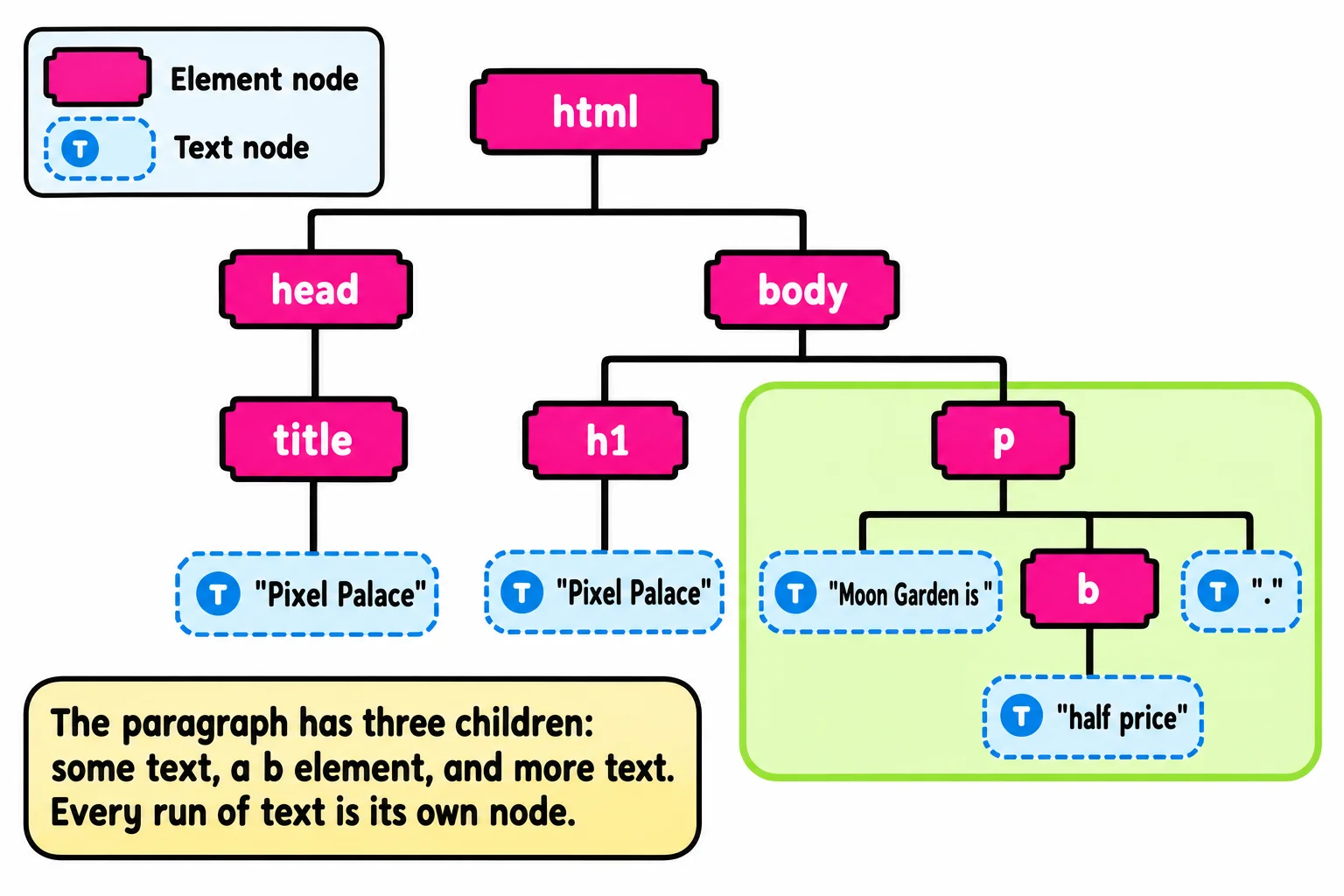
Here is a small page and the tree the browser builds from it:
```html
Pixel Palace
Pixel Palace
Moon Garden is half price.
```
```text
html
├── head
│ └── title
│ └── text: "Pixel Palace"
├── text: (a line break and two spaces)
└── body
├── h1
│ └── text: "Pixel Palace"
├── text: (a line break)
├── p
│ ├── text: "Moon Garden is "
│ ├── b
│ │ └── text: "half price"
│ └── text: "."
└── text: (the line breaks at the end of the file)
```
Look at the `
`: it holds three children, not one. The words before ``, the `` element, and the period after it are each their own node. And the line breaks and spaces between tags became text nodes too, even the ones at the end of the file, which the parser tucks into the ``. The Elements panel hides most of those whitespace-only text nodes to keep the view tidy, but they're in the tree. (The `` line becomes a node of its own, above `html`; it only tells the browser to use modern rules.)
## The browser forgives: implied end tags
A good server at a coffee shop who hears "a latte, a muffin" doesn't wait for you to say "end of order" after the latte. They know a new item means the last one is finished. The parser works the same way.
HTML that breaks a parsing rule is called a **parse error**. Unlike most programming languages, HTML never stops on one. The browser carries on, following rules written into the HTML standard for exactly this. That is **parser error recovery**, and because every current browser follows the same written rules, they all build the same tree from the same mistakes.
The parser's most common move is an **implied end tag**: an end tag it acts as if you'd written. A new `` closes the open ``, and a new `` closes the open `
`:
```html
- Moon Garden
- Turbo Kart Rally
New this week
Preorders open Friday
```
The browser builds two list items and two separate paragraphs, exactly as if you'd written every `
` and `
`. It even adds the parts of the page skeleton you left out: a page with no ``, `` or `` tags still gets all three in its tree.
Here's a surprise: this example isn't even a mistake. HTML lets you leave out a few end tags, `` and `` among them, when the next thing makes the end clear, so the validator accepts it. This course writes every end tag anyway: a page where every element is closed where you can see it is clearer to read and to check. The real mistakes, the parse errors, are in the next section.
## Repairs that move your content
Some repairs do more than add an end tag. They move things, and that's where pages start to surprise people.
**A paragraph can't hold a `
`.** A paragraph holds only text-level content, such as words, links and `
`. When the parser meets a `` inside an open `
`, it closes the paragraph first:
```html
Today only:
20% off every racing game
```
```html
Today only:
20% off every racing game
```
The first block is what you wrote; the second is the tree the browser builds. The `
` now sits *after* the paragraph, and your `` at the end has no paragraph left to close, so the browser makes an empty one for it. A style aimed at "the sale inside the paragraph" never finds it.
**Misnested tags get split.** Tags are like boxes inside boxes: the last one you opened is the first one you close. When they cross, the parser closes and reopens them so each box sits inside another:
```html
Turbo Kart Rally is back
```
```html
Turbo Kart Rally is back
```
You wrote one `
`; the tree has two.
**Stray text in a table moves above it.** A table may hold rows and cells, not loose words. Text typed between `` and the first `` is lifted out and placed right before the table. The standard has a lovely name for this: **foster parenting**, because the text gets a new parent.
```html
Prices drop at midnight!
| Moon Garden | $19.99 |
```
The words "Prices drop at midnight!" show up *above* the table on the page. The browser also adds a `
` around the row, which it does for every table whose rows aren't already in one.
## See the repairs yourself
The browser gives you two views of every page, and the difference between them *is* the repair:
- **View Source** (right-click the page, then **View Page Source**, or Ctrl+U; on a Mac, Option+Command+U) shows the file exactly as the server sent it, mistakes included.
- **The Elements panel** (F12, or right-click and **Inspect**; Firefox calls it the **Inspector**, and Safari shows it under **Elements** in its Web Inspector) shows the DOM tree after the parser has built and repaired it.

**Try it.** In VS Code, make a file named `repairs.html`, type the page skeleton with the `!` shortcut, and paste the paragraph-with-a-`` example and the table example into the ``. Open it with Live Server. Open View Source and the Elements panel side by side, and find the empty paragraph and the text that moved above the table.
## Why you still validate
If the browser fixes everything, why fix anything yourself? Because the browser fixes it *its* way, which isn't always what you meant:
- your CSS styles the repaired tree, so a rule for "the sale inside the paragraph" doesn't match;
- a screen reader reads the repaired tree, so content can land in a different place or a different order;
- a script looks for elements in the repaired tree, and finds them somewhere else.
The repairs are predictable, but they hide in plain sight: the page looks fine, and the Elements panel shows a tidy tree. The **validator** (the W3C Nu HTML Checker at validator.w3.org/nu, or the checks in this course's exercises) reads your file *as you wrote it*, before any repair, so it names every parse error with its line number. Write it right, validate it, and the tree the browser builds is the tree you meant.
## Check yourself
2 questions to try on the lesson page.
## So what
Every page on the web, tidy or messy, goes through the same parser and becomes a tree. Once you can picture that tree, you can explain any page's surprises, and you know why "it looks fine" isn't the same as "it's right".
## Key terms
- [HTML parser](https://www.ask-codey.com/glossary/html-parser)
- [DOM tree](https://www.ask-codey.com/glossary/dom-tree)
- [Parse error](https://www.ask-codey.com/glossary/parse-error)
- [Parser error recovery](https://www.ask-codey.com/glossary/parser-error-recovery)
- [Implied end tag](https://www.ask-codey.com/glossary/implied-end-tag)
## Cheat sheets
- [How the Browser Parses HTML](https://www.ask-codey.com/cheat-sheets/html-how-the-browser-parses-html-cheat-sheet)
## Related
- [Validating Your Page](https://www.ask-codey.com/lessons/html-validating-your-page)
- [Developer Tools: Inspecting a Page](https://www.ask-codey.com/lessons/html-developer-tools-inspecting-a-page)
Source: https://www.ask-codey.com/lessons/html-how-the-browser-parses-html