Links Between Your Own Pages
A relative path gives directions from the page you are on to another page of your own site, into a folder or back up with ../, so your links keep working wherever the site lives.
Apprentice · HTML · Updated
After this lesson you can
- Write a relative path from one page to another, into a folder or up a folder with ../
- Explain why a path to a file on your own computer breaks once the site is online
Key takeaways
- A relative path gives directions from the page the link is on, the way you'd give directions from where you're standing.
- A folder's name and a slash go into that folder, and ../ goes up one folder.
- A path to a file on your own computer, such as file:///C:/Users/..., can work only on that computer, so it breaks once the site is online.
- Web servers care about capital letters, so a link must spell a file's name exactly the way the file is named.
- Link to other sites with an absolute URL, and to your own pages with a relative path.
A site with more than one page needs links between its pages: from the home page to each album, and from each album back home. Those links have to work on your computer while you build the site, and keep working once it's online at a different address. That's what this lesson is for, and it's the cause of one of the most common bugs on a first website: links that worked yesterday and break after the upload.
Directions from where you stand
Ask a friend where the keys are, and they won't give you the street address of the house. They'll say "in the kitchen, on the counter", starting from where you're standing. A link to another page of your own site works the same way. Its directions start from the folder of the page the link is on, and they're called a relative path.
Here's The Neon Lanterns' site, as folders and files:
neon-lanterns/
├── index.html
├── tour.html
└── albums/
    ├── paper-moon.html
    └── static-hearts.html
index.html and tour.html sit side by side in the neon-lanterns folder. The two album pages are one folder down, in albums.
Into the same folder, or down into another
A page in the same folder is only its file name. A page in a folder below needs the folder's name, a slash, and then the file's name. Read albums/paper-moon.html as "into the albums folder, then paper-moon.html". In index.html:
<p>See the <a href="tour.html">tour dates</a>.</p>
<p>Our first album is <a href="albums/paper-moon.html">Paper Moon</a>.</p>
Up a folder with ../
From an album page, home is one folder up. ../ (read "dot dot slash") means "up one folder". In albums/paper-moon.html:
<p><a href="../index.html">Back to the home page</a></p>
<p>See the <a href="../tour.html">tour dates</a>.</p>
<p>Next album: <a href="static-hearts.html">Static Hearts</a></p>
The first two go up out of albums, then to the file. The third needs no ../: static-hearts.html is in the same folder as the page the link is on. Two folders up is ../../, one ../ per folder.
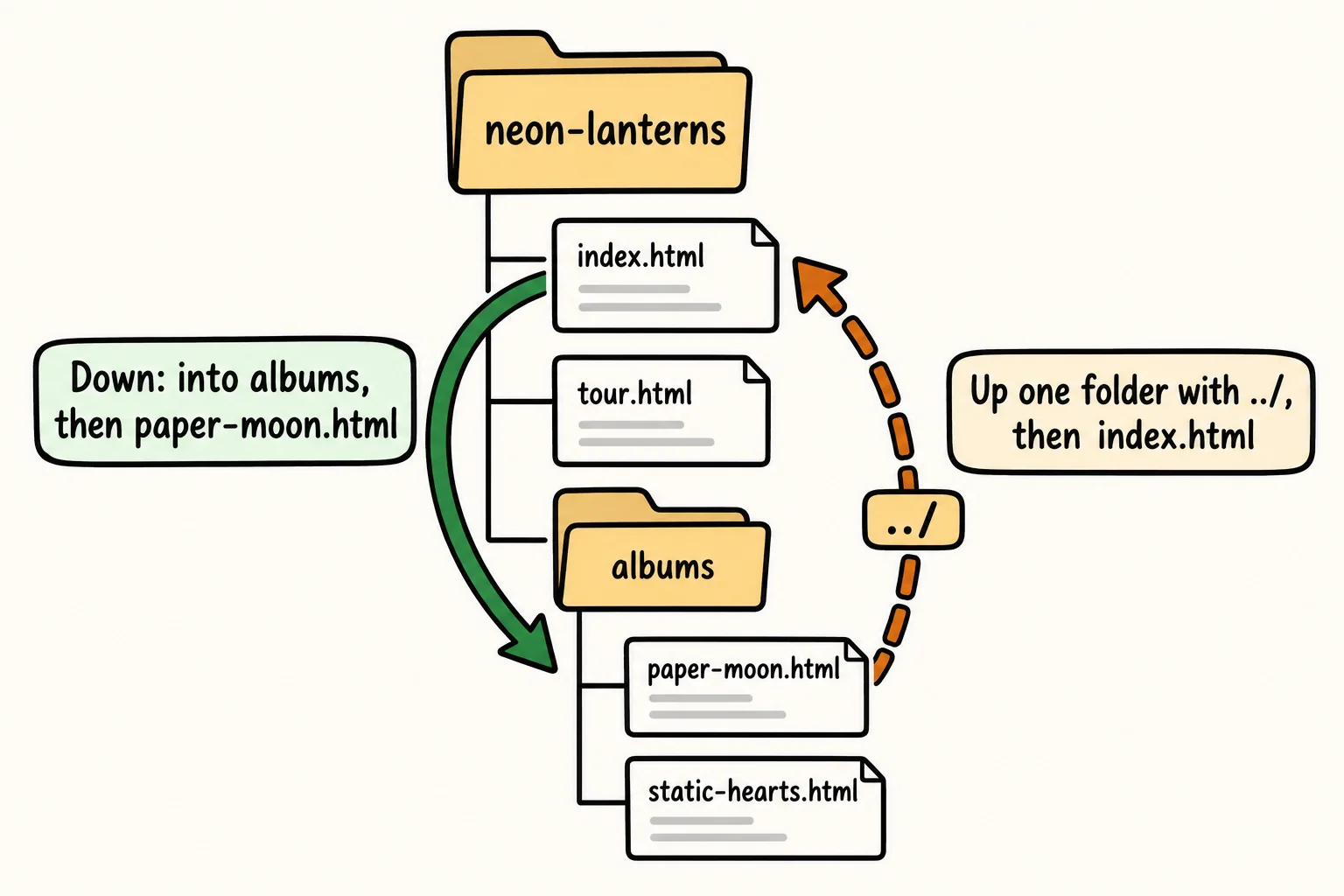
Try it. In your neon-lanterns folder, make an albums folder with a page named paper-moon.html in it. Link index.html to it, and link it back to index.html with ../. Open the site with Live Server and click both ways.
Why a path from your computer breaks online
Sometimes an editor or a drag and drop fills in a link like this one:
<a href="file:///C:/Users/sam/Documents/neon-lanterns/albums/paper-moon.html">Paper Moon</a>
That's an absolute path: the whole route to the file from the top of your computer's drive, like a full street address. It can work when you open the page by double-clicking it, but not with Live Server, and never online. Once the site is online, a visitor's browser follows the same directions on their computer, finds no such file, and shows an error. A relative path has no computer's name or drive in it, so it travels with the folder: it works on your computer, on a web server, and on anyone's site you copy the folder to.
The same goes for a path that starts with a drive letter, such as C:/, or with your home folder on a Mac, such as /Users/sam/. If a link has a part that only exists on your computer, it will break online.
Capital letters count online
Windows and macOS usually don't care about capital letters in file names, so Paper-Moon.html finds paper-moon.html on your computer. Most web servers do care, including GitHub Pages, where this course puts your site online. There, Paper-Moon.html and paper-moon.html are two different files, and the link breaks:
<!-- Works on your computer, breaks online: the file is paper-moon.html -->
<a href="albums/Paper-Moon.html">Paper Moon</a>
That's why this course names every file and folder in lowercase, with hyphens for spaces (see Files and Folders for a Website): there's nothing to get wrong.
So the rule of thumb is: another site gets an absolute URL that starts with https:// (see Links to Other Sites), and your own pages get a relative path.
Check yourself
2 questions to try on the lesson page.
So what
Relative paths are directions from where the page stands, so a site built with them works on your computer, on a web server and on any address you move it to.