Loading Scripts: defer, async and Modules
Load a script without holding up the page, and choose defer, async or type="module" by what the script needs.
Journeyman · HTML · Web Development · Updated
After this lesson you can
- Explain why a plain script tag in the head holds up the page
- Load a script with defer, async or type=module, and say when each one runs
Key takeaways
- A plain script tag stops the HTML parser until the script downloads and runs, so a slow script in the head means a blank page.
- A script that runs from the head can't find the elements below it, because they haven't been built yet.
- defer downloads a script while the page is built, then runs it once the page is ready, in the order the tags appear.
- async runs a script the moment it arrives, in any order. It suits scripts that need neither the page nor each other, such as analytics.
- A script with type="module" is deferred already. Put deferred scripts in the head, where the browser finds them early.
Sooner or later you'll paste a script tag into a page: a countdown, a chat bubble from a help-desk service, the visitor counter a client asks for, a map, a "buy now" button from a payment company. The instructions usually say "paste this into your page", and where you paste it, and how, decides whether the page appears at once or sits blank while the script downloads. Sometimes it decides whether the script works at all.
This lesson is the HTML side only: one tag, and two words that change when it runs. You won't write any JavaScript. The Movie Night Club's countdown.js is ready-made, and all you need to know about it is that it finds the paragraph with id="countdown" and writes the time left until Friday's film into it. (If you want to write scripts like it, the JavaScript in Depth course teaches that.)
A recipe that says "stop and wait"
Back to the recipe card from How a Page Loads. Picture a line halfway down that says: "Go to the store for cream now, and don't read another line until you're back and it's whipped." Everything stops. The oven sits cold and nothing else gets done until you're back.
A plain script tag is that line.
The script tag
The <script> element holds JavaScript, the language that makes a page do things, or points to a file of it. Its src attribute (read "source") names the file. A script loaded from its own file like this is an external script:
<script src="countdown.js"></script>
Write the closing </script> tag every time, even with nothing between the tags: <script> isn't a void element, and without the closing tag the browser treats the rest of the page as part of the script.
When the parser reaches this line, it stops. It waits for countdown.js to download, runs it, and only then reads the next line. A script that stops the parser like this is a parser-blocking script. Browsers do it to play safe: a script can change the page while it's being built, so the browser waits to see what the script does before it carries on.
Two problems with a script in the head
Here is the Movie Night Club's head, the way the club first wrote it:
<head>
  <meta charset="utf-8">
  <title>Movie Night Club</title>
  <link rel="stylesheet" href="style.css">
  <script src="countdown.js"></script>
</head>
The page waits. Nothing in the body can be built until the script has downloaded and run. countdown.js is small, but some chat and advertising scripts are hundreds of kilobytes, and on a slow phone connection that's seconds of white screen.
The script can't find what it needs. It runs while the parser is still in the head, so the body, and the countdown paragraph in it, doesn't exist yet. The script looks for the paragraph, finds nothing (JavaScript's word for nothing is null), and stops with this error in the developer tools' Console panel:
Uncaught TypeError: Cannot set properties of null (setting 'textContent')
The page still shows, but the countdown never changes from "Counting down to Friday...".
For years the fix was to move the script to the very end of the body, right before </body>. That works: by then the page is built. But the browser now finds the script last, so its download starts last too. There's a better way.
defer: run it once the page is built
Think of ordering a birthday cake in the morning: the bakery makes it while you get everything else ready, and the candles go on once the table is set. To defer something is to put it off until later.
<script src="countdown.js" defer></script>
defer is a boolean attribute: writing its name is enough, with no value. With it, the browser downloads the script while the parser keeps building the page, then runs the script once the whole page is built. Deferred scripts run in the order their tags appear, so a script that needs another one, listed above it, can count on it being there.
That makes defer the right choice for most scripts: menus, countdowns, sliders, anything that works with the page. One limit: defer works only on a script with src. On code written between the tags (an inline script) it does nothing.
Try it. In a new folder, make countdown-test.html with a <script src="hello.js"></script> line in its head and a <p id="countdown">Waiting...</p> in its body. Then make hello.js with this one line, copied as it is:
document.querySelector('#countdown').textContent = 'The script found the paragraph.';
Open the page with Live Server and open the Console: you'll see the null error. Add defer to the script tag, save, and the paragraph changes.
async: run it the moment it arrives
Now think of a pizza delivery. You don't know when it will come. When it does, you stop what you're doing, eat, and carry on.
<script src="https://analytics.example.com/count-visits.js" async></script>
async (short for asynchronous, "not in step") also downloads the script while the page is built, but runs it as soon as it arrives. While it runs, the parser pauses. Several async scripts run in whatever order they arrive, not the order of their tags.
That suits a script that doesn't touch the page and doesn't need any other script: analytics that counts visits, an advertising script. It doesn't suit countdown.js. If the countdown arrived before the parser had built its paragraph, you'd get the same null error, but only sometimes, which is harder to track down than an error that happens every time.
type="module": modern scripts are deferred already
Modern JavaScript is often split into several files that load each other with the word import. A script written that way is a module script, and its tag says so with type="module":
<script type="module" src="countdown.js"></script>
A module script is deferred already: it downloads while the page is built and runs after, in order, with no defer needed (adding defer changes nothing). Adding async makes it run as soon as it's ready instead. One catch: module scripts don't run from a file opened by double-clicking it, whose address starts file:///. They need a web server, such as Live Server.
Which one, and where
| The script | Write | When it runs |
|---|---|---|
| Works with the page: a menu, a countdown, a slider | defer |
After the page is built, in the order of the tags |
Uses import, or its instructions say type="module" |
type="module" |
After the page is built, in the order of the tags |
| Stands alone and needs nothing: analytics, ads | async |
The moment it arrives, in any order |
| No attribute at all | nothing | Right away, holding up the page until it's done |
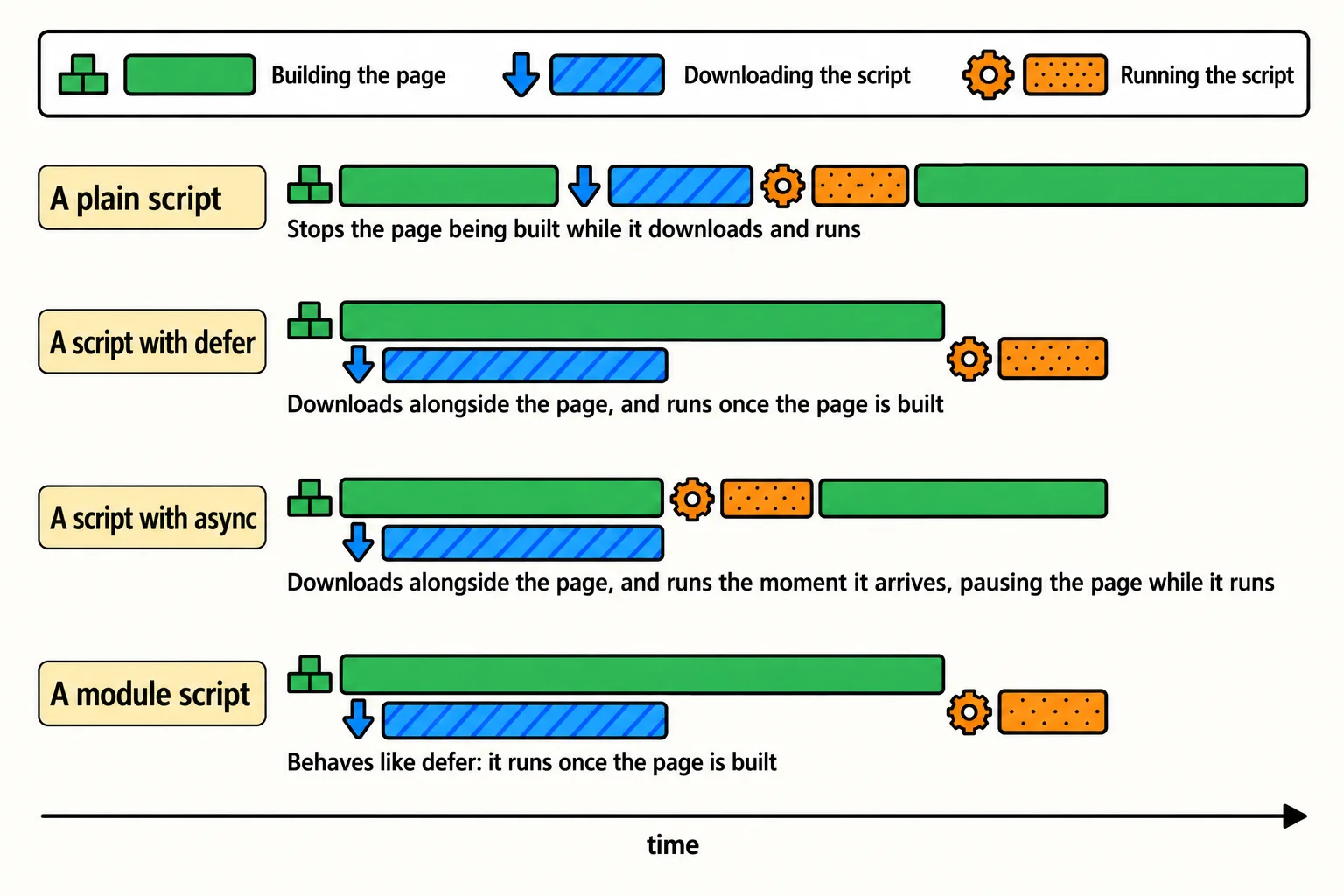
Where to put the tag: in the head, with defer (or type="module"). In the head, the browser finds the script early and starts the download straight away; defer makes sure it runs late, once the page is ready. You'll still see plain scripts at the end of the body on many sites. They work, and now you know what they're trading away.
Check yourself
2 questions to try on the lesson page.
So what
Every script tag you paste into a page from now on, you'll read the same way: does this need the page, does it need another script, and where does it sit? One word, defer or async, is often the difference between a page that appears at once and one that keeps its visitors waiting.