Captions and Subtitles
A track element adds captions or subtitles to a video from a small text file you can write by hand, so people who can't hear it, or don't speak its language, can still follow along.
Journeyman · HTML · Updated
After this lesson you can
- Add a captions or subtitles track to a video, choosing the kind the viewer needs
- Write a WebVTT captions file with a header and timed cues
Key takeaways
- Captions show the words and the sounds, for people who can't hear. Subtitles translate the words, for people who can hear but don't speak the language.
<track>goes inside the<video>and needs kind, src, srclang and label. default turns it on when the video starts.- A WebVTT file starts with
WEBVTT, then its cues. Each cue is a timing line,start --> end, then its words, with a blank line between cues. - Browsers show no captions for audio, so a podcast gets a transcript on the page instead.
- A captions file only loads from a server, such as Live Server, not from a page you double-clicked.
Think of who watches a video on your page. Someone who is deaf. Someone on a noisy bus, or in a quiet library without headphones. Someone learning English, who catches more when they can read along. Most people scrolling a phone watch with the sound off. Captions help every one of them. Accessibility rules that many companies, schools and governments must follow ask for captions on every recorded video, so a job building websites will ask you for them too.
This lesson adds captions to The Bike Shed's repair video, from episode 12, Fixing a Flat in Ten Minutes.
Captions, subtitles and transcripts
Three kinds of text help people follow a video or a recording, and each one is for someone different:
| Kind | What it shows | Who it's for |
|---|---|---|
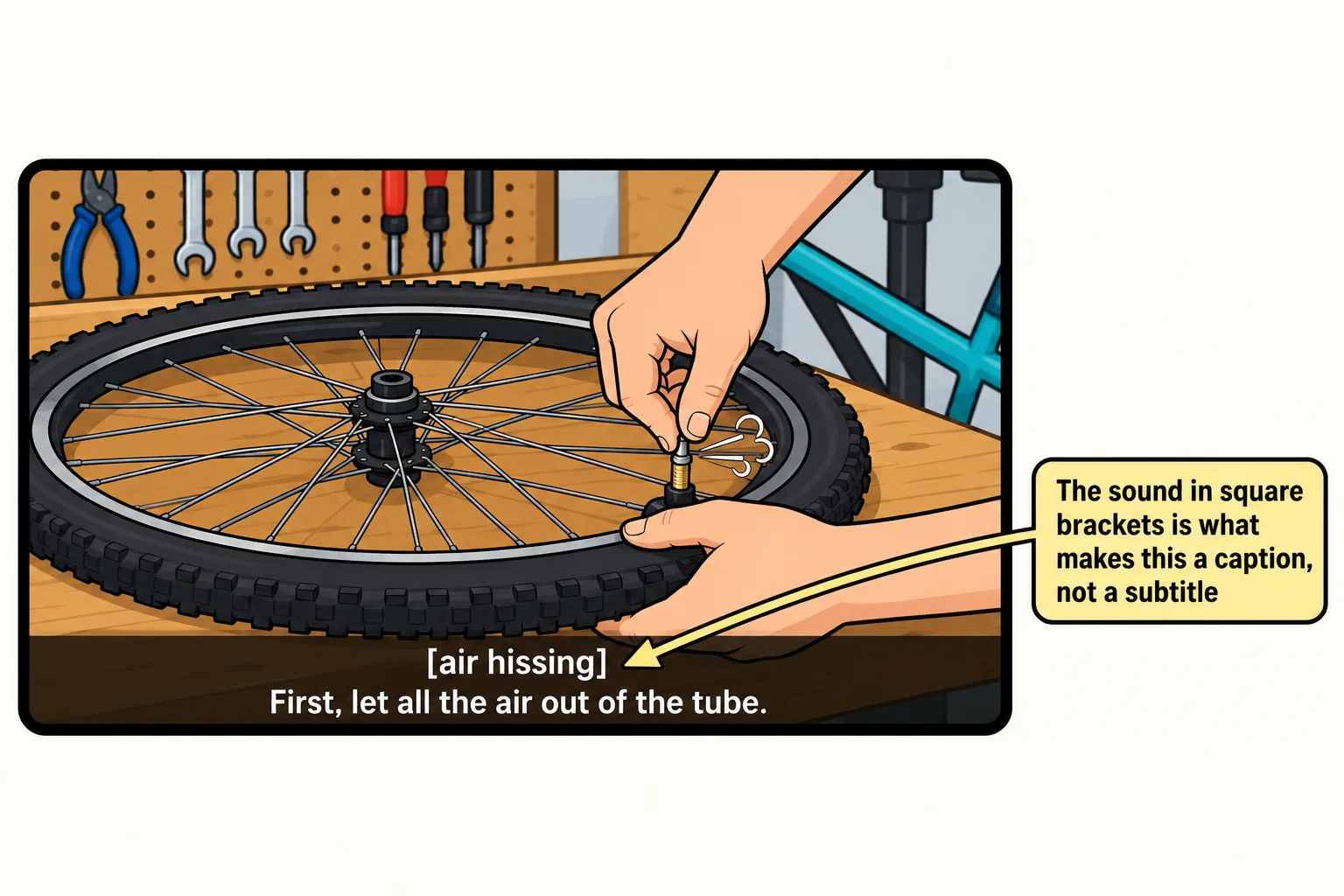
| Captions | The words, in the video's own language, plus the sounds that matter: [air hissing], [laughs] | People who can't hear the sound, or can't turn it up |
| Subtitles | The words, translated into another language | People who can hear but don't speak the video's language |
| Transcript | Everything that's said, as text on the page | Anyone who'd rather read, and anyone using a recording with nothing to watch, such as a podcast |
On TV and streaming sites, captions you can turn on and off are called closed captions (the CC button). Words that are part of the picture itself, and can't be turned off, are open captions. HTML's captions are closed captions.
The track element
Captions and subtitles are kept in their own small text file, one per language, and a <track> element connects the file to the video. A file like this, with words timed to the video, is called a text track.
<video controls width="640" height="360" poster="media/flat-fix-poster.jpg">
    <source src="media/flat-fix.mp4" type="video/mp4">
    <track kind="captions" src="media/captions.vtt" srclang="en" label="English" default>
</video>
kindsays what the track is:captionsorsubtitleshere. Browsers don't show the other kinds (descriptions,chaptersandmetadata) on screen; they're for scripts and other tools. Leavekindout and the browser treats it assubtitles.srcis the address of the text file.srclangis the language of its words, as a short code:enfor English,esfor Spanish,frfor French.labelis the name the viewer sees in the player's captions menu.defaultis a boolean attribute: it turns this track on when the video starts. Only one track should have it.
Like <source>, <track> has no closing tag, and it goes inside the <video>, after the <source> elements.
Subtitles in another language
Each language is a file and a track of its own. Add a track for each, and the viewer picks one from the player's captions menu.
<video controls width="640" height="360" poster="media/flat-fix-poster.jpg">
    <source src="media/flat-fix.mp4" type="video/mp4">
    <track kind="captions" src="media/captions.vtt" srclang="en" label="English" default>
    <track kind="subtitles" src="media/subtitles-es.vtt" srclang="es" label="Español">
</video>
The English track is captions because it's for people who can't hear: it includes the sounds. The Spanish track is subtitles because it's for people who can hear the hiss of the tire but don't speak English.
Writing a WebVTT file
Think of the words on a karaoke screen: each line appears at the moment it's sung, then goes away. A captions file is a list of those lines with their times. The format is WebVTT, short for Web Video Text Tracks, and its files end in .vtt. Here is the start of the Bike Shed's captions file:
WEBVTT

1
00:00:00.500 --> 00:00:03.500
Welcome back to The Bike Shed.
Let's fix a flat.

2
00:00:03.500 --> 00:00:07.000
[air hissing]
First, let all the air out of the tube.
- The first line is
WEBVTT, on its own. Without it, the browser ignores the whole file. - Each cue, one caption on the screen, has an optional number or name, a timing line and then its words, one or two short lines.
- The timing line is the start time,
-->(read "arrow"), and the end time. A time is hours, minutes and seconds, then a period and the milliseconds (thousandths of a second):00:00:03.500is three and a half seconds in. The hours can be left out, as in00:03.500. - A blank line comes between cues.
The most common mistake is a comma before the milliseconds, 00:00:03,500. That's how an older format, SubRip (.srt files), writes it, and many tools export it. In a .vtt file, the browser skips any cue written that way, with no error.
Captions need a server
Try it. In your media-practice folder, make a file named captions.vtt with three cues for the first ten seconds of your video. Add a <track> for it with kind="captions", srclang, label and default. Open the page with Live Server, the VS Code extension from Setup: VS Code, a Browser and Node.js, play the video and watch your words appear.
Then close it and double-click index.html to open it straight from the file instead. In Chrome and Edge the captions vanish: a page opened from a file, whose address starts file://, isn't allowed to load a captions file. Press F12 and the Console says why, in red: Unsafe attempt to load URL … 'file:' URLs are treated as unique security origins. Captions work from a server, and Live Server is a small server on your own computer.
Audio gets a transcript
A <track> is allowed inside <audio>, but browsers show no captions for it: there's no picture to put them on. A podcast gets a transcript on the page instead. A <details> element keeps a long one closed until someone opens it:
<audio controls src="media/bike-shed-ep12.mp3"></audio>
<details>
    <summary>Read the transcript</summary>
    <p><strong>Sam:</strong> Welcome back to The Bike Shed. This week, the repair everyone needs sooner or later: a flat tire.</p>
    <p><strong>Priya:</strong> Ten minutes, once you've done it twice. You need two tire levers, a patch kit or a new tube, and a pump.</p>
</details>
A transcript helps search engines too: they can't listen to a recording, but they can read every word of the page.
Check yourself
2 questions to try on the lesson page.
So what
A text file of timed lines and one <track> element let deaf viewers, travelers on a noisy bus and people who speak another language follow your video. Many video sites can write a first draft of the captions for you; check and fix it by hand, because a wrong caption is worse than none.