# Link Previews with Open Graph
Open Graph tags in a page's head decide the card a chat app or social site shows when someone pastes your link, with its title, description and picture.
Journeyman · HTML · Web Development · Updated October 31, 2026
## After this lesson you can
- Write the Open Graph tags that give a shared link its title, description and picture
- Find and fix the mistakes that break a link preview
## Key takeaways
- When a link is pasted into a chat or a post, the app reads the page's Open Graph tags to build its preview card.
- Open Graph tags are `` tags with `property="og:..."` and a `content` value: og:title, og:description, og:image, og:url and og:type.
- The share picture needs its full address, starting https://, and works best at 1200 by 630 pixels. og:image:alt says what it shows.
- X reads `` to choose a big picture, and falls back to the Open Graph tags for the rest.
- A preview tool can only read a page that's online, and apps remember a preview, so check it with a tool that fetches it again.
You paste a link into a group chat, and a moment later a card appears under it: a big photo, a bold headline, a line of text. Paste a different link and you get a bare blue address that nobody taps. The difference is a handful of lines in the page's head. You'll want them the day you share your portfolio in a job application on LinkedIn, post a friend's event page, or send the Rolling Tacos menu to the family group chat.
## The card a chat app builds
A preview card is like a business card for your page: a picture, a name and one line about it, small enough to take in at a glance.
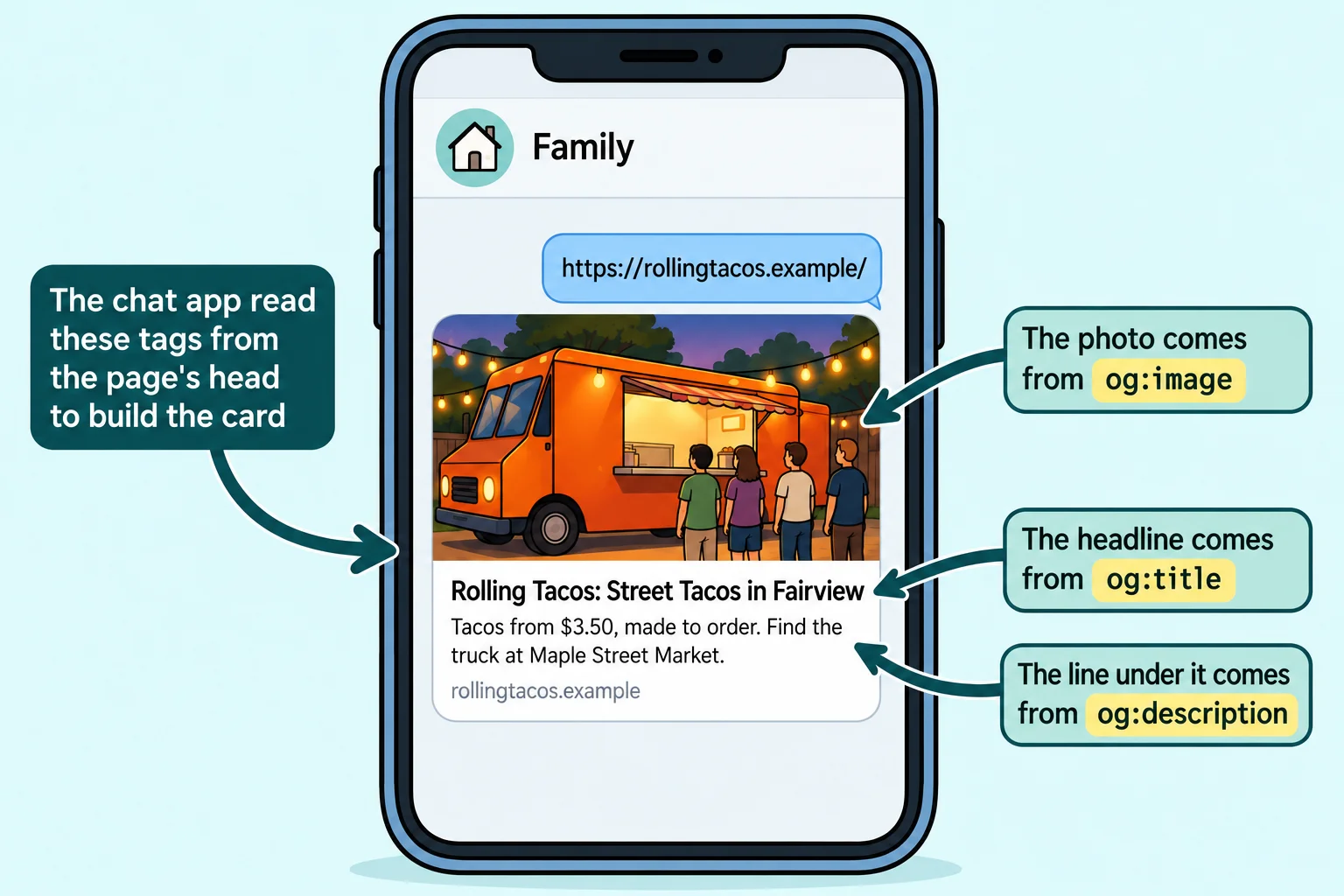
When you paste a link, the app's computers visit the page, read its ``, and build the card from what they find. Most apps read the same set of tags, called **Open Graph**. Facebook made it in 2010, and today iMessage, WhatsApp, Slack, Discord, LinkedIn, Facebook and many more read it. With no Open Graph tags, an app guesses from the `` and the page's text, or shows the bare address.
## The tags every card needs
Each Open Graph tag is a `<meta>` tag with two attributes: `property` names the piece of the card, and `content` holds its value. The property starts with `og:`, read "O-G" (for *Open Graph*): `og:title` is "O-G title".
```html
<meta property="og:title" content="Rolling Tacos: Street Tacos in Fairview">
<meta property="og:description" content="Tacos from $3.50, made to order. Find the truck at Maple Street Market.">
<meta property="og:type" content="website">
<meta property="og:url" content="https://rollingtacos.example/">
```
- **og:title** is the card's headline. It can be friendlier than the `<title>`, because it's read in a chat, not a list of results.
- **og:description** is the line under it. Keep it short: many cards show only one or two lines.
- **og:type** says what kind of thing the page is. `website` fits most pages; a blog post can use `article`.
- **og:url** is the page's official address, the same one as its canonical link.
Watch the attribute: Open Graph uses `property`, where the description and the other tags you've met use `name`.
## The picture: size and a full address
The picture is what makes people tap. Its tag is `og:image`, and its content must be the picture's **full address**, starting `https://`:
```html
<meta property="og:image" content="https://rollingtacos.example/share-image.jpg">
<meta property="og:image:alt" content="The orange Rolling Tacos truck parked under string lights, with a line at its window">
```
Why the full address? Your page says `share-image.jpg` and the browser knows to look next to the page. But the app reads your page from its own computers, far away, the way a delivery driver needs the street address, not "the blue house next to mine". A short address such as `share-image.jpg` leads nowhere, and the card has no picture.
- **1200 by 630 pixels** works best: wide, like the card. A small or square picture may be shown tiny, or cropped.
- **A JPEG or PNG**, and a small file (a few hundred kilobytes), so the card loads fast on a phone.
- **og:image:alt** describes the picture for people who use a screen reader, the same way an `alt` attribute does on the page. Write what the picture means, not "image".
## X and twitter:card
X (the site that was Twitter) reads one tag of its own, and this one uses `name`, not `property`:
```html
<meta name="twitter:card" content="summary_large_image">
```
`summary_large_image` asks for the big card with the picture across the top; `summary` gives a small square picture beside the text. For the title, description and picture, X falls back to your Open Graph tags, so you don't write them twice.
## Checking a preview
Your preview tags work only once the page is **online**. The address Live Server gives you (`http://127.0.0.1:5500/`) points at your own computer, and no app can reach it from outside. Put the page online first; the lesson *Put Your Site Online for Free* shows how with GitHub Pages.
Then check the card:
- **Meta's Sharing Debugger** (developers.facebook.com/tools/debug, free, sign in with a Facebook account) shows the card Facebook builds and lists every Open Graph tag it found or missed.
- **LinkedIn's Post Inspector** (linkedin.com/post-inspector, sign in with LinkedIn) does the same for LinkedIn.
- **Send the link to yourself** in the chat app your friends use.
Apps remember a card for days after they first build it, so a fix may not show up at once. Both tools have a button that fetches the page again (in the Sharing Debugger, **Scrape Again**), and that refreshes the card on their own site. Other apps catch up on their own, given a few days.
| What you see | The usual cause |
|---|---|
| No picture | `og:image` is a short address, such as `share-image.jpg`, or the picture isn't online |
| The card says "Home" | No `og:title`, so the app used the `<title>` |
| The old title, after you changed it | The app remembered the old card: fetch it again with a preview tool |
| No card at all | The page isn't online, or the address is a Live Server one |
## The whole head
Here is the Rolling Tacos home page's head, with its search tags from the last lesson and its preview tags together:
```html
<!DOCTYPE html>
<html lang="en">
<head>
<meta charset="utf-8">
<meta name="viewport" content="width=device-width, initial-scale=1">
<title>Street Tacos at Maple Street Market | Rolling Tacos