# Titles, Descriptions and Search Results
A few lines in a page's head decide what its search result says, so write a title and a description that tell a searcher this is the page they want.
Apprentice · HTML · Web Development · Updated October 31, 2026
## After this lesson you can
- Write a page title and a meta description that tell searchers what the page offers
- Choose a canonical link or a robots noindex tag for a page and write it in the head
## Key takeaways
- A search result shows three things: the page's title, its address, and a short description of it.
- Give every page its own ``, the specific part first and the site name last, in about 60 characters or fewer.
- A meta description is your pitch for the click. A search engine may show other text from the page instead, so write it for people.
- A canonical link names the one address to show for a page that can be reached at two. A robots noindex tag keeps a page out of search results.
- Search engine optimization (SEO) means making a page clear to search engines and worth clicking. Nobody can promise you the top spot.
You've searched for something like "tacos near me" and scanned the results. In a second or two you skipped most of them and clicked one. What made you pick it? Mostly the few words in each result, and the page's own HTML wrote those words. Every page you build that people should find, from your portfolio to a friend's bakery site to a class project, needs them. This lesson follows a made-up food truck, **Rolling Tacos**, whose menu page shows up in search as "Home", with no description at all.
## A search result, taken apart
A search result works like the back cover of a book in a store: a title, and a few lines that tell you whether it's worth opening. It has three parts, and each comes from your page:
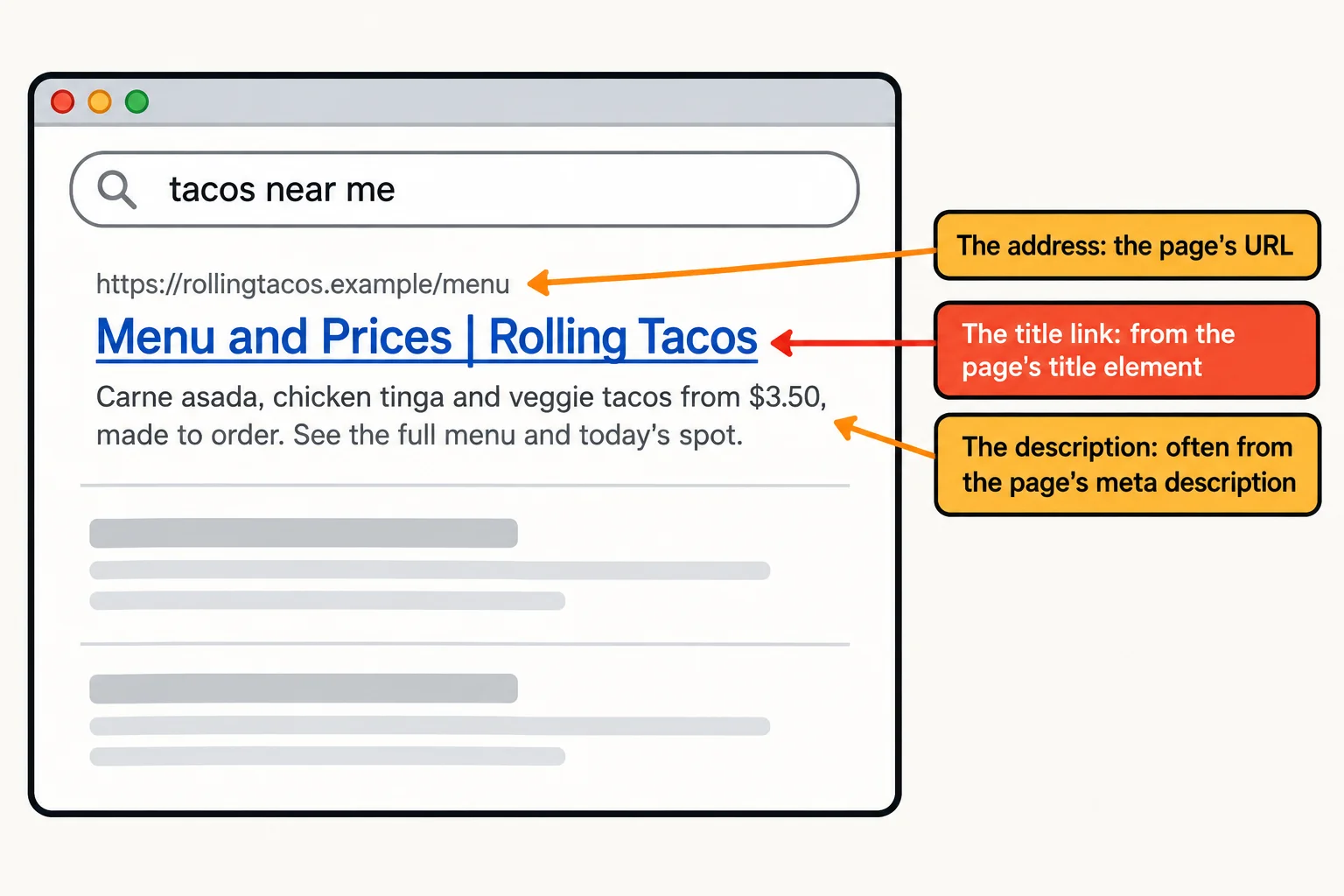
1. **The title link**, the big clickable line. It usually comes from the page's `<title>`.
2. **The address** (the URL), so the searcher knows which site they're going to.
3. **The description**, a line or two of text. Search engines call it the *snippet*, and it often comes from the page's meta description.
None of these appear on the page itself. They live in the `<head>`, the part of the page that describes the page. In your textbook this is called **document metadata**: data *about* the page, the way a book's cover and its library card describe the book.
```html
<head>
<title>Menu and Prices | Rolling Tacos
```
**Try it.** Search for a restaurant you like, then open its site. Compare the browser tab's text with the title link you clicked. They're usually the same words.
## The title: specific first, site name last
The `` element (read "the title tag") holds the page's name. It shows in the search result, on the browser tab, and as the name of a bookmark. There's one per page, inside the `<head>`.
A good title says what *this* page offers, then the site's name, with a separator between them. The `|` is read "pipe" or "vertical bar" (on a US keyboard it's Shift and the backslash key); a dash works as well.
```html
<title>Menu and Prices | Rolling Tacos
```
- **Specific first.** A searcher reads from the left, and long titles get cut off on the right. "Menu and Prices" is what they came for.
- **About 60 characters or fewer.** Search results cut a title to fit the screen's width, so a long one ends in "…".
- **One per page, and each one different.** If every page is called "Rolling Tacos", the searcher can't tell the menu from the catering page. "Home" is the worst: thousands of sites have a page called that.
The page's one `
` should tell the same story as the title. Google says it may write its own title link when a `` is empty, vague or doesn't match the page, and the visible heading is one of the places it looks:
```html
<title>Menu and Prices | Rolling Tacos
...
Menu and Prices
```
The `...` stands for the rest of the page: the title is in the ``, the `
` in the ``.
## The meta description: your pitch for the click
The `` element (read "the meta tag") holds one piece of information about the page, as a name and its content. With `name="description"`, the content is the page's **meta description**: a sentence or two that sells the click.
```html
```
- **Say what the visitor gets**, with specific facts: what's on the menu, the price, where to find it.
- **About 150 to 160 characters.** There's no official limit, but longer text is cut off to fit the screen.
- **Be honest about what happens to it.** A search engine may show your description, or it may pick other text from the page that fits the search better. Google says so plainly. A good description makes it more likely yours is the one shown.
You may see `` on older pages. Google ignores it, and has for years, so leave it out.
**Try it.** On a site you like, right-click the page and choose **View Page Source** (Ctrl+U on Windows, Cmd+Option+U in Chrome on a Mac). Press Ctrl+F (Cmd+F) and search for `description`. Is the text the same as the one in its search result?
## One page, two addresses: the canonical link
Rolling Tacos shares its menu on Instagram with a tracking address, so it can count the visitors who come from there:
```text
https://rollingtacos.example/menu
https://rollingtacos.example/menu?from=instagram
```
Both addresses open the same page. It's like a friend with a nickname: mail reaches them under either name, but the name on their ID is the official one. A search engine that finds both addresses has to guess which one to show. A **canonical link** tells it: "this is the official address of this page."
```html
```
`rel` is short for *relationship*: this `` says the page's canonical (official) address is the one in `href`. Write the full address, starting `https://`, and put the same tag on every copy of the page. Search engines treat it as a strong hint, not an order, and a visitor sees nothing different: a canonical link doesn't send anyone anywhere.
## Keeping a page out of search: robots noindex
Some pages should never show up in a search: the "Thanks for your order!" page after someone orders catering, a test copy of the site, or a page of the site's own search results. The search engines' programs that read pages are called *robots* (or crawlers), and a `` tag talks to them:
```html
```
`noindex` (read "no index") means "don't list this page in search results." It isn't a lock: anyone with the link can still open the page, so never use it to hide something private. And a robot has to be able to read the page to see the tag, so the page itself must stay reachable.
**Which one?** When the *same* page lives at two addresses, use a canonical link, so one of them is shown. When a page shouldn't be shown *at all*, use noindex.
## What SEO is, and what it isn't
**Search engine optimization** (SEO, said as the three letters "S-E-O") is the work of making pages that search engines can understand and people want to click. A clear title, an honest description, one `
`, real headings and a canonical address are the HTML side of it. The other side is having something worth finding: a menu that's up to date, the hours, the spot.
Be wary of anyone who promises the top result. Search engines change how they rank pages all the time, and nobody outside them controls it. What you control is that your page says clearly what it is.
One more line helps: `` says which language the page is in. Screen readers use it to pronounce the words, browsers use it to offer a translation, and some search engines read it. (Google works out the language from the words themselves.) Here is the whole head of the menu page:
```html
Menu and Prices | Rolling Tacos
Menu and Prices
Every taco is made to order, on corn tortillas pressed in the truck.
```
**Try it.** Make a page for a business you'd like to see online (a barbershop, a dog groomer, your own portfolio). Write its title and a meta description, open it with Live Server, and read the tab. Then count your description's characters: select it in VS Code, and the bar at the bottom shows how many are selected.
## Check yourself
2 questions to try on the lesson page.
## So what
The title and the description are the first thing most people ever see of your page, before they decide to visit. A few honest, specific words there do more for a page than any trick.
## Key terms
- [<title>](https://www.ask-codey.com/glossary/title)
- [Meta description](https://www.ask-codey.com/glossary/meta-description)
- [Canonical link](https://www.ask-codey.com/glossary/canonical-link)
- [Document metadata](https://www.ask-codey.com/glossary/document-metadata)
- [<meta>](https://www.ask-codey.com/glossary/meta)
- Search engine optimization
## Cheat sheets
- [Titles, Descriptions and Search Results](https://www.ask-codey.com/cheat-sheets/html-metadata-titles-and-descriptions-cheat-sheet)
## Related
- [Link Previews with Open Graph](https://www.ask-codey.com/lessons/html-metadata-link-previews)
Source: https://www.ask-codey.com/lessons/html-metadata-titles-and-descriptions