Quotes, Dates, Code and More
HTML has small elements that say what a piece of text is, such as a quote, a date, an abbreviation, a key to press or a price that changed, so browsers, search engines and screen readers can treat it right.
Apprentice · HTML · Updated
After this lesson you can
- Mark up a quote and its source with blockquote, q and cite
- Write a date or time in a time element with a machine-readable datetime
- Choose abbr, code, pre, kbd, mark, del or ins for a piece of text
Key takeaways
- Use
<blockquote>for a quote set apart on its own and<q>for a short quote inside a sentence.<cite>holds the title of a work. <time>shows a date the way people say it, and itsdatetimeattribute holds an exact value, such as2026-11-12T19:00, that programs can read.<abbr>explains an abbreviation,<code>marks code,<kbd>marks keys to press, and<pre>keeps every space and line break.<mark>highlights what matters right now, and<del>and<ins>show what was taken out of a page and what was put in.
Slice of Heaven Pizza runs a trivia night every Thursday, and its web page has a little of everything: a glowing review from the local paper, the date and time of the next game, "RSVP", a key to press to find your team on the scoreboard, and a pizza price that was cut this week. A person reading the page can tell these apart at a glance. A browser, a search engine or a screen reader can only tell them apart if the HTML says which is which.
You'll use these elements any time a page quotes someone (reviews, testimonials, news), lists an event (concerts, classes, game nights), explains steps on a computer (help pages, tutorials, a class assignment's instructions) or shows a sale price. Each one is a small tag you wrap around a few words, like the <strong> and <em> you met in Bold, Italic and What They Mean.
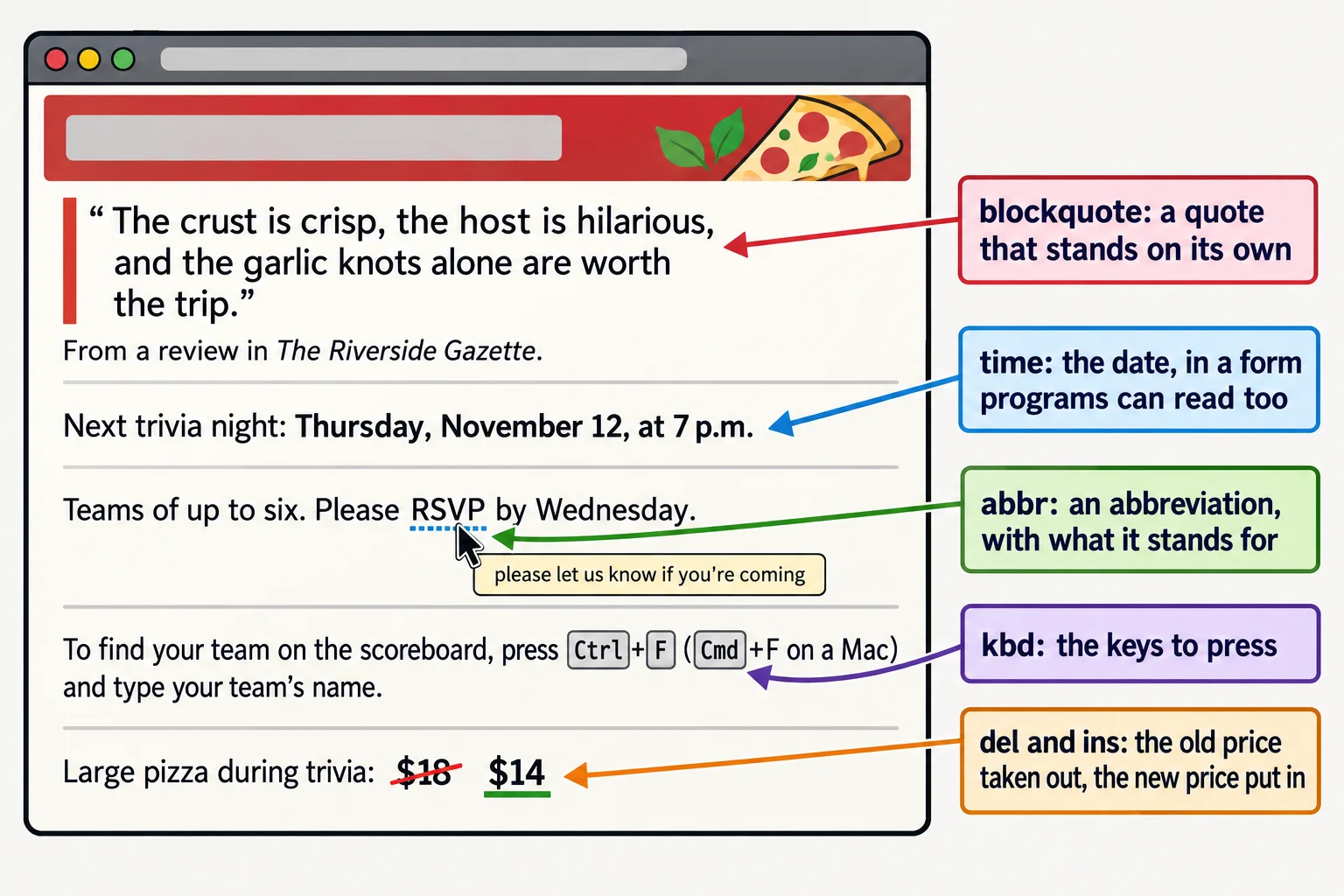
Quotes: `<blockquote>`, `<q>` and `<cite>`
Think of a magazine. A long quote gets its own block, set apart from the article, and a short one sits inside a sentence with quotation marks around it. HTML has an element for each.
<blockquote>(read "block quote") is a quote that stands on its own, as a block. The browser indents it. Itsciteattribute can hold the web address the quote came from; the browser doesn't show it, but it's there for anyone, or any program, that wants the source.<q>(read "Q", for quote) is a short quote inside a sentence. The browser adds the quotation marks itself, so you don't type them.<cite>(read "site") holds the title of a work: a book, a movie, a song, a newspaper, a website. Browsers show it in italics. It isn't for a person's name.
<blockquote cite="https://www.example.com/reviews/slice-of-heaven">
  <p>The crust is crisp, the host is hilarious, and the garlic knots
  alone are worth the trip.</p>
</blockquote>
<p>From a review in <cite>The Riverside Gazette</cite>.</p>

<p>Last month's winners, the Quizzly Bears, said the science round was
<q>harder than our final exams</q>.</p>
The page shows the review indented, The Riverside Gazette in italics, and the short quote as “harder than our final exams”, with curly quotation marks the browser added. If you type your own marks inside a <q>, the reader sees two pairs.
Try it. Make a folder named trivia-night with an index.html page (VS Code's ! shortcut writes the skeleton). Add a <blockquote> with a review of your favorite pizza place, a line under it that names where it came from in a <cite>, and a sentence with a short <q> quote in it. Open it with Live Server.
Dates and times: `<time>` and `datetime`
"Thursday at 7" is clear to a person who knows which Thursday you mean. A calendar app, a search engine or a browser extension needs the exact date. The <time> element gives you both: the words people read go between the tags, and the exact value programs read goes in its datetime attribute.
<p>Next trivia night:
<time datetime="2026-11-12T19:00">Thursday, November 12, at 7 p.m.</time></p>
Read 2026-11-12T19:00 from the left: the year, the month and the day, joined by hyphens, then a capital T (for "time") and the time on a 24-hour clock, so 7 p.m. is 19:00. The visitor sees only "Thursday, November 12, at 7 p.m.".
| You mean | The datetime value |
|---|---|
| A date: November 12, 2026 | 2026-11-12 |
| A time: 7:30 p.m. | 19:30 |
| A date and a time | 2026-11-12T19:00 |
| A month: November 2026 | 2026-11 |
| A length of time: 2 hours 30 minutes | PT2H30M |
The last one reads "P" for period, "T" for time, then 2 hours (2H) and 30 minutes (30M). If the words between the tags are already in one of these exact forms, such as <time>19:00</time>, you can leave datetime out. Anything friendlier, such as "7 p.m." or "next Thursday", needs it.
Try it. Add the date and time of your own next game night, or a birthday party, to your page in a <time> element with a datetime value. Then add how long it lasts, such as PT3H for three hours.
Abbreviations: `<abbr>`
Not everyone knows what "RSVP" means. The <abbr> element (read "abbreviation") marks an abbreviation, and its title attribute holds what it stands for.
<p>Teams of up to six.
Please <abbr title="please let us know if you're coming">RSVP</abbr> by Wednesday.</p>
With a mouse, holding the pointer over "RSVP" shows the title in a small tooltip. Phones and tablets don't show tooltips, so when the meaning matters, spell it out in the text too, the first time it appears.
Code, keys and text that keeps its shape: `<code>`, `<kbd>` and `<pre>`
Help pages and tutorials, including this one, need to show the difference between ordinary words, a piece of code and a key you press.
<code>marks a piece of computer code, such as a tag name or a file name. Browsers show it in a monospace font, where every letter is the same width.<kbd>(read "keyboard") marks a key or keys the reader presses.<pre>(read "pre", for preformatted) keeps every space and line break exactly as you typed it. Everywhere else, HTML squeezes runs of spaces and line breaks into one space. A block of code goes in<pre>with a<code>inside.
<p>To find your team on the scoreboard, press <kbd>Ctrl</kbd>+<kbd>F</kbd>
(<kbd>Cmd</kbd>+<kbd>F</kbd> on a Mac) and type your team's name.</p>
<p>Geek round, question 10: what does this HTML show?</p>
<pre><code><ul>
<li>Pepperoni</li>
<li>Mushroom</li>
</ul></code></pre>
The second part shows the code itself on the page, not a list. Inside it, every < is written < and every > is >, the character references from Paragraphs, Line Breaks and Special Characters. Without them, the browser would read <ul> as a real list and build one.
Try it. Add the scoreboard sentence to your page. Then copy the geek-round block and change one < back to <: watch what the browser does with it.
Highlights and changes: `<mark>`, `<del>` and `<ins>`
A highlighter pen picks out the words that matter for what you're doing right now. <mark> is that pen: browsers give it a yellow background. Use it for what's relevant at this moment, such as the words a visitor searched for, or a rule they mustn't miss.
When a page changes, <del> (read "delete") marks text that was taken out, and <ins> (read "insert") marks text that was put in. Browsers cross out the first and underline the second, so a reader sees both the old and the new.
<p>The final round's answers score <mark>double points</mark>.</p>

<p>Large pizza during trivia: <del>$18</del> <ins>$14</ins></p>
<del> says something was removed, not only that it looks crossed out. A crossed-out price that a page keeps on purpose, to show a change, is exactly what <del> and <ins> are for.
Check yourself
3 questions to try on the lesson page.
So what
A page that says what each piece of text is (a quote, a date, a key, a change) is easier to read, easier for a screen reader to announce and easier for programs such as search engines and calendars to use. Each one costs a pair of tags.