` marks keys to press, and `` keeps every space and line break.
- `` highlights what matters right now, and `` and `` show what was taken out of a page and what was put in.
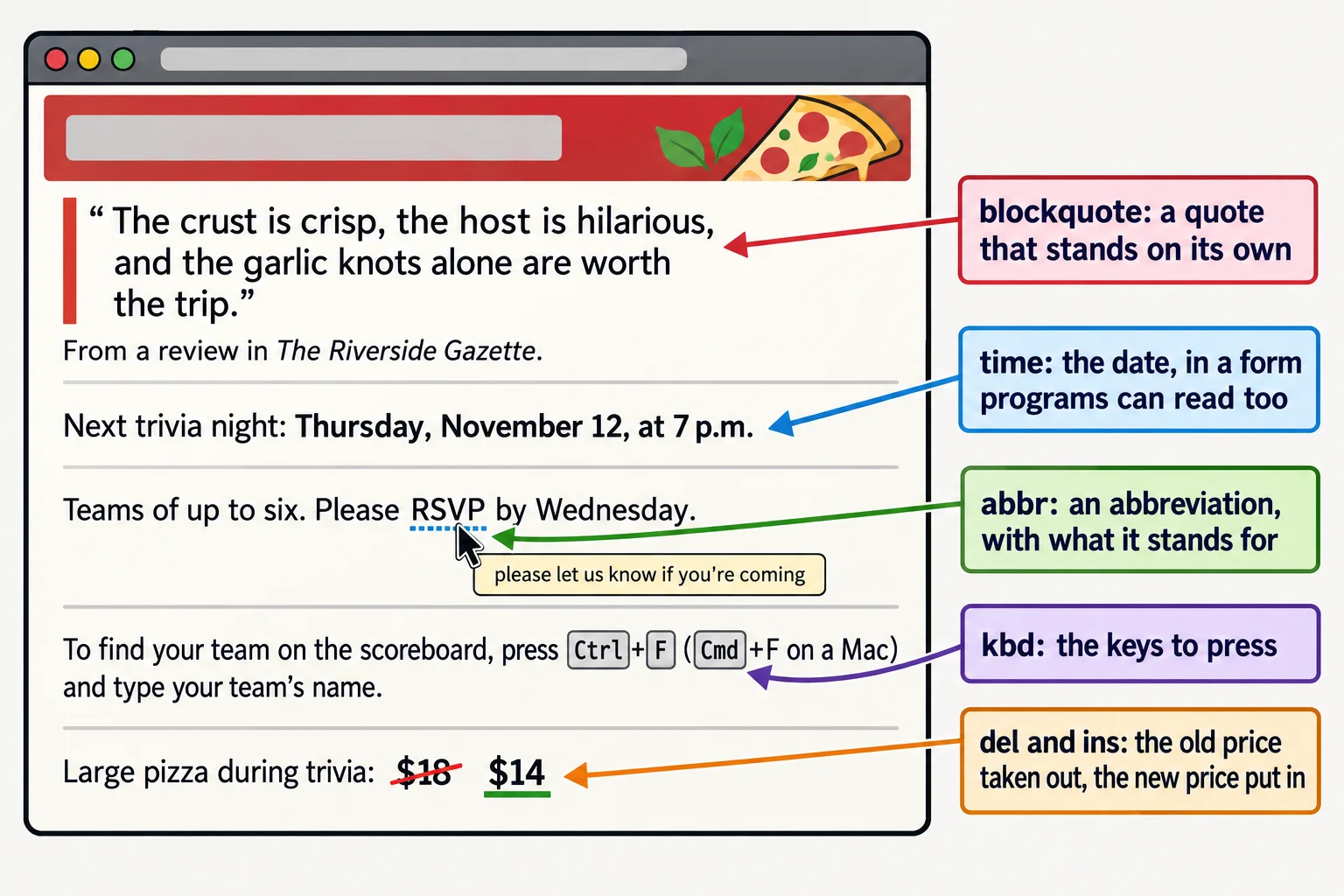
Slice of Heaven Pizza runs a trivia night every Thursday, and its web page has a little of everything: a glowing review from the local paper, the date and time of the next game, "RSVP", a key to press to find your team on the scoreboard, and a pizza price that was cut this week. A person reading the page can tell these apart at a glance. A browser, a search engine or a screen reader can only tell them apart if the HTML says which is which.
You'll use these elements any time a page quotes someone (reviews, testimonials, news), lists an event (concerts, classes, game nights), explains steps on a computer (help pages, tutorials, a class assignment's instructions) or shows a sale price. Each one is a small tag you wrap around a few words, like the `` and `` you met in *Bold, Italic and What They Mean*.
## Quotes: \`<blockquote>\`, \`<q>\` and \`<cite>\`
Think of a magazine. A long quote gets its own block, set apart from the article, and a short one sits inside a sentence with quotation marks around it. HTML has an element for each.
- **``** (read "block quote") is a quote that stands on its own, as a block. The browser indents it. Its `cite` attribute can hold the web address the quote came from; the browser doesn't show it, but it's there for anyone, or any program, that wants the source.
- **``** (read "Q", for quote) is a short quote inside a sentence. The browser adds the quotation marks itself, so you don't type them.
- **``** (read "site") holds the **title of a work**: a book, a movie, a song, a newspaper, a website. Browsers show it in italics. It isn't for a person's name.
```html
The crust is crisp, the host is hilarious, and the garlic knots
alone are worth the trip.
From a review in The Riverside Gazette .
Last month's winners, the Quizzly Bears, said the science round was
harder than our final exams .
```
The page shows the review indented, *The Riverside Gazette* in italics, and the short quote as “harder than our final exams”, with curly quotation marks the browser added. If you type your own marks inside a ``, the reader sees two pairs.
**Try it.** Make a folder named `trivia-night` with an `index.html` page (VS Code's `!` shortcut writes the skeleton). Add a `` with a review of your favorite pizza place, a line under it that names where it came from in a ``, and a sentence with a short `` quote in it. Open it with Live Server.
## Dates and times: \`<time>\` and \`datetime\`
"Thursday at 7" is clear to a person who knows which Thursday you mean. A calendar app, a search engine or a browser extension needs the exact date. The **``** element gives you both: the words people read go between the tags, and the exact value programs read goes in its **`datetime`** attribute.
```html
Next trivia night:
Thursday, November 12, at 7 p.m.
```
Read `2026-11-12T19:00` from the left: the year, the month and the day, joined by hyphens, then a capital `T` (for "time") and the time on a 24-hour clock, so 7 p.m. is `19:00`. The visitor sees only "Thursday, November 12, at 7 p.m.".
| You mean | The `datetime` value |
|---|---|
| A date: November 12, 2026 | `2026-11-12` |
| A time: 7:30 p.m. | `19:30` |
| A date and a time | `2026-11-12T19:00` |
| A month: November 2026 | `2026-11` |
| A length of time: 2 hours 30 minutes | `PT2H30M` |
The last one reads "P" for period, "T" for time, then 2 hours (`2H`) and 30 minutes (`30M`). If the words between the tags are already in one of these exact forms, such as `19:00 `, you can leave `datetime` out. Anything friendlier, such as "7 p.m." or "next Thursday", needs it.
**Try it.** Add the date and time of your own next game night, or a birthday party, to your page in a `` element with a `datetime` value. Then add how long it lasts, such as `PT3H` for three hours.
## Abbreviations: \`<abbr>\`
Not everyone knows what "RSVP" means. The **``** element (read "abbreviation") marks an abbreviation, and its `title` attribute holds what it stands for.
```html
Teams of up to six.
Please RSVP by Wednesday.
```
With a mouse, holding the pointer over "RSVP" shows the title in a small tooltip. Phones and tablets don't show tooltips, so when the meaning matters, spell it out in the text too, the first time it appears.
## Code, keys and text that keeps its shape: \`<code>\`, \`<kbd>\` and \`<pre>\`
Help pages and tutorials, including this one, need to show the difference between ordinary words, a piece of code and a key you press.
- **``** marks a piece of computer code, such as a tag name or a file name. Browsers show it in a monospace font, where every letter is the same width.
- **``** (read "keyboard") marks a key or keys the reader presses.
- **``** (read "pre", for preformatted) keeps every space and line break exactly as you typed it. Everywhere else, HTML squeezes runs of spaces and line breaks into one space. A block of code goes in `` with a `` inside.
```html
To find your team on the scoreboard, press Ctrl +F
(Cmd +F on a Mac) and type your team's name.
Geek round, question 10: what does this HTML show?
<ul>
<li>Pepperoni</li>
<li>Mushroom</li>
</ul>` as a real list and build one.
**Try it.** Add the scoreboard sentence to your page. Then copy the geek-round block and change one `<` back to `<`: watch what the browser does with it.
## Highlights and changes: \`<mark>\`, \`<del>\` and \`<ins>\`
A highlighter pen picks out the words that matter for what you're doing right now. **``** is that pen: browsers give it a yellow background. Use it for what's relevant at this moment, such as the words a visitor searched for, or a rule they mustn't miss.
When a page changes, **``** (read "delete") marks text that was taken out, and **``** (read "insert") marks text that was put in. Browsers cross out the first and underline the second, so a reader sees both the old and the new.
```html
The final round's answers score double points .
Large pizza during trivia: $18 $14
```
`` says something was removed, not only that it looks crossed out. A crossed-out price that a page keeps on purpose, to show a change, is exactly what `` and `` are for.
## Check yourself
3 questions to try on the lesson page.
## So what
A page that says what each piece of text is (a quote, a date, a key, a change) is easier to read, easier for a screen reader to announce and easier for programs such as search engines and calendars to use. Each one costs a pair of tags.
## Key terms
- [<blockquote>](https://www.ask-codey.com/glossary/blockquote)
- [<q>](https://www.ask-codey.com/glossary/q)
- [<time>](https://www.ask-codey.com/glossary/time)
- [<abbr>](https://www.ask-codey.com/glossary/abbr)
- [<code>](https://www.ask-codey.com/glossary/code)
- [<kbd>](https://www.ask-codey.com/glossary/kbd)
## Cheat sheets
- [Quotes, Dates, Code and More](https://www.ask-codey.com/cheat-sheets/html-quotes-dates-code-and-more-cheat-sheet)
## Related
- [Bold, Italic and What They Mean](https://www.ask-codey.com/lessons/html-emphasis-and-importance)
Source: https://www.ask-codey.com/lessons/html-quotes-dates-code-and-more