Semantic HTML
Semantic elements such as strong, nav, main and footer say what their content means, so the HTML describes the content and CSS handles the formatting.
Apprentice · HTML · CSS · Updated
After this lesson you can
- Replace the formatting tags b, i, u and center with strong, em or CSS
- Mark up a page's regions with header, nav, main, aside, article, section and footer instead of div
Key takeaways
- A semantic element's name says what its content is, such as a navigation bar, the main content or an important phrase.
- Use strong and em for importance and emphasis, and do bold, underlining and centering for looks with CSS.
- Mark up a page's regions with header, nav, main, aside and footer instead of a div with an id.
- Semantic HTML helps screen readers, and it makes your HTML easier to read.
Each HTML element serves a specific purpose. For example, a hyperlink or <a> element is intended to display a clickable link to the user, and an <input> element will be rendered as a text box.
The supported list of HTML elements has evolved over time. This is largely because modern browsers are more powerful than early browsers, and have evolved to meet the needs of modern web applications. But it is also because the intent of our HTML has changed.
Early HTML was treated mostly like a Word document, so elements were only thought of as a way to indicate if a word needed to be bold, underlined, or italicized. So early HTML included <b>, <u> and <i> elements. Over time it became apparent that these elements did not adequately represent the intent of what the content was trying to convey to the user. Rather, these elements were used to define the formatting of the page.
HTML evolved to support primarily semantic elements whose names convey their intent, not just containers that define visual formatting. Instead of a <b> tag which marks a word to be bold, we now use the <strong> tag. Browsers still format the content as bold, but now the HTML itself says the word or phrase is important, so screen readers (used by people who can't see the screen), search engines and the next developer can tell.
<center> is obsolete and shouldn't be used, and <b>, <i> and <u> now have narrower meanings. When you mean importance or emphasis, use <strong> and <em>, and do visual formatting such as centering and underlining with CSS. The idea is that the HTML elements should be used to describe the content and CSS should be used to define the formatting.
<b>         -> <strong>
<i>         -> <em>
<u>         -> use CSS
<center>    -> use CSS
Other Semantic HTML
In the past, when we needed to define different regions of our web page, such as a navigation bar, a main content area, header, footer or other common area, we would define each area using a <div>. The placement and formatting would be done using CSS, but all containers were defined as a <div>. The HTML almost always looked like some variation of the following example:
<body>
    <div id="nav">Navigation</div>

    <div id="header">Page Header</div>

    <div id="left">Links</div>

    <div id="main">Main Content</div>

    <div id="footer">Footer</div>
</body>
The pages would look something like this:
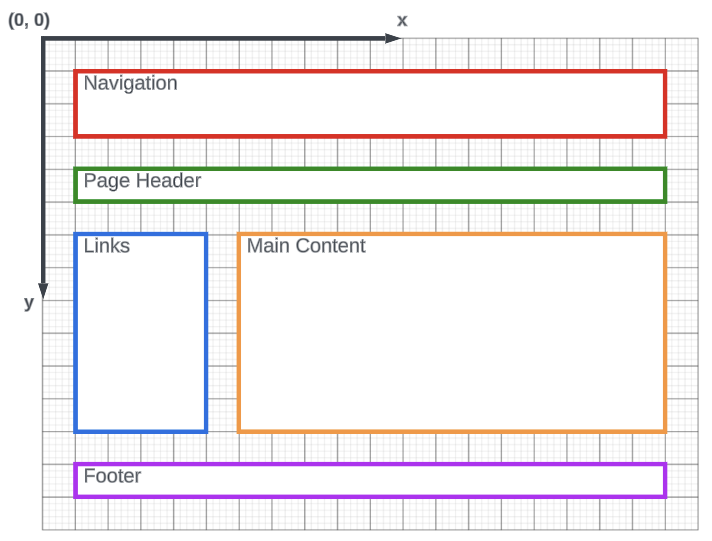
Notice that all content on this page is contained inside of a div. The div tag was everywhere. It became an all purpose tool to solve every design problem. But like the <b> tag, it did not convey the meaning of the content, it was just a way to define a region that needed to be formatted.
All web pages are made up of regions that have specific meanings. They are similar to the image above: site or page navigation, main content area, a list of articles or links, a section header, a page footer, etc.
The current HTML specification now includes elements that more appropriately define these page regions. Using semantic HTML, the above page might more appropriately be written like this:
<body>
    <nav>Navigation</nav>

    <header>Page Header</header>

    <aside>Links</aside>

    <main>Main Content</main>

    <footer>Footer</footer>
</body>
Notice that the HTML element names now almost exactly match what used to be the id of each div in the previous example. The elements now describe the content, instead of just defining a container that needs to be formatted.
Common Semantic Elements
Common semantic elements include:
<article></article>
<aside></aside>
<details></details>
<figcaption></figcaption>
<figure></figure>
<footer></footer>
<header></header>
<main></main>
<mark></mark>
<nav></nav>
<section></section>
<summary></summary>
<time></time>
What they're for:
<header>: the top of the page or of a section, such as a logo and a title.<nav>: a block of navigation links.<main>: the page's main content. A page has one.<aside>: content beside the main content, such as a list of related links.<article>: a piece that makes sense on its own, such as a blog post or a news story.<section>: a group of related content, usually with its own heading.<footer>: the bottom of the page or of a section, such as contact details and the copyright.<figure>and<figcaption>: a picture and its caption.<details>and<summary>: a box the reader can open and close.<summary>is the part that always shows.<mark>: highlighted text, and<time>: a date or a time.
A <div> is still fine when you need a box only for styling and no semantic element fits.
Check yourself
2 questions to try on the lesson page.
So what
When your elements say what the content is, screen readers, search engines and the next developer can all understand the page, and CSS is free to make it look any way you like.