# The Page Skeleton
Every HTML page starts from the same skeleton, the doctype, an html element with a head and a body, and knowing what each line does saves you from strange bugs.
Novice · HTML · Updated October 31, 2026
## After this lesson you can
- Write a page skeleton with the doctype, html with lang, head and body, and leave notes in HTML comments
- Put each part of a page in the head or the body, including the charset, viewport and title
## Key takeaways
- Every page starts with ``, then one `` element that holds a `` and a ``.
- The head holds what the browser needs, such as the character set, the viewport and the title. The body holds what people see.
- The charset line makes every letter and emoji show correctly, and `` names the browser tab.
- A comment, `<!-- like this -->`, is a note for people. The page doesn't show it, but anyone can read it in the page's source.
- In VS Code, type `!` and press Tab to get the whole skeleton, then change its title.
Every page you build, a class assignment, a portfolio, a shop's home page, starts with the same dozen lines. VS Code can type them for you in two keystrokes, but you need to know what each one does, because a missing line causes bugs that are hard to explain: a browser tab that says *index.html*, a menu where *café* turns into *café*, a page that looks tiny on a phone.
## The frame of a house
Before a house gets furniture, it gets a frame: walls, a roof, a front door. Every house has one, and it's always built the same way. A web page has a frame too, called its **skeleton**. Here is The Daily Grind's home page with its skeleton around the content:
```html
<!DOCTYPE html>
<html lang="en">
<head>
<meta charset="utf-8">
<meta name="viewport" content="width=device-width, initial-scale=1">
<title>The Daily Grind
The Daily Grind
Your neighborhood coffee shop on Maple Street.
```
The rest of this lesson takes it one line at a time.
## The doctype and the html element
The first line, ``, is read "angle bracket, exclamation mark, doctype html". It's the **document type declaration**, or **doctype**: it tells the browser "this is a modern HTML page, use today's rules". It isn't an element and has no end tag. Without it, the browser switches to *quirks mode*, where it copies the habits of browsers from the 1990s, and parts of a page can come out the wrong size for no reason you can see.
Everything else sits inside one **``** element, the outermost box of the page. Its `lang` attribute says what language the page is in:
```html
```
A screen reader uses `lang` to read the page aloud in the right accent, and a browser uses it to offer a translation.
## The head and the body
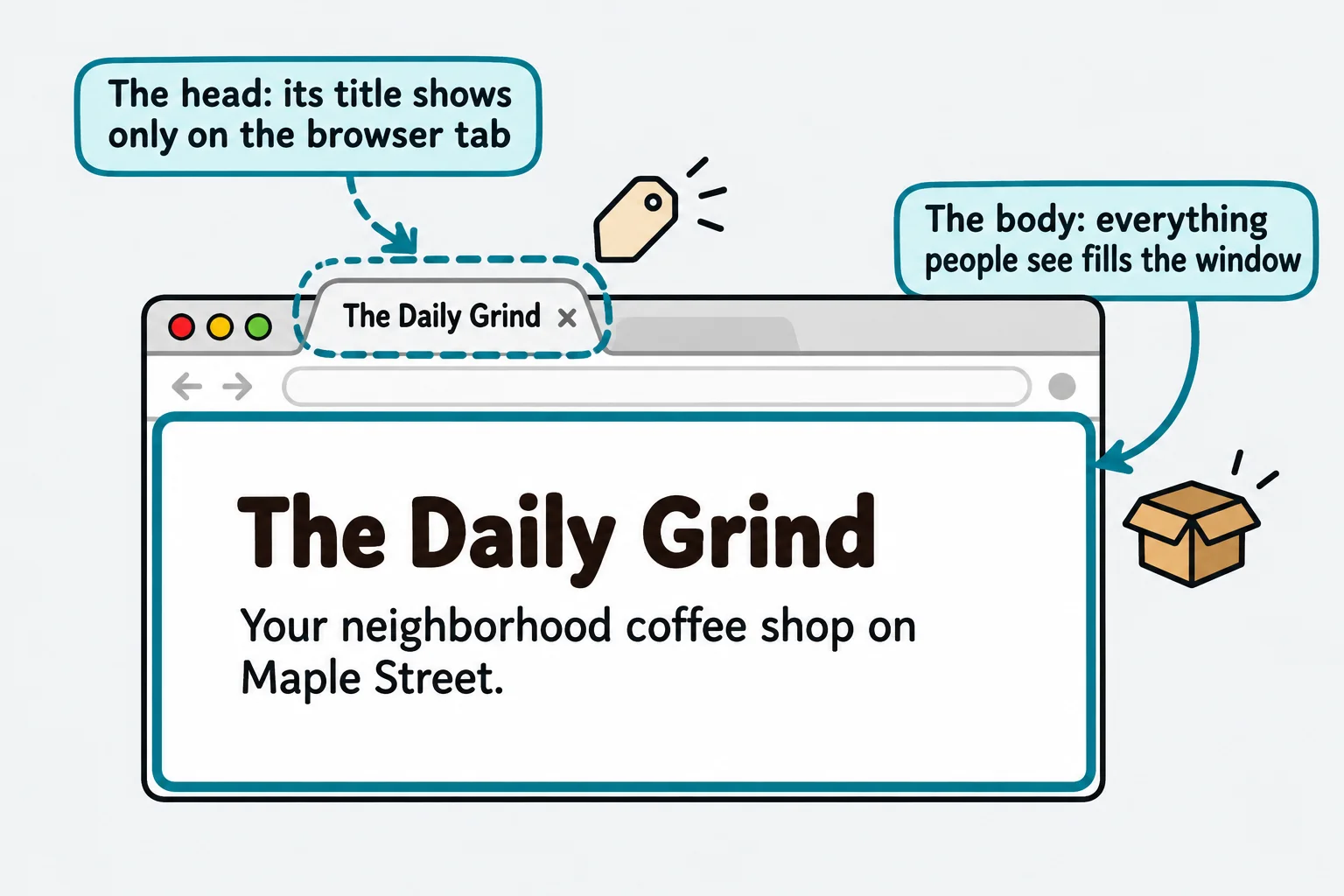
Inside `` are exactly two boxes. Think of a package in the mail: the shipping label is for the people who deliver it, and the box's contents are for you.
- **``** is the shipping label: information for the browser and for search engines, never shown on the page itself.
- **``** is the contents: every heading, paragraph, picture and link that people see.
```html
The Daily Grind
The Daily Grind
```
The head always comes first, and the body second.
## What goes in the head
Three lines go in the head of every page:
```html
The Daily Grind
```
- **``** is the **character encoding declaration**. A computer stores every letter as a number, and the *charset* says which table of numbers to use. **UTF-8** is the table that has every language's letters and every emoji in it. Without this line, *café* can come out as *café*. Put it first in the head.
- **The viewport line** makes a phone show the page at the phone's own width, instead of shrinking a desktop-sized page down to fit.
- **``** is the page's name. It shows on the browser tab, in bookmarks and as the blue link in search results.
`<meta>` is a void element, so neither line has an end tag. `<title>` holds text, so it does.
**Try it.** Make a new file named `skeleton.html`, type the skeleton from the first section, and open it with Live Server. Change the words in `<title>`, save, and look at the browser tab. Then add a paragraph with `café` in it, and see it shown correctly.
## Comments: notes for people
Sometimes you want to leave a note in your HTML: why a line is there, or what to change next month. That's a **comment**:
```html
<!-- Prices go up on January 1. Check the menu then. -->
<p>Latte: $4.50</p>
```
A comment starts with `<!--`, read "angle bracket, exclamation mark, dash dash", and ends with `-->`, read "dash dash, angle bracket". The browser doesn't show it on the page. But it's still in the file, and anyone can read it with the browser's **View Source**, so a comment is no place for a password or anything private.
## VS Code's shortcut
In a new, empty `.html` file in VS Code, type `!` (an exclamation mark) and press **Tab**. VS Code writes the whole skeleton for you:
```html
<!DOCTYPE html>
<html lang="en">
<head>
<meta charset="UTF-8">
<meta name="viewport" content="width=device-width, initial-scale=1.0">
<title>Document
```
This shortcut comes from **Emmet**, a tool built into VS Code that turns short abbreviations into HTML. Its skeleton has the same lines as The Daily Grind's (`UTF-8` and `utf-8` mean the same thing). Change `Document` to the page's real name every time: a tab that says *Document* is a sign someone forgot.
## Check yourself
2 questions to try on the lesson page.
## So what
Every HTML page you'll ever write starts from this skeleton. Know what each line is for, and you'll recognize the bugs a missing one causes: the wrong tab name, scrambled letters, a page that's tiny on a phone.
## Key terms
- [Document type declaration](https://www.ask-codey.com/glossary/document-type-declaration)
- [<head>](https://www.ask-codey.com/glossary/head-html)
- [<body>](https://www.ask-codey.com/glossary/body)
- [<title>](https://www.ask-codey.com/glossary/title)
- [Character encoding declaration](https://www.ask-codey.com/glossary/character-encoding-declaration)
- [HTML comment](https://www.ask-codey.com/glossary/html-comment)
## Cheat sheets
- [The Page Skeleton](https://www.ask-codey.com/cheat-sheets/html-the-page-skeleton-cheat-sheet)
## Related
- [Attributes](https://www.ask-codey.com/lessons/html-attributes)
- [Developer Tools: Inspecting a Page](https://www.ask-codey.com/lessons/html-developer-tools-inspecting-a-page)
Source: https://www.ask-codey.com/lessons/html-the-page-skeleton