# Introducing the DOM: an overview
When the browser loads a page, it turns the HTML into the DOM, a tree of objects with one for each element, and JavaScript reads and changes the page through that tree.
Novice · JavaScript · Updated October 29, 2026
## After this lesson you can
- Read an HTML page as a DOM tree, and name an element's parent, children and siblings
## Key takeaways
- The DOM (Document Object Model) is the page as the browser holds it in memory, a tree with one node for each HTML element.
- An element inside another is its child, and the element around it is its parent. Elements with the same parent are siblings.
- JavaScript reads and changes the page through the DOM, not through the HTML file.
You click **Add to cart** on a store's page, and the cart count changes from 2 to 3 without the page reloading. Nobody edited the HTML file. JavaScript changed the page the browser is showing, and it did that through the **DOM**.
DOM stands for **D**ocument **O**bject **M**odel. When the browser opens an HTML page, it reads the file and builds a copy of the page in memory, shaped like a family tree: each element sits inside the one around it, the way the HTML nests them. Each item in that tree is a **node** (a word for one item in a tree; it has nothing to do with Node.js). Each node is an object whose properties JavaScript can read and change, such as its text and its id. That tree of nodes is the DOM, and it's what the browser actually draws.
```html
content
```
The previous HTML would generate the following DOM.
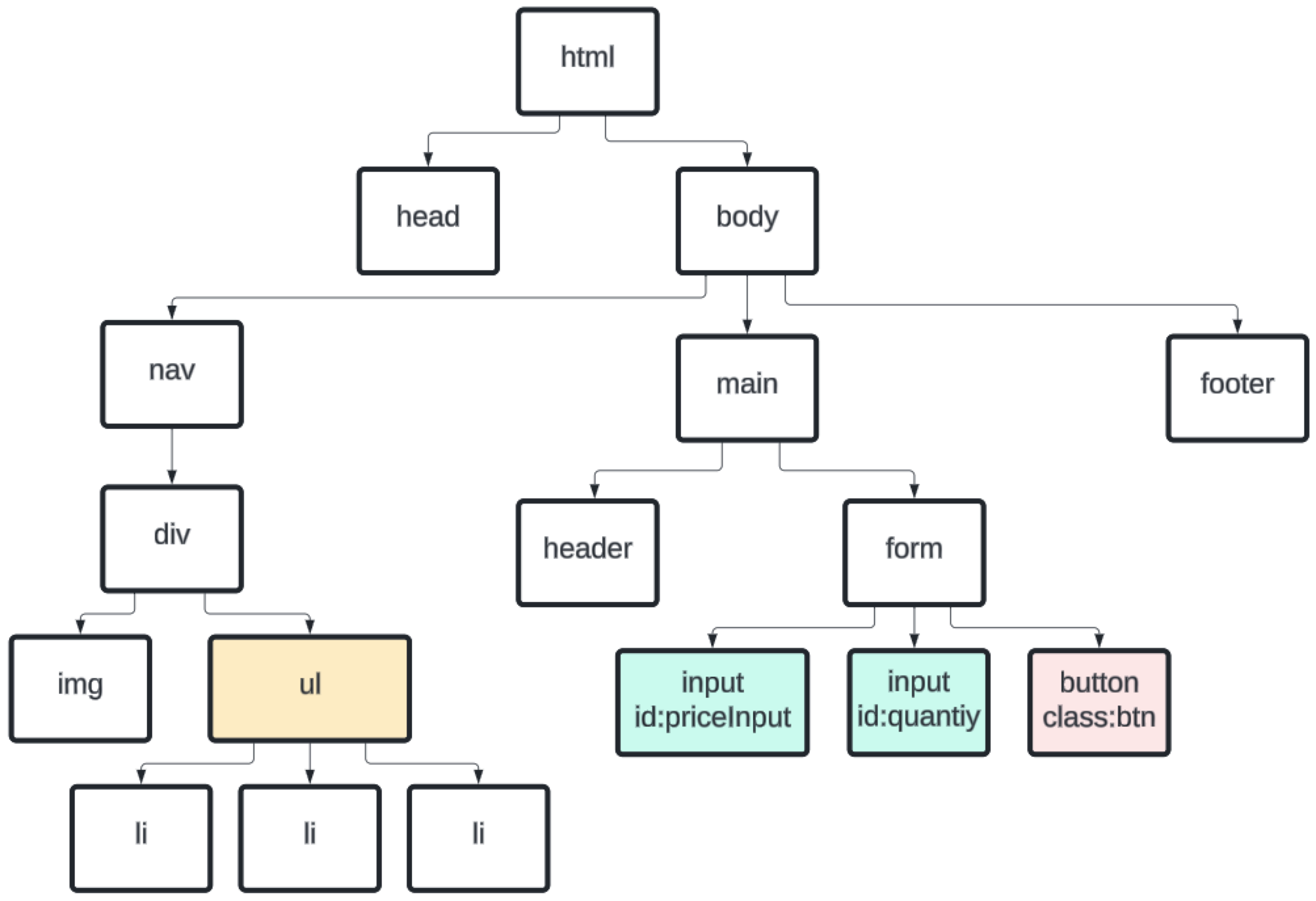
The tree uses family words. An element inside another is its **child**, and the element around it is its **parent**. Here `
` is the parent of the three `
` elements, and `
` is the parent of `
`. Elements with the same parent, like the `` and the `
`, are **siblings**. At the top, `` holds everything else: it's the parent of `` and ``, and every other element sits somewhere below them.
## Check yourself
2 questions to try on the lesson page.
## So what
Every change JavaScript makes to a page, from new text to a whole new list item, is a change to this tree, so knowing its shape tells you where to look.
## Key terms
- [DOM](https://www.ask-codey.com/glossary/dom)
Source: https://www.ask-codey.com/lessons/introducing-the-dom-an-overview