What Is an Array
An array keeps a whole list of values, such as the songs on a road-trip playlist, under one name, and you reach each one by its position, counting from 0.
Novice · JavaScript · Updated
After this lesson you can
- Create an array with square brackets and read how many items it has with length
- Read and replace an array item by its index, counting from 0
Key takeaways
- An array is a list of values kept in order under one name, written in square brackets with commas between the items.
lengthtells you how many items an array has. It counts the way people do, so three songs give 3.- Each item has an index, its position counting from 0, so the first song is
playlist[0]and the last isplaylist[playlist.length - 1]. - Reading an index past the end gives
undefinedinstead of an error, so an off-by-one mistake can hide. - You can replace an item by giving its index a new value.
Almost every app you've used is built around a list. A music app has a playlist, a store has a shopping cart, a group chat has its messages, a game has its high scores. When you write code for any of them, the first thing you need is a way to keep a whole list of things together. In JavaScript, that's an array, and once you know arrays, you can start building real apps.
One name for a whole list
Say you're planning a road trip with friends and making the playlist. With what you know from Module 1, you might keep each song in its own variable:
const song1 = 'Highway Sunrise';
const song2 = 'Gas Station Coffee';
const song3 = 'Desert Radio';

console.log(song1);
console.log(song2);
console.log(song3);
Highway Sunrise
Gas Station Coffee
Desert Radio
It works for three songs. Now picture the real playlist: forty songs, and a friend who adds two more at every gas stop. You'd need a new variable each time, and every line that prints or counts the songs would have to change. What you want is one name for the whole list, the way your phone shows one playlist with all its songs inside.
Making an array
An array is a list of values kept in order, under one name. You write it with square brackets, [ and ], and put commas between the values. Each value in the list is called an item (you'll also see the word element, which means the same thing).
const playlist = ['Highway Sunrise', 'Gas Station Coffee', 'Desert Radio'];
const songLengths = [214, 187, 243];
const emptyPlaylist = [];

console.log(playlist);
console.log(songLengths);
console.log(emptyPlaylist);
[ 'Highway Sunrise', 'Gas Station Coffee', 'Desert Radio' ]
[ 214, 187, 243 ]
[]
playlistholds three song titles, which are strings, so each one is in quotes.songLengthsholds how long each song is, in seconds. Numbers need no quotes.[], read "empty square brackets", is an array with nothing in it yet: a playlist waiting for songs.
When Node prints an array, it shows the square brackets and the items, with quotes around the strings. A browser's Console shows it a little differently, with the same items inside.
How many items: length
Every array knows how many items it holds. Ask it with length, written after the array's name and a dot:
const playlist = ['Highway Sunrise', 'Gas Station Coffee', 'Desert Radio', 'Windows Down'];
const emptyPlaylist = [];

console.log(playlist.length);
console.log(emptyPlaylist.length);
console.log(`The playlist has ${playlist.length} songs.`);
4
0
The playlist has 4 songs.
length counts the way people do: four songs give 4, and an empty array gives 0. There are no parentheses after length, because it's a value the array keeps, not something you ask it to do.
Try it. Make a file named road-trip.js. Make an array of five songs you'd want on a long drive, and print how many there are with a template literal, such as 5 songs for the road. Run it with node road-trip.js.
Each item has a number: the index
Picture the songs lined up in a row. To say where a song is, you count how many steps it is from the start. The first song is zero steps from the start, the second is one step, the third is two. That count is the item's index, and it always starts at 0.
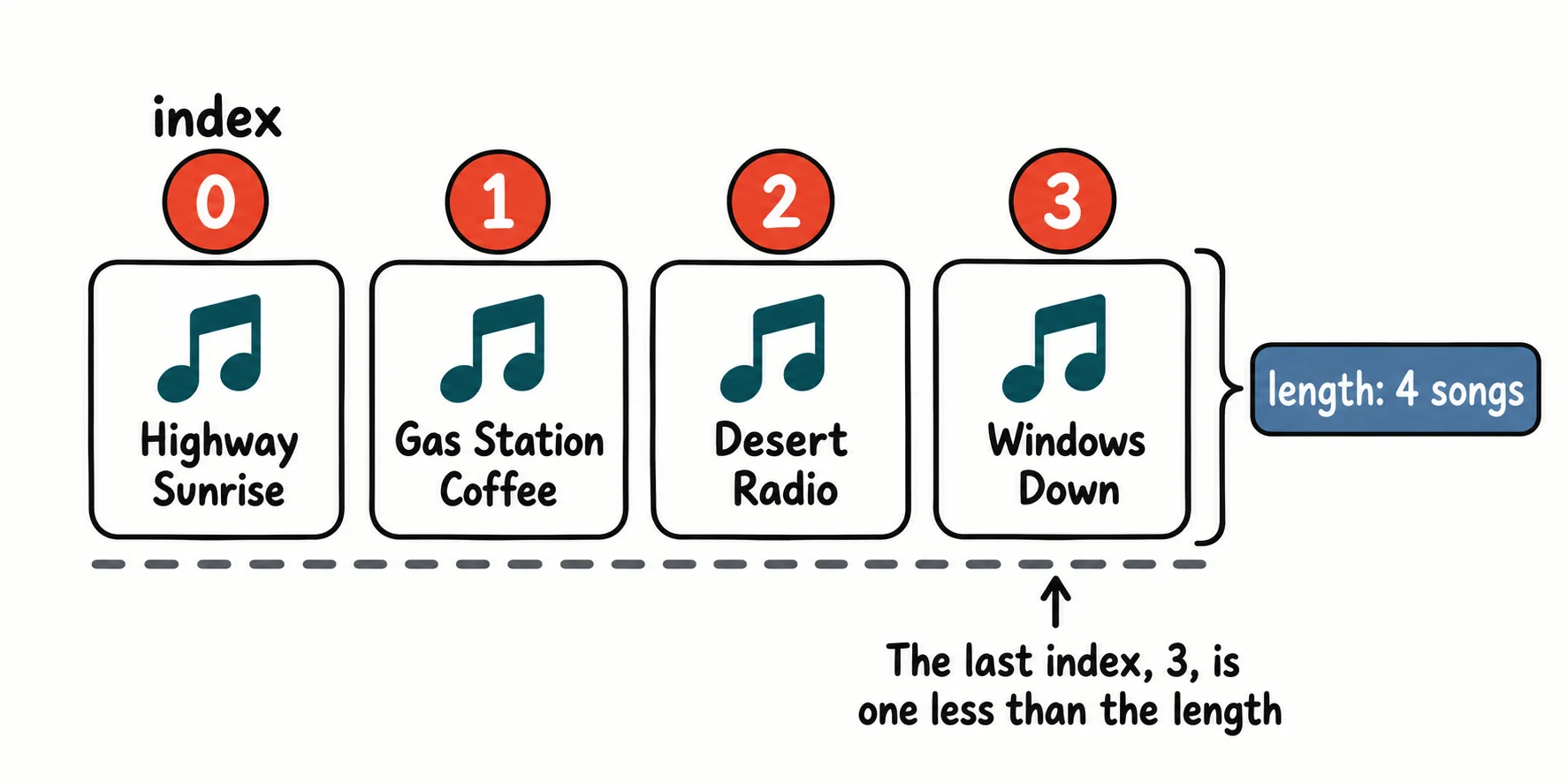
To read an item, write the array's name and the index in square brackets. playlist[0] is read "playlist, index zero", or "playlist at zero".
const playlist = ['Highway Sunrise', 'Gas Station Coffee', 'Desert Radio', 'Windows Down'];

console.log(playlist[0]);
console.log(playlist[2]);
console.log(playlist[playlist.length - 1]);
Highway Sunrise
Desert Radio
Windows Down
Because counting starts at 0, the last index is always one less than the length. Four songs have the indexes 0, 1, 2 and 3, so playlist.length - 1 is the index of the last song, however long the playlist grows. In your textbook this may be called zero-based indexing.
Replacing an item
A friend hates Gas Station Coffee and wants Mile Marker 9 in its place. Give that index a new value with =:
const playlist = ['Highway Sunrise', 'Gas Station Coffee', 'Desert Radio'];

playlist[1] = 'Mile Marker 9';

console.log(playlist);
console.log(playlist.length);
[ 'Highway Sunrise', 'Mile Marker 9', 'Desert Radio' ]
3
The array still has three songs: one was swapped for another. You may wonder how a const array can change. const means the name playlist always points to this same array; the items inside it can still change. The next lesson, Adding and Removing Items, comes back to this.
Try it. In road-trip.js, replace your third song with a different one, then print the whole array to check.
One step too far: undefined
Here's a mistake almost everyone makes at first. Four songs, and the code asks for the song at index 4:
const playlist = ['Highway Sunrise', 'Gas Station Coffee', 'Desert Radio', 'Windows Down'];

console.log(playlist.length);
console.log(playlist[playlist.length]);
console.log(playlist[4]);
4
undefined
undefined
There's no song at index 4: the last one is at 3. JavaScript doesn't stop with an error. It gives back undefined, its word for "there's no value here". That makes the mistake hard to spot: your program keeps running and prints undefined where a song title should be.
Being one away from the right number is so common it has a name: an off-by-one error. When you see undefined where you expected an item, check your index first: is it the length, when it should be the length minus 1?
Check yourself
2 questions to try on the lesson page.
So what
An array keeps a whole list under one name: songs, prices, scores, messages. Every list-shaped thing you build from here on starts as an array, with its length and its indexes from 0.