The Event Loop, in Pictures
The call stack runs one function at a time, finished timers wait their turn in the task queue, and the event loop moves the next one onto the stack only when the stack is empty, which is why setTimeout(fn, 0) runs after the code around it.
Journeyman · JavaScript · Updated
After this lesson you can
- Predict the order code runs in when it mixes regular code and timer callbacks
- Explain how the call stack, the task queue and the event loop decide what runs next
- Explain why nested callbacks get hard to read
Key takeaways
- The call stack holds the functions running right now. A called function goes on top, and comes off when it returns.
- When a timer is up, its callback joins the task queue, a line where callbacks wait their turn, first in, first out.
- The event loop moves the next callback from the queue onto the stack, but only when the stack is empty.
- So a timer's callback, even setTimeout(fn, 0), runs after all of the code around it has finished.
- Steps that each wait for the last one nest callbacks inside callbacks, and the code drifts right and gets hard to follow.
Sooner or later, every JavaScript developer writes code that prints undefined, or an old value, when it "should" print the new one, and it happens because a callback ran later than they expected. Job interviews ask about it too: "What does this print?", with a setTimeout(..., 0) hiding in the middle. Once you can picture how JavaScript decides what runs next, those questions stop being tricks, and you can read the order of any program with timers in it, line by line.
Three parts decide the order: the call stack, the task queue and the event loop. Here they are, in a pizza kitchen.
The call stack: what's running right now
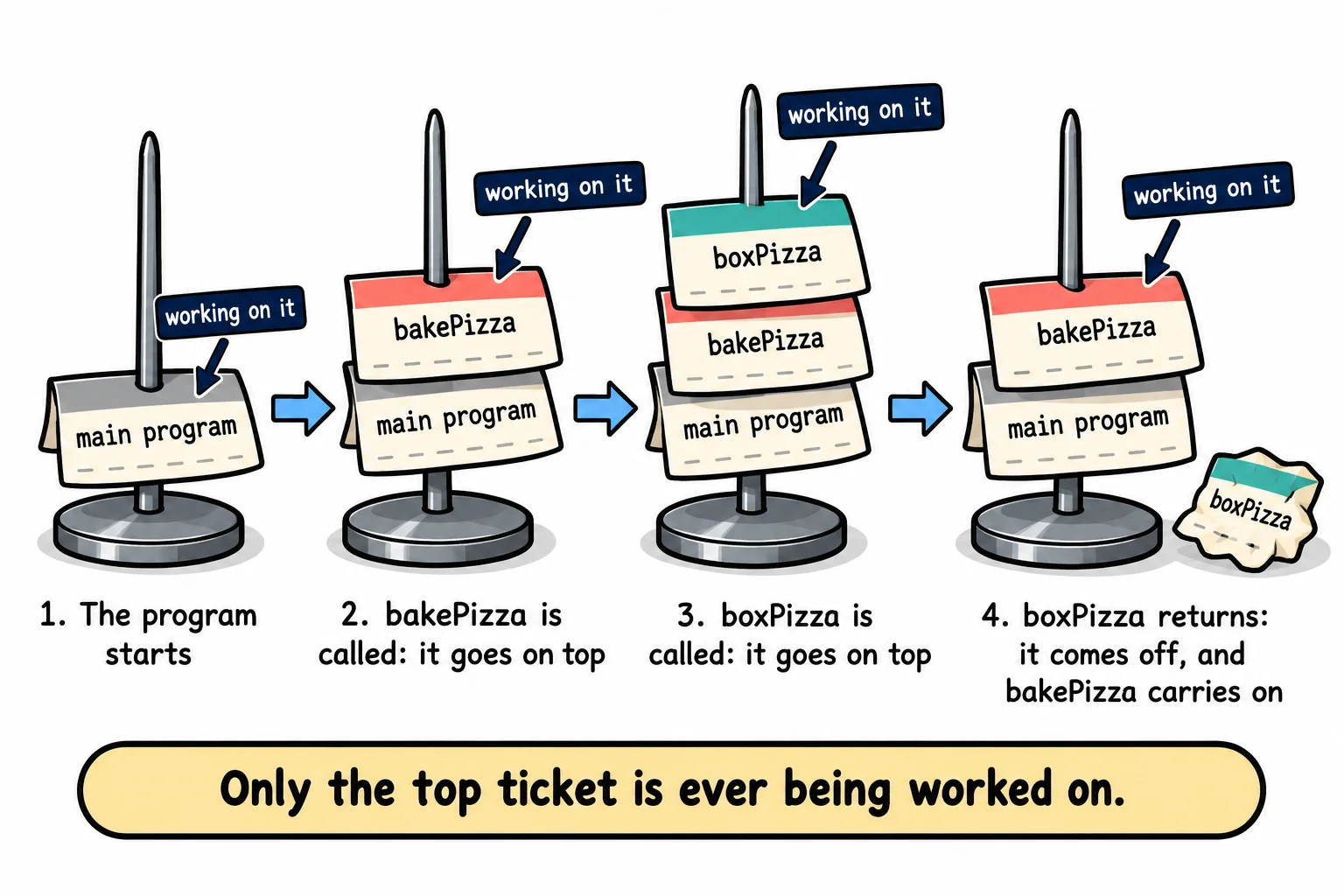
In the kitchen, Nina works from a spike of order tickets. When a job needs a smaller job done first, she spikes a new ticket on top, does it, pulls it off, and goes back to the ticket underneath. She only ever works on the top ticket.
JavaScript keeps the same kind of pile, called the call stack. Calling a function puts it on top of the stack; when the function returns, it comes off, and JavaScript carries on with the function underneath. The last one in is the first one out.
function boxPizza() {
  console.log('3. Box the pizza');
}

function bakePizza() {
  console.log('2. Bake the pizza');
  boxPizza();
  console.log('4. Back in bakePizza');
}

console.log('1. Start the order');
bakePizza();
console.log('5. Order done');
1. Start the order
2. Bake the pizza
3. Box the pizza
4. Back in bakePizza
5. Order done
bakePizza goes on the stack, then boxPizza goes on top of it. When boxPizza returns, it comes off, and bakePizza carries on where it left off, with line 4.
The task queue: callbacks waiting their turn
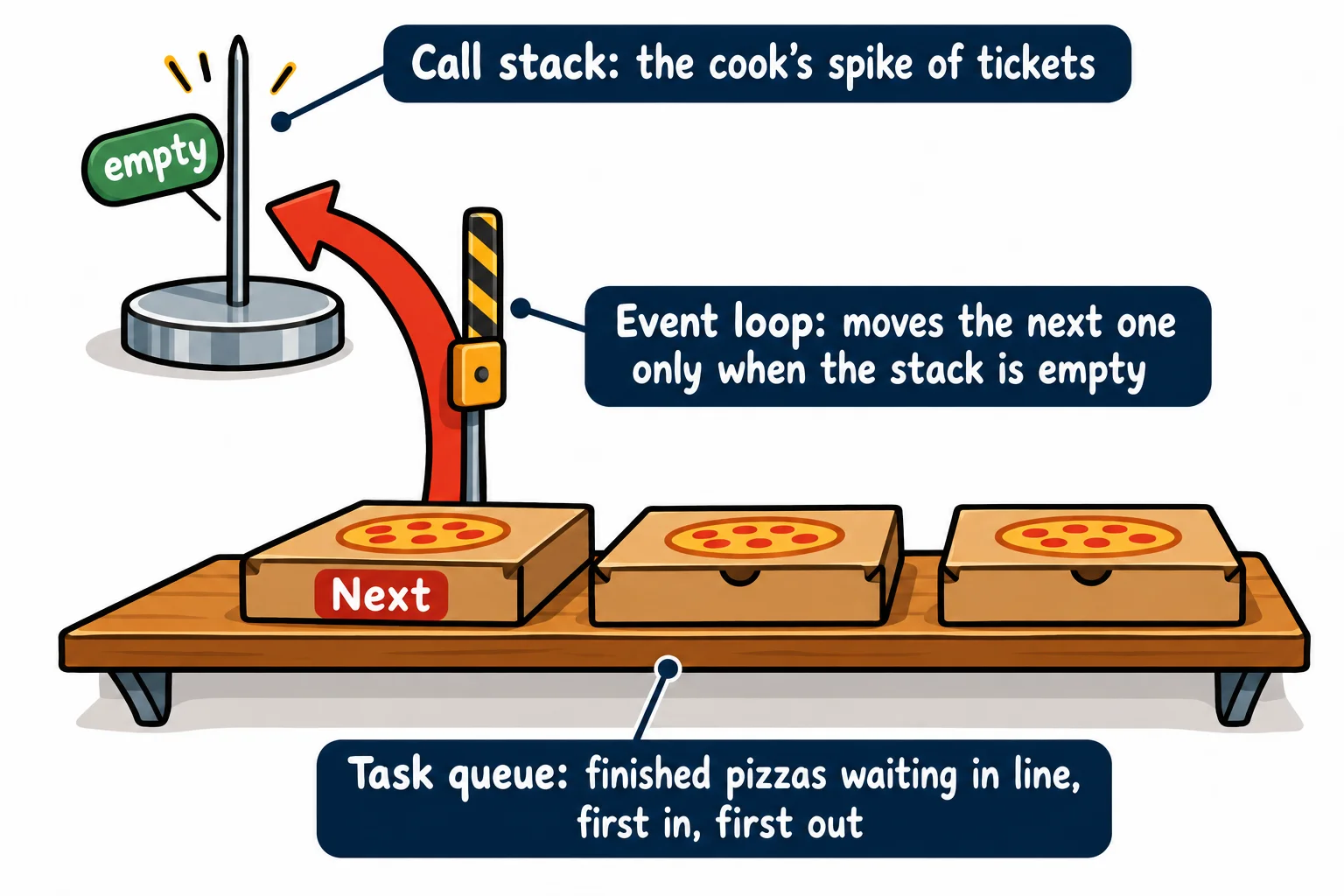
When an oven timer beeps, Nina doesn't drop what she's doing. The finished pizza goes on the pass, the shelf where food waits to be served, in the order it came out. In JavaScript, when a timer's time is up, the runtime puts its callback in the task queue: a line where callbacks wait to run, first in, first out, like the line at the counter.
setTimeout(() => console.log('Oven 1: pepperoni is ready'), 300);
setTimeout(() => console.log('Oven 2: veggie is ready'), 100);
setTimeout(() => console.log('Oven 3: cheese is ready'), 100);

console.log('All three pizzas are in');
All three pizzas are in
Oven 2: veggie is ready
Oven 3: cheese is ready
Oven 1: pepperoni is ready
A callback joins the queue when its timer is up, so the two 100 ms timers line up first, in the order they were set, and the 300 ms one joins later. The order you set them in doesn't decide it; the time each one is due does. And none of them can run before the last line, because that line is still on the stack.
The event loop: the stack must be empty
In a busy kitchen, someone watches the pass and the cook: the moment the cook's hands are free, they hand over the next plate. JavaScript has that helper too, and it's called the event loop. Over and over, it does this:
- Is the call stack empty? If not, wait: something is still running.
- If it is, take the first callback from the task queue and put it on the stack.
- The callback runs until it's finished, and the stack is empty again. Back to step 1.
Step 3 has a name: run-to-completion. Once a piece of code starts, nothing interrupts it; a timer that's due waits in the queue until the code on the stack has finished. That's why a busy loop made the timer in Timers: setTimeout and setInterval late.
Why setTimeout(fn, 0) runs last
A delay of 0 means "as soon as possible", and as soon as possible is after everything on the stack. Predict the order before you read the output:
console.log('A: take the order');

setTimeout(() => {
  console.log('B: the timer callback');
}, 0);

for (let box = 1; box <= 3; box++) {
  console.log(`C: fold box ${box}`);
}

console.log('D: done with this order');
A: take the order
C: fold box 1
C: fold box 2
C: fold box 3
D: done with this order
B: the timer callback
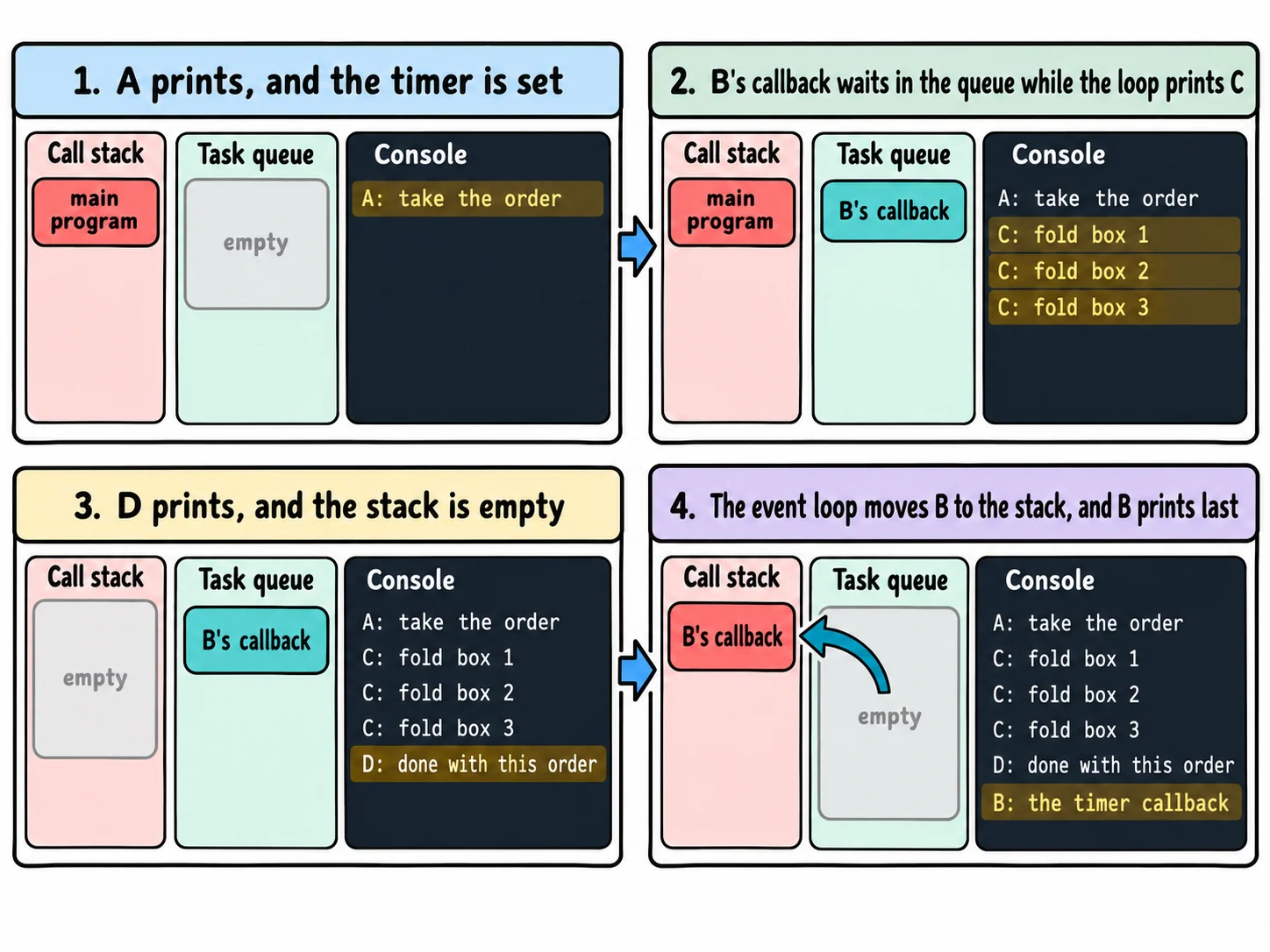
The timer is up almost at once, and its callback goes in the queue. But the whole program is still on the stack: A, the loop and D all run first. Only when the program has finished is the stack empty, and the event loop hands over B.
The bug this explains
Here's the kind of bug from the start of the lesson. The status changes in a callback, and the line that prints it runs before the callback does:
let orderStatus = 'in the oven';

setTimeout(() => {
  orderStatus = 'ready';
}, 0);

console.log(`Order #42 is ${orderStatus}`);
Order #42 is in the oven
The fix is to use the new value where it's ready: inside the callback.
let orderStatus = 'in the oven';

setTimeout(() => {
  orderStatus = 'ready';
  console.log(`Order #42 is ${orderStatus}`);
}, 0);
Order #42 is ready
Try it. Make a file named order.js with the A, B, C, D program. Before you run it, change the loop to fold 1000 boxes, and write down where you think B will print. Then run it with node order.js. However many boxes there are, B comes last.
Callbacks inside callbacks
Some steps have to wait for the step before them: stretch the dough, then add the sauce, then bake, then box. With callbacks, the only way to say "then" is to start the next step inside the callback of the last one:
function kitchenStep(message, ms, next) {
  setTimeout(() => {
    console.log(message);
    next();
  }, ms);
}

kitchenStep('Dough stretched', 300, () => {
  kitchenStep('Sauce and cheese on', 200, () => {
    kitchenStep('Baked', 500, () => {
      kitchenStep('Boxed', 100, () => {
        console.log('Order #42 is ready!');
      });
    });
  });
});
Dough stretched
Sauce and cheese on
Baked
Boxed
Order #42 is ready!
It works, but look at its shape. Every step pushes the code further right, and the end of the order is buried under a stack of }); lines. Add what real code needs, such as "and if the oven breaks, do this instead" at every step, and it doubles. Developers call this shape callback hell, or the pyramid of doom. It's the reason JavaScript has promises, which the next chapter starts with Promises: then, catch and finally: the same steps, written one under the other.
Check yourself
2 questions to try on the lesson page.
So what
The call stack runs one thing at a time, finished timers wait in the task queue, and the event loop hands them over only when the stack is empty. With that picture, you can predict the order of any code with timers, explain the "why is it still the old value?" bug, and see why the next chapter's promises were invented.
Key terms
- Event Loop
- Call Stack
- Task Queue
- Run-to-Completion
- Callback Hell