Functions as Values: Callbacks
In JavaScript a function is a value you can hand to another function, which calls it for you; that handed-over function is a callback, and it's how sorting, timers and buttons work.
Apprentice · JavaScript · Updated
After this lesson you can
- Pass a function to another function as a callback, without calling it first
- Write a callback as an arrow function and predict what it does with the values it is handed
Key takeaways
- In JavaScript a function is a value, like a number or a string. You can store it in a variable and hand it to another function.
- A callback is a function you pass to another function, which calls it for you, once per item or when the time comes.
- Pass a function by its name with no parentheses. With parentheses it runs right away, and you hand over its result instead.
- A short callback is usually an arrow function written right inside the call.
- The function that calls your callback decides what it hands over. forEach hands over the item first, then its position.
Click a button on a website and something happens. Sort a shop's products by price, low to high. Wait three seconds, then show a message. Underneath, all three work the same way: you hand JavaScript a function and say "run this when it's time". That handed-over function is called a callback, and once you can spot one, you'll see callbacks in almost every JavaScript program you read, including every lesson left in this chapter.
This chapter's running example is the high-score list of Comet Dash, an arcade game where you steer a comet through an asteroid field. Each entry has a player's gamer tag (such as PixelPanda), their score, the level they reached and the date they played. By the end of the chapter you'll turn that list into a leaderboard.
A function is a value, like a number or a string
Think of a recipe card. You can cook from it, or you can hand the card to a friend so they can cook later. Handing it over doesn't cook anything.
A function in JavaScript works the same way. Its name with parentheses, cheer("PixelPanda"), runs it: that's cooking. Its name with no parentheses, cheer, is the card itself: a value you can store in a variable or pass along.
function cheer(tag) {
  return `Nice run, ${tag}!`;
}

const sayIt = cheer;

console.log(typeof cheer);
console.log(sayIt("PixelPanda"));
function
Nice run, PixelPanda!
typeof says cheer is a function, a kind of value like number or string. And sayIt holds the same function, so calling sayIt runs cheer. In your textbook, a language where functions are values you can store and pass around is said to have first-class functions.
Handing a function to another function
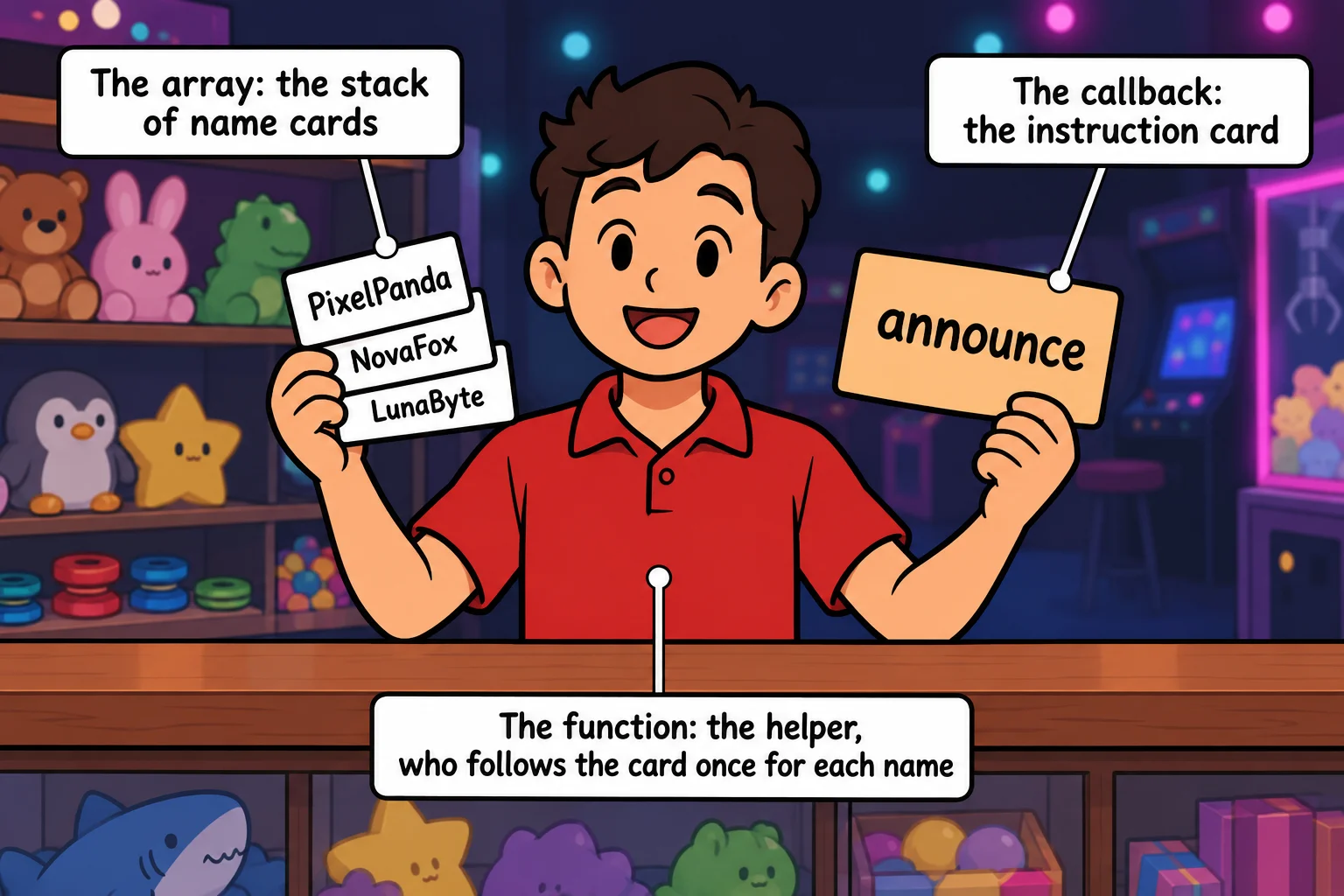
Picture the prize counter at an arcade. You hire a helper and give them two things: the stack of winners' names, and an instruction card that says what to do with each one. The helper does the walking through the stack. The card says what happens to each name.
Here is that helper in code. forEachPlayer takes a list of tags and a function named action, and calls action once for each tag:
function forEachPlayer(tags, action) {
  for (const tag of tags) {
    action(tag);
  }
}

function announce(tag) {
  console.log(`${tag} made the high-score list!`);
}

forEachPlayer(["PixelPanda", "NovaFox", "LunaByte"], announce);
PixelPanda made the high-score list!
NovaFox made the high-score list!
LunaByte made the high-score list!
announce is the callback: you hand it over, and forEachPlayer calls it back, once per tag. A function like forEachPlayer, which takes a function (or gives one back), is called a higher-order function. Inside it, action is an ordinary parameter that happens to hold a function, so action(tag) calls whatever function you passed in.
The helper never changes. To do something different with each tag, you hand it a different card.
Try it. Make a file named callbacks.js with the code above and run it with node callbacks.js. Then write a second function, shout, that prints the tag in capitals with tag.toUpperCase(), and pass shout to forEachPlayer instead of announce.
Passing, not calling: watch the parentheses
The most common callback mistake is one pair of parentheses. Here, the last line hands over announce() instead of announce:
function forEachPlayer(tags, action) {
  for (const tag of tags) {
    action(tag);
  }
}

function announce(tag) {
  console.log(`${tag} made the high-score list!`);
}

forEachPlayer(["PixelPanda", "NovaFox"], announce());
The parentheses run announce right away, before forEachPlayer starts, with no tag, so it prints undefined made the high-score list! once. A function with no return gives back undefined, so undefined is what gets passed as action. Then forEachPlayer tries to call it, and the program stops with TypeError: action is not a function.
When you see is not a function and a callback is involved, look at the line that passes it: there's usually a () that doesn't belong.
Writing the callback right where it's used
A callback you only need once doesn't need a name. You can write it as an arrow function right inside the call. => is read "arrow": the parameters go on its left, and what the function does goes on its right.
function forEachPlayer(tags, action) {
  for (const tag of tags) {
    action(tag);
  }
}

forEachPlayer(["PixelPanda", "NovaFox"], (tag) => console.log(`GG, ${tag}!`));
GG, PixelPanda!
GG, NovaFox!
(tag) => console.log(...) is a whole function: it takes a tag and prints a message. Use an arrow function written in place for a short, one-off step, and a named function when the step is long or you'll use it in more than one place.
The helper decides what your callback gets
JavaScript arrays come with their own helper, forEach, which you may have met in Looping Through an Array. The array is the stack of names, and your callback is the instruction card. forEach hands your callback two things, always in this order: the item, then its position (its index, counting from 0).
const highScores = [
  { tag: "PixelPanda", score: 8200 },
  { tag: "NovaFox", score: 12450 },
  { tag: "LunaByte", score: 9900 },
];

highScores.forEach((player, index) => {
  console.log(`${index + 1}. ${player.tag}: ${player.score} points`);
});
1. PixelPanda: 8200 points
2. NovaFox: 12450 points
3. LunaByte: 9900 points
You choose the parameter names, but not their order. Name them (index, player) and index would hold each player, because forEach always hands the item over first. Each player here is an object, like the records in Arrays of Objects.
Try it. Add a fourth player to highScores, such as { tag: "TurboSnail", score: 450 }, and run the code again. The callback runs one more time, with no change to the callback itself.
Callbacks you'll meet everywhere
The same idea turns up all over JavaScript. setTimeout takes a callback and a wait in milliseconds (1000 is one second), and calls the callback once the wait is over:
console.log("Get ready...");

setTimeout(() => console.log("Level 2: the asteroid field!"), 1500);

console.log("Steer with the arrow keys.");
Get ready...
Steer with the arrow keys.
Level 2: the asteroid field!
Look at the order: the last line printed before the callback did. setTimeout doesn't wait in line. It hands the callback over and the program carries on; a second and a half later, the callback runs. On a web page, button.addEventListener("click", callback) works the same way: the callback runs whenever someone clicks. You'll build pages like that in JavaScript in the Browser (Module 4), and the rest of this chapter hands callbacks to map, filter, reduce and sort.
Check yourself
2 questions to try on the lesson page.
So what
A callback lets you write the "go through every item" or "wait until it's time" part once, and swap in what happens each time. Every array method in the rest of this chapter, and every click handler you'll ever write, is built on it.
Key terms
- Callback Function
- Higher-Order Function
- First-Class Function
- Arrow Function