Making Decisions with if and else
An if statement runs a block of code only when its condition is true, else gives the other path, and else if chooses between several, so your program can react to what's going on.
Novice · JavaScript · Updated
After this lesson you can
- Run code only when a condition is true with if and else
- Choose between several paths with else if, in the right order
Key takeaways
- An if statement runs the code in its curly braces only when the condition in its parentheses is true.
- else gives the code to run when the condition is false, so exactly one of the two paths runs.
- else if adds more paths. JavaScript checks them from the top and runs only the first one whose condition is true.
- The lines between { and } are a code block. Declare a variable before the if when you need it after the if.
Almost every app you use makes decisions. A shopping site shows Add to cart when an item is in stock and Sold out when it isn't. A game says Game over when your lives reach zero. A sign-up form says Password too short when it is. Each of those is a few lines of code that check something and pick what to do. In this lesson you write those lines, for a bike rental shop.
Meet Hilltop Bikes, a small shop that rents bikes by the hour: $12 an hour on weekdays, $15 on weekends, and $4 for a helmet. Every lesson in this chapter works on its prices and its rack of bikes.
A fork in the road
You make decisions like this all day: if it's raining, take a rain jacket. There's a question (is it raining?) and something to do only when the answer is yes.
In JavaScript, that's an if statement. The question goes in parentheses ( ), and it's called the condition: anything that works out to true or false. The code to run when it's true goes between curly braces { }:
const isRaining = true;

if (isRaining) {
  console.log("Grab a rain jacket for the ride.");
}

console.log("Have a great ride!");
Grab a rain jacket for the ride.
Have a great ride!
Change true to false and run it again: only Have a great ride! prints. The last line isn't inside the braces, so it runs either way.
Asking a question with a comparison
Most conditions are comparisons, like the ones from Booleans and Comparisons: > (read "greater than"), >= ("greater than or equal to"), === ("strictly equal"). Hilltop Bikes gives a free water bottle with every rental of 4 hours or more:
const hours = 5;

if (hours >= 4) {
  console.log("Free water bottle with this rental!");
}

console.log(`Rental booked for ${hours} hours.`);
Free water bottle with this rental!
Rental booked for 5 hours.
hours >= 4 is the condition. With hours at 5 it's true, so the message prints. With 2 hours it's false, and JavaScript skips the whole block.
Try it. Make a file named water-bottle.js with the code above, and run it with node water-bottle.js. Then change hours to 4, then to 3, and run it each time. Which numbers get the bottle?
else: the other path
Sometimes both answers need their own code: if it's the weekend, the rate is $15; otherwise it's $12. The word else (read "otherwise") gives the code for when the condition is false. Exactly one of the two blocks runs, never both:
const isWeekend = false;
const hours = 3;
let hourlyRate;

if (isWeekend) {
  hourlyRate = 15;
} else {
  hourlyRate = 12;
}

console.log(`${hours} hours at ${hourlyRate} an hour: ${hours * hourlyRate}`);
3 hours at $12 an hour: $36
In ${hourlyRate}, the first $ is an ordinary dollar sign that gets printed, and ${hourlyRate} is the template literal's slot for the value.
Notice that let hourlyRate; comes before the if. The lines between a { and its } are called a code block, and a variable made with let or const inside a block exists only inside it. Declare it outside, give it a value inside, and you can use it after the if.
else if: more than two paths
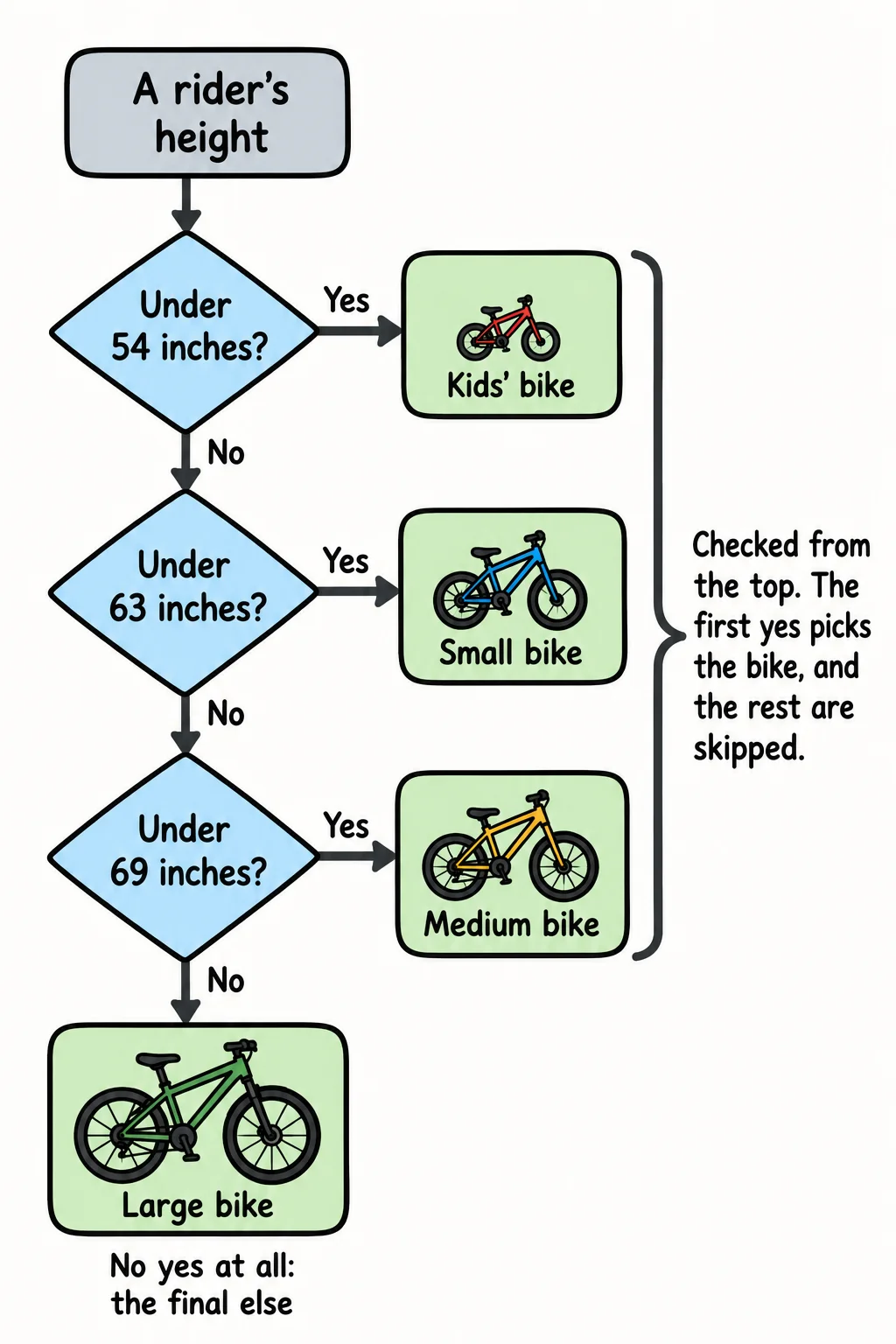
Hilltop Bikes has four sizes of bike, and the right one depends on the rider's height: under 54 inches is a kids' bike, under 63 is small, under 69 is medium, and anything taller is large. That's more than two paths, so you chain them with else if:
const height = 66;
let size;

if (height < 54) {
  size = "kids";
} else if (height < 63) {
  size = "small";
} else if (height < 69) {
  size = "medium";
} else {
  size = "large";
}

console.log(`A rider who is ${height} inches tall gets a ${size} bike.`);
A rider who is 66 inches tall gets a medium bike.
JavaScript checks the conditions from the top and runs only the first one that's true. Then it skips everything else in the chain. With 66, height < 54 is false, height < 63 is false, and height < 69 is true, so size becomes "medium" and the else never runs. The else at the end catches every height the others didn't.
Order matters
Because the first true condition wins, the order of an else if chain is part of what it means. Here's the same chain with the checks in the wrong order:
const height = 50;
let size;

if (height < 69) {
  size = "medium";
} else if (height < 63) {
  size = "small";
} else if (height < 54) {
  size = "kids";
} else {
  size = "large";
}

console.log(`A rider who is ${height} inches tall gets a ${size} bike.`);
A rider who is 50 inches tall gets a medium bike.
A 50-inch rider is a kid, but 50 is also less than 69, and that check comes first. Nothing complains: the program runs and gives the wrong answer. When your conditions overlap like these, put the narrowest one first (height < 54) and work outward.
Try it. Make bike-size.js with the right-order version. Run it with the heights 53, 54, 62, 63 and 75, and check each answer against the shop's sizes. The numbers right at the edge (54, 63) are where bugs like to hide.
Check yourself
2 questions to try on the lesson page.
So what
Every if this, do that in an app, from Sold out to Game over, is an if statement. With else and else if your programs can choose between as many paths as the situation needs.