# Bubbling and Event Delegation
A click travels up from the element it happened on through every parent, so one listener on a list can handle every button inside it, even buttons added later.
Journeyman · JavaScript · Web Development · Updated November 1, 2026
## After this lesson you can
- Predict which listeners run, and in what order, as a click bubbles up from an element through its parents
- Handle clicks for a whole list with one listener, using event.target.closest and a data- attribute
## Key takeaways
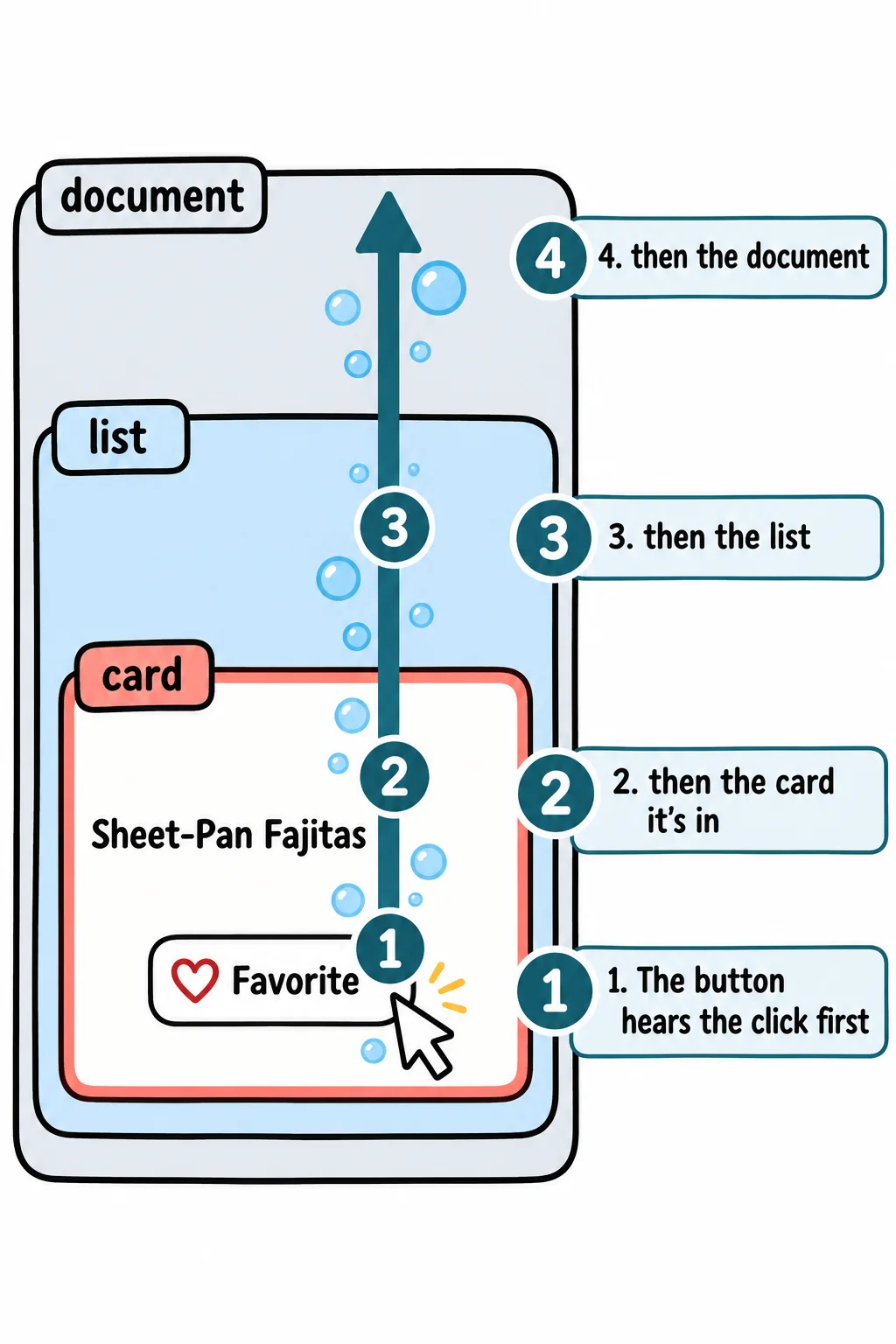
- An event starts on the element it happened on, then bubbles up through its parent, the parent's parent, and on up to the document. Every listener on the way runs, from the inside out.
- Event delegation puts one listener on a list instead of one on every item, and it works for items added after the page loaded.
- event.target.closest('.favorite') starts at the clicked element and walks up through its parents, giving back the first one that matches the selector, or null.
- A data- attribute, such as data-id="fajitas", labels an element with your own information, and JavaScript reads it as element.dataset.id.
Weeknight Recipes shows 30 recipe cards, and each one has a **Show steps** button and a heart. That's 60 buttons. Give each its own listener and you've written 60 listeners; then the visitor clicks **Dinner**, the list is drawn again with new buttons, and none of the new ones has a listener at all. Every page with a list runs into this, from a to-do app to a shopping cart to a playlist. The fix is one listener on the list itself, and it works because of the way events travel.
## An event bubbles up
Picture a bubble in a glass of soda. It forms at the bottom, then rises through the drink until it reaches the top.
An event does the same. A click on the heart starts at the heart button, then rises through the card the button is in, the list the card is in, and on up to the page's `` and the `document`. This is called **event bubbling**, and every listener the event meets on the way runs.
Here's a card in a list, with only the parts that matter:
```html
Sheet-Pan Fajitas
```
Give the button, the card, the list and the document a listener each. They're added from the outside in, on purpose:
```javascript
document.addEventListener('click', () => console.log('document'));
document.querySelector('#recipe-list').addEventListener('click', () => console.log('list'));
document.querySelector('.recipe-card').addEventListener('click', () => console.log('card'));
document.querySelector('.favorite').addEventListener('click', () => console.log('button'));
```
Click the heart, then the heading, and the Console shows:
```text
button
card
list
document
card
list
document
```
The order follows the page, not the code: the element that was clicked first, then each parent on the way up. The heading has no listener of its own, so its click is first heard by the card. That's why, in *The Event Object*, a click on a card's heading ran the card's listener.
In your textbook this is the *bubbling phase*. There's also a *capturing phase*, when the event travels down from the document to the target before it bubbles up. Listeners use the bubbling phase unless they ask otherwise, and you'll rarely need the other.
## One listener for the whole list: event delegation
An apartment building doesn't give every apartment its own doorman. One front desk takes every parcel and reads the label to see whose it is.
**Event delegation** is the front desk: one listener on the list, which handles a click on anything inside it. Every click inside the list bubbles up to the list's listener, and `event.target` says where it started:
```javascript
const list = document.querySelector('#recipe-list');
list.addEventListener('click', (event) => {
console.log(`Clicked a ${event.target.tagName} inside the list`);
});
```
Two things make this the way lists are usually handled:
- **One listener instead of sixty.** Less code, and one place to look when something goes wrong.
- **Items added later work too.** The listener is on the list, which stays on the page. A card added with `appendChild` an hour later is inside the list, so its clicks bubble up to the same listener.
## closest: "which button am I inside?"
There's a catch. The heart button has a little icon inside it, in its own element:
```html
```
Click right on the icon, and `event.target` is the ``, not the button. To find the button whether the click landed on the icon or the word, ask the element **`closest`**. It starts with the element itself, then walks up through its parents, and gives back the first one that matches a CSS selector, or `null` when none does:
```javascript
list.addEventListener('click', (event) => {
const heart = event.target.closest('.favorite');
if (!heart) {
return;
}
heart.classList.toggle('is-favorite');
});
```
`closest('.favorite')` gives back the heart button for a click on the icon, on the word, or on the button's edge. A click on the card's heading isn't inside a heart, so `closest` gives back `null`, `!heart` is `true` (`!` is read "not"), and `return` ends the listener early: that click wasn't for this code.
## Which recipe? A data- attribute
The listener knows a heart was clicked, but not whose. Give each card a label of your own with a **data- attribute**: `data-` followed by a name you choose.
```html
```
JavaScript reads it through the element's `dataset`, without the `data-` part: `data-id` is `card.dataset.id`. A longer name with hyphens turns into camelCase: `data-meal-type` is `card.dataset.mealType`. Now one listener handles both buttons on every card:
```javascript
list.addEventListener('click', (event) => {
const button = event.target.closest('button');
if (!button) {
return;
}
const card = button.closest('.recipe-card');
if (button.classList.contains('favorite')) {
console.log(`Favorite: ${card.dataset.id}`);
} else if (button.classList.contains('show-steps')) {
console.log(`Show steps: ${card.dataset.id}`);
}
});
```
`classList.contains('favorite')` is `true` when the element has that class. With an Overnight Oats card (`data-id="oats"`) in the list too, clicking its heart icon prints `Favorite: oats`, and clicking the fajitas card's **Show steps** prints `Show steps: fajitas`.
**Try it.** In your `weeknight` page, add a list with two cards, each with `data-id`, a **Show steps** button and a heart, and the listener above. Then, in the Console, add a third card with `createElement` and `appendChild`, and click its heart. The listener you wrote before the card existed answers it.
## Stopping the bubble, and why you rarely should
Sometimes bubbling gets in the way. Say a click anywhere on a card opens the full recipe, and the heart is inside the card: clicking the heart would favorite it and open the recipe too. `event.stopPropagation()` exists for this: called in the heart's listener, it stops the event from rising any further. It also hides the click from every listener above, including ones you didn't write, such as a menu that closes when you click elsewhere on the page.
The gentler fix is to have the card's listener ignore clicks that were meant for the heart:
```javascript
card.addEventListener('click', (event) => {
if (event.target.closest('.favorite')) {
return;
}
console.log('Opening the recipe');
});
```
A click on the heart now favorites the recipe and nothing else, a click anywhere else on the card opens it, and every other listener still hears every click.
## Check yourself
2 questions to try on the lesson page.
## So what
One listener on a list, `closest` to find the button, and a `data-` attribute to know whose it is: that's how every long list on the web is wired, and it keeps working when the list is drawn again from new data.
## Key terms
- [Event Bubbling](https://www.ask-codey.com/glossary/event-bubbling)
- [Event Delegation](https://www.ask-codey.com/glossary/event-delegation)
- [Custom data attribute](https://www.ask-codey.com/glossary/custom-data-attribute)
- [stopPropagation()](https://www.ask-codey.com/glossary/stoppropagation)
## Cheat sheets
- [Bubbling and Event Delegation](https://www.ask-codey.com/cheat-sheets/javascript-events-bubbling-and-delegation-cheat-sheet)
## Related
- [The Event Object](https://www.ask-codey.com/lessons/javascript-events-the-event-object)
- [Drawing the Page from Your Data](https://www.ask-codey.com/lessons/javascript-rendering-from-data)
Source: https://www.ask-codey.com/lessons/javascript-events-bubbling-and-delegation