What Is a Function
A function is a named set of steps you write once and run whenever you need it, by calling its name.
Novice · JavaScript · Updated
After this lesson you can
- Declare a function and call it
- Give a function one job and a name that says what it does
Key takeaways
- A function is a named set of steps that you write once and run as many times as you like.
- Declare a function with the word function, a name, parentheses and a body in curly braces. Nothing in it runs until you call it.
- Call a function by writing its name followed by parentheses, such as showLevelComplete(). Without the parentheses, nothing runs.
- Give each function one job and a name that says what it does, usually starting with a verb, such as playCoinSound.
Think about a game you've played on your phone or a console. Every time you grab a coin, the same sound plays. At the end of every level, the same "Level complete!" banner appears. Nobody wrote those lines of code again for each coin and each level. They wrote them once, gave them a name, and the game runs them by name whenever it needs them. That named set of steps is a function.
You'll use functions in every program from here on. Every button on a web page runs a function when you click it, and every app you'll ever work on is built out of hundreds of small functions with clear names. In this chapter you'll write the scoring code for a small video game, Coin Dash, where a fox named Pip runs across city rooftops collecting coins.
A recipe card for your code
Picture a recipe card for pancakes. Someone wrote it once, and it has a name at the top and the steps underneath. Writing the card doesn't make any pancakes: they get made when someone picks up the card and follows it, this Saturday, next Saturday, as often as anyone wants pancakes.
A function works the same way, and the two halves have names:
- Declaring a function is writing the card: you give the steps a name.
- Calling a function is cooking from the card: JavaScript runs the steps, right then.
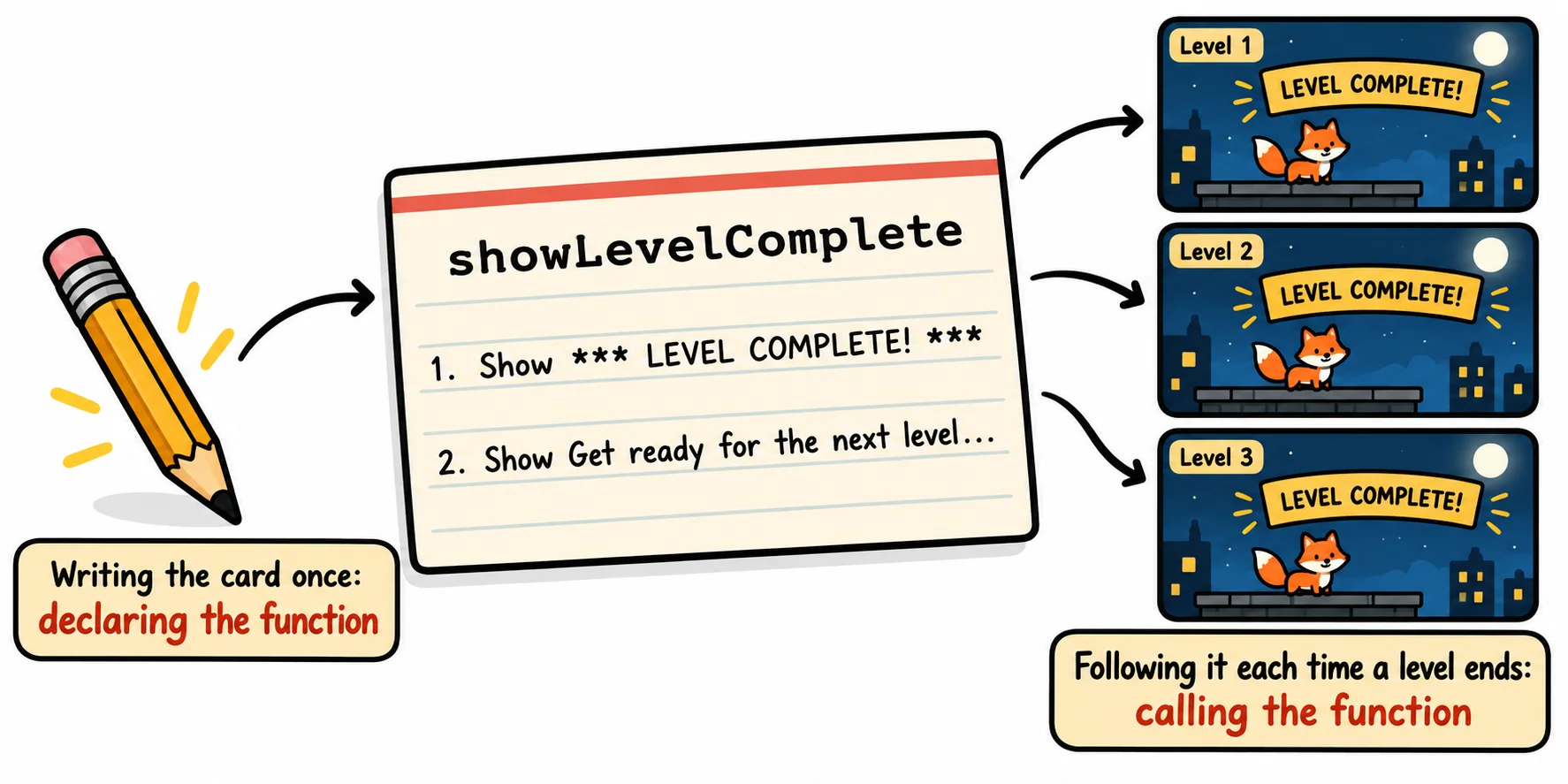
The shape of a function declaration
This is the shape of a function declaration, the most common way to write a function:
function name() {
  // the steps go here
}
functionis the keyword that says "here comes a function".- The name follows the same rules as a variable's name, and is written in camelCase:
showLevelComplete,playCoinSound. (), read "parentheses", come right after the name. They're empty for now. In the next lesson, Parameters and Return Values, you'll put values in them.{ }, read "curly braces", hold the function's body: the steps it runs, one statement per line, indented by two spaces so they stand out.
Calling a function
Here is a real function from Coin Dash. The first three lines declare it; the last two lines call it:
function showLevelComplete() {
  console.log('*** LEVEL COMPLETE! ***');
}

showLevelComplete();
showLevelComplete();
*** LEVEL COMPLETE! ***
*** LEVEL COMPLETE! ***
To call a function, write its name followed by parentheses and a semicolon: showLevelComplete();. Each call runs the whole body once, so two calls print the banner twice. Without the last two lines, the program would print nothing at all: a recipe card nobody cooks from.
Try it. Make a file named banner.js, copy the code above into it, and run it in a terminal with node banner.js. Then add a second line to the function's body, console.log('Get ready for the next level...');, and run it again. Both calls print both lines: you changed the function in one place, and every call follows.
Write once, use whenever
The real payoff comes when the same steps are needed again and again. Pip grabs three coins in a row here, and a loop calls the function once for each coin:
function playCoinSound() {
  console.log('Ding! +10');
}

for (let coin = 1; coin <= 3; coin++) {
  playCoinSound();
}

console.log('Pip reaches the rooftop.');
playCoinSound();
Ding! +10
Ding! +10
Ding! +10
Pip reaches the rooftop.
Ding! +10
The sound is written in one place and used in two. If the game's designer decides the coin should go Cha-ching! instead, you change one line inside the function, and every coin in the game changes with it.
Forgetting the parentheses
The parentheses are what make the call happen. A name without them only mentions the function, the way saying "the pancake recipe" doesn't make pancakes:
function showLevelComplete() {
  console.log('*** LEVEL COMPLETE! ***');
}

showLevelComplete;
console.log(showLevelComplete);
[Function: showLevelComplete]
The line showLevelComplete; runs without an error, but nothing happens: the banner never prints. And console.log(showLevelComplete) prints a description of the function itself, not its banner. When a function you wrote seems to do nothing, check the call for its () first.
One job per function
A good recipe card does one thing. You keep the pancake card and the syrup card separate, so you can use the syrup card for waffles too. Functions are the same: a function that does one job is easier to name, to test, and to use again somewhere else.
Here the title screen of Coin Dash is built from three small functions, and the third one calls the other two:
function showTitle() {
  console.log('COIN DASH');
}

function showControls() {
  console.log('Arrow keys to run, space to jump');
}

function showTitleScreen() {
  showTitle();
  showControls();
}

showTitleScreen();
COIN DASH
Arrow keys to run, space to jump
The pause menu can now call showControls() too, without showing the title again. Name each function for its one job, usually starting with a verb: showControls, playCoinSound, resetTimer. If the only honest name you can find has an and in it, such as showTitleAndSaveScoreAndPlayMusic, it's doing more than one job, and it wants to be split up.
In a textbook, splitting a program into small functions is called decomposition, and the one-job rule is called the single responsibility principle.
Try it. Write a function named showGameOver that prints GAME OVER, and a function named showTryAgain that prints Press space to try again. Then write showEndScreen, which calls both, and call showEndScreen() once at the bottom of the file.
Check yourself
2 questions to try on the lesson page.
So what
A function turns a few lines of code into one named step you can run whenever you need it. Every program you'll write from here on, from a game to a website, is built from small functions like these, each with one job and a name that says what it is.