Repeating with while
A while loop repeats a block of code for as long as its condition stays true, which fits any job where you can't know in advance how many times it will take, as long as something inside the loop lets it end.
Novice · JavaScript · Updated
After this lesson you can
- Repeat JavaScript code while a condition is true with a while loop
- Spot and fix an endless loop by changing the condition's variable inside the loop
Key takeaways
- A
whileloop checks its condition, runs its block if the condition istrue, then goes back and checks again. - Each pass through the block is an iteration. If the condition is
falsefrom the start, the block never runs. count++adds 1 to a variable andcount--takes 1 away.total += 5adds 5, andtotal -= 5takes 5 away.- Something inside the loop must change its condition's variable, or it's an endless loop. Press Ctrl+C to stop it.
Computers are great at doing the same thing again and again without getting bored. A music app plays the next song until the playlist ends. A game keeps running rounds until someone wins. A sign-up form keeps asking until the password is long enough. That again and again is a loop, and the simplest kind in JavaScript is the while loop.
Again and again: the loop
Think of filling a bike tire: while the tire is soft, pump some more air. You don't decide in advance how many pumps it takes. You check, pump, check again, and stop when the check says you're done.
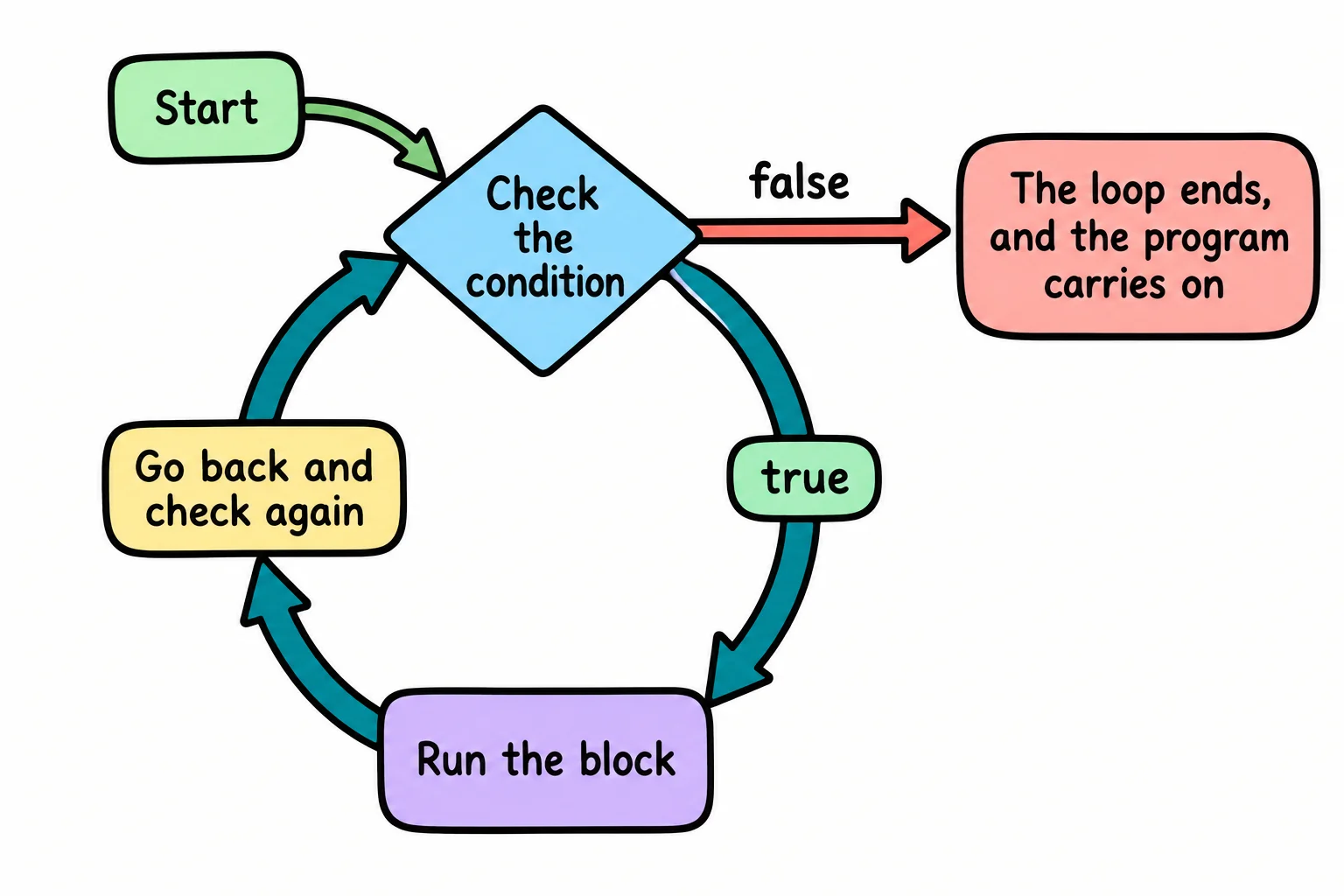
A while loop works the same way. It checks its condition; if it's true, it runs the block in its curly braces, then goes back and checks again. When the condition is false, the loop ends, and the program carries on after it.
Hilltop Bikes opens with 3 bikes in the rack. Here the loop rents them out, one at a time, until the rack is empty:
let bikesInRack = 3;

while (bikesInRack > 0) {
  console.log(`Renting out a bike. Bikes in the rack: ${bikesInRack}`);
  bikesInRack = bikesInRack - 1;
}

console.log("The rack is empty.");
Renting out a bike. Bikes in the rack: 3
Renting out a bike. Bikes in the rack: 2
Renting out a bike. Bikes in the rack: 1
The rack is empty.
Each pass through the block is called an iteration. There are three here, with bikesInRack at 3, 2 and 1. When it reaches 0, bikesInRack > 0 is false, and the loop ends.
Adding and taking away one
Loops change variables all the time, so JavaScript has short ways to write it:
| Short form | Read | Means |
|---|---|---|
count++ |
"count plus plus" | count = count + 1 |
count-- |
"count minus minus" | count = count - 1 |
total += 5 |
"total plus equals 5" | total = total + 5 |
total -= 5 |
"total minus equals 5" | total = total - 5 |
Adding one is called incrementing, and ++ is the increment operator; taking one away is decrementing, with --. The bike rack loop could say bikesInRack--; instead of bikesInRack = bikesInRack - 1;. Both do the same thing, and you'll see the short form in almost every loop.
When you don't know how many times
while fits best when you can't know in advance how many iterations it'll take. Hilltop Bikes has a rewards card: every rental earns 15 points, and 100 points gets a free rental. How many rentals is that?
let points = 0;
let rentals = 0;

while (points < 100) {
  points += 15;
  rentals++;
}

console.log(`Free rental after ${rentals} rentals, with ${points} points.`);
Free rental after 7 rentals, with 105 points.
Change the 15 to 20, and the loop works out a new answer, with no other change. That's the point of a loop: it keeps going exactly as long as the job needs.
Try it. In rewards.js, write the rewards loop and run it with node rewards.js. Then add a console.log inside the loop that prints the points after each rental, so you can watch the loop work.
The condition is checked first
A while loop checks its condition before each iteration, the first one included. If the condition is false from the start, the block never runs at all:
let bikesInRack = 0;

while (bikesInRack > 0) {
  console.log("Renting out a bike.");
  bikesInRack--;
}

console.log(`Bikes left: ${bikesInRack}`);
Bikes left: 0
That's usually what you want: with an empty rack, there's nothing to rent.
The loop that never ends
Every while loop needs something inside it that will, sooner or later, make its condition false. Here the line that takes a bike out of the rack has been forgotten:
let bikesInRack = 3;

while (bikesInRack > 0) {
  console.log(`Renting out a bike. Bikes in the rack: ${bikesInRack}`);
}
bikesInRack stays 3 forever, so bikesInRack > 0 is always true, and the loop never stops. This is an endless loop, also called an infinite loop. The terminal fills with the same line, thousands of times a second, and the program never gets to the end.
Run it once on purpose, so you'll recognize it when it happens by accident. Save it as endless.js and run node endless.js. When you've seen enough, click in the terminal and press Ctrl+C (on a Mac too: Control, not Command). That stops the program, and nothing is harmed. In a browser tab, an endless loop freezes the page instead; closing the tab stops it.
To fix it, find the variable in the condition, and make sure the loop changes it in the right direction. Here that's bikesInRack--; inside the loop. A bikesInRack++; would change it too, but upward, and the loop would still never end.
Check yourself
2 questions to try on the lesson page.
So what
A while loop lets a few lines of code do a job of any size, from three bikes to three million records, and checking that something inside the loop moves it toward the end is the habit that keeps your programs from freezing.
Key terms
- while Loop
- Iteration
- Infinite Loop
- Increment Operator