Drawing the Page from Your Data
Keep what the page shows in an array, write one render function that draws the page from it, and have every listener change the data and call render, so the page and the data never disagree.
Journeyman · JavaScript · Web Development · Updated
After this lesson you can
- Write a render function that draws a list on the page from an array of objects
- Change the data or the filter in a listener, then call render, so the page always matches the data
Key takeaways
- Keep what the page shows in your data, such as an array of recipe objects, and treat the page as a drawing of that data.
- A render function empties the list and draws it again from the data, every time it's called.
- A listener changes the data, then calls render. It never edits the cards by hand, so the page and the data can't disagree.
- A filter only chooses what to draw. Nothing is removed from the data, so choosing All brings every recipe back.
- Drawing again replaces the buttons, so after render, put focus back on the new copy of the button that was pressed.
Weeknight Recipes now has three things that change: which meal is chosen, which recipes have a heart, and which card is open. Let each listener edit the page by hand, and sooner or later they disagree: the heart is red on the card, but the Favorites filter leaves that recipe out; a recipe hidden by one filter never comes back after the next. Bugs like these show up in every page with a list that changes, from a to-do app to a shopping cart, and the way to avoid them is a habit you'll use on every page whose content changes: keep the truth in your data, and draw the page from it.
The data is the truth; the page is a drawing of it
At a basketball game, the scorekeeper's sheet is the truth, and the big scoreboard shows what's on the sheet. When a team scores, the scorekeeper writes it on the sheet and the board updates from the sheet. Nobody climbs up a ladder to change the board by hand.
Your page works best the same way. The data is the sheet: here, an array of recipe objects. The page is the scoreboard. A function that draws the page from the data is called a render function ("render" means "draw").
const recipes = [
  { id: 'fajitas', name: 'Sheet-Pan Fajitas', meal: 'dinner', minutes: 30, favorite: false },
  { id: 'oats', name: 'Overnight Oats', meal: 'breakfast', minutes: 5, favorite: true },
  { id: 'soup', name: 'Tomato Soup', meal: 'lunch', minutes: 25, favorite: false },
  { id: 'fried-rice', name: 'Veggie Fried Rice', meal: 'dinner', minutes: 20, favorite: false },
];
In your textbook, the data a page keeps is often called its state, and keeping it in one place is called having a single source of truth: when the data and the page could disagree, the data wins.
One render function
render makes the page match the data, starting from nothing every time. list.replaceChildren(), with nothing in the parentheses, empties the list, so drawing twice never shows each recipe twice. Then it builds one card per recipe, with makeCard, below:
const list = document.querySelector('#recipe-list');

function render() {
  list.replaceChildren();
  for (const recipe of recipes) {
    list.appendChild(makeCard(recipe));
  }
}

render();
makeCard builds one card from one recipe with createElement and appendChild, from Manipulating the DOM Structure. Everything about the card comes from the recipe: its data-id, its title, and its heart, with aria-pressed from Keyboard Users and Accessible Controls:
function makeCard(recipe) {
  const card = document.createElement('li');
  card.className = 'recipe-card';
  card.dataset.id = recipe.id;

  const title = document.createElement('h3');
  title.textContent = `${recipe.name}, ${recipe.minutes} min`;
  card.appendChild(title);

  const heart = document.createElement('button');
  heart.className = 'favorite';
  heart.setAttribute('aria-pressed', String(recipe.favorite));
  heart.textContent = recipe.favorite ? '♥ Favorite' : '♡ Favorite';
  card.appendChild(heart);
  return card;
}
className sets the element's class attribute, and dataset.id = recipe.id gives it data-id="fajitas". With the four recipes above, the page shows four cards, and Overnight Oats already has a filled heart, because its data says favorite: true.
Change the data, then render
Now a click on a heart. The listener doesn't touch the heart at all. It finds the recipe in the data, changes it, and calls render:
list.addEventListener('click', (event) => {
  const heart = event.target.closest('.favorite');
  if (!heart) {
    return;
  }
  const id = heart.closest('.recipe-card').dataset.id;
  const recipe = recipes.find((item) => item.id === id);
  recipe.favorite = !recipe.favorite;
  render();
});
render draws the card again, and the new heart is filled because the data says so. There's no second place to forget: the text, the aria-pressed value and the data are always the same, because two of them are drawn from the third.
The listener sits on the list, as in Bubbling and Event Delegation. render replaces every card and every button inside the list, but the list itself stays, so its one listener keeps working for the new buttons.
Filtering without deleting
A filter is one more piece of data: which meal is chosen. Keep it in a variable, and let render decide what to draw:
let mealFilter = 'all';

function render() {
  const shown = mealFilter === 'all'
    ? recipes
    : recipes.filter((recipe) => recipe.meal === mealFilter);
  list.replaceChildren();
  for (const recipe of shown) {
    list.appendChild(makeCard(recipe));
  }
  count.textContent = `Showing ${shown.length} recipes`;
  for (const button of filterBar.querySelectorAll('button')) {
    button.setAttribute('aria-pressed', String(button.dataset.meal === mealFilter));
  }
}
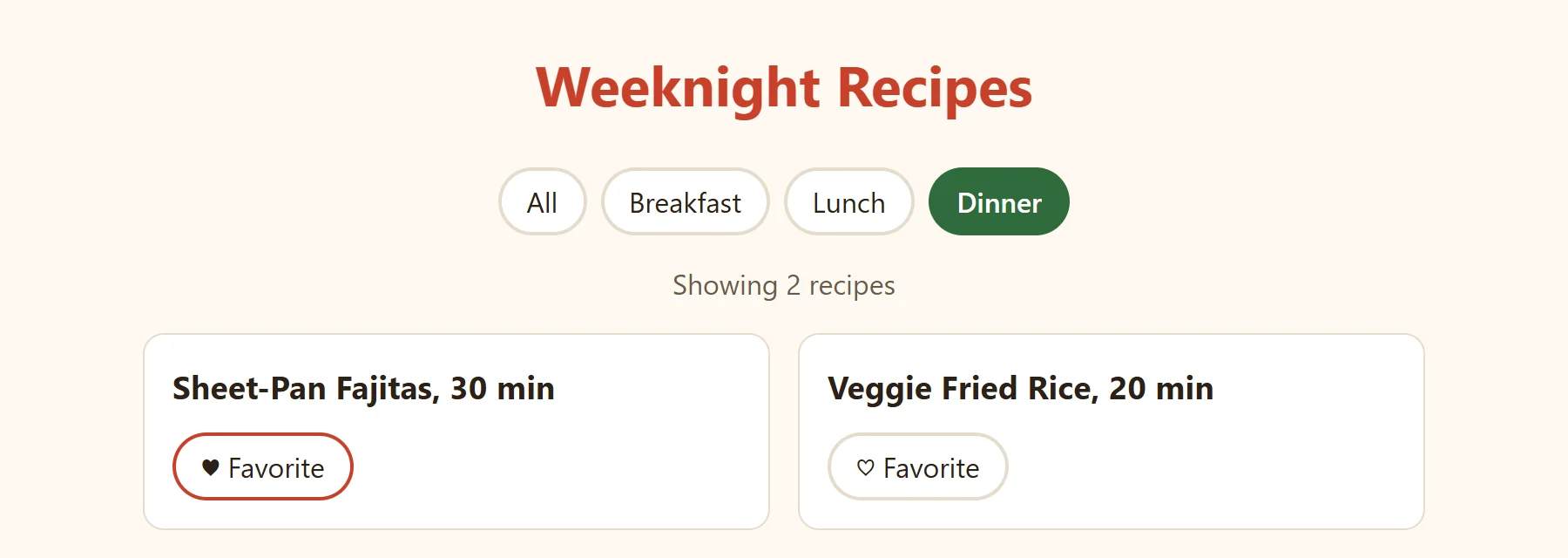
filter, from map and filter, makes a new array and leaves recipes as it was. Each filter button has a data-meal attribute, such as data-meal="dinner", and its listener only sets mealFilter = button.dataset.meal and calls render(). Choose Dinner and the page shows Showing 2 recipes: the fajitas and the fried rice. Heart the fajitas, choose All, and all four come back, with the fajitas' heart still filled. Nothing was ever deleted; the filter only chose what to draw. The same render also marks the chosen filter button with aria-pressed="true", so the filter bar can't disagree with the data either.
The thinking part can be tested
Which recipes to show is a question with no page in it, so it can be a function of its own that takes data and gives back data. A function like that runs in Node, and tests can check it:
function visibleRecipes(recipes, meal) {
  if (meal === 'all') {
    return recipes;
  }
  return recipes.filter((recipe) => recipe.meal === meal);
}

const recipes = [
  { id: 'fajitas', name: 'Sheet-Pan Fajitas', meal: 'dinner' },
  { id: 'oats', name: 'Overnight Oats', meal: 'breakfast' },
  { id: 'fried-rice', name: 'Veggie Fried Rice', meal: 'dinner' },
];

console.log(visibleRecipes(recipes, 'dinner').map((recipe) => recipe.name));
console.log(visibleRecipes(recipes, 'all').length);
console.log(visibleRecipes(recipes, 'snack'));
console.log(recipes.length);
[ 'Sheet-Pan Fajitas', 'Veggie Fried Rice' ]
3
[]
3
render then starts with const shown = visibleRecipes(recipes, mealFilter);. This split, the thinking in functions with no page and the page code that only reads, calls and draws, is how the exercise after this lesson is built.
Try it. Save the program above as visible.js in your weeknight folder and run it with node visible.js. Add a recipe for lunch, and print visibleRecipes(recipes, 'lunch').
One catch: putting focus back
render throws away the old buttons and makes new ones. For a mouse user, nothing looks different. For a keyboard user, the heart they just pressed with the space bar is gone, and their focus goes with it, back to the page itself: they've lost their place in the list. Put focus back on the new copy of the button, right after render:
render();
list.querySelector(`[data-id="${id}"] .favorite`).focus();
The square brackets in a selector find an element by an attribute: [data-id="fajitas"] .favorite is "the heart inside the card whose data-id is fajitas". Add this line at the end of the heart listener, after render(), and the focus ring stays on the heart that was pressed.
Check yourself
2 questions to try on the lesson page.
So what
Data in an array, one render function, and listeners that change the data and call render: that's the idea that React, Vue and Angular are built on. Those frameworks call render for you and keep focus where it was, and now you know what they're doing underneath.
Key terms
- Array
- filter()
- createElement()
- Single Source of Truth