Scope: Where a Variable Can Be Seen
Scope is the part of a program where a variable can be seen and used, and knowing its three kinds (global, function and block) explains a whole family of "is not defined" errors and values that won't change.
Apprentice · JavaScript · Updated
After this lesson you can
- Predict whether a line of code can see a variable in global, function or block scope
- Predict what code prints when an inner variable shadows an outer one, and fix the bug it causes
Key takeaways
- Scope is the part of the code where a variable can be seen. Code can look out of its own scope, never into another one.
- A variable made at the top of a file is in the global scope, and every function in the file can use it.
- A variable made inside a function belongs to that function. A let or const made inside { } belongs to that block.
- JavaScript looks for a name in the closest scope first, then one step out at a time. That path is the scope chain.
- A new variable with the same name as an outer one shadows it, so changes go to the inner one and the outer one stays the same.
Sooner or later, every JavaScript programmer stares at an error that says ReferenceError: total is not defined while total sits right there on the screen, a few lines up. Or a game's high score refuses to update, even though the line that sets it clearly runs. Both come from scope: the rules for where in a program a variable can be seen. Once you know them, these bugs stop being mysteries, and you can keep the variables of a big program from tripping over each other.
This chapter's examples come from an arcade: the Starlight Arcade, with players who buy tokens, games that keep high scores, and prize tickets that add up.
Rooms in a house
Picture a house with one-way windows. From your bedroom you can see out into the hallway, and from the hallway out into the front yard. But nobody in the yard can see into the hallway, and nobody in the hallway can see into your bedroom.
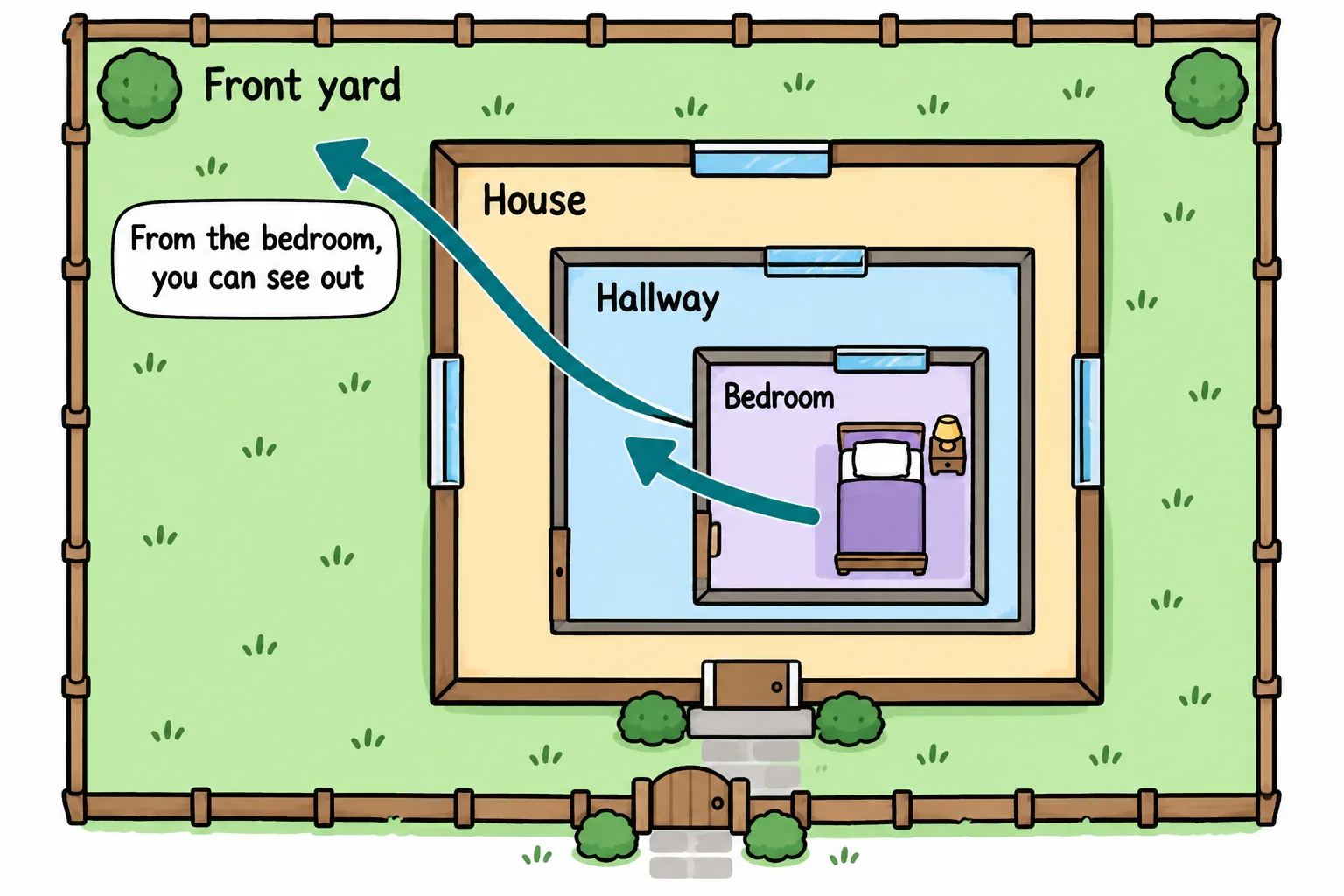
A program works the same way. Every variable lives in a room, and code can see the variables in its own room and in every room around it, but never into a room inside or beside it. The real name for a room is a scope: the part of the code where a variable can be seen and used.
In JavaScript, the walls of a room are usually a pair of curly braces, { and } (read "open brace" and "close brace"). A function's body has them, and so do the blocks of an if and a loop.
The global scope: the front yard
A variable made at the top of a file, outside every function and every block, is in the global scope. It's the front yard: every room in the house looks out on it, so every function in the file can use it.
const arcadeName = 'Starlight Arcade';

function welcome(player) {
  console.log(`Welcome to ${arcadeName}, ${player}!`);
}

welcome('Ava');
welcome('Leo');
console.log(arcadeName);
Welcome to Starlight Arcade, Ava!
Welcome to Starlight Arcade, Leo!
Starlight Arcade
welcome has no variable named arcadeName of its own, so it looks out into the global scope and finds it there.
Function scope: a room of its own
A variable made inside a function belongs to that function. It's made fresh each time the function runs, and the code outside can't see it. This is called function scope, and a variable that lives inside a function or a block is a local variable. A function's parameters are local to it too: player above exists only inside welcome.
function playSpaceBlaster() {
  const pointsThisGame = 1200;
  console.log(`Points this game: ${pointsThisGame}`);
}

playSpaceBlaster();
console.log(pointsThisGame);
Points this game: 1200
C:\arcade\rooms.js:7
console.log(pointsThisGame);
            ^

ReferenceError: pointsThisGame is not defined
The first line prints, and then the program stops. Line 7 is outside the function, in the yard, and it can't see into the function's room. A ReferenceError is JavaScript saying "I looked for that name everywhere I'm allowed to look, and it isn't there." (Node prints your own folder's path in the second line, and a few more lines starting with at after the error. You can skip those for now.)
Try it. Save the code above as rooms.js and run it with node rooms.js. Then move the console.log(pointsThisGame); line up, inside the function, and run it again.
Block scope: a closet inside the room
A variable made with let or const inside any pair of braces, such as an if block or a loop, belongs only to that block. This is block scope. The block is a closet inside the room: once the closing brace is reached, what was made inside it is gone.
const tickets = 120;

if (tickets >= 100) {
  const prize = 'giant stuffed panda';
  console.log(`You can take home a ${prize}!`);
}

for (let round = 1; round <= 3; round++) {
  console.log(`Skee-ball round ${round}`);
}

// console.log(prize);  would stop with ReferenceError: prize is not defined
// console.log(round);  would stop with ReferenceError: round is not defined
You can take home a giant stuffed panda!
Skee-ball round 1
Skee-ball round 2
Skee-ball round 3
A loop's counter, made with let in the loop's parentheses, belongs to the loop. That's why you can write a dozen loops in one file, each with its own round or i, and they never get mixed up.
Looking outward: the scope chain
Rooms can sit inside rooms, as deep as you like. When a line uses a name, JavaScript looks in the line's own scope first. If the name isn't there, it looks one scope out, then one more, all the way to the global scope. That path, from the inside out, is the scope chain.
const arcadeName = 'Starlight Arcade';

function openMachine(machineName) {
  const tokensPerPlay = 2;

  function startGame(player) {
    const lives = 3;
    console.log(`${player} plays ${machineName} at ${arcadeName}`);
    console.log(`${tokensPerPlay} tokens, ${lives} lives`);
  }

  startGame('Priya');
}

openMachine('Space Blaster');
Priya plays Space Blaster at Starlight Arcade
2 tokens, 3 lives
startGame finds lives and player in its own scope, machineName and tokensPerPlay one step out in openMachine, and arcadeName in the global scope. The search only ever goes outward: openMachine can't see lives, because that lives in a room inside it.
Shadowing: two variables with the same name
What if an inner scope makes a variable with the same name as an outer one? The inner one wins inside its scope, and the outer one is hidden there. This is called shadowing: the inner variable casts a shadow over the outer one. It's allowed, and it's behind one of the most common bugs there is. Here, the game machine's high score should update:
let highScore = 5000;

function recordGame(points) {
  if (points > highScore) {
    let highScore = points;
    console.log(`New high score: ${highScore}`);
  }
}

recordGame(7300);
console.log(`The machine shows: ${highScore}`);
New high score: 7300
The machine shows: 5000
The word let inside the if made a new highScore in the block, and the new score went into it. The block ended, that variable was thrown away, and the machine's own highScore never changed. The fix is to delete one word: highScore = points; with no let changes the outer variable, and the machine shows 7300.
Try it. Run the high-score code, then delete the let inside the if and run it again. When a value "won't change" in your own code, look for a let or const that made a second variable with the same name.
Check yourself
2 questions to try on the lesson page.
So what
Scope is how a program with hundreds of variables keeps each one in its place: you can name a variable total inside a function without worrying about every other total in the program. When a name "is not defined" or a value won't change, ask which room the line is in, and which way it's looking.