Joining Tables: an overview
The two kinds of join, inner and outer, and the small chores database (person and task) used to compare them.
Apprentice · SQL · MySQL · Updated
Understanding the types of relationships in a database is important because the relationships are used to join the data in related tables.
There are essentially two types of JOIN available. INNER JOINs and OUTER JOINs.
Let's use the following sample chores database to differentiate between the types of joins.
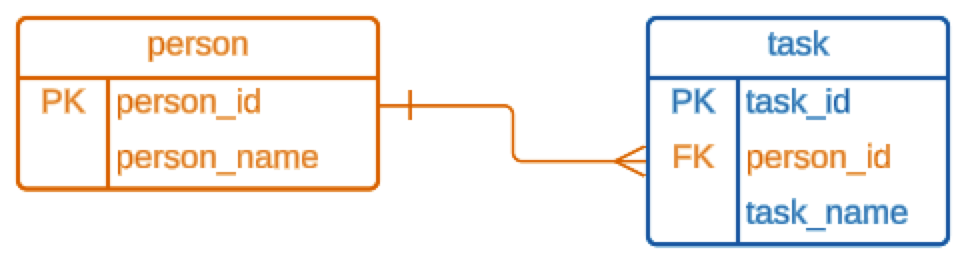
In this sample database, each task can be assigned to one person. If a task is not assigned, the person_id in the task table is NULL.

Do it: show each chore beside the person's name
A family keeps its chores in a small chores database, like the lesson's. The chore chart on the fridge shows a number where the person's name should be: 1, 2, 3. Everyone wants to see names instead.
Two tables hold what the chart needs:
task: each chore'stask_id, itstask_name, and itsperson_id, the foreign key.person: each person'sperson_id, the primary key, and theirperson_name.
They hold these rows (the Tables tab shows the SQL that makes them):
| person_id | person_name |
|---|---|
| 1 | Rosa |
| 2 | Sam |
| 3 | Lena |
| task_id | person_id | task_name |
|---|---|---|
| 21 | 2 | feed the cat |
| 22 | 1 | take out the trash |
| 23 | 3 | water the plants |
| 24 | 2 | vacuuming |
| 25 | 1 | wash the car |
The starter already joins the two tables. Its INNER JOIN ... ON line follows each task's person_id to the person row with the same person_id. (The next lesson teaches how to write one.) After the join, the columns of both tables sit side by side, each named table.column, such as person.person_name.
For example, feed the cat has person_id 2, and person 2 is Sam, so its row on the chart is feed the cat | Sam.
Your query should give exactly these rows, in this order:
| task_name | person_name |
|---|---|
| feed the cat | Sam |
| take out the trash | Rosa |
| vacuuming | Sam |
| wash the car | Rosa |
| water the plants | Lena |
Your job: change the starter's query so the chart shows each person's name, not their number.
- Show two columns,
task_nameandperson_name, in that order. - Keep the starter's
FROMandINNER JOINlines as they are. - Sort the rows by
task_name, A to Z.
Practiced live on the lesson page: write the SQL right there and check it.