Different Steps for Different Columns
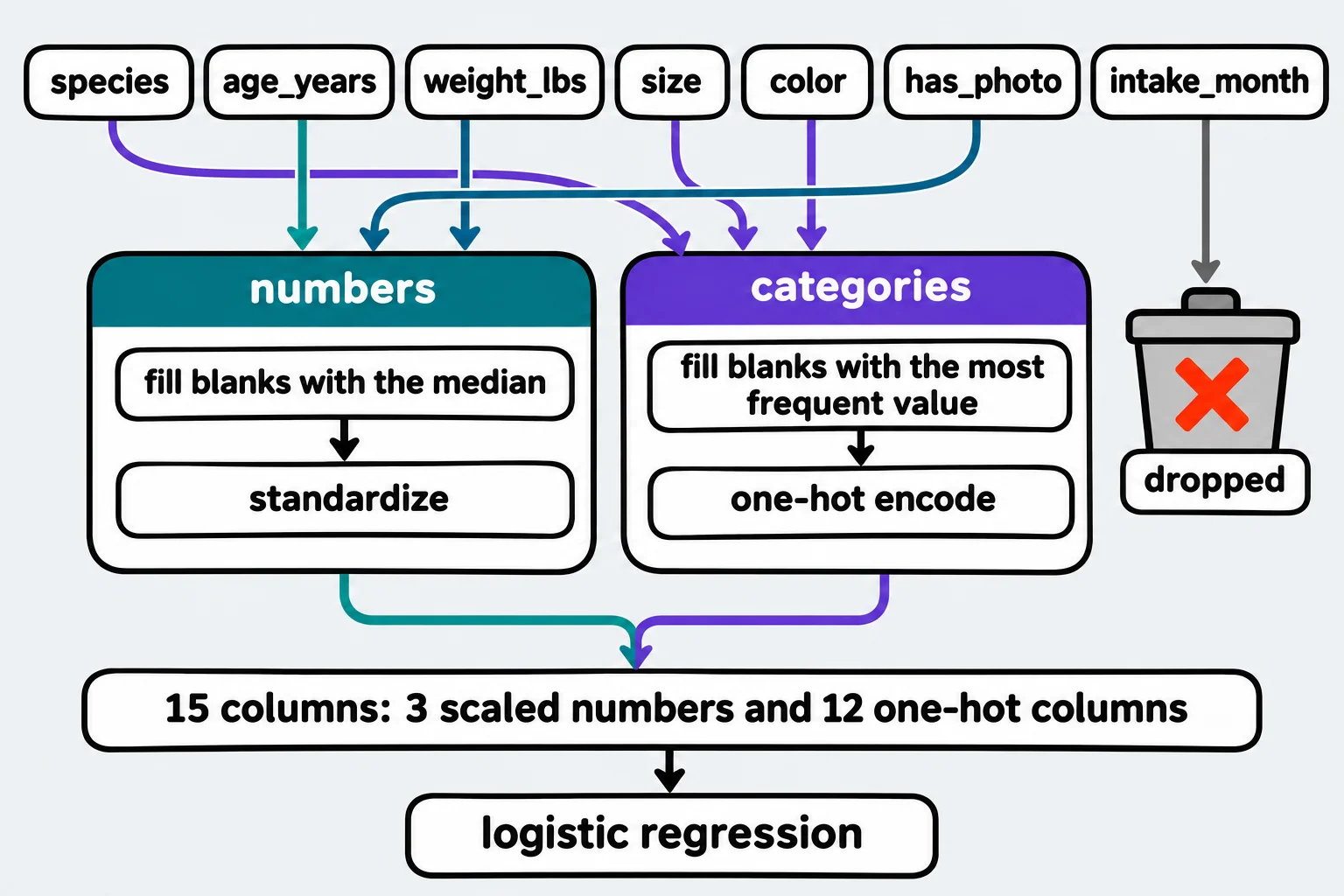
A ColumnTransformer sends each list of columns through its own steps, so the number columns are filled with the median and standardized while the category columns are filled with the most frequent value and one-hot encoded, columns it isn't given are dropped by default, and as the first step of a pipeline it lets one fit and one predict handle a whole table, with get_feature_names_out listing the columns the model gets.
Freelancer · AI Basics · Python · Updated
After this lesson you can
- Build a ColumnTransformer that imputes and scales the number columns and imputes and one-hot encodes the category columns, as a pipeline's first step
- Read get_feature_names_out to list the columns a model gets, and explain what happens to the columns a ColumnTransformer isn't given
Key takeaways
- A ColumnTransformer takes (name, steps, columns) triples and runs each set of steps on its own columns, then puts the results side by side.
- Numbers get filled with the median and scaled, categories get filled with the most frequent value and one-hot encoded, each learned from the training data.
- Columns you don't list are dropped (remainder='drop' is the default). remainder='passthrough' keeps them unchanged.
- get_feature_names_out lists every column the model gets, each named after the step that made it.
A real table mixes kinds of columns: numbers that need scaling, words that need encoding, and blanks in both. The pipeline in Pipelines: Every Step, Every Time used only the number columns, because a scaler can't scale the word dog and a one-hot encoder shouldn't turn every different age into a column of its own. Whenever your table has both numbers and categories, which is most of the time, you'll give each kind its own steps.
The example is Happy Tails Pet Adoption's pets.csv, from Exercise: Adoption Pipeline. Each code block is one notebook cell, run in order: the first one loads the data.
Two kinds of columns, two recipes
Here are the columns a model could use, after the ID and the label are set aside:
import pandas as pd
from sklearn.compose import ColumnTransformer
from sklearn.impute import SimpleImputer
from sklearn.linear_model import LogisticRegression
from sklearn.model_selection import train_test_split
from sklearn.pipeline import Pipeline, make_pipeline
from sklearn.preprocessing import OneHotEncoder, StandardScaler

pets = pd.read_csv("pets.csv")
X = pets.drop(columns=["pet_id", "adopted_in_30_days"])
y = pets["adopted_in_30_days"]
X_train, X_test, y_train, y_test = train_test_split(
    X, y, test_size=0.25, stratify=y, random_state=42
)
print(list(X_train.columns))
['species', 'age_years', 'weight_lbs', 'size', 'color', 'has_photo', 'intake_month']
Age, weight and the photo are numbers; weight has blanks. Species, size and color are categories; color has blanks. Each kind needs its own recipe, like a kitchen where the vegetables go to the chopping station and the bread to the oven, and everything meets on the plate. A ColumnTransformer is that kitchen: it takes a list of (name, steps, columns) triples, runs each set of steps on its own columns, and sets the results side by side.
Building it
Each recipe is a small pipeline of its own, and the ColumnTransformer becomes the first step of the full pipeline:
numbers = ["age_years", "weight_lbs", "has_photo"]
categories = ["species", "size", "color"]

prepare = ColumnTransformer([
    ("numbers", make_pipeline(SimpleImputer(strategy="median"), StandardScaler()), numbers),
    ("categories", make_pipeline(SimpleImputer(strategy="most_frequent"),
                                 OneHotEncoder(handle_unknown="ignore")), categories),
])
model = Pipeline([("prepare", prepare), ("model", LogisticRegression())])
model.fit(X_train, y_train)
print("Test accuracy:", round(model.score(X_test, y_test), 3))
Test accuracy: 0.755
Now fit takes the whole training table. The number recipe learns the medians, means and standard deviations from the training pets' number columns; the category recipe learns the most frequent color and the categories to encode from their category columns. The number-only pipeline scored 0.715 on the same test pets. One split can flatter a model, though, so hold that thought until the cross-validation at the end of this lesson.
What the model gets
get_feature_names_out lists every column that comes out of the ColumnTransformer, in order, each named after the step that made it, two underscores, then the column:
print(model.named_steps["prepare"].get_feature_names_out())
['numbers__age_years' 'numbers__weight_lbs' 'numbers__has_photo'
 'categories__species_cat' 'categories__species_dog'
 'categories__species_rabbit' 'categories__size_large'
 'categories__size_medium' 'categories__size_small'
 'categories__color_black' 'categories__color_brown'
 'categories__color_gray' 'categories__color_mixed'
 'categories__color_orange' 'categories__color_white']
Fifteen columns: three scaled numbers, then three for species, three for size and six for color. One column is missing: intake_month. A ColumnTransformer passes on only the columns it was given; everything else is dropped, because its remainder setting is "drop" by default. Here that's what we want, since the intake month had no effect on adoption. If you want the other columns kept as they are, set remainder="passthrough", and check get_feature_names_out again: a column you forgot to list is a column the model never sees.
One table in, one guess out
A new pet with a blank weight and a color the center has never recorded, cream, goes in as one row of the original table:
new_pet = pd.DataFrame({
    "species": ["dog"], "age_years": [0.8], "weight_lbs": [None], "size": ["medium"],
    "color": ["cream"], "has_photo": [1], "intake_month": [5],
})
print(model.predict(new_pet))
print(model.predict_proba(new_pet).round(2))
[1]
[[0.08 0.92]]
The blank weight became the training median, the unknown color became six zeros (handle_unknown="ignore"), and the intake month was dropped. The model gives this puppy a 0.92 chance of adoption within 30 days. No step raised an error, and nobody had to prepare the row by hand.
make_column_transformer builds the same thing without names, naming each part after its step's class, as make_pipeline does (two pipelines become pipeline-1 and pipeline-2). Named parts are easier to read in get_feature_names_out. And the whole pipeline goes into cross_val_score like any model, so every recipe is refit inside every fold:
from sklearn.model_selection import cross_val_score

scores = cross_val_score(model, X_train, y_train, cv=5)
print("Mean:", round(scores.mean(), 3), "Spread:", round(scores.std(), 3))
Mean: 0.72 Spread: 0.029
That's about the number-only pipeline's 0.725 (spread 0.017) from Pipelines: Every Step, Every Time: the difference is smaller than the spread, so the extra columns didn't clearly help. Weight already carries much of what size says (most large pets are heavy dogs), and only about one pet in nine is a rabbit. The 0.755 on one test split was partly luck in which pets were held back, which is exactly what cross-validation is for.
The model learned from the pets it was shown. It says younger pets with photos were adopted sooner in this data; it doesn't say why, and it's no promise about next year's arrivals.
Check yourself
2 questions to try on the lesson page.
So what
A ColumnTransformer gives each kind of column the preparation it needs, inside the pipeline, so one fit learns every step from the training data and one predict handles a raw row, blanks and new categories included.
Sources
- scikit-learn 1.9.1, ColumnTransformer, API reference:
transformersis a list of (name, transformer, columns) tuples, with columns given by name for a DataFrame; by default only the specified columns are transformed and the others are dropped (remainder='drop'), andremainder='passthrough'passes them through;verbose_feature_names_out=Trueby default prefixes each feature name with the name of the transformer that made it, as{transformer_name}__{feature_name}. - scikit-learn, Pipelines and composite estimators: ColumnTransformer for heterogeneous data, User Guide: different transformations for different columns, within a pipeline that is safe from data leakage; remaining columns are ignored by default;
make_column_transformergives the names automatically. - scikit-learn 1.9.1, OneHotEncoder, API reference: with
handle_unknown='ignore', an unknown category's one-hot columns are all zeros. - scikit-learn 1.9.1, SimpleImputer, API reference:
'median'for numeric data and'most_frequent'for strings or numbers.