BSON Types and the _id Field
MongoDB stores documents as BSON, which adds types JSON doesn't have; whole numbers become int and decimals double, money goes in NumberDecimal and dates in ISODate, and every document has an _id, an ObjectId unless you choose your own.
Apprentice · MongoDB · Updated
After this lesson you can
- Choose the BSON type for a value, writing money with NumberDecimal and dates with ISODate, and explain why a number stored as text is a bug
- Explain what _id does, what an ObjectId is made of, and when to give a document an _id of your own
- Choose the shape and type for each part of a recipe card, from text, numbers, Decimal128, dates, true or false, arrays and nested documents
Key takeaways
- MongoDB stores each document as BSON, a binary form of JSON with more types, such as dates, exact decimals and ObjectIds.
- Whole numbers typed in mongosh are stored as int and numbers with a decimal point as double. Both count as numbers in a search.
- Money goes in NumberDecimal("0.60"), stored as Decimal128, because a double keeps most decimals only as a very close guess.
- Dates go in ISODate("2026-01-24") or new Date(). A number or a date stored as text compares letter by letter, which is a quiet bug.
- Every document has an _id that no other document in its collection shares. Leave it out, and MongoDB makes an ObjectId, which starts with the time it was made.
A price stored as text, a date typed as "Jan 24", a count saved as "10": none of them causes an error, and every one of them breaks a search, a sort or a total later, usually in front of a user. You'll pick a type for every value you ever store, in MongoDB and in every other database, so this lesson shows the types MongoDB has and how to type each one in mongosh.
Sunday Kitchen wants each card to show what a serving costs and the day the recipe was added. The examples add Banana Bread to the cards collection from Arrays and Documents Inside Documents.
What MongoDB stores: BSON
JSON knows text, numbers, true and false, null (no value), lists and documents. It has no type for a date, for money or for an id. MongoDB stores every document as BSON (read "BEE-son", short for binary JSON): the same shape, saved in a compact binary form, with more types. These are the ones you'll meet in this course:
| Type | What it holds | How you type it in mongosh |
|---|---|---|
| string | Text | "Banana Bread" |
| int | A whole number | 10 |
| double | A number with a decimal point | 4.5 |
| Decimal128 | An exact decimal, for money | NumberDecimal("0.60") |
| boolean | true or false | true |
| date | A moment in time | ISODate("2026-01-24"), or new Date() for now |
| null | A field that's there, with no value | null |
| array | A list | ["sweet", "bake-sale"] |
| object | A document inside a document | { calories: 240, protein: 4 } |
| ObjectId | A document's id, made by MongoDB | ObjectId() |
Numbers, and why money needs Decimal128
mongosh stores a whole number such as 10 as an int, and a number with a decimal point such as 4.5 as a double. To a search, both are numbers. A double keeps most decimals only as a very close guess, and the guess shows when you add up money:
1.10 + 2.20
3.3000000000000003
A few cents of rounding on a bill is a real bug. Decimal128 stores a decimal exactly. Type it with NumberDecimal, and put the number in quotes, so its digits are read exactly as you wrote them:
NumberDecimal("0.60")
Decimal128('0.60')
Dates, and text that should be something else
A date goes in ISODate("2026-01-24"), or new Date() for this moment:
ISODate("2026-01-24")
ISODate('2026-01-24T00:00:00.000Z')
T separates the date from the time of day, and Z means the time is in UTC, the world's reference clock. A real date can be sorted, compared and counted in days; the text "Jan 24" can't.
Text that holds a number is the quiet bug from Documents: Fields, Values, Quotes and Braces. Text compares letter by letter, so "10" comes before "9", because 1 comes before 9. And adding to text glues it on:
"4.75" + 1
4.751
_id: every document's own name
Every document has an _id field, and no two documents in a collection can share one. Leave it out, and MongoDB makes one for you, an ObjectId. Here is the one the pancake card got (yours is different):
db.cards.find({ name: "Saturday Pancakes" }, { name: 1 })
[
  {
    _id: ObjectId('6afc9a975f8e18afe451bbbd'),
    name: 'Saturday Pancakes'
  }
]
The second set of braces asks for only the name; Choosing Fields with Projections in Module 2 explains it. An ObjectId is 24 characters, each 0 to 9 or a to f. The first 8 are the time it was made, in seconds; the next 10 are a random value; the last 6 count up. Because the time comes first, newer ObjectIds sort after older ones, and you can read the time back:
ObjectId("69621c18a1b2c3d4e5f60718").getTimestamp()
ISODate('2026-01-10T09:30:00.000Z')
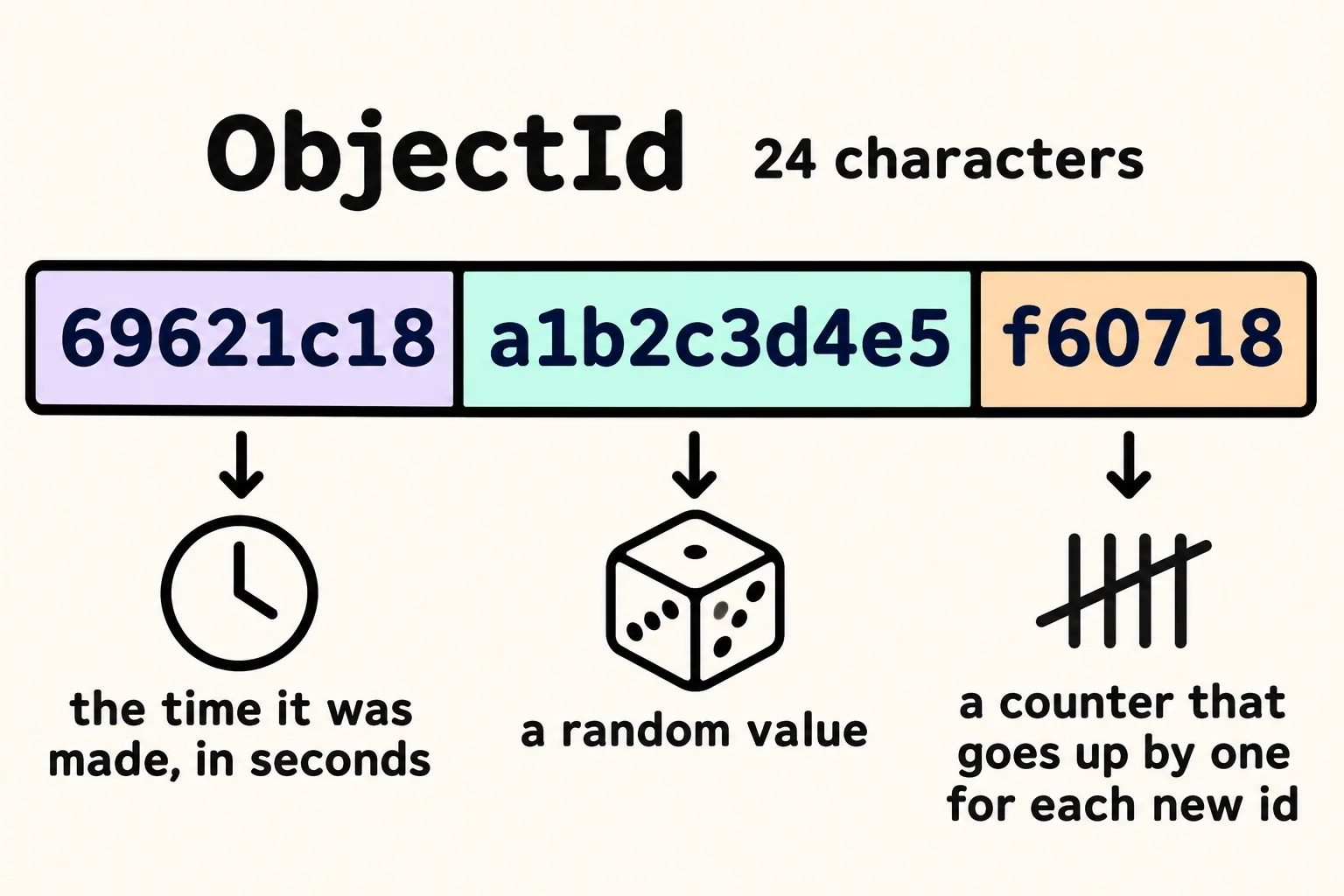
You can also choose your own _id, when your data already has a unique number. Sunday Kitchen numbers its paper cards, and Banana Bread is card 11.
A card with the right types
db.cards.insertOne({
  _id: 11,
  name: "Banana Bread",
  servings: 10,
  rating: 4.5,
  vegetarian: true,
  costPerServing: NumberDecimal("0.60"),
  added: ISODate("2026-01-24"),
  photo: null,
  tags: ["sweet", "bake-sale"],
  nutrition: { calories: 240, protein: 4 }
})
{ acknowledged: true, insertedId: 11 }
db.cards.find({ _id: 11 })
[
  {
    _id: 11,
    name: 'Banana Bread',
    servings: 10,
    rating: 4.5,
    vegetarian: true,
    costPerServing: Decimal128('0.60'),
    added: ISODate('2026-01-24T00:00:00.000Z'),
    photo: null,
    tags: [ 'sweet', 'bake-sale' ],
    nutrition: { calories: 240, protein: 4 }
  }
]
Before you type a value, ask what it is, and pick its shape:
| Part of the card | It is | Type it as |
|---|---|---|
| The name | Text | "Banana Bread" |
| Servings, minutes | A count | 10 |
| The rating | A decimal number | 4.5 |
| What a serving costs | Money | NumberDecimal("0.60") |
| Vegetarian or not | Yes or no | true |
| The day it was added | A date | ISODate("2026-01-24") |
| No photo yet | Nothing, for now | null |
| The tags | A list | ["sweet", "bake-sale"] |
| The nutrition box | A group of details | { calories: 240, protein: 4 } |
Check yourself
2 questions to try on the lesson page.
So what
Every value now has a type you chose on purpose: money that adds up to the cent, dates that sort, and an _id that names each card, so the searches in Module 2 find exactly what you stored.