Comparison Operators: $gt, $lt, $in and More
Comparison operators let a filter ask for more than an exact value, such as less than 30 minutes, a range between two numbers, one of a list of cuisines, or anything but one value.
Apprentice · MongoDB · Updated
After this lesson you can
- Find documents above, below or between values with $gt, $gte, $lt and $lte
- Match a field against a list of values, or rule one value out, with $in, $nin and $ne
Key takeaways
- An operator is a word that starts with a dollar sign, written inside the field's own braces, such as minutes with $lt 30.
- $gt, $gte, $lt and $lte mean greater than, greater than or equal to, less than, and less than or equal to.
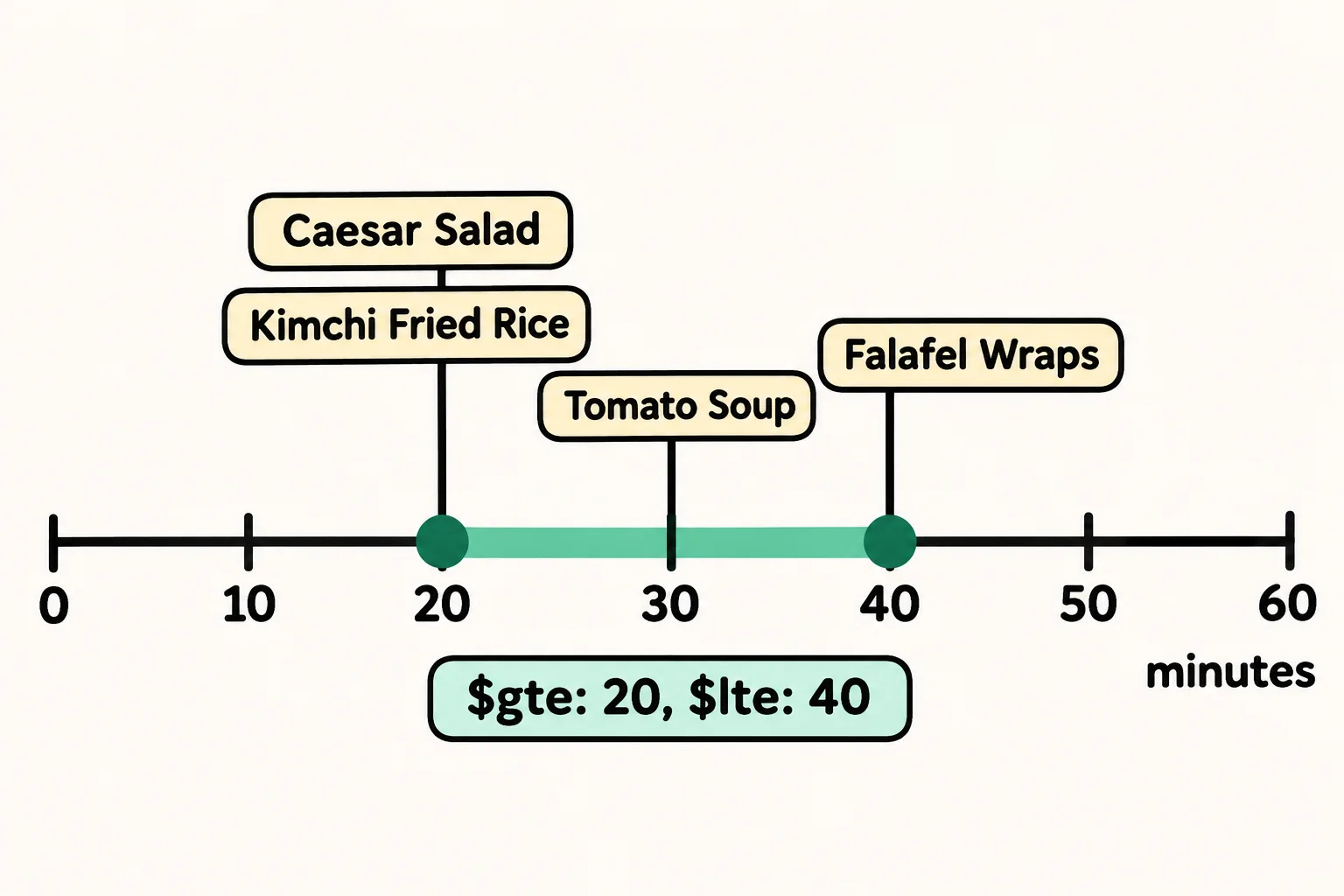
- Two operators in the same braces make a range, such as $gte 20 and $lte 40 for 20 to 40 minutes.
- $in matches a field that equals any value in a list, and $nin one that equals none of them.
- $ne matches every document whose field isn't the value given.
"Dinners in under 30 minutes." "Recipes rated 4.5 or better." "Anything Thai, Japanese or Korean." These are the filters behind a search page's sliders and checkboxes, and none of them is an exact value. Whenever an app lets someone pick a price range, a date range or several options at once, a comparison operator is doing the work.
The examples use Sunday Kitchen's 40 recipes from Adding Many Documents with insertMany.
An exact match can't say "under"
Sunday Kitchen wants a "quick dinners" page. A filter like the ones in Finding Documents with find and findOne can only ask for one exact value:
db.recipes.find({ meal: "dinner", minutes: 30 }, { name: 1, minutes: 1 })
[
  { _id: 5, name: 'Pad Thai', minutes: 30 },
  { _id: 34, name: 'Beef Tacos', minutes: 30 }
]
That's the dinners that take exactly 30 minutes. The 20-minute Black Bean Tacos are quicker still, and they're missing. You'd have to ask for 29 minutes, then 28, then 27, and so on. What the page needs is "less than".
Operators: words with a dollar sign
A sign at a restaurant says "kids under 12 eat free". The cashier doesn't check for one exact age; they compare. MongoDB's comparison operators compare too. Each is a short word that starts with a dollar sign, $, so MongoDB can tell it from a field name, and it goes inside the field's own braces:
db.recipes.find({ meal: "dinner", minutes: { $lt: 30 } }, { name: 1, minutes: 1 })
[
  { _id: 7, name: 'Black Bean Tacos', minutes: 20 },
  { _id: 12, name: 'Spaghetti Carbonara', minutes: 25 },
  { _id: 13, name: 'Veggie Stir-Fry', minutes: 20 },
  { _id: 18, name: 'Chicken Fried Rice', minutes: 25 },
  { _id: 24, name: 'Teriyaki Salmon', minutes: 25 }
]
Read { minutes: { $lt: 30 } } aloud as "minutes less than 30". Pad Thai and Beef Tacos take exactly 30, so they're left out: 30 isn't less than 30. To keep them, add "or equal to":
db.recipes.find({ meal: "dinner", minutes: { $lte: 30 } }, { name: 1, minutes: 1 })
[
  { _id: 5, name: 'Pad Thai', minutes: 30 },
  { _id: 7, name: 'Black Bean Tacos', minutes: 20 },
  { _id: 12, name: 'Spaghetti Carbonara', minutes: 25 },
  { _id: 13, name: 'Veggie Stir-Fry', minutes: 20 },
  { _id: 18, name: 'Chicken Fried Rice', minutes: 25 },
  { _id: 24, name: 'Teriyaki Salmon', minutes: 25 },
  { _id: 34, name: 'Beef Tacos', minutes: 30 }
]
The four comparison operators are the math symbols you know, spelled as words:
| Operator | Read it as | Math symbol | Example |
|---|---|---|---|
$gt |
greater than | > | { minutes: { $gt: 90 } } |
$gte |
greater than or equal to | ≥ | { rating: { $gte: 4.5 } } |
$lt |
less than | < | { minutes: { $lt: 30 } } |
$lte |
less than or equal to | ≤ | { minutes: { $lte: 30 } } |
The e at the end is "or equal to", and it decides what happens to a value that sits exactly on the line.
A range: two operators in the same braces
A lunch that takes between 20 and 40 minutes needs two comparisons on one field. Put both inside the field's braces, separated by a comma:
db.recipes.find({ meal: "lunch", minutes: { $gte: 20, $lte: 40 } }, { name: 1, minutes: 1 })
[
  { _id: 22, name: 'Caesar Salad', minutes: 20 },
  { _id: 33, name: 'Falafel Wraps', minutes: 40 },
  { _id: 38, name: 'Kimchi Fried Rice', minutes: 20 },
  { _id: 40, name: 'Tomato Soup', minutes: 30 }
]
Read it as "lunches where minutes is at least 20 and at most 40". Both ends are included here because both operators end in e.
$in, $nin and $ne
A theme night wants recipes from three cuisines. $in (read "in") matches when the field equals any value in a list, written in square brackets:
db.recipes.find({ cuisine: { $in: ["Thai", "Japanese", "Korean"] } }, { name: 1, cuisine: 1 })
[
  { _id: 5, name: 'Pad Thai', cuisine: 'Thai' },
  { _id: 8, name: 'Miso Soup', cuisine: 'Japanese' },
  { _id: 24, name: 'Teriyaki Salmon', cuisine: 'Japanese' },
  { _id: 25, name: 'Bibimbap', cuisine: 'Korean' },
  { _id: 28, name: 'Mango Sticky Rice', cuisine: 'Thai' },
  { _id: 30, name: 'Green Curry', cuisine: 'Thai' },
  { _id: 37, name: 'Shoyu Ramen', cuisine: 'Japanese' },
  { _id: 38, name: 'Kimchi Fried Rice', cuisine: 'Korean' }
]
$nin (read "not in") is its opposite: the documents whose field equals none of the values. Leaving out the 8 American and 4 Italian recipes leaves 28:
db.recipes.countDocuments({ cuisine: { $nin: ["American", "Italian"] } })
28
And $ne (read "not equal") rules out one value, like ≠ in math. Everything but the American recipes:
db.recipes.countDocuments({ cuisine: { $ne: "American" } })
32
Check yourself
2 questions to try on the lesson page.
So what
Search pages are made of ranges and choices. With $gt, $gte, $lt, $lte, $in, $nin and $ne, a filter can say "under 30 minutes", "4.5 or better" and "any of these three" as plainly as you would.