A Data Layer: One File That Talks to the Database
A data layer keeps every driver call in one file, data/pets.js, whose functions listPets, getPet, addPet and updatePet the routes call without ever touching the driver, turning each document into a plain pet and building filters, a projection, a sort and pages from the query string.
Journeyman · MongoDB · Node.js · Updated
After this lesson you can
- Write data-layer functions that the routes call, so every driver call lives in one file and the routes never touch the driver
- Build a list query from the query string, with a filter added piece by piece, a projection, a sort and one page from skip and limit
Key takeaways
- A data layer is the one file that talks to the database. The routes call its functions, and never the driver.
- Swapping the in-memory array for MongoDB changes the data layer, while routes that only call its functions stay as they are.
- The data layer hands back plain pets, with the _id turned into text named id, so no ObjectId leaks into the API's answers.
- listPets builds its filter piece by piece from what the address asks for, then sorts by name and shows one page with skip and limit.
- updatePet changes fields with $set through findOneAndUpdate, and gives back the changed pet, or null when no pet has that id.
Every app with a database has to decide where the database code lives. Put it in the right place, and you can change how data is stored, or test it, without touching the rest of the app. Put it everywhere, and a small change turns into a hunt through every route. You'll make this choice in every API you build, and you'll meet it in every project you join.
The examples use the center's 12 pets and the pet API from Connecting from Node: MongoClient and the Connection String.
Driver calls in every route
The quickest way to move the pet API onto MongoDB is to call the driver right inside each route:
petsRouter.get("/:id", async (req, res) => {
  const pet = await db.collection("pets").findOne({ _id: new ObjectId(req.params.id) });
  res.json(pet);
});
It works, and it has three problems. Every route needs db and ObjectId, so every route file imports the driver. The same findOne with the same new ObjectId turns up again in PATCH /pets/:id, and again in the next route, so a fix has to be made in each copy. And the answer has changed shape: the warm-up API answered with id, and this one answers with MongoDB's _id, so every page that shows a pet breaks.
The kitchen window
In a restaurant, the waiters take the orders and pass tickets through a window, and only the kitchen touches the stove. If the kitchen gets a new stove, the waiters don't need to learn anything. A data layer is that window: one file whose functions the routes call, and the only file that talks to the database. Keeping it behind one door like this is often called the repository pattern.
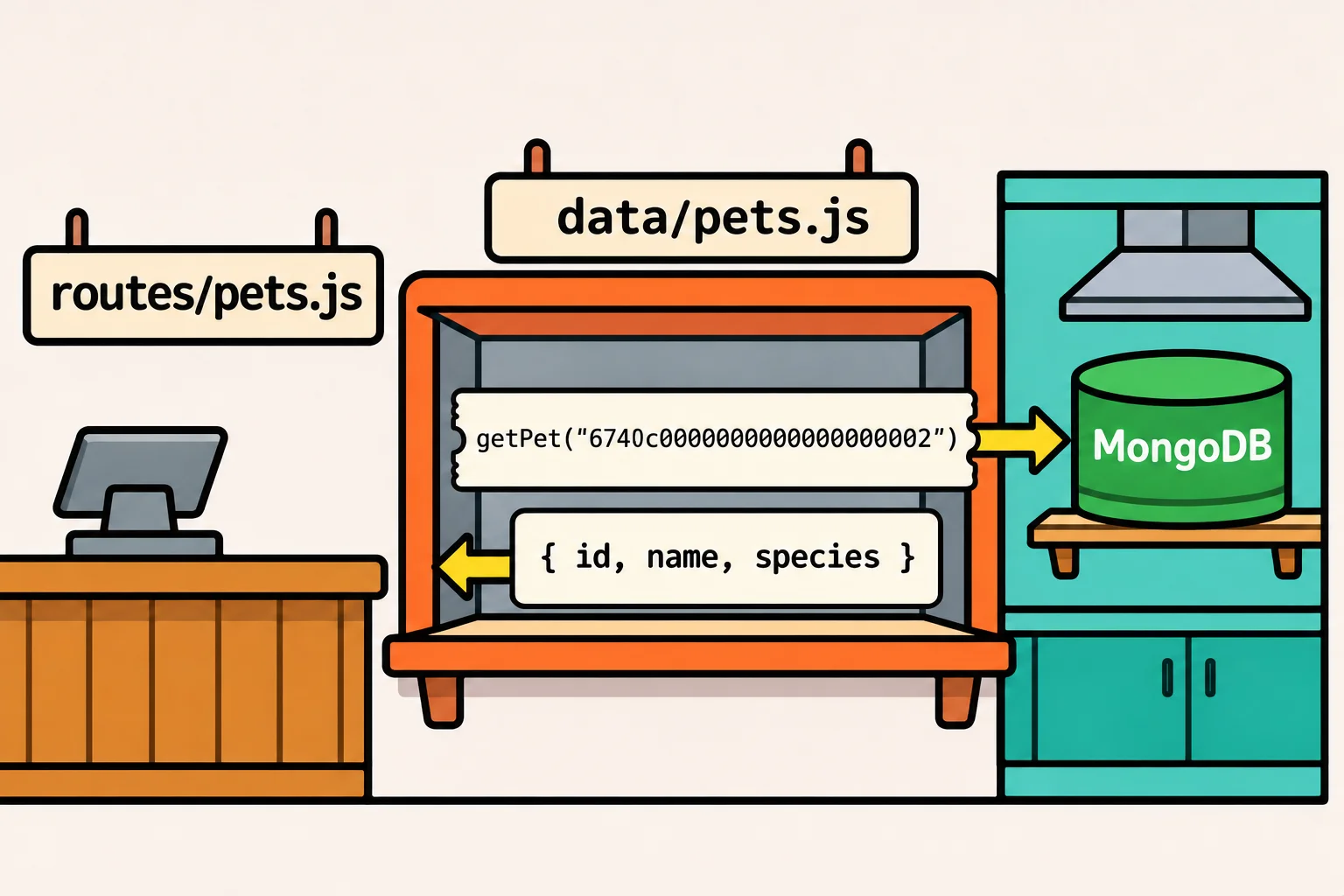
The starter was built for it: its routes already call listPets, getPet and addPet from data/pets.js, so every driver call goes in that file. Where the array was, the collection is now, filled in once by useDatabase:
import { ObjectId } from "mongodb";

let pets; // the pets collection, once useDatabase has run

export function useDatabase(db) {
  pets = db.collection("pets");
}

// A document as the rest of the app sees it: its _id as text, named id.
function toPet(document) {
  return {
    id: document._id.toString(),
    name: document.name,
    species: document.species,
    age: document.age,
    traits: document.traits,
    status: document.status,
  };
}

export async function getPet(id) {
  const document = await pets.findOne({ _id: new ObjectId(id) });
  if (document === null) {
    return null;
  }
  return toPet(document);
}
toPet keeps the API's answers the shape they always had, so no ObjectId leaks past the window. In app.js, createApp(db) starts with useDatabase(db);, so the data layer gets whichever database it's handed: yours from server.js, or a throwaway one in a test. The GET /pets/:id route didn't change at all:
GET /pets/6740c0000000000000000002
HTTP/1.1 200 OK
{"id":"6740c0000000000000000002","name":"Mochi","species":"cat","age":2,"traits":["calm","indoor only"],"status":"available"}
Lists: filters, sort and pages from the address
The center's list page asks more than the warm-up did: one species, only pets that are good with kids, five pets a page, in name order. The address carries the choices in its query string, such as ?species=cat&goodWithKids=true&page=2. listPets builds its filter piece by piece, adding a condition only when the address asks for it:
const pageSize = 5;

export async function listPets({ species, goodWithKids, page }) {
  const filter = {};
  if (species !== undefined) {
    filter.species = species;
  }
  if (goodWithKids) {
    filter.traits = "good with kids";
  }
  const documents = await pets
    .find(filter, { projection: { name: 1, species: 1, age: 1, status: 1 } })
    .sort({ name: 1 })
    .skip((page - 1) * pageSize)
    .limit(pageSize)
    .toArray();
  return documents.map(toListing);
}
It's Sorting and Paging: sort, limit and skip in Node: page 3 skips the first 10 pets and shows the next 5. The projection leaves out traits, since a list card shows only the name, species, age and status, and toListing is toPet for those fields. documents.map(toListing) (read "map with toListing") makes a new array with toListing run on each document. The route now hands over an object:
petsRouter.get("/", async (req, res) => {
  const pets = await listPets({
    species: req.query.species,
    goodWithKids: req.query.goodWithKids === "true",
    page: Number(req.query.page ?? 1),
  });
  res.json(pets);
});
Everything in a query string is text, so "true" is compared as text and Number() turns "3" into 3. ?? is read "or else": with no page in the address, it's page 1.
GET /pets?species=cat&goodWithKids=true
HTTP/1.1 200 OK
[{"id":"6740c0000000000000000005","name":"Juniper","species":"cat","age":5,"status":"adopted"},{"id":"6740c0000000000000000007","name":"Olive","species":"cat","age":9,"status":"available"},{"id":"6740c0000000000000000009","name":"Pickles","species":"cat","age":1,"status":"adopted"}]

GET /pets?page=3
HTTP/1.1 200 OK
[{"id":"6740c0000000000000000006","name":"Rocket","species":"dog","age":1,"status":"available"},{"id":"6740c0000000000000000011","name":"Ziggy","species":"cat","age":4,"status":"available"}]
Adding and changing a pet
addPet saves a new pet with insertOne, and updatePet is new: the center marks a pet adopted with PATCH /pets/:id and a body such as { "status": "adopted" }. It's findOneAndUpdate with $set, from Upserts and Replacing a Whole Document, which gives back the changed pet, or null when no pet has that id:
export async function updatePet(id, changes) {
  const document = await pets.findOneAndUpdate(
    { _id: new ObjectId(id) },
    { $set: changes },
    { returnDocument: "after" },
  );
  if (document === null) {
    return null;
  }
  return toPet(document);
}
Its route works like GET /pets/:id: it awaits updatePet(req.params.id, req.body), answers 404 for null, and otherwise sends the pet:
PATCH /pets/6740c0000000000000000006
HTTP/1.1 200 OK
{"id":"6740c0000000000000000006","name":"Rocket","species":"dog","age":1,"traits":["playful","needs a yard"],"status":"adopted"}

PATCH /pets/6740c0000000000000000099
HTTP/1.1 404 Not Found
{"status":404,"title":"Not Found","detail":"There's no pet 6740c0000000000000000099."}
Search the routes for mongodb, ObjectId or collection, and you won't find one.
Check yourself
2 questions to try on the lesson page.
So what
One file talks to MongoDB, and everything else asks it. That's what lets the center swap an array for a database without touching a route that only asks it for pets, and what lets a test hand the app a throwaway database instead of the real one.